Godot: Cannot load C++ custom module with Godot 3.0 Beta 2
(Apologize I removed out template text, as initially I will file the issue at GDNative-demos repo, but think again this place is more suitable. Anyway I include much of the info I think you might need and the removed template text'd ask for).
Platform: macOS 10.13 with Godot 3.0 Beta 2
Aim: Trying to integrate C++ Custom module into Godot project
Expected result: Godot editor can load custom module successfully
What I found: Godot silently quit, and it cannot load custom module. As well, after I closed the project and restart Godot editor to load such project again, it cannot start and exit silently without showing anything.
Project files: There are 2 projects I upload as repositories so you can check them out (I linked them appropriately again below while I lay out steps and approach I followed).
- C++ Custom Module
- Godot project that consumes such module
I successfully ...
- built a C++ custom module (Simple Library) as laid out in example here
- created
NativeScriptandGDNativeLibraryresource, hook them up with Godot editor and scene. Load it but at the end it just silently exit the program without error.
Here I will describe the steps and approach I followed
- I created a C++ custom module project. You can grab the project or see its source code here. The module is built against
- Godot 3.0 beta 2 for macOS as can be seen here in which I first unzip the file then use its
Godot.app/Contents/MacOS/Godotas set up in godot-cpp'sSConstructfile to build - godot-cpp's
bde1ce384fa0e9244ee5fb67c81fceb4c96e1f1dcommit - godot_headers's
08c6d98ebcd709488b30bc268f90c9666eb6958e.
> Latter twos are both frommasterbranch, and are from latest commit during the time of this writing. You can take a look at its correspondingSConstructfile to see compilation parameters.
- Godot 3.0 beta 2 for macOS as can be seen here in which I first unzip the file then use its
- After successfully built a module, I copy its
.dylibresult into Godot project I created. - I set things up, and hook things together (hopefully correct, I succeeded doing this before with Godot 3.0 Beta 1 with C custom module). In short, I create
NativeScriptthen add a newGDNativeLibraryresource linking to it. Both of them saved on file system with extension.gdnsand.gdnlibrespectively. I checked inside.gdnlibwith text editor and it has correct paths to.dylibfor platform I target (macOS). Then finally I attach an embed GDScript with a main scene's root node to preload such module. You can grab this project here. - Now I run the project, it silently delays for quite awhile (I use
preloadin the code) then it quits without any error message.
Please advice on what to proceed next, or any hints that I should test things out. Any advice is appreciated.
 haxpor
All 13 comments
Try using the headers from
 karroffel
on 22 Dec 2017
karroffel
on 22 Dec 2017
Ok, thanks for reply! I'm testing it. Anyway what do you mean exactly after building? Do you mean after building cpp_bindings?
If so, I did test that and it's has the same result.
As well, I need to attach linking's error log when try to build a library for cpp_bindings (happen either included module/gdnative/include, or not included as CPPPATH in SConstruct)
/Volumes/Slave/Applications/Xcode9/Xcode.app/Contents/Developer/Toolchains/XcodeDefault.xctoolchain/usr/bin/ranlib: for architecture: x86_64 file: bin/libgodot_cpp_bindings.a(AudioEffect.o) has no symbols
/Volumes/Slave/Applications/Xcode9/Xcode.app/Contents/Developer/Toolchains/XcodeDefault.xctoolchain/usr/bin/ranlib: for architecture: x86_64 file: bin/libgodot_cpp_bindings.a(AudioStream.o) has no symbols
/Volumes/Slave/Applications/Xcode9/Xcode.app/Contents/Developer/Toolchains/XcodeDefault.xctoolchain/usr/bin/ranlib: for architecture: x86_64 file: bin/libgodot_cpp_bindings.a(AudioStreamPlayback.o) has no symbols
/Volumes/Slave/Applications/Xcode9/Xcode.app/Contents/Developer/Toolchains/XcodeDefault.xctoolchain/usr/bin/ranlib: for architecture: x86_64 file: bin/libgodot_cpp_bindings.a(BulletPhysicsDirectBodyState.o) has no symbols
/Volumes/Slave/Applications/Xcode9/Xcode.app/Contents/Developer/Toolchains/XcodeDefault.xctoolchain/usr/bin/ranlib: for architecture: x86_64 file: bin/libgodot_cpp_bindings.a(BulletPhysicsServer.o) has no symbols
/Volumes/Slave/Applications/Xcode9/Xcode.app/Contents/Developer/Toolchains/XcodeDefault.xctoolchain/usr/bin/ranlib: for architecture: x86_64 file: bin/libgodot_cpp_bindings.a(GlobalConstants.o) has no symbols
/Volumes/Slave/Applications/Xcode9/Xcode.app/Contents/Developer/Toolchains/XcodeDefault.xctoolchain/usr/bin/ranlib: for architecture: x86_64 file: bin/libgodot_cpp_bindings.a(InputDefault.o) has no symbols
/Volumes/Slave/Applications/Xcode9/Xcode.app/Contents/Developer/Toolchains/XcodeDefault.xctoolchain/usr/bin/ranlib: for architecture: x86_64 file: bin/libgodot_cpp_bindings.a(IP_Unix.o) has no symbols
/Volumes/Slave/Applications/Xcode9/Xcode.app/Contents/Developer/Toolchains/XcodeDefault.xctoolchain/usr/bin/ranlib: for architecture: x86_64 file: bin/libgodot_cpp_bindings.a(Physics2DDirectBodyStateSW.o) has no symbols
/Volumes/Slave/Applications/Xcode9/Xcode.app/Contents/Developer/Toolchains/XcodeDefault.xctoolchain/usr/bin/ranlib: for architecture: x86_64 file: bin/libgodot_cpp_bindings.a(Physics2DServerSW.o) has no symbols
/Volumes/Slave/Applications/Xcode9/Xcode.app/Contents/Developer/Toolchains/XcodeDefault.xctoolchain/usr/bin/ranlib: for architecture: x86_64 file: bin/libgodot_cpp_bindings.a(ResourceImporter.o) has no symbols
/Volumes/Slave/Applications/Xcode9/Xcode.app/Contents/Developer/Toolchains/XcodeDefault.xctoolchain/usr/bin/ranlib: for architecture: x86_64 file: bin/libgodot_cpp_bindings.a(ResourceImporterOGGVorbis.o) has no symbols
/Volumes/Slave/Applications/Xcode9/Xcode.app/Contents/Developer/Toolchains/XcodeDefault.xctoolchain/usr/bin/ranlib: for architecture: x86_64 file: bin/libgodot_cpp_bindings.a(ResourceImporterTheora.o) has no symbols
/Volumes/Slave/Applications/Xcode9/Xcode.app/Contents/Developer/Toolchains/XcodeDefault.xctoolchain/usr/bin/ranlib: for architecture: x86_64 file: bin/libgodot_cpp_bindings.a(ResourceImporterWebm.o) has no symbols
/Volumes/Slave/Applications/Xcode9/Xcode.app/Contents/Developer/Toolchains/XcodeDefault.xctoolchain/usr/bin/ranlib: for architecture: x86_64 file: bin/libgodot_cpp_bindings.a(Separator.o) has no symbols
/Volumes/Slave/Applications/Xcode9/Xcode.app/Contents/Developer/Toolchains/XcodeDefault.xctoolchain/usr/bin/ranlib: for architecture: x86_64 file: bin/libgodot_cpp_bindings.a(Shape.o) has no symbols
/Volumes/Slave/Applications/Xcode9/Xcode.app/Contents/Developer/Toolchains/XcodeDefault.xctoolchain/usr/bin/ranlib: for architecture: x86_64 file: bin/libgodot_cpp_bindings.a(SpatialGizmo.o) has no symbols
/Volumes/Slave/Applications/Xcode9/Xcode.app/Contents/Developer/Toolchains/XcodeDefault.xctoolchain/usr/bin/ranlib: for architecture: x86_64 file: bin/libgodot_cpp_bindings.a(VideoStream.o) has no symbols
/Volumes/Slave/Applications/Xcode9/Xcode.app/Contents/Developer/Toolchains/XcodeDefault.xctoolchain/usr/bin/ranlib: for architecture: i386 file: bin/libgodot_cpp_bindings.a(AudioEffect.o) has no symbols
/Volumes/Slave/Applications/Xcode9/Xcode.app/Contents/Developer/Toolchains/XcodeDefault.xctoolchain/usr/bin/ranlib: for architecture: i386 file: bin/libgodot_cpp_bindings.a(AudioStream.o) has no symbols
/Volumes/Slave/Applications/Xcode9/Xcode.app/Contents/Developer/Toolchains/XcodeDefault.xctoolchain/usr/bin/ranlib: for architecture: i386 file: bin/libgodot_cpp_bindings.a(AudioStreamPlayback.o) has no symbols
/Volumes/Slave/Applications/Xcode9/Xcode.app/Contents/Developer/Toolchains/XcodeDefault.xctoolchain/usr/bin/ranlib: for architecture: i386 file: bin/libgodot_cpp_bindings.a(BulletPhysicsDirectBodyState.o) has no symbols
/Volumes/Slave/Applications/Xcode9/Xcode.app/Contents/Developer/Toolchains/XcodeDefault.xctoolchain/usr/bin/ranlib: for architecture: i386 file: bin/libgodot_cpp_bindings.a(BulletPhysicsServer.o) has no symbols
/Volumes/Slave/Applications/Xcode9/Xcode.app/Contents/Developer/Toolchains/XcodeDefault.xctoolchain/usr/bin/ranlib: for architecture: i386 file: bin/libgodot_cpp_bindings.a(GlobalConstants.o) has no symbols
/Volumes/Slave/Applications/Xcode9/Xcode.app/Contents/Developer/Toolchains/XcodeDefault.xctoolchain/usr/bin/ranlib: for architecture: i386 file: bin/libgodot_cpp_bindings.a(InputDefault.o) has no symbols
/Volumes/Slave/Applications/Xcode9/Xcode.app/Contents/Developer/Toolchains/XcodeDefault.xctoolchain/usr/bin/ranlib: for architecture: i386 file: bin/libgodot_cpp_bindings.a(IP_Unix.o) has no symbols
/Volumes/Slave/Applications/Xcode9/Xcode.app/Contents/Developer/Toolchains/XcodeDefault.xctoolchain/usr/bin/ranlib: for architecture: i386 file: bin/libgodot_cpp_bindings.a(Physics2DDirectBodyStateSW.o) has no symbols
/Volumes/Slave/Applications/Xcode9/Xcode.app/Contents/Developer/Toolchains/XcodeDefault.xctoolchain/usr/bin/ranlib: for architecture: i386 file: bin/libgodot_cpp_bindings.a(Physics2DServerSW.o) has no symbols
/Volumes/Slave/Applications/Xcode9/Xcode.app/Contents/Developer/Toolchains/XcodeDefault.xctoolchain/usr/bin/ranlib: for architecture: i386 file: bin/libgodot_cpp_bindings.a(ResourceImporter.o) has no symbols
/Volumes/Slave/Applications/Xcode9/Xcode.app/Contents/Developer/Toolchains/XcodeDefault.xctoolchain/usr/bin/ranlib: for architecture: i386 file: bin/libgodot_cpp_bindings.a(ResourceImporterOGGVorbis.o) has no symbols
/Volumes/Slave/Applications/Xcode9/Xcode.app/Contents/Developer/Toolchains/XcodeDefault.xctoolchain/usr/bin/ranlib: for architecture: i386 file: bin/libgodot_cpp_bindings.a(ResourceImporterTheora.o) has no symbols
/Volumes/Slave/Applications/Xcode9/Xcode.app/Contents/Developer/Toolchains/XcodeDefault.xctoolchain/usr/bin/ranlib: for architecture: i386 file: bin/libgodot_cpp_bindings.a(ResourceImporterWebm.o) has no symbols
/Volumes/Slave/Applications/Xcode9/Xcode.app/Contents/Developer/Toolchains/XcodeDefault.xctoolchain/usr/bin/ranlib: for architecture: i386 file: bin/libgodot_cpp_bindings.a(Separator.o) has no symbols
/Volumes/Slave/Applications/Xcode9/Xcode.app/Contents/Developer/Toolchains/XcodeDefault.xctoolchain/usr/bin/ranlib: for architecture: i386 file: bin/libgodot_cpp_bindings.a(Shape.o) has no symbols
/Volumes/Slave/Applications/Xcode9/Xcode.app/Contents/Developer/Toolchains/XcodeDefault.xctoolchain/usr/bin/ranlib: for architecture: i386 file: bin/libgodot_cpp_bindings.a(SpatialGizmo.o) has no symbols
/Volumes/Slave/Applications/Xcode9/Xcode.app/Contents/Developer/Toolchains/XcodeDefault.xctoolchain/usr/bin/ranlib: for architecture: i386 file: bin/libgodot_cpp_bindings.a(VideoStream.o) has no symbols
scons: done building targets.
I'm not sure this might be the factor.
Edit: I tried including cpp_bindings headers in CPPPATH and I faced the same result. Delayed then exit when run the project from Godot editor.
haxpor
on 22 Dec 2017
I mean after building Godot (since the API struct header gets generated at compile time) but I actually just updated the godot_headers repository to be on the beta 2 state. So use those headers, then those shouldn't be a problem.
I don't know about the linking errors/warning, that's a godot-cpp issue, not Godot.
Have you tried following the (not yet merged) C tutorial? It should be a bit easier to set up than a library with the C++ bindings. The tutorial is here.
Also notice that there is now a UI for the GDNativeLibrary resource, so you don't need to edit the file with an external program anymore.
karroffel
on 22 Dec 2017
Whoa, the problem might be I directly link against pre-built Godot binary without actually doing compilation, so that might be the case as you say something get generated on that.
That C tutorial looks great although I have succeeded integrated C custom module before, so I want to achieve the same with C++ custom module.
Thanks for reminding, I noticed it in beta 2 as well, cheers on that.
Alright, I'm doing it again against updated godot_headers repo. I'll report back. Thanks for updating it!
haxpor
on 22 Dec 2017
Report back: Didn't succeed. Face the same no matter I use headers at gdnative, or godot_headers. It cannot load module, and shows to me that "Attempt to call function 'new' in base 'NativeScript' on a null instance via the following line
onready var sl = preload("res://simple_library/simple_library.gdns").new()
I would like to make this work as I want to utilize class to write module.
Think again, compiling against official binary should not be a problem as if I manually compile myself, the result should be the same.
Any more suggestions or things I missed here?
haxpor
on 22 Dec 2017
Any output in from Godot? Any error or warning prints?
karroffel
on 22 Dec 2017
No anymore error or warning. According to that line of code, it show in debugger panel that I was trying to call new() method on null object.
haxpor
on 22 Dec 2017
Is there any other output? check the editor output too (from a console/terminal)
karroffel
on 23 Dec 2017
There's nothing more error showing.
For reference, I tried running Godot via command line to see if it shows something in console.
In editor I got this.

In console, I got this
[haxpors-mbp:Downloads haxpor$ Godot-3.0-beta2.app/Contents/MacOS/Godot -e
arguments
0: Godot-3.0-beta2.app/Contents/MacOS/Godot
1: -e
Current path: /Volumes/Slave/Downloads
OpenGL ES 3.0 Renderer: Intel HD Graphics 4000 OpenGL Engine
GLES3: max ubo light: 409
GLES3: max ubo reflections: 455, ubo size: 144
ARVR: Registered interface: Native mobile
OPENING: /Users/haxpor/slave/Downloads/TestGDNative3.0-beta2-4 (::Users::haxpor::slave::Downloads::TestGDNative3.0-beta2-4)
arguments
0: /Volumes/Slave/Downloads/Godot-3.0-beta2.app/Contents/MacOS/Godot
1: --path
2: /Users/haxpor/slave/Downloads/TestGDNative3.0-beta2-4
3: --editor
Current path: /Volumes/Slave/Downloads/Godot-3.0-beta2.app/Contents/Resources
OpenGL ES 3.0 Renderer: Intel HD Graphics 4000 OpenGL Engine
GLES3: max ubo light: 409
GLES3: max ubo reflections: 455, ubo size: 144
haxpors-mbp:Downloads haxpor$ ARVR: Registered interface: Native mobile
Running: /Volumes/Slave/Downloads/Godot-3.0-beta2.app/Contents/MacOS/Godot --path /Volumes/Slave/Downloads/TestGDNative3.0-beta2-4 --remote-debug 127.0.0.1:6007 --allow_focus_steal_pid 10196 --position 768,240
arguments
0: /Volumes/Slave/Downloads/Godot-3.0-beta2.app/Contents/MacOS/Godot
1: --path
2: /Volumes/Slave/Downloads/TestGDNative3.0-beta2-4
3: --remote-debug
4: 127.0.0.1:6007
5: --allow_focus_steal_pid
6: 10196
7: --position
8: 768,240
Current path: /Volumes/Slave/Downloads/Godot-3.0-beta2.app/Contents/Resources
Remote Debugger: Connection failed with status: '2', retrying in 1 sec.
OpenGL ES 3.0 Renderer: Intel HD Graphics 4000 OpenGL Engine
GLES3: max ubo light: 409
GLES3: max ubo reflections: 455, ubo size: 144
ARVR: Registered interface: Native mobile
Resource structure is as follows
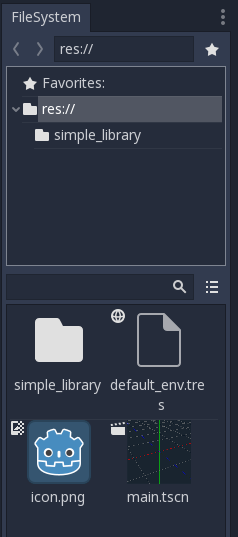
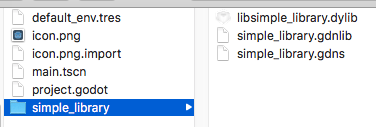
and within simple_library directory inside the project that GDNativeLibrary lives at is like this
haxpor
on 23 Dec 2017
Hmmm, that's weird, I'll check it out after Christmas and will try to replicate (but I don't have a mac)
karroffel
on 23 Dec 2017
Ok, thanks for that. Just let me know if you need me to help testing or proceed with any suggestions.
haxpor
on 23 Dec 2017
macOS 10.13.2 (17C88), Xcode 9.2 (9C40B).
Godot 3 beta 2 ("FAT" dylib), and 5c63687 (64-bit dylib and main executable).
Project and module from https://bitbucket.org/haxpor/*, godot-cpp and godot_headers from https://github.com/GodotNativeTools/.
Library loads and works correctly.
func _ready():
    print("hey")
    var n = simple_library.new()
    n.test_void_method()
    print(n.method("Test2"))
produce:
Current path: /Volumes/Seagate/Projects/cpp_proj/godot-3.0-beta2-issue-project
OpenGL ES 3.0 Renderer: AMD Radeon HD - FirePro D300 OpenGL Engine
GLES3: max ubo light: 409
GLES3: max ubo reflections: 455, ubo size: 144
ARVR: Registered interface: Native mobile
hey
This is test
Test2
Edit:
Same module/project with modified simple_library.gdnlib also works on Linux (Debian 9, 64-bit, GCC 6.3.0-18) and MinGW-w64 (cross-build from macOS, 64-bit, GCC 7.2.0) / Visual Studio 2017 (64-bit, Windows 10).
MinGW-w64 dll works with Visual Studio exe and vice versa.
 bruvzg
on 27 Dec 2017
bruvzg
on 27 Dec 2017
Thank you so much @bruvzg .
I have tested it again. In short, it works fine!
I tested both via compiling Godot binary again manually against latest commit on github, and just normally use beta 2 release binary. Use latest headers from godot_headers and cpp_bindings from godot-cpp. Both case works fine!.
The problem for my case is about rpath in .dylib file which is different from location I put it in a real project, so it cannot locate (I believe) and fail silently.
For others that meet with the same problem (note I work on macOS),
I pin-pointed the problem by using otool -L libsimple_library.dylib, it will show the following output
bin/libsimple_library.dylib:
    bin/libsimple_library.dylib (compatibility version 0.0.0, current version 0.0.0)
    /System/Library/Frameworks/Cocoa.framework/Versions/A/Cocoa (compatibility version 1.0.0, current version 22.0.0)
    /usr/lib/libc++.1.dylib (compatibility version 1.0.0, current version 400.9.0)
    /usr/lib/libSystem.B.dylib (compatibility version 1.0.0, current version 1252.0.0)
But in my testing Godot project. I put such .dylib in simple_library directory, and inside simple_library.gdnlib refers to it via res://simple_library/libsimple_library.dylib for macOS. This is a problem. Contrast this to SimpleDemo via C from GDNative- Demos which put such result shared library inside bin directory. So it won't be a problem.
I checked with SimpleDemo's shared library. Its rpath is
bin/libsimple.dylib.
With this, I need to change its rpath by using install_name_tool command. First you cd to the exact directory that holds such result shared library, then do as follows
install_name_tool -id libsimple_library.dylib libsimple_library.dylib
The -id parameter might be misleading as we probably should use -change to change from bin/libsimple_library.dylib to libsimple_library.dylib. But I tried with install_name_tool -change bin/libsimple_library.dylib libsimple_library.dylib without any success (only works with static library). So -id is only option as I've found.
As a result, you can then put your libsimple_library.dylib in anywhere inside your Godot project. No fixed location anymore.
Although we could cross-compile such shared library from macOS to Linux/Windows. Further testing to confirm this is needed. If anyone ever test this out, feel free to chime in here. I closed this issue now as it solved my problem.
Edit
After slightly more research, it seems that changing rpath to @rpath/libsimple_library.dylib is better. It works the same as just libsimple_library.dylib.
Edit2
Anyway, for safety you could by default use bin directory to hold all of your shared library files for all platform, so you have no worry to change such rpath for each library manually again on each platform. I will see to write tutorial on this creating and integrating C++ custom module on godot-docs.
haxpor
on 28 Dec 2017
Related issues
 Zylann
·
3Comments
Zylann
·
3Comments
 testman42
·
3Comments
testman42
·
3Comments
 n-pigeon
·
3Comments
n-pigeon
·
3Comments
 RayKoopa
·
3Comments
RayKoopa
·
3Comments
 kirilledelman
·
3Comments
kirilledelman
·
3Comments
Most helpful comment
I mean after building Godot (since the API struct header gets generated at compile time) but I actually just updated the godot_headers repository to be on the beta 2 state. So use those headers, then those shouldn't be a problem.
I don't know about the linking errors/warning, that's a godot-cpp issue, not Godot.
Have you tried following the (not yet merged) C tutorial? It should be a bit easier to set up than a library with the C++ bindings. The tutorial is here.
Also notice that there is now a UI for the GDNativeLibrary resource, so you don't need to edit the file with an external program anymore.