Godot: autotile editor- ability to mark squares as filled shapes/ autofill squares with a single click
Right now setting collusion,occlusion and navigation is extremely cumbersome, because you have to manually draw the shapes. It would save ALOT of time and effort if there is a quick command that simply fills the selected square with a square shape - instead of asking to manually create each single shape
99% of the time that is what we want anyway
See how rpg maker has it:

It takes one single click to mark a square as passable or non passable. We can also click and drag to set multiple squares as non passable and right click and drag- to set multiple squares as non passable.
Can we get a tool that emulates that somehow? Autoshape fill tool?
 blurymind
All 16 comments
If you talking about top down game, that was totally fine. But how about sidescroller game? Some of my tiles I created is not full square, sometimes I need polygon shapes (non square). Well, the collision using concave which is currently not usable for KinematicBody2D.
Maybe fixing the snap function (I try the snap and doesn't work) will be more suitable
 damarindra
on 25 Nov 2017
damarindra
on 25 Nov 2017
@damarindra for more specific shapes, you can use the current shape tool and draw each square painstakingly manual as you wish.
My proposal does not nullify the current tools. It merely compliments them.
Here I made a mockup:

Also note that once filling a square, you can still refine it with the edit node tool. Filling and refining is way faster than creating from scratch
You can file another feature request to copy and paste shapes from one square to another.
Or the ability to draw a shape across multiple tile squares. Those things would really help too
blurymind
on 25 Nov 2017
That was more suitable in this situation.
Is your snap tool working?
damarindra
on 25 Nov 2017
@damarindra not sure about the snap- is it supposed to snap to pixels? If so- I dont think it works.
Should we file another bug report?
blurymind
on 25 Nov 2017
@damarindra do collisions made in the autotile editor work for you? They dont seem to work at all for me- not even showing in debug>visible collision shapes.
Edit:it seems that changes I made to collisions didnt get updated until I saved the autotile tileset before running the project:
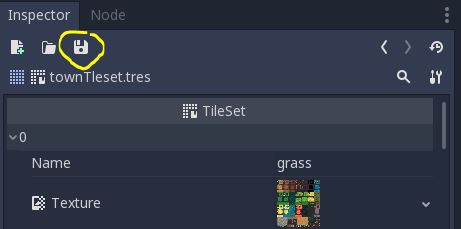
Godot is not auto-saving it as expected before running the project
blurymind
on 25 Nov 2017
Snapping keep points inside of the tile, and also snaps to bitmask grid (the 2x2 and 3x3 invisible lines)
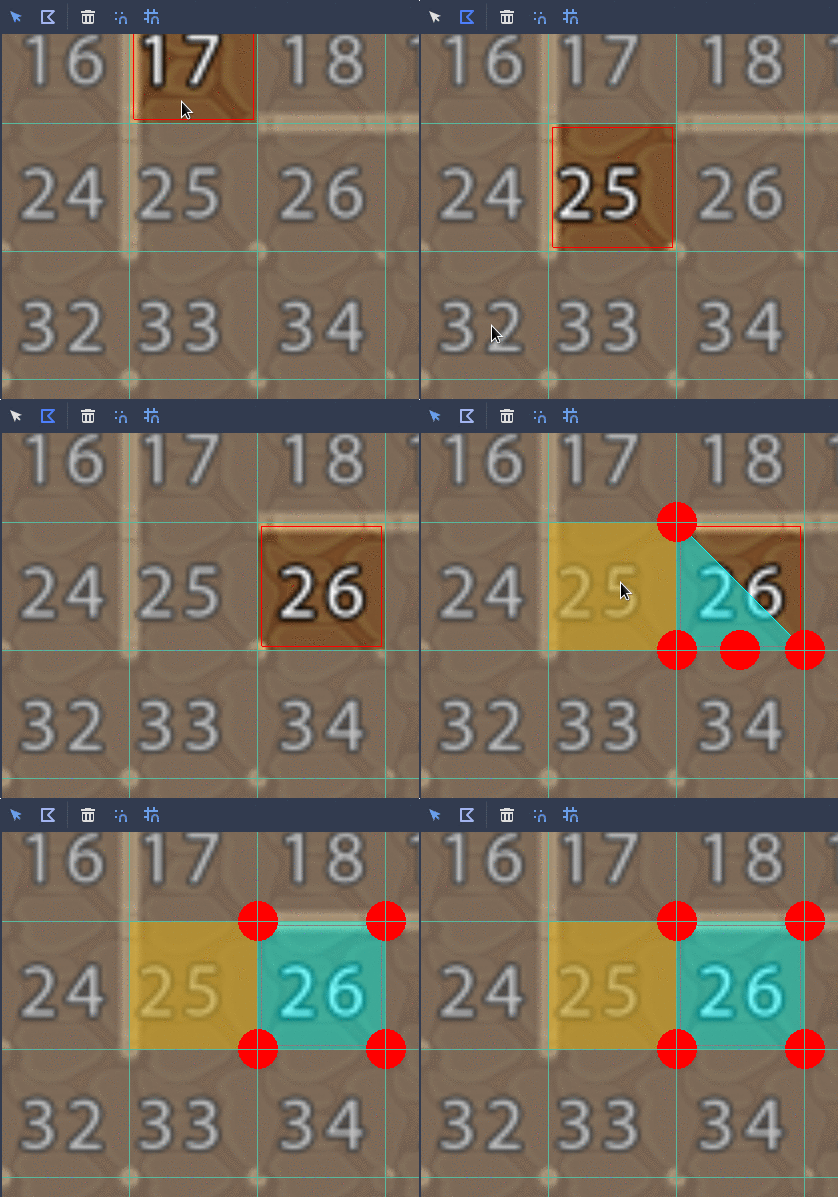
so a complete fill is 4 (easy) clicks instead of a single click, not sure if this is really necessary, difficult to implement, unless the right click deletes all the shapes on the tile (because there's no way to know which one of the shapes in the tile is the original one created with a fill, sure you can check points and see if they fit, but still not probably the best solution).
BTW @blurymind in the right side of the auto tiles tools there are Zoom In/Out/Reset buttons, it's much easier to edit shapes and record gifts using them. I originally wanted to add buttons to create shapes based on the bitmask (match mask and match non-mask), this tool was suposed to delete all shapes and create new ones. Not sure if will do it, for now it's easy enought to draw shapes.
 MarianoGnu
on 3 Dec 2017
MarianoGnu
on 3 Dec 2017
@MarianoGnu thank you for the tip. I knew about the snap. It still takes too long as compared to a possible bucket tool.
Right now we can't even copy a shape from one tile and paste it into another. Would a copy and paste feature be easier to implement?
I mean if we can do it for bitmasks, why not also be able to do it for tile collision shapes?
Copy all shapes across tabs and different autotiles?(copy/paste tileset shapes button)
Also copy a single shape to as many tiles as we want to (ctrl+c, ctrl+v, ctrl+v, ctrl+v...) - that would be even more useful than a bucket tool
blurymind
on 3 Dec 2017
copy-paste ALL the shapes together was also on the plans, and not so difficult to do
MarianoGnu
on 3 Dec 2017
copy-paste ALL would help a lot !
Copy paste across individual tiles would also change workflow for the better imo :D
Please can we have both? I dont want to have to manually create a square 50+ times
It makes for a less than fun experience using the autotiles
is it really so difficult to make a tool that simply adds a shape (copied to clipboard) to a tile the user clicks on? It doesnt have to be a square if you dont like that. The idea is to populate a tile with a shape in a single click - so as to make the workflow of populating all the tiles that need it much much faster than it currently is.
right now:
1 tile = select tile click,click to select shape tool, click 4 times to make a square =6 clicks
50 tiles = 300 clicks to populate tileset
with requested tool:
50 tiles = 51 clicks to populate tileset
blurymind
on 3 Dec 2017
Adding 6 buttons (copy, copy all, paste, paste as duplicate, paste all, paste all as duplicate) makes stuff confusing, there are a LOT of things that can be done, making the work as simple and with the best experience is important.
MarianoGnu
on 6 Dec 2017
@MarianoGnu how about 3 buttons- copy all,paste all (consistent design with the bitmap copy and paste) and a bucket fill tool-for filling tiles really quickly
If you are interested in copy and pasting between tiles- that doesnt make much sense as a top tray button imo- it should be a ctrl+c >ctrl+v triggered commands to save clicks and confusion.
Actually that was the first thing I tried to do intuitively.I selected the shape inside a tile to copy it with ctrl+c, then selected another empty tile and pressed ctrl+v. Unfortunately nothing happened when I did that - as that functionality is non-existent atm.
If you want a copy across tiles functionality presented via gui- it would make much more sense to find it as an item in a right click menu. That's where most software puts context sensitive "copy" and "paste" commands- users expect to find it there, the same way they expect those two copy and paste shortcuts to do that
The bucket fill tool suggested here is a mode of operation- similar to create shape tool. Its not a single command on a tile or the whole set.
While you are in the bucket fill tool,
Left clicking on a tile results in that tile being populated with a square.
Right clicking - with that tile being purged from shape(s).
https://user-images.githubusercontent.com/6495061/33233521-17f98e86-d20f-11e7-9c5e-515e338e0241.gif
The idea is to quickly fill many tiles with a single click on each (as presented in my gif mockup). Not to click on tile, then click back on button and so on.
Just an idea to make it really really fast to set up an autotile. Very often we have to make these squares- as the tiles are internal anyway. And squares are a good staring point to edit for tiles with more specific collision shapes
These suggestions are of course extra features for usability and workflow- I'm not saying they should be of high priority. They will help a lot during gamejam events, where time is limited. Lets say you've got 48 hours to make a game. You have a bunch of autotiles and you have to make these shapes quickly...
50 clicks vs 300 clicks really adds up when you consider more than one autotile to set up. It's incremental.
Lets say 3 different autotiles = 150 vs 900 clicks, 6 autotiles= 300 vs 1800 clicks.. and so on. These numbers can get astronomical
On Wed, Dec 6, 2017 at 6:09 PM, Mariano Javier Suligoy <
[email protected]> wrote:
Adding 6 buttons (copy, copy all, paste, paste as duplicate, paste all,
paste all as duplicate) makes stuff confusing, there are a LOT of things
that can be done, making the work as simple and with the best experience is
important.—
You are receiving this because you were mentioned.
Reply to this email directly, view it on GitHub
https://github.com/godotengine/godot/issues/13283#issuecomment-349725939,
or mute the thread
https://github.com/notifications/unsubscribe-auth/AGMbVbGXzOJ7cfcUJPTlvhvSuRw1bvxPks5s9thAgaJpZM4QqgZ5
.
blurymind
on 6 Dec 2017
I'd like to throw in my support for a bucket-fill tool, I think that would help a lot. I think just copy+paste would be hugely helpful as well, even if you leave off all other operations.
I also have to manually click the save icon to get the colliders to update, but not the icon or bitmask. That is very confusing, to the point where I thought the colliders were simply broken. I can maybe look into fixing that this weekend sometime if I have the time.
 CyanBlob
on 7 Dec 2017
CyanBlob
on 7 Dec 2017
This has been addressed in 3.1 when creating a square collision, it fills the whole tile. Should we close it?
 xphere
on 20 Mar 2019
xphere
on 20 Mar 2019
@MarianoGnu
It's still trash to use. See
https://youtu.be/RPgTlxb7Bno?t=469
Can we reopen this bug and make it like my gif mockup:
https://github.com/godotengine/godot/issues/13283#issuecomment-346958074
One click is required to fill a cell - not 3 steps.
Please remember that the user has to do this for each cell. This can mean hundreds of cells sometimes. You are simply asking for too much. The process is still painfully slow
blurymind
on 29 Mar 2020
@blurymind Please open a proposal on the Godot Proposals repository. All feature proposals are now tracked there.
 Calinou
on 29 Mar 2020
Calinou
on 29 Mar 2020
Here is alink to the proposal
https://github.com/godotengine/godot-proposals/issues/648
blurymind
on 29 Mar 2020
Related issues
 n-pigeon
·
3Comments
n-pigeon
·
3Comments
 mooseyfaith
·
3Comments
mooseyfaith
·
3Comments
 RayKoopa
·
3Comments
RayKoopa
·
3Comments
 kirilledelman
·
3Comments
kirilledelman
·
3Comments
 bojidar-bg
·
3Comments
bojidar-bg
·
3Comments