Godot: Add create object menu for meshes
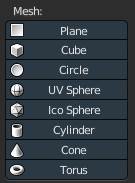
May be godot can add some menu like blender's create menu.
Click to create cube , plane,etc...
 sersoong
All 17 comments
Sounds like a good candidate for a Plugin in AssetLib.
 n-pigeon
on 9 Nov 2017
n-pigeon
on 9 Nov 2017
Well, Godot is not Blender, you don't need basic shapes really often.
That being said, it might be useful to create placeholders.
Sounds like a good candidate for a Plugin in AssetLib.
Probably. :)
 groud
on 9 Nov 2017
groud
on 9 Nov 2017
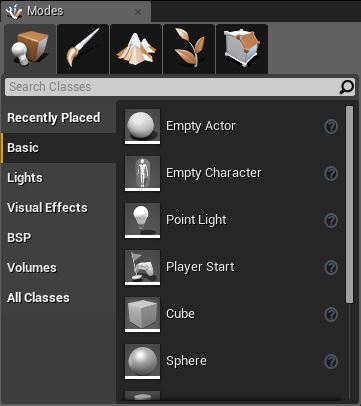
But ...u3d and ue4 have it.
Maybe some testers will like it.
Test materials or lights? sometimes.
sersoong
on 9 Nov 2017
But ...u3d and ue4 have it.
Do you have any screenshot ?
I'm not again a more generic menu, with a list of appropriate nodes or scenes. But if it's only for basic shapes like spheres, cubes... it doesn't worth it to be built-in.
groud
on 9 Nov 2017
@sersoong
It is very useful! I totally agree!
Although.
We should think to make official ScriptPlugins in AssetLib for stuff like that.
Plugins would be easier to maintain end extend, more than C++ module and most of tools like that don't need native code to run fast. :)
It would be two side win.
@groud
Yup UE4 has it :) and not only for 3D shapes, also Area triggers, lights and many other stuff.
n-pigeon
on 9 Nov 2017
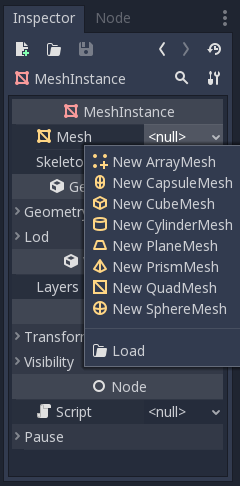
Guys, in master you can create basic placeholder meshes like spheres, quads and cubes by creating a mesh instance and assigning it a QuadMesh or a SphereMesh or a CubeMesh.
Similarly for 2.1. we have a plane mesh and a quad mesh as separate node types.
Unless I'm completely misunderstanding the request this is something we already have in Godot?
 Zireael07
on 9 Nov 2017
Zireael07
on 9 Nov 2017
We should make it easier to use, don't we?
sersoong
on 9 Nov 2017
@Zireael07
@sersoong is asking for the tool to do this fast :D
n-pigeon
on 9 Nov 2017
This is what the editor should do.
More simple, easier, more suitable for stupid designers.
sersoong
on 9 Nov 2017
I know many designers. They are not stupid :D
They always have shit load of work tho...
n-pigeon
on 9 Nov 2017
Ok, I get the point now.
3.0 is already much more user friendly in this respect than 2.x. I'm not so sure we can find a way to make it even easier in 3.0 without cluttering up the editor itself?
Zireael07
on 9 Nov 2017
Guys, in master you can create basic placeholder meshes like spheres, quads and cubes by creating a mesh instance and assigning it a QuadMesh or a SphereMesh or a CubeMesh.
I think the request is to have a context menu that pops-up where you click on the screen.
groud
on 9 Nov 2017
I would do this as a ScriptPlugin and in form of palette with drag n drop + on Viewport gizmo to just draw it instead editing properties.
First version could be only Palette with drag n drop that creates MeshInstance with right Mesh assigned and snaped to surface you drag.
n-pigeon
on 9 Nov 2017
When we train new people, we can tell them click + click, or drag n drop.
Not add....blah blah blah node and then add blah blah blah res..
In a word, thank you very much for your work. @n-pigeon
sersoong
on 9 Nov 2017
Too early to thank me. :P
I wanted to work on set of tools like that but for now I'm fighting Spatial Tranform Gizmo math. :< And I'm losing! xD
n-pigeon
on 9 Nov 2017
Maybe this plugin caoulb be interesting someway.
 Malkverbena
on 15 Mar 2018
Malkverbena
on 15 Mar 2018
This was implemented by @BastiaanOlij in #8661 already.
 akien-mga
on 15 Mar 2018
akien-mga
on 15 Mar 2018
Related issues
 timoschwarzer
·
3Comments
timoschwarzer
·
3Comments
 ivanskodje
·
3Comments
ivanskodje
·
3Comments
 testman42
·
3Comments
testman42
·
3Comments
 ndee85
·
3Comments
ndee85
·
3Comments
 blurymind
·
3Comments
blurymind
·
3Comments
Most helpful comment
This is what the editor should do.
More simple, easier, more suitable for stupid designers.