Godot: Changing RectangleShape2D extents on an instance of an object changes it on all instances
Operating system or device, Godot version, GPU Model and driver (if graphics related):
Godot 3.0 alpha 2 Mono version
Issue description:
Every instance of a scene with a RectangleShape2D gets its shape updated when modifying extents.
Steps to reproduce:
Make KinematicBody2D with CollisionShape2D child with RectangleShape2D (only one I've tested). Save as a scene, make two instances of it in another scene. Change only one of the instances' extents, and both will change.
See example project included, make sure visible collision debug is on.
Link to minimal example project:
RectShape extents bug Example Project.zip
 Boothand
All 10 comments
I think you need to mark the shape as unique in the instance were you want specific extents. It's because the resource is being re-used rather than copied all over the place.
 Zylann
on 5 Nov 2017
Zylann
on 5 Nov 2017
But I can't explicitly mark every new instance of this object's RectangleShape2D as unique (spawning in runtime etc). This should happen automatically when having two different instances of the same scene at least.
Boothand
on 5 Nov 2017
@Boothand it can't happen automatically, every resource works like this when instancing scenes (Textures, SpriteFrames, Materials...).
It's easy to make the shape unique, check the "modifiable children" option in the node's contextual menu, then you can do this:
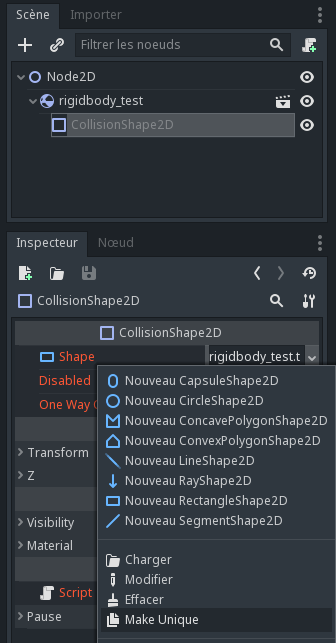
If you find yourself doing that for too many instances, perhaps you should make a scene inheriting the base one, and instance that instead, or have a script dealing with this so you can export a property simplifying the work ;)
Zylann
on 5 Nov 2017
I've already tried making it unique at the .tscn level. However that doesn't make it unique when putting several instances of the scene together in another scene.
The only way I've found around it is to make a new RectangleShape2D in code at the start and give it the properties set in the inspector, then call SetShape(theNewShape) on the CollisionShape2D
Boothand
on 5 Nov 2017
I've already tried making it unique at the .tscn level. However that doesn't make it unique when putting several instances of the scene together in another scene.
Read my answer again. What I'm doing in the screenshot is on the instance, not the source scene.
Zylann
on 5 Nov 2017
But how do you handle this in a project where you need for example 100 unique instances of an object? And it's not a good workflow for almost any number, in my opinion. I suppose this won't happen if the objects are spawned in runtime, but I haven't checked. Either way, if it's intended behaviour, it feels counter intuitive that this resource is shared when it's not copy/pasted or somehow marked as shared. I see the point, but the moment it is modified in runtime, you'd almost never expect the user to want to do this on every instance of the scene.
Boothand
on 5 Nov 2017
But how do you handle this in a project where you need for example 100 unique instances of an object?
A script on your scene is a good solution. You can even make it tool to see a preview in editor.
The problem with your workflow would basically not exist if that RectangleShape2D was not a resource, then a script can do that in a simple way.
If you think the engine should let you make them unique automatically, this can't be the case for every resource. It can't even be by type since it depends on use case. Automatically making resources unique makes it even harder to make them shared if that opposite is needed, which IMO is a more widespread use case. It needs some thinking before making everything unique.
If modifying the resource on the instance would make it unique, that could also be unexpected. It might be expected in your specific use case, but it's not for me. I often navigate to a resource from the place where it's used, and 99% of the time my intention is not to make it unique.
I also just thought, if you are modifying rectangles on the instances... then you are only one click away from making them unique, isn't it? I'm trying to imagine how your workflow could be made easier, but apart from the "make unique" button or a script, I don't see how it would be done without side-effects.
Zylann
on 5 Nov 2017
I see, that makes sense. Though I'm not convinced new users will have an easy time figuring this out. Maybe there could be a check flag to force something to be unique for all scenes, or something else to educate the users on how it works. =] Don't know what would be best.
Boothand
on 5 Nov 2017
By default, Godot resources are always shared, within the same scene and between scenes.
In far most cases, this behavior is the desired one, as it makes sure resource usage is more efficient.
If you duplicate a node within the same scene, you can make the resources unique (as @Zylann) mentioned.
From Godot 3.0 onwards, if you are instancing the scene and want each instance to have a unique copy of the resource, you can set this flag in the resource:
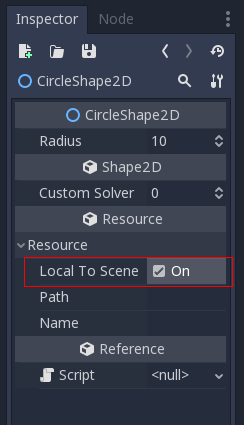
Of course, the resource needs to be used in a node directly. If used inside another resource (not this case though), you need to also set the flag in that resource.
 reduz
on 15 Jan 2018
reduz
on 15 Jan 2018
Great, so there's now a builtin way to support this use case. The need for documentation is tracked in https://github.com/godotengine/godot-docs/issues/581, so closing.
 akien-mga
on 15 Jan 2018
akien-mga
on 15 Jan 2018
Related issues
 mooseyfaith
·
3Comments
mooseyfaith
·
3Comments
 Spooner
·
3Comments
Spooner
·
3Comments
 timoschwarzer
·
3Comments
Zylann
·
3Comments
timoschwarzer
·
3Comments
Zylann
·
3Comments
 ivanskodje
·
3Comments
ivanskodje
·
3Comments
Most helpful comment
By default, Godot resources are always shared, within the same scene and between scenes.
In far most cases, this behavior is the desired one, as it makes sure resource usage is more efficient.
If you duplicate a node within the same scene, you can make the resources unique (as @Zylann) mentioned.
From Godot 3.0 onwards, if you are instancing the scene and want each instance to have a unique copy of the resource, you can set this flag in the resource:
Of course, the resource needs to be used in a node directly. If used inside another resource (not this case though), you need to also set the flag in that resource.