Godot: The editor is less responsive when set to "update only changes"
Godot 3.0 master, also 2.1.3
Windows 10 64 bits
I don't know wether this is fixable or not, but on Windows I always noticed a better response time / better framerate when "update always" was checked on top-right. To the point I always checked it when taking videos, because the experience is smooth and reactive. Now I see the option is going to be deprecated and default to "update changes", which finally convinced me to open this issue for the record.
I noticed this in many situations, for example scrolling the script editor, and took a video of it to show the difference: https://github.com/godotengine/godot/issues/10489#issuecomment-325166871
@toger5 didn't experience this on Mac, so it might be OS-specific.
I just tried to record a video of it in the 3D viewport but I was unable to make the difference stand out much with OBS, because on my laptop it slows down FPS just enough, which is frustrating...
I retried with tweaked settings: http://zylannprods.fr/dl/godot/subtle_framerate_difference.mp4
(but the most measurable example is the script editor).
It feels like the editor reacts and redraws at 30..40 fps / drops frames, instead of 60 when I set "update changes", which is fairly noticeable and impacts usage experience in a global way.
Edit: the difference is also easily seen when resizing docks or using freelook.
TL;DR:
The editor lags if not redrawn after a few seconds because the driver puts the graphics card in low-performance mode, and it's by default. It is very slow at waking back up, causing lag, and ruins editing experience.
It happens only on Windows with nVidia drivers, and AMD appears to have this too, with OpenGL 3. This gets much worse if the scene is complex.
See the measured framerate showing the lag here https://github.com/godotengine/godot/issues/11030#issuecomment-345572705
And explanation for nVidia: https://github.com/godotengine/godot/issues/11030#issuecomment-363450729
This does not happen (or not as badly) with Godot 2 (OpenGL 2), and I also noticed the exact same issue in Blender 2.8 beta, while reactivity in 2.79 felt much better. (although a bug existed since 2016 https://developer.blender.org/T49758)
A workaround is to change the driver settings to put the application in maximum performance mode, or to run a 60fps application side-by-side. This might however heat your computer much more.
I hope drivers get fixed in the future (it's been years now), or that Vulkan drivers will work better...
 Zylann
All 33 comments
Yeah, I've noticed this too. Setting the editor to "Update Changes" causes the framerate in the 3D viewport to drop from a solid 60fps to what feels like 30fps. Quickly scrolling through a script also shows some jerkiness with this setting. I don't think it's subtle at all, this is definitely something that should be ironed out.
Tested on master 5f0d367, Linux Mint 18.2 Cinnamon x64, running on an NVIDIA Geforce 980 Ti with NVIDIA's drivers (version 375.66)
 ghost
on 7 Sep 2017
ghost
on 7 Sep 2017
I can reproduce this as well (on Intel and NVIDIA graphics).
 Calinou
on 7 Sep 2017
Calinou
on 7 Sep 2017
@Zylann It might also just be that it is only noticeable with really good hardware which can draw the editor at 60+fps.
 toger5
on 7 Sep 2017
toger5
on 7 Sep 2017
@toger5 my hardware is a "gaming" laptop with an very average graphics card^^ (nVidia 940M)
Zylann
on 7 Sep 2017
The same for me. Using a ThinkPad X230, i7-3520M, Intel HD 4000, Ubuntu 16.04.3 LTS, so it might not depend on the Hardware
 stephdin
on 8 Sep 2017
stephdin
on 8 Sep 2017
@reduz I tested the fix:
It feels a little better, and now it's smooth if I keep moving my mouse around.
However the problem still exists when starting actions (as in, not constantly feeding input, which is 90% of all actions in editor). Things still have difficulty to "kick in", still mostly noticed by scrolling the script editor, or beginning a pan, scroll or drag. (compared to "update always")
New videos taken, hopefully the difference is visible:
Script editor: http://zylannprods.fr/dl/godot/godot_reactivity_after_first_fix.mp4
Moving a window: http://zylannprods.fr/dl/godot/godot_reactivity_after_first_fix_2.mp4
Panning: http://zylannprods.fr/dl/godot/godot_reactivity_after_first_fix_3.mp4
Those are examples, the issue still affects everything in a more or less noticeable way.
Zylann
on 18 Nov 2017
This is likely a bug in the text editor scrolling that should be fixed
On Fri, Nov 17, 2017 at 10:21 PM, Marc notifications@github.com wrote:
I tested the fix:
It feels better, however still not as good as "update always". Things
still have a bit of difficulty to "kick in" (for example scrolling the
script editor) while it reacts faster and smoothly with "update always".—
You are receiving this because you modified the open/close state.
Reply to this email directly, view it on GitHub
https://github.com/godotengine/godot/issues/11030#issuecomment-345406874,
or mute the thread
https://github.com/notifications/unsubscribe-auth/AF-Z26CfGwQ0wKv2BxbS9bJlJ38nShyfks5s3jEqgaJpZM4PPH7k
.
 reduz
on 19 Nov 2017
reduz
on 19 Nov 2017
No, it is not. It's everywhere, I recorded three videos to show it :(
Zylann
on 19 Nov 2017
What about attempting https://github.com/godotengine/godot/commit/ca194033061b4b29fe00d8e9bddf2f0478b3c3f0 again, but with an higher sleep time like 8000 (125 FPS)? I haven't tested this yet.
Calinou
on 20 Nov 2017
@Calinou I tested with 8000 and it doesn't solve it. In fact, I wonder why this sleep time would be the problem, to me I would intuitively look for here https://github.com/godotengine/godot/blob/master/main/main.cpp#L1716
Zylann
on 20 Nov 2017
I've profiled this section to see how long it takes:
https://github.com/godotengine/godot/blob/master/main/main.cpp#L1712-L1727
Narrowed to https://github.com/godotengine/godot/blob/master/servers/visual/visual_server_raster.cpp#L99-L106
Narrowed to https://github.com/godotengine/godot/blob/master/servers/visual/visual_server_raster.cpp#L107
I waited. Then I started dragging stuff (here the EditorSettings window), without stopping. Then I stopped dragging and immediately paused the process to look at my prints. Here is the result:

Zylann
on 20 Nov 2017
Tested on another computer with beta 1 (powerful desktop one, GeForce GTX 750 Ti/PCIe/SSE2), and I can still feel the difference between two modes, and the kick-in lag is present too (please read my post above to see where it really comes from).
I took yet another video, with a GIProbe so it slowed down FPS there the difference is even more noticeable. In that video I saw that my mouse wasn't captured at the same rate I saw it though (it lags at the same "rate" as Godot in the video, even though I saw it moving independently smooth):
http://zylannprods.fr/dl/godot/godot_reactivity_beta1.mp4
However... I noticed that if OBS is open and running on the same graphics card, this kick-in doesn't happen Oo
And it turns out, "luckily", when I recorded videos I linked above on my laptop, OBS apparently launched by default using the other less powerful card, which allowed me to record the lag, but ONLY on my laptop (because the other PC has only one card). I tried launching OBS on the powerful graphics card and it wasn't able to record the lag because that lag doesn't exist if OBS is launched that way... d'oh!
Does it means this not-so-good responsivity is a driver issue that we cannot fix?
Zylann
on 1 Dec 2017
Now that I tested this on Windows and Linux, I can say that I'm fine with the current editor responsiveness; it's much better than it was a few months ago. 😃
I can't notice much difference between Update Changes and Update Always now (if at all).
Calinou
on 14 Dec 2017
@Calinou it still responds awfully on my laptop, and it worsens if the scene is busy or has a GIProbe. I guess high-end graphics card dont have this issue as much as I have...
Zylann
on 14 Dec 2017
Not critical for the upcoming 3.0 release, so moving to the next milestone. A fix can still be cherry-picked for 3.0.x maintenance releases once available in the master branch.
 akien-mga
on 16 Jan 2018
akien-mga
on 16 Jan 2018
Update:
Using the nvidia-smi tool, I checked the Performance state of the graphics card while doing my repro steps, using the command .\nvidia-smi.exe -q -d PERFORMANCE.
I noticed it is stuck in state P8 when the editor is set to "Update changes".
If I start to move stuff around, it automatically goes to P0.
This performance state P8 is associated with lower memory and GPU clock speed, which may cause the lag.
There is a administrator command to manually set the clock speeds, but on my computer it had no effect, as if the Performance State was still controlled by another automatic system.
I made a video to illustrate this:
http://zylannprods.fr/dl/godot/godot_lag_nvidia_perf_state.mp4
(ignore the lag caused by the video recording itself, have a look at the P0/P8 state changes in the console window on the right).
As an additional note, having another Godot instance that "updates always" open behind also bumps the graphics card to P0, getting rid of the lag.
It would be really nice if we could get rid of this (which seems to be Windows-specific) in an easy way. For now the only hacky solution I was suggested is to make the editor render at around 5 or 10 fps when the spinner is set to "Update changes", in order to trick this automatic behavior. But a true solution would be ideal^^
Zylann
on 6 Feb 2018
Good news:
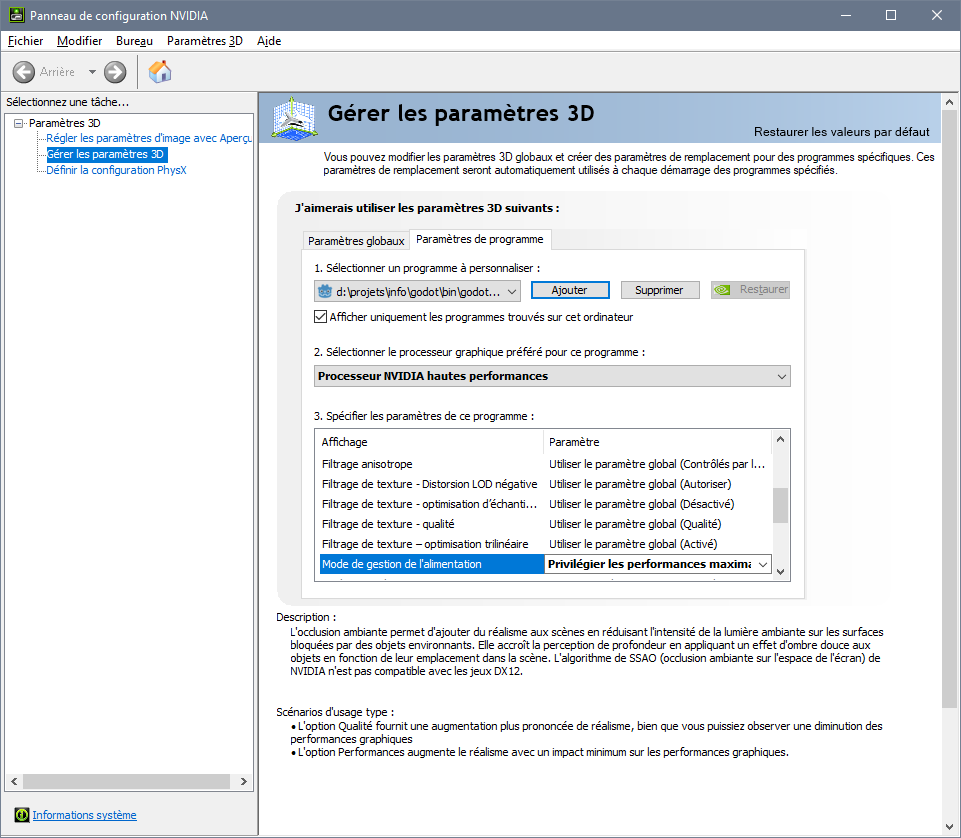
One option of the nVidia control panel seems to fix the issue!
In french it says "Mode de gestion de l'alimentation" (english might be "power management" or something like that), you have to set it to "Maximal performances", and then restart Godot if it is running.
There should be a way to set this per-program too, so you don't have to bump up your GPU globally by default.
TMM (on IRC) suggested we try to detect this situation in Godot so that users won't have a bad first experience and see a warning about their graphics being in "optimized" mode.
So in a sense, the spinner option does its job, it saves power. But on Windows, it does this job quite badly compared to Linux, and this is the default^^
Zylann
on 6 Feb 2018
I checked on a powerful desktop computer and the same situation happens, everything runs in P8 until something moves (just created an empty scene with two cubes and a GIProbe 128, which makes the lag show up badly).
Maybe it is worth noting that, Unity3D also runs in P8 but is not having this issue at all (production scene with large terrain, props and shaded+wireframe both enabled)... or maybe it does, but not as badly because the renderer is faster or maybe they trick the driver somehow
Zylann
on 9 Feb 2018
I wanted to edit the first post but the Edit menu broke even if I restart Firefox, so:
I wrote a TL;DR to sum up what is the root problem, and it looks like even Blender has been aware since 2016, at least for nVidia: https://developer.blender.org/T49758
Zylann
on 15 Mar 2019
Is this also the case for vulkan? if not we could wait until Vulcan is the default. (Donno how different the driver is when using gles3 vs vulkan)
toger5
on 15 Mar 2019
@toger5 there is only one way to find out... :D
Zylann
on 15 Mar 2019
Some related ideas on this (aside from the driver problem, which may be difficult to fix Godot side), which may or may not be relevant (I have very little knowledge on how Godot currently does this, especially in terms of threads for editor and 3d / 2d window):
Using sleep in the main thread to limit FPS in the editor seems like it could be problematic. If the editor is running at e.g. 10fps, then (depending on how it works with the OS) you could be artificially putting a variable lag on your input, AND potentially limiting the continuous response time as you e.g. move around a mouse on a scrollbar. I don't know whether input overrides a sleep, I suspect not.
An alternative (at least for running the IDE in low processor mode at low frame rates) is to use OS timers. These are often very unreliable in terms of accuracy, however they have the advantage that they won't introduce any lag to input, so you can have low processor, but the moment you decide to e.g. rotate the 3d view, you get instant reponse again, best of both worlds.
Another idea is to set a 'last input time' every time you get input (keyboard mouse), and prevent doing any sleeping until there hasn't been any input for say, half a second. This would at least potentially make things like scrolling more responsive.
The other trick with heavy 3d / 2d scenes is to render them to a texture that is cached, and when changing UI items you don't always do a full render of the 3d / 2d window, so that UI responsiveness isn't linked to how heavy the scene is. (You can also do this vice versa.)
 lawnjelly
on 10 Feb 2020
lawnjelly
on 10 Feb 2020
I have the same problem I think (win10, 144Hz display, GTX 2070 Super).
While focused the editor (and the open project window) both have a mouse framerate lag, as if switching to a lower framerate monitor. If I unfocus the editor (click on another window) the mouse visuals return to normal.
For me enabling "update continuously" made the editor put GPU in 80-90% load while unfocused, but while focused started working as normal with no mouse visuals problems and at lowload (5-15% load). Enabling "V-sync" in project settings as well as "update continuously" in the editor settings, makes it stutter free while focused and low load while onfocused. This does not include the open project window that still suffers the problem (probably since the settings are not loaded yet?).
This has solved it for me, but again I have a powerful computer enough for the continous updates, so it doesn't feel like this is how it should be. Also it feels as if the editor should be more limited when unfocused as opposed to focused.
I talked to @Calinou in discord and tried the build in #36052 but the results were identical (not working, at least for me), except V-sync wasn't working yet.
 d0rf3n
on 25 Feb 2020
d0rf3n
on 25 Feb 2020
This does not include the open project window that still suffers the problem (probably since the settings are not loaded yet?).
Projects don't use the low processor mode by default unless you enable it in the Project Settings.
Calinou
on 25 Feb 2020
What's the state of this in 4.0 with Vulkan? It seems latest master just continuously updates even when set not to but wasn't sure if that's intended or if I did something wrong.
Also, is @Calinou PR still going in for 3.2 and did it end up helping?
 giulianob
on 8 Jun 2020
giulianob
on 8 Jun 2020
What's the state of this in 4.0 with Vulkan? It seems latest master just continuously updates even when set not to but wasn't sure if that's intended or if I did something wrong.
This is definitely not intended; low-processor mode hasn't been reimplemented yet in the master branch.
Also, is @Calinou PR still going in for 3.2 and did it end up helping?
It hasn't been merged yet, but it's still cherry-pickable into the 3.2 branch. (It's probably too late to merge it into 3.2.2 though.)
Calinou
on 8 Jun 2020
I'm interested in this issue for my own app which is using low processor mode not specifically the editor. What I don't quite understand is why is it that setting the low cpu more usec to 0 then yields high framerate when I have vsync enabled. Basically what I'm trying to achieve isn't so much the CPU reduction from the sleep but primarily the reduction to be gained from the RenderingServer check which only renders when there are changes. Is it possible to achieve that? Or is the issue precisely because we're not rendering then vsync isn't being applied? It seems if that's the case potentially having a way to still use the renderingserver to apply backpressure rather than the artificial sleep would make things fairly seamless but I am way out of my depth here.
giulianob
on 8 Jun 2020
Basically what I'm trying to achieve isn't so much the CPU reduction from the sleep but primarily the reduction to be gained from the RenderingServer check which only renders when there are changes. Is it possible to achieve that?
Yes, that can be done by setting the low-processor mode sleep duration to a very low duration like you did.
Or is the issue precisely because we're not rendering then vsync isn't being applied?
V-Sync should still be applied when you enable low-processor mode. Godot enables V-Sync by default, and many graphics drivers enforce it (with no way for applications to disable it). This is often the case on mobile/web platforms.
Calinou
on 8 Jun 2020
setting the low cpu more usec to 0
Doesn't this mean Godot will then never sleep and consume max CPU instead?
Zylann
on 8 Jun 2020
That is indeed what I'm seeing. If v-sync was still applied then I wouldn't see my app running at 144fps when using the same settings as the editor (or even hitting as high as 500fps when going w/ a very low sleep) but instead I should see only 60fps since that's what my monitor supports. If vsync should still be the upper bound (meaning if sleep is 0 I should only see 60fps) then something is wrong there.
When I don't use low cpu mode then I do see the app running at 60fps so vsync does seem to work fine.
BTW I don't know how bad the responsiveness is for you @Zylann when using low cpu mode vs continous update. I can't say it's absolutely horrible but I'd describe it as going from something that feels like 60fps down to something that feels like 20ish fps. I'm going to test out @Calinou change maybe tonight and report whether I notice an improvement.
giulianob
on 8 Jun 2020
BTW I don't know how bad the responsiveness is for you @Zylann when using low cpu mode vs continous update. I can't say it's absolutely horrible but I'd describe it as going from something that feels like 60fps down to something that feels like 20ish fps.
This is pretty much what my PR should fix. It replaces the low processor mode's fixed delay for a delay that varies depending on the time spent in the last frame (like Force Fps in the Project Settings).
Calinou
on 8 Jun 2020
@Calinou It's night and day difference for me! My use case is a tree with a lot of visible nodes. The latest 3.2.2 beta during scrolling gets ~30fps on a high end desktop whereas your change never drops below 70fps. It's seems my frame is not ast enough to maintain 144fps but that's ok, at least your change has the dynamic component which still then does its best to maintain as high FPS as it can whereas current behavior just adds the fixed delay and makes things even worse.
No way we can get this merged for 3.2.2? Seems like a fairly straight forward change that primarily affects the editor.
giulianob
on 9 Jun 2020
@giulianob I don't know if Akien plans to release a fifth beta for 3.2.2, so it may be too late. Anyway, I asked on the PR.
Calinou
on 9 Jun 2020
Related issues
 mefihl
·
3Comments
mefihl
·
3Comments
 timoschwarzer
·
3Comments
timoschwarzer
·
3Comments
 EdwardAngeles
·
3Comments
EdwardAngeles
·
3Comments
 ndee85
·
3Comments
ndee85
·
3Comments
 RayKoopa
·
3Comments
RayKoopa
·
3Comments