Same deal as #8087, but for 2.1.4.
This issue is meant to gather initial feedback on pre-release binaries, so that we can spot regressions (either from new developments or from bad cherry-picks I might have done).
Note: as always I'm only interested in regressions (i.e. bugs that did not affect earlier 2.1.x versions), including to some extent bugs in new features if there are any. Packaging issues with the templates, etc., are of course also interesting :)
 akien-mga
All 37 comments
Current binaries for 2.1.4-beta (June 25), please test: http://download.tuxfamily.org/godotengine/2.1.4/beta/
The 32-bit Linux editor and template binaries are missing due to Travis and Ubuntu randomly failing, but that should be solved prior to the stable release.
akien-mga
on 25 Jun 2017
FYI, I deleted unrelated comments to get this issue focused on actual regressions... :)
akien-mga
on 25 Jun 2017
I'm not getting Output information in the editor, I can see my print() stuff in shell console, but not in the "Output" tab, or debug: "Remote Debugger: Unable to connect"
Another thing I can see is that when you close the game, the "Play" icon doesn't change, and shows the "Restart" icon.
 josempans
on 26 Jun 2017
josempans
on 26 Jun 2017
Question : on 2.1.4, with AnimationPlayer and with discrete points, it now seems that the first value you set will be the value set at the beginning of the anim
Which means that if you want to make an animtion, for example, based on parst going from visible(false) to visible(true), you have to init all your anim tracks with visible(false)
It doesn't start with the value the node had
Is that an intended new behaviour or a regression ?
Using the value the node had before sounded like a good idea actually
Makes animation less "hardcoded", they can be played from multiple situations
Should this then be considered as a regression or as a feature ?
I'm putting this here so it can be kept alive and "studied".
 ObaniGemini
on 26 Jun 2017
ObaniGemini
on 26 Jun 2017
@ObaniGemini That seems like a regression, since it would break older projects using 2.1.3..
 bojidar-bg
on 26 Jun 2017
bojidar-bg
on 26 Jun 2017
@josempans : I don't have your bug with the Play icon, even by forcing quitting the game
ObaniGemini
on 26 Jun 2017

Ok, here are a pair of screens... no output information (I have a few prints), and the play button won't change to "restart"... this only happen with a force quit (closing the window, not pressing the Stop)
I've downloaded the beta from the website, and I also build one.
josempans
on 26 Jun 2017
OS ?
ObaniGemini
on 26 Jun 2017
@josempans anything on the console window?
 vnen
on 27 Jun 2017
vnen
on 27 Jun 2017
Windows 10. I can read the print output in the console shell.
josempans
on 27 Jun 2017
@josempans oh, I meant if there's a relevant error message. Usually connection errors are printed there. Also, try to change the Remote Port in the Debug category of project settings (you have to run the project once for it to appear).
vnen
on 27 Jun 2017
Yes, yes... sorry, I thought I've wrote about that... in the console shell I get a message about a connection problem with the debugger
josempans
on 27 Jun 2017
@josempans: There should be an issue or two about debugger connection problems.
 Zireael07
on 28 Jun 2017
Zireael07
on 28 Jun 2017
I am also seeing the behavior @josempans has mentioned. I too am using Win 10. When opening the project in the 2.1.3 stable x64 I see data in the output window from several print statements. However, opening the same project in in the 2.1.4 version I do not see anything in the output window within the editor. I do see the expected print output in the console window.
I'm a little confused as to the Debug connection exchange above. Is there somewhere I should be checking some settings to enable this behavior? Or other information I can provide? It may be the issue has been resolved and I'm just not clear on how so I apologize if I'm re-raising this unnecessarily.
 cowhand214
on 4 Jul 2017
cowhand214
on 4 Jul 2017
If somebody else can replicate this issue #8581 (run on android) and get some hints of the source would be cool, I have no clue of what happens there.
 eon-s
on 4 Jul 2017
eon-s
on 4 Jul 2017
@cowhand214 do you have more than one instance of Godot running, regardless of version? If you open two instances, the second one won't be able to connect to the debugger. You can also try to change the debug port, as I mentioned earlier.
vnen
on 5 Jul 2017
Sorry for the delay, last time I've tried the debug connection problem was there. Tomorrow I'll make a new build, and try to find where is the issue. I've built 2.1.3 and 2.1.4, and the .4 has that problem.
josempans
on 5 Jul 2017
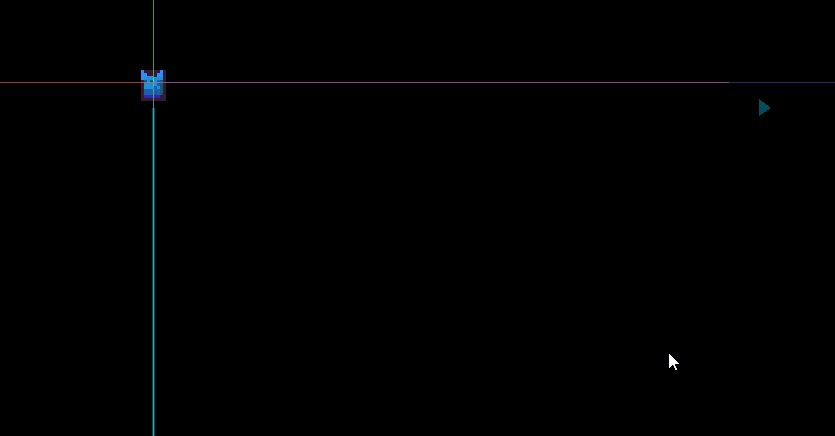
Raycast Arrows are turned wrong way while the lines are in correct direction
 Dodgetgo
on 9 Jul 2017
Dodgetgo
on 9 Jul 2017
@Dodgetgo Please make a new bug report for it so that it's easier to track down.
akien-mga
on 9 Jul 2017
@vnen Ok, I know what was going on. No problems with source, it seems the editor was trying to connect with other address than 127.0.0.1. So, I changed that in Editor Settings, and the debugger was able to connect without problem.
josempans
on 15 Jul 2017
In the beta of Godot v2.1.4, I also have the same issue as @josempans debugger output not shown. Only shown in console. Running one instance of Godot and v2.1.3 works fine. Changing "Remote Port" in project settings didn't help. Console window doesn't show any debugger connection error. It is worth mentioning that when starting Godot, it displays the copyright notice, but once you run a game, output disappears.
Even if there is some setting that can alleviate this issue, it is still a regression nevertheless.
Also, exiting game by clicking on the [x] on the top corner of the window, Godot does not terminate execution. I have to manually click on stop at the top of Godot.
 RebelliousX
on 26 Jul 2017
RebelliousX
on 26 Jul 2017
@RebelliousX Can you try to compile the 2.1 branch from source? It might have been fixed recently.
akien-mga
on 26 Jul 2017
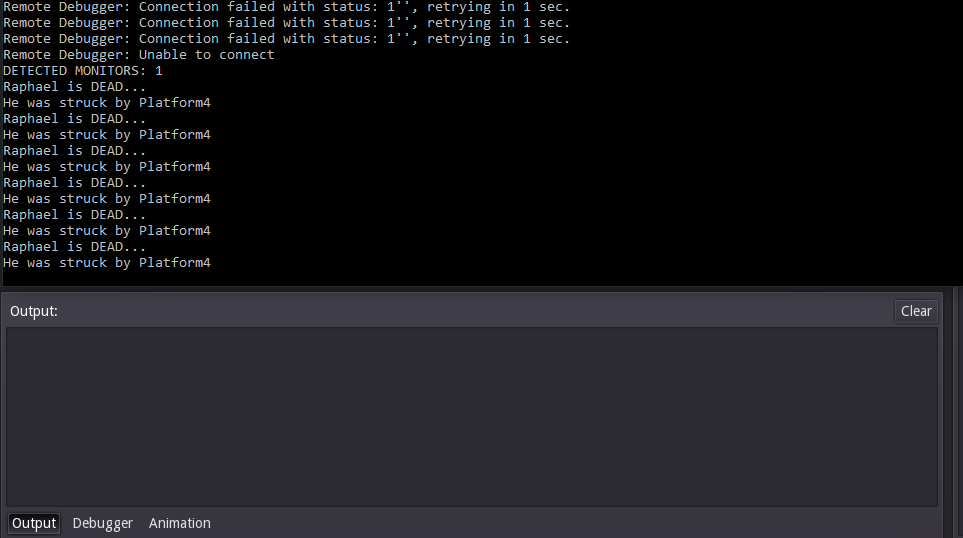
@akien-mga No luck, I just compiled it and same behavior. Though, I am getting "Remote Debugger" connection failed now. Also, the issue remain about when closing the game window and godot still thinks it is running.
RebelliousX
on 26 Jul 2017
Yes, https://github.com/godotengine/godot/commit/0aa6b4aac74971addd98ab3ed465b0febc4633d9 should be reverted. It would be a good thing if it had been always the case, it's good for 3.0, but a breaking change for 2.1. My own game heavily relies on the "unfixed" behavior.
 RandomShaper
on 27 Jul 2017
RandomShaper
on 27 Jul 2017
My #8999 included a point:
Implement index shifting (or marking as -1) for shapes indices in collision pairs shapes are removed.
I'm not completely sure that is needed. If @reduz confirms, I'll port that point to 3.0 to make #9832 complete.
If he says that's not needed, I'll revert that only point from 2.1 because it might impact performance.
RandomShaper
on 27 Jul 2017
Yes, 0aa6b4a should be reverted. It would be a good thing if it had been always the case, it's good for 3.0, but a breaking change for 2.1. My own game heavily relies on the "unfixed" behavior.
Thanks, reverted.
akien-mga
on 27 Jul 2017
Not a regression, but seeing as Visual Studio 2015 is no longer being offered for download and Godot 2.x doesn't support Visual Studio 2017 yet I think #9902 should be considered for inclusion in the next release. It's just a build script update and doesn't touch Godot itself.
EDIT: Upon further investigation, the free tier of the Visual Studio subscription _does_ offer free downloads of VS2015. That makes #9902 less critical.
 brenttaylor
on 27 Jul 2017
brenttaylor
on 27 Jul 2017
@brenttaylor I have only seen MSVC 2015 but was unable to make it work so a patch for 2017 may be needed.
eon-s
on 27 Jul 2017
@eon-s There were some changes to the build scripts in the master branch that added support for VS2017. I'll try and poke at it tomorrow and see if I can get the 2.1 branch compiling against VS2017 properly and if I can get the master branch working against the VS2015 build tools. Should be an easy fix. Famous last words, I know.
brenttaylor
on 27 Jul 2017
@brenttaylor I can compile 2.1 with 2017 but for 32bit only (no matter which console I use, it does not detect 64), I have not tried master yet.
eon-s
on 27 Jul 2017
I've been able to build 2.1 (64-bit) with MSVC 2017 just by cherry-picking 14a982a0c2100a2a406421f017b11340f7a38316.
RandomShaper
on 27 Jul 2017
The only thing I'm not being able to achieve is generating a VS project with vsproj=yes (neither in _2.1_ nor _master_). And this time it does look as an issue with SCons VS 2017 support, doesn't it?
RandomShaper
on 27 Jul 2017
@RandomShaper AFAIK this commit broke the build with VS 2015, so there was a follow-up (#8876). And yes, SCons does not support VS 2017 yet. Never tested the project generation with 2017, but it worked with earlier versions.
vnen
on 27 Jul 2017
9922 is here to fix Android debug/run issues!
RandomShaper
on 27 Jul 2017
After 9922 gets merged could be good to have another beta/rc to test official builds and templates, because there were lot of fixes since the last beta.
eon-s
on 27 Jul 2017
Another bug on the new debugger #10030 (beta 2)
eon-s
on 2 Aug 2017
All good, let's roll this 2.1.4-stable.
akien-mga
on 27 Aug 2017
Related issues
 mefihl
·
3Comments
mefihl
·
3Comments
 Zylann
·
3Comments
Zylann
·
3Comments
 EdwardAngeles
·
3Comments
EdwardAngeles
·
3Comments
 n-pigeon
·
3Comments
n-pigeon
·
3Comments
 testman42
·
3Comments
testman42
·
3Comments
Most helpful comment
All good, let's roll this 2.1.4-stable.