Godot: Some styles can't be changed with imported editor themes
Godot 3.0 30th april build linux x64 Kubuntu 17.04
Changing resource for PanelContainer class does not change editor theming like it was doing in previous versions.
STR: Make a theme, assign it as editor theme and try changing PanelContainer properties

ItemList class bg property is broken the same way but bg focus works fine
Button also gets inherited by all sorts of stuff and if you add any change to it's style items classes like CheckBox and switch in color picker get messed up. Changing their values to space out text and icon doesn't do anything.
 ghost
ghost
All 47 comments
There were some changes recently where some style boxed got moved to the editor them (instead default theme). Maybe if you check the editor theme class you will find a solution.
Just a guess though.
p.s. the colors are nice ;) really nice idea to blend it in with your system window colour!
 toger5
on 30 Apr 2017
toger5
on 30 Apr 2017
Hell yeah for breeze dark experience! :D

Got most of the stuff working but that button inheritance and panel container are just ugh. Editor class is all about script editor, don't see anything that would point to panels.
P.S. Kinda sad couldn't get sweet borders around tabs to be displayed like in default widgets =\
ghost
on 30 Apr 2017
Holy *
good job. I actually really like the text inputs you designed!
I think it looks better without the thin border lines. they just confuse. although the contrast between docks and bg is almost nonexistent.
let me search the file real quick I was referring...
toger5
on 30 Apr 2017
okay here we go: https://github.com/godotengine/godot/blob/2153feb6fd8cc328191c92b43818624a6fa6c27e/editor/editor_themes.cpp
this file also introduces some style boxes. which are independent of the default theme. And it seems like it is setting custom colors:
style_panel->set_bg_color(Color::html("#36424e"));
It uses styleBoxFlat so the textures have no impact...
maybe this is what prohibits you from changing the colour...
toger5
on 30 Apr 2017
Yeah I suspected that some of the stuff got hardcoded into godot during theme transition and I can't wire up to it from tres. I guess it's just plain impossible to finish theme for now (and I REALLY don't want people to have to recompile godot just to get another theme running)
If you wanna play around with it, here's the file. Also, full disclosure, breeze is work of kde people, I'd never come up with something so sexy :D Just following the design as close as possible given the constraints
breeze_dark.tres.tar.gz
Reverted buttons to default since changing those completely breaks color picker and check boxes.

I was so close x-x
ghost
on 30 Apr 2017
Also I have no idea how to give tres relative paths to icons so it would work, for example, with icons that are located inside theme folder. I'd pump it full of sweet breeze stuff if I could get those to work in a nice drag n droppable portable package.
ghost
on 30 Apr 2017
oh you didn't even touch the editor_theme.cpp ?? it's just a imported theme. Even nicer.
Maybe you should rephrase the issue description to: Some styles can't be changed with imported editor themes. because that is actually an issue ;)
@volzhs I think this is because of the changes to the theme in the file I linked before. do you have an idea how to fix it so that imported editor themes can overwrite it?
Just checked the file again. maybe it is not caused by the changes you made. since imported themes are custom themes as far as I know so they use the other function...
@volzhs maybe you have another an idea
toger5
on 30 Apr 2017
@ArcFutahito icons are not handled by the theme. they are part of the editor itself. so you can't change without recompile...
(also something to take into consideration... customisable icon sets. But I really like the current one)
toger5
on 30 Apr 2017
They actually ARE handled by the theme. It's just that paths are not relative and you need them kicking around in res:// to get loaded
ghost
on 30 Apr 2017
can u post a screenshot of the messed up color picker (when assigning a style box for buttons)
toger5
on 30 Apr 2017

Default color picker. Messed up but I've seen some tickets around.

After restyling buttons this happens to RAW mode checkbox button and other controls that inherit Button. I've been digging around affected classes trying to straighten it out but nothing seems to work.
ghost
on 30 Apr 2017
@ArcFutahito What icons? Are you talking about images for style boxes, or icons for buttons: search icon, expand icon ... or node icons.
Style box textures are supported. For editor icons I think only some are accessible but I'm not sure. (for example the expand in trees could be part of the theme) but I thinks the search icon for example is not part of the theme file. and the node icons aren't either. If I'm wrong I'm happy to know!
Yea and the path for the style box textures is an issue... someone once posted a theme which had an install file than adapted all the path's in the theme file...
Another topic that could need an issue... maybe I can link you the github when I find it.
toger5
on 30 Apr 2017
All icons ARE handled by theme. They are a bitch to get to because reduz decided to make it easter egg or something. Had to colorize screenshot because making empty template fucks everything up but here's a fraction of stuff kicking around dusty corners.

ghost
on 30 Apr 2017
there we go: https://github.com/Geequlim/godot-themes
qeequlim had a install script check it out. that could make It work... although there should be a better solution without install script. but with relative file paths...
toger5
on 30 Apr 2017
@ArcFutahito holy.. okay thats really nice to know. Need to check it out immediately Thank you!
toger5
on 30 Apr 2017

Empty editor template adds a whole metric ton of classes not accessible from dropdown because reasons. Last time I checked, everything worked just fine.
ghost
on 30 Apr 2017
@ArcFutahito you are totally right sorry! Never was brave enough to press Create Empty Editor Template ;)
So it's just about making the paths relative and than we will get flooded with themes
toger5
on 30 Apr 2017
Interesting you are right they are only accessible through the editor theme button. which makes sense to be honest. Most of those values are irrelevant for any other theme! I like that. although it's hard to find.
Did you check out the install script?
toger5
on 30 Apr 2017
Yeah, making those avaliable from "Add Class" menu would be nice. Or having separate menu for editor classes.
ghost
on 30 Apr 2017
Checking it out right now.
ghost
on 30 Apr 2017
Theme resources are kicking in res:// in there too. For example: res://addons/arc_dark/resources/button/button-insensitive.tres
It's possible to make theme as an addon and yeah it would work but you'd have to add this folder to every project. Or maybe not every project (i played with icons a long time ago) but project folder is not exactly a place for editor theme anyway.
ghost
on 30 Apr 2017
in the install Script
line 33
content = content.replace("res://addons", themdir)
he is changing the actual theme.tres file to adapt all the paths...
this is how it works for his theme but I would consider that quite hacky...
toger5
on 30 Apr 2017
../resources/button/button-insensitive.tres
this should be supported for imported themes. relative to the path passed to the custom theme property.
toger5
on 30 Apr 2017
oh and the theme generation needs to have an option for relative paths...
toger5
on 30 Apr 2017
Well, icons are not a priority yet anyway, at least not as long as there are random hardcoded panels lying around
ghost
on 30 Apr 2017
I think I found the reason: since volzhs's update to the theme the main editor uses the EditorPanel style box from EditorStyles
bottom_panel->add_style_override("panel", gui_base->get_stylebox("EditorPanel", "EditorStyles"));
the reason is, that it needs a adapted size...
Ill check if that is accessible through the theme creator.
toger5
on 30 Apr 2017
just found this, maybe thats interesting:
Ref<Theme> theme = create_editor_theme();
theme_base->set_theme(theme);
gui_base->set_theme(create_custom_theme());
first the default theme gets added to theme_base, than the custom theme (usually empty) is to the gui_base. All Childs use the theme from the closest parent, so when you give it a style for a specific element it uses it, for any undefined elements it just falls back to the default editor theme. because thats is assigned to theme_base node.
In your theme panel is set, so before volzhs changes it used your theme. not the editor panel doesn't search anymore for panel, instead it searches for EditorPanel which is not set in your theme so if falls back to the blue design.
Most of it is probably not new for you but I still wanted to explain it in detail.
A fix would be to add the EditorPanel to the list in the theme editor.
toger5
on 30 Apr 2017
just checked some more code and basically it should be there. I'm currently recompiling and check if I can find the Style.
toger5
on 30 Apr 2017

Here we go!
So everything works as intended, it's just a little bit confusing, that it is not using the default panel. but it also has advantages in terms of Customisation...
So this one is solved but I thin we should open another issue: make custom theme paths relative for easier installation.
other option would be to create a custom binary type which includes the assets with the theme...
toger5
on 30 Apr 2017
Thanks a lot! I got way too focused on how previous versions of editor were working and that was my undoing.
Got those panels working, they also didn't update without restarting the editor so it made everything even more complicated.
ItemList still has some weird behavior. From what I understand instead of bg when unfocused it gets editor bg style. Otherwise, editor is shaping up quite well

I'm not sure which styles animation player editor uses as well. When unfocused it gets TextEdit or something and when focused it's either transparent or gets some other style
ghost
on 30 Apr 2017
So godot just decided to wipe the crap out of the entire tres. Fun times, ha ha!
ghost
on 30 Apr 2017
This looks really good. some ppl might even prefer it as the default there is a color argument going on... So maybe as soon as the installation process becomes easier, this could be a unofficial official alternative or even shipped with the engine (since you don't have any textures your theme is tiny).
maybe we also can investigate into the issue with the dock borders you were bringing up.
Can you rephrase it so I know what exactly you expected and what is not working?
toger5
on 30 Apr 2017
@ArcFutahito: "Kinda sad couldn't get sweet borders around tabs to be displayed like in default widgets =\"
Is it a technical limitation or can you not get it so that there is a gap in the border around the tabContainer so that it looks wired?
If that is the case I have an idea. you can use expands to make the tabs overlap down over the tab container. and than the style box of the tab's has no border at the bottom but it has borders around the the top part. the tab container has borders all around but they are hidden underneath the bottom expand from the active tab.
It's just a guess and maybe you had a different issue...
toger5
on 30 Apr 2017
Is it a technical limitation or can you not get it so that there is a gap in the border around the tabContainer so that it looks wired?
Technical limitation, tab borders are your plain old rectangles as well as tab containers. I can't control border drawing separately because there was a genius idea to make two border options: left+top and right+bottom.
Since you can't just disable one of the borders or even control border size separately tab title looks like a rectangle slapped on top of another rectangle.
It's not exactly a HUGE thing but having more control over stylebox borders would be definitely a nice thing to have. And while I'm daydreaming, rounded corners getting drawn by the engine instead of textures would be just plain great.
this could be a unofficial alternative
That's the idea.
ghost
on 1 May 2017
Basically, what I think the reason for this is how polygons get drawn on the low level. If my hunch is correct it probably looks like the picture on top and that's why you can control two sides in a pack deal. Making styleboxes drawn with four polys would allow to control each border separately.

But I'm speaking out of my ass so honestly it's just a speculation
ghost
on 1 May 2017
@ArcFutahito Okay I see what you mean. So you could achieve it with texture style boxes. but there for you need the relative paths to make it easier to install.
I also really like the idea of giving an option for rounded corners for flat styleboxes that would make it flat boxes sooo useful:
perfect would be:
roundedTL: Float (radius)
roundedTR: Float (radius)
roundedBL: Float (radius)
roundedBR: Float (radius)
ColorTL: Color
ColorTR: Color
ColorBL: Color
ColorBR: Color
WidthTL: Float
WidthTR: Float
WidthBL: Float
WidthBR: Float
fillColor: Color
@MakeGodotGreatAgain I dont know what you mean? this thread is not about any theme launch.
It is also not about the default editor theme??
Or are you talking about the default editor theme? than this is the wrong thread...
toger5
on 1 May 2017
So you could achieve it with texture style boxes. but there for you need the relative paths to make it easier to install.
Personally I would try to omit using textures for something that doesn't require a lot of resources to get rendered especially if functionality can be used for a whole lot of different purposes (at least I THINK people would like to be able to control borders separately and have rounded corners for their game UI needs).
It's doable with textures though, yes.
ghost
on 1 May 2017

Completion panel edit is for panel on background of completion. There seems to be no way to change actual completion window.
ghost
on 1 May 2017

here's my WIP.
a PR for new theme was reverted in my branch because it changed default theme.
I will pick some arts in that PR.
what I'm trying to do is that theme color can be changed in editor setting.
note that, you can see 2.x theme in 2d viewport.
 volzhs
on 1 May 2017
volzhs
on 1 May 2017
Were you able to do anything with CheckBox class? I'm trying to change text margin but none of the parameters are working.

ghost
on 1 May 2017
I'm doing one by one for better look.
I will take a look later.
volzhs
on 1 May 2017
Please tell me if you find anything, those checkboxes are driving me nuts.
ghost
on 1 May 2017
@ArcFutahito I think almost all the things we addressed in this discussion are solved.
You could consider closing I think.
even the borders you wanted to get the same than they are in Breeze could work. since you now can do individual border width + rounded corners.
you could also add a expand margin to the bottom of the tabs so that there is a connection without line to the container.
toger5
on 31 Aug 2017
I guess Custom Theme is useless now at editor settings > interface > theme.
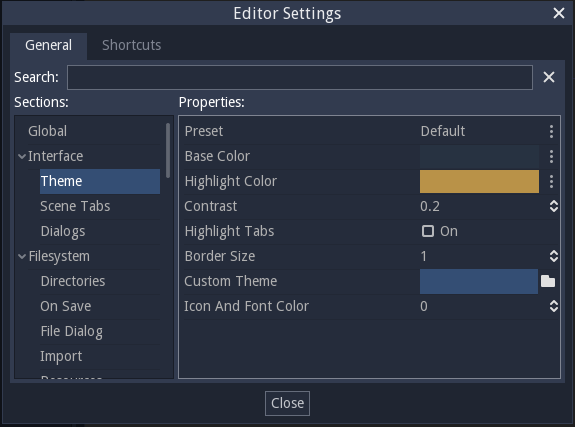
could we remove it?
volzhs
on 31 Aug 2017
@volzhs I wouldn't remove since it still could be cool when wanting to create icon themes.. or when someone wants something special with less modern rounder...
toger5
on 31 Aug 2017
First of all thank you for your report and sorry for the delay.
We released Godot 3.0 in January 2018 after 18 months of work, fixing many old issues either directly, or by obsoleting/replacing the features they were referring to.
We still have hundreds of issues whose relevance/reproducibility needs to be checked against the current stable version, and that's where you can help us.
Could you check if the issue that you described initially is still relevant/reproducible in Godot 3.0 or any newer version, and comment about its current status here?
For bug reports, please also make sure that the issue contains detailed steps to reproduce the bug and, if possible, a zipped project that can be used to reproduce it right away. This greatly speeds up debugging and bugfixing tasks for our contributors.
Our Bugsquad will review this issue more in-depth in 15 days, and potentially close it if its relevance could not be confirmed.
Thanks in advance.
Note: This message is being copy-pasted to many "stale" issues (90+ days without activity). It might happen that it is not meaningful for this specific issue or appears oblivious of the issue's context, if so please comment to notify the Bugsquad about it.
 kubecz3k
on 7 Apr 2018
kubecz3k
on 7 Apr 2018
Fixed by #8631.
 akien-mga
on 22 Nov 2018
akien-mga
on 22 Nov 2018
Related issues
 ducdetronquito
·
3Comments
ducdetronquito
·
3Comments
 bojidar-bg
·
3Comments
bojidar-bg
·
3Comments
 ivanskodje
·
3Comments
ivanskodje
·
3Comments
 RayKoopa
·
3Comments
RayKoopa
·
3Comments
 EdwardAngeles
·
3Comments
EdwardAngeles
·
3Comments
Most helpful comment
Hell yeah for breeze dark experience! :D

Got most of the stuff working but that button inheritance and panel container are just ugh. Editor class is all about script editor, don't see anything that would point to panels.
P.S. Kinda sad couldn't get sweet borders around tabs to be displayed like in default widgets =\