Godot: Can't push the "next tab" button when three tabs are in the same dock
3 tabs in one layout spot, can't push the red marked button.

 AlexHolly
All 12 comments
What is this red marked button? I don't see it in the editor here.
 akien-mga
on 9 Nov 2015
akien-mga
on 9 Nov 2015
I had this issue on Windows 7 64-bit right now I'm on Ubuntu and can't reproduce it.
I will try to check on Windows the next days.
I think the godot window was not in full screen mode and then they appeared.
AlexHolly
on 9 Nov 2015
Ok I checked on Windows and I'm able to reproduce it.

AlexHolly
on 14 Nov 2015
Thanks. It looks indeed like the UI scaling does not work on X11, so the issue is only reproducible on Windows (maybe Mac too).
akien-mga
on 14 Nov 2015
I can't reproduce this, maybe it is fixed?
 reduz
on 31 Dec 2015
reduz
on 31 Dec 2015
@reduz you have to check on Windows as it didn't happen on Linux.
 vnen
on 31 Dec 2015
vnen
on 31 Dec 2015
Is this still reproducible in the current master branch?
akien-mga
on 21 Jul 2016
I can't reproduce because I get this:

vnen
on 21 Jul 2016
This was fixed with https://github.com/godotengine/godot/pull/7600. The old logic had several issues which I rewrote. I just re-tested it, and can't reproduce it anymore.
S. also https://github.com/godotengine/godot/issues/7546
EDIT: Damn it to hell. Move out a tab and you can get into this situation. I thought I added code to scroll to the nearest visible tab, but I think I never pushed that as it was part of something else I gave up on.
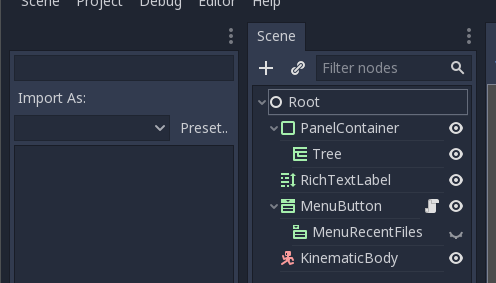
 RayKoopa
on 11 Dec 2017
RayKoopa
on 11 Dec 2017
@RayKoopa Any update on this one?
AlexHolly
on 21 Aug 2018
Nope. Not having anything open on godot anymore except those PRs here.
RayKoopa
on 21 Aug 2018
Seems like in 3.1 it always works. Unless there are some steps I'm missing.
 KoBeWi
on 20 May 2019
KoBeWi
on 20 May 2019
Related issues
 EdwardAngeles
·
3Comments
EdwardAngeles
·
3Comments
 SleepProgger
·
3Comments
RayKoopa
·
3Comments
SleepProgger
·
3Comments
RayKoopa
·
3Comments
 ivanskodje
·
3Comments
ivanskodje
·
3Comments
 Zylann
·
3Comments
Zylann
·
3Comments
Most helpful comment
I can't reproduce because I get this: