Godot-proposals: Add diagonal constants to Vector2() like UP_LEFT
Describe the project you are working on:
Top down action game with 8 directions.
Describe the problem or limitation you are having in your project:
Vector2 constants are fantastic, they make the code a lot more readable!
However since all my games are 8 directional, just having 4 constants results in either me having to mix constants (Vector2.LEFT) and numerical vectors for the diagonal (Vector2.(-1,1)), or not use constants at all. Which is weirdly confusing and kind of defeats their prime purpose of readability.
Describe the feature / enhancement and how it helps to overcome the problem or limitation:
If we also had diagonal Vector2 constants, I could use constants everywhere in my projects.
Describe how your proposal will work, with code, pseudocode, mockups, and/or diagrams:
Adding:
Vector2.UP_LEFT
Vector2.UP_RIGHT
Vector2.DOWN_LEFT
Vector2.DOWN_RIGHT
If this enhancement will not be used often, can it be worked around with a few lines of script?:
Would be used often by anyone working with 8 directional inputs (so not exactly rare usecase)
Is there a reason why this should be core and not an add-on in the asset library?:
It is about integral API.
 golddotasksquestions
All 18 comments
By mixing constants you mean like the following?
var up_left = Vector2.UP + Vector2.LEFT
But yeah to me that was kinda strange to see there are only 4 constants for directions as I often use diagonal lookups in 2D (like tilemap/bitmap/image operations).
For instance, you can implement a bucket fill algorithm which can use either 4-way or 8-way connectivity kernel (see example in one of my modules).
Moore neighborhood is comprised of 8 directions too.
It may be problematic for 3D as it's kinda difficult to name diagonal directions there, like Vector3.UP_LEFT_FORWARD is way too verbose compared to Vector3(-1, 1, -1) or similar.
 Xrayez
on 7 Mar 2020
Xrayez
on 7 Mar 2020
@Xrayez
No, by mixing I mean I would have to use
Vector2.UP
Vector2.DOWN
Vector2.LEFT
Vector2.RIGHT
Vector2.(-1, -1)
Vector2.(1, -1)
Vector2.(1, 1)
Vector2.(-1, 1)
if I'm working with 8 directions. This seems very confusing to me. I would like to either use only constants or no constants at all. But I would really prefer to use contants because they are much easier to read and quickly to grasp when glancing over the code.
golddotasksquestions
on 7 Mar 2020
Note that values like Vector2(-1, -1) or Vector2(1, -1) are not unit vectors. They represent a diagonal to jump within a grid, but they are longer than 1 unit of space when used to move a character, so if you use them it will make the character go faster in diagonals than cardinal directions.
Also, due to the fact diagonals are not actually a physical button but a combination, a movement system that can go in diagonal doesn't actually need to use diagonal constants:
var direction = Vector2()
if pressed_left:
    direction += Vector2.LEFT
if pressed_right:
    direction += Vector2.RIGHT
if pressed_up:
    direction += Vector2.UP
if pressed_down:
    direction += Vector2.DOWN
position += direction.normalized() * speed
 Zylann
on 8 Mar 2020
Zylann
on 8 Mar 2020
For input I use
    var dirinput = Vector2()
    dirinput.x = Input.get_action_strength("right") - Input.get_action_strength("left")
    dirinput.y = Input.get_action_strength("down") - Input.get_action_strength("up")
For animation and a lot of other things I need all 8 directions.
I'm not the only one, this is one of the regular questions on reddit. Example just from this week:
https://www.reddit.com/r/godot/comments/feec0n/wanting_to_stop_animation_from_walking_to_idle/fjrg7r8?utm_source=share&utm_medium=web2x
I also fail to see how Vector2.UP_LEFT not being a unit vector has anything to do with it being a constant.
golddotasksquestions
on 9 Mar 2020
From a given directional vector, instead of going through 8 copy/pasted if statements (which would also suffer from float imprecision when used wrongly, and can't be used with analog gamepads), you can obtain an angle, which is easy to convert into a number going from 0 to 7, and then into the string for your animation.
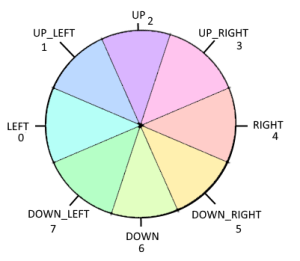
Here is a project showing this approach:
DirectionVector.zip
Zylann
on 9 Mar 2020
@Zylann I know, this is exactly what I do (and I've also mentioned that in my reply in the reddit thread I linked) This has absolutely nothing to do with the topic though, so please stay on topic.
can't be used with gamepads
Of course they can. It's just makes more sense to use angles because then you can use analog sticks as well on your gamepad but it's harder to understand for beginner, which was the case in the this reddit thread.
golddotasksquestions
on 9 Mar 2020
@golddotasksquestions I'm explaining this because I'm not certain why you absolutely need those vector constants, as with such technique none of them are used. And indeed in your reddit answer you said you didn't use them either, so... why have them?
Just my point of view though... I guess if you still really want to write 8 ifs everywhere that would make the code more consistent. We have 146 color constants too after all :p
can't be used with gamepads
Of course they can.
What I mean is that you'd need to normalize both the constant and the gamepad direction AND also quantize them to be able to compare them as vectors. It's not that you "can't", it's more like it's "much harder".
Zylann
on 9 Mar 2020
Because when you make a topdown 8 directional game you use these vectors all the time in a variety of cases. They are there, always.
Why? Because the most flexible solution is not always the best one. Especially when it is more work (harder to comprehend, more code) to use a more flexible solution (angles) and a simper solution (vectors) would suffice.
Maybe I just fail to see how what you are proposing is easier to use.
I also don't understand why you would need to quantize those vectors.
My point is those contants are great because they are easy to read, and I need them for the diagonals too.
If the person using them then decides to clamp, normalize, or quantize them, it up to their business.
I just want to be able to use the constant vectors for 8 directional projects. Mixing them makes it harder to read. It defeats the purpose. It makes me feel like I am obstructed from using the more legible way to write these vectors, only because I use 8 directions instead of 4. With the inclusion of the diagonal vectors there would be no obstruction.
I'm currently making an action game, but I actually think this is might be even more relevant if you make anything grid based. There is just no reason _not_ to have all 8 directions as spelled out constants if you already have 4.
golddotasksquestions
on 9 Mar 2020
I don't think these would be widely used enough to warrant being in core. It's also very easy, and very readable, to just do the following:
var directions = [
    Vector2.RIGHT,
    Vector2.RIGHT + Vector2.DOWN,
    Vector2.DOWN,
    Vector2.LEFT + Vector2.DOWN,
    Vector2.LEFT,
    Vector2.LEFT + Vector2.UP,
    Vector2.UP,
    Vector2.RIGHT + Vector2.UP,
]
Plus, there could be a debate of the ordering (UP_LEFT would likely make more sense for humans, but LEFT_UP would make logical sense because it puts the X axis first), there would be the question of whether or not to do this for Vector3 (there'd be 20 of them), and there would also be the question of having both Vector2.ONE and Vector2.RIGHT_DOWN while they're equal.
All of these things mean that the easiest and simplest option (not adding this) is, IMO, the best idea.
 aaronfranke
on 9 Mar 2020
aaronfranke
on 9 Mar 2020
I understand that Xrayez, Zylann and you @aaronfranke are experienced an skilled programmers. However by far not all Godot users are at your level. I am most definitely not.
I feel like in your replys you are over-complicating a simple request to make life for beginner and intermediate programmers a lot easier.
I was not talking about Vector3. I don't even know if there is a need for that in 3D. Most top down 8 directional games are still 2D. Most simple grid games are 2D. Even if they were 3D, for game play programming you would most often not even need Vector3, if only the graphics are 3D and gameplay is 2D.
Vector2.LEFT + Vector2.UP to me is about as readable as Vector2(-1,-1). It would mean I have to think. Adding those two together, thinking about what the result might be. I understand that's not the case for you, I understand you guys are mostly interested in consistency and logic. But I remember very well how confusing Vector2(-1,-1) was to me and how long it took to finally get to a point where I look at a Vector2(1,-1) and immediately "see" a RIGHT_UP vector. Still, if it would be written out, it would still be faster to recognize at a glance.
golddotasksquestions
on 9 Mar 2020
@golddotasksquestions your proposal is quite trivial implement in core and I could make a PR really, unfortunately the "stubbornness" wins so I don't feel like it's going to be merged, and so far there's no consensus on this. I agree that over-complication for the sake of it is bad for practical stuff, and can become a bad habit.
@aaronfranke
Plus, there could be a debate of the ordering (UP_LEFT would likely make more sense for humans, but LEFT_UP would make logical sense because it puts the X axis first),
What about adding new set of constants which could represent each directions as in here.
Vector2.LEFT == Vector2.W # west
Vector2(-1, -1) == Vector2.NW # north-west
Vector2(1, -1) == Vector2.NE # north-east
# etc.
And now you don't have to replicate all those constants in Vector3 because they only actually make sense for 2D navigation. Well, for 3D you could also provide those, but they would be restricted to ZX plane or similar.
Also, the human expectations should always take higher priority even if it doesn't make sense on the paper logically. "Up-left corner" is more common in human language than "Left-up" IMO.
Xrayez
on 12 Mar 2020
and there would also be the question of having both Vector2.ONE and Vector2.RIGHT_DOWN while they're equal.
Isn't that possible to bind a different constant to the same value?
Xrayez
on 12 Mar 2020
@Xrayez That's a better idea, and it would also be easily extended (like SSE for 22.5 degrees, which would be between S and SE). This actually also raises another question, which is whether or not they should be normalized - should SE be (1, 1) or (0.7071..., 0.7071...)
This would be much better to have in a third-party library or add-on. The use cases vary significantly, there are many different ways to implement this, and there is no solution that would please everyone without being bloat. Simply having a GDScript class that has constants such as NW would allow you to do things like Direction.NW etc. Depending on your game and your use cases, you could make this normalized or not, for 2D or 3D or both, have as many constants as you want, they can use whatever naming convention you want, etc.
Is there a reason why this should be core and not an add-on in the asset library?:
It is about integral API.
There is no reason that this needs to be in core and a part of Vector2. It can easily be done in an add-on via a script. It is not "integral" at all.
Isn't that possible to bind a different constant to the same value?
Yes, perfectly possible, but it's redundant.
aaronfranke
on 12 Mar 2020
Normalization loses some important information which could be useful for tilemap/grid-based lookups, so I'd personally prefer this to be "unnormalized", and normalize when you actually need it, which again can be done "via script easily". 😛
Xrayez
on 12 Mar 2020
There is no reason that this needs to be in core and a part of Vector2. It can easily be done in an add-on via a script. It is not "integral" at all.
Yes it is integral. Neither beginners not intermediate users, and I wonder if even pros, would go on the Asset Library to download more four more Vector2 constants for their scripts. It's far too tiny thing you would have to reinstall with every engine update ... for every project!
@Xrayez I appreciate you suggesting a solution. I don't know where you guys are from, but in central Europe we don't use NSEW directions at all that much (not to mention NE, SE, or even SSE. If you where to make a quiz on the street, most people would not even have an idea what they could mean). I know Americans use it a lot, recognize them a lot easier than us. To them SE might be immediately obvious, but to me it is not.
When I decided on naming conventions for the animations of my 8 directional action-game, I thought quite hard about using Cardinal directions over UpLeft CamelCase. Eventually I decided against NSEW, even though it would have made my animaiton names considerably shorter, because I knew I would just incorporate more bugs if I did use NSEW, simply because my brain does not discriminate them as reliably as spelled out words. Same is true for the numerical Vector2(-1,1) btw.
golddotasksquestions
on 12 Mar 2020
for every project!
This statement implies that it's common. Considering I haven't needed this once in my projects, I disagree. Maybe for you, it is, but that doesn't justify it in core.
I maintain the demo projects repo, I haven't seen a need for this once there either. Even for the demos which don't use movement on cardinal directions.
aaronfranke
on 12 Mar 2020
This could slow down my coding, because I often do Vector.L [Space] [Enter] to type Vector.LEFT. Now I have to choose which left vector I want, Vector.LEFT_UP, Vector.LEFT_DOWN or Vector.LEFT.
And what about Vector3? Does it get Vector3.UPLEFTFORWARD and Vector3.DOWNRIGHTBACK?
I also agree that this isn't used anywhere as much as the current direction vectors. When do you want to move something in two directions simultaniously?
 Jummit
on 12 Mar 2020
Jummit
on 12 Mar 2020
This can already be done with dictionary mapping, or just using a Vector2
 girng
on 18 Mar 2020
girng
on 18 Mar 2020
Related issues
 KoBeWi
·
3Comments
KoBeWi
·
3Comments
 Dorifor
·
3Comments
Dorifor
·
3Comments
 Torguen
·
3Comments
aaronfranke
·
3Comments
Torguen
·
3Comments
aaronfranke
·
3Comments
 regakakobigman
·
3Comments
regakakobigman
·
3Comments
Most helpful comment
Note that values like
Vector2(-1, -1)orVector2(1, -1)are not unit vectors. They represent a diagonal to jump within a grid, but they are longer than 1 unit of space when used to move a character, so if you use them it will make the character go faster in diagonals than cardinal directions.Also, due to the fact diagonals are not actually a physical button but a combination, a movement system that can go in diagonal doesn't actually need to use diagonal constants: