Godot-proposals: Add option to deactivate the Mono "build error" window
Describe the project you are working on:
Any minimal or big project.
Describe the problem or limitation you are having in your project:
The window that appears when there is a code error can be annoying and a waste of time for the developer.
This window does not indicate anything, and you just have to close it, the details of the error are indicated in the debug panel.
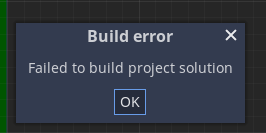
Describe how this feature / enhancement will help you overcome this problem or limitation:
If there were the option to disable this window it would be more convenient for many developers.
Show a mock up screenshots/video or a flow diagram explaining how your proposal will work:
Describe implementation detail for your proposal (in code), if possible:
Add an option to the editor to disable this window.
If this enhancement will not be used often, can it be worked around with a few lines of script?:
No.
Is there a reason why this should be core and not an add-on in the asset library?:
I'm not sure that this can be done with an asset library add-on.
Godot is amazing, thanks to all the collaborators and the community.
 Torguen
All 3 comments
I think the window could be removed entirely as long as the error is printed to the editor's Output window (with red text so it's easy to notice).
 Calinou
on 18 Nov 2019
Calinou
on 18 Nov 2019
I'm not sure about removing it entirely as some people in the past didn't realize the build failed even though the bottom panel was expanded to show the errors.
Instead of adding an option to disable this, I think it will be better to replace it with a red fading toast/tooltip.
 neikeq
on 19 Nov 2019
neikeq
on 19 Nov 2019
Well, the solution always seems good to me if you avoid the necessary user action or alternatively activate an option to prevent the user from intervening in order to continue using the editor.
For example, this window forces me to have to close it to continue using the editor and it would be nice to be able to deactivate that.
Torguen
on 19 Nov 2019
Related issues
 KoBeWi
·
3Comments
KoBeWi
·
3Comments
 davthedev
·
3Comments
davthedev
·
3Comments
 PLyczkowski
·
3Comments
PLyczkowski
·
3Comments
 rainlizard
·
3Comments
rainlizard
·
3Comments
 wijat
·
3Comments
wijat
·
3Comments
Most helpful comment
I'm not sure about removing it entirely as some people in the past didn't realize the build failed even though the bottom panel was expanded to show the errors.
Instead of adding an option to disable this, I think it will be better to replace it with a red fading toast/tooltip.