Godot-docs: Update documentation regarding building godot for android
A per this issue and its comments on the godot repository: https://github.com/godotengine/godot/issues/28736
The documentation on how to build the android version of godot here: https://godot.readthedocs.io/en/stable/development/compiling/compiling_for_android.html is wildly incorrect, making it an order of magnitude more difficult to build for android. I still haven't figured out the correct way to do it. The documentation needs to be up to date at least before the 3.2 release
 creikey
All 4 comments
I don't have the time to update the docs but if any one is interested, here is some information.
For the new custom builds system, as explained here, you need to zip all the files and directories in godot/platform/android/java/ -except the build folder- into android_source.zip. This zip must be placed in the templates directory, which is where the Godot editor will look for it when running Install Android Build Template.
For classic prebuilt apks the gradle commands are still the same, but the resulting apks are no longer copied to the output #bin directory as android_debug.apk and android_release.apk, unlike what the current documentation states. Instead, you can find them at platform/android/java/build/outputs/apk/debug/java-debug-unsigned.apk and platform/android/java/build/outputs/apk/release/java-release-unsigned.apk. I haven't tried this, but copying them to the templates directory with the names android_debug.apk and android_release.apk should be all that's needed.
It wouldn't hurt to have a python script in platform/android to take care of all this automatically...
 neikeq
on 20 Jul 2019
neikeq
on 20 Jul 2019
Hello,
I have a question regarding this new Android Build template.
Here we saw that it has been commented, so I though both apk where not needed.
However, in the 3.2 export template, it's still present, and if we remove it the editor complains.
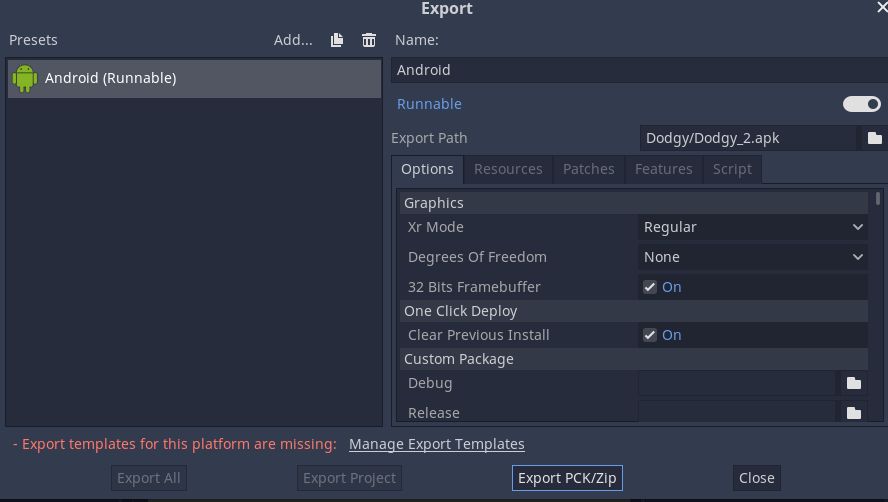
Maybe it should still be there ?
Thanks
 Coleim
on 19 Sep 2019
Coleim
on 19 Sep 2019
@Coleim We still support the old system of pre-compiled apks. In fact it's still the default, which is why it complains if you remove the export templates apks.
In order to use the new system, first you need to need to install the build template into your project with this option:
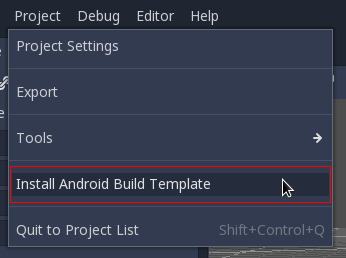
Then select _"Custom build"_ in the export options:
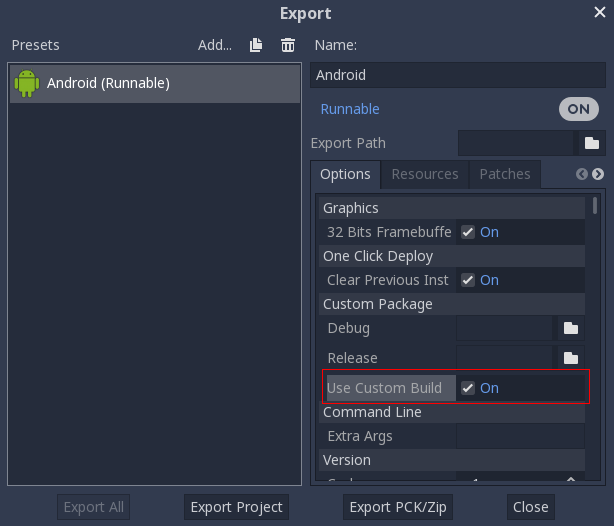
This process is described here: https://godotengine.org/article/godot-3-2-will-get-new-android-plugin-system
This issue ticket is about how to build the templates themselves. As a user you don't have to worry about that unless you're building the engine from source.
neikeq
on 22 Sep 2019
Yep, I just discovered the new way to do by looking at the doc repo.
I am trying to build directly an android plugin now :)
Thanks for the precision.
Coleim
on 22 Sep 2019
Related issues
 touilleMan
·
4Comments
touilleMan
·
4Comments
 hubbyist
·
4Comments
hubbyist
·
4Comments
 eon-s
·
3Comments
eon-s
·
3Comments
 jcmonkey
·
4Comments
jcmonkey
·
4Comments
 stsewd
·
3Comments
stsewd
·
3Comments
Most helpful comment
I don't have the time to update the docs but if any one is interested, here is some information.
For the new custom builds system, as explained here, you need to zip all the files and directories in
godot/platform/android/java/-except thebuildfolder- intoandroid_source.zip. This zip must be placed in the templates directory, which is where the Godot editor will look for it when runningInstall Android Build Template.For classic prebuilt apks the gradle commands are still the same, but the resulting apks are no longer copied to the output
#bindirectory asandroid_debug.apkandandroid_release.apk, unlike what the current documentation states. Instead, you can find them atplatform/android/java/build/outputs/apk/debug/java-debug-unsigned.apkandplatform/android/java/build/outputs/apk/release/java-release-unsigned.apk. I haven't tried this, but copying them to the templates directory with the namesandroid_debug.apkandandroid_release.apkshould be all that's needed.It wouldn't hurt to have a python script in
platform/androidto take care of all this automatically...