Gnome-shell-system-monitor-applet: Add support for GNOME 40 and an updated version to https://extensions.gnome.org/extension/120/system-monitor/
Add support for GNOME 40 and an updated version to https://extensions.gnome.org/extension/120/system-monitor/
 Kerrung
All 29 comments
The extension mostly work by just changing version in metadata.json.
Preferences don't, of course, because of the gtk 4 switch.
 p91paul
on 8 Apr 2021
p91paul
on 8 Apr 2021
What distro/release is everyone mostly using?
 chrisspen
on 8 Apr 2021
chrisspen
on 8 Apr 2021
Using Arch Linux here.
 BlackDex
on 8 Apr 2021
BlackDex
on 8 Apr 2021
What distro/release is everyone mostly using?
I ran into this on the beta for Fedora 34 (uses Gnome 40 by default).
The Fedora 34 final release is scheduled for April 20, 2021.
 shawnbrown
on 8 Apr 2021
shawnbrown
on 8 Apr 2021
What distro/release is everyone mostly using?
I use Arch Linux (rolling release).
Kerrung
on 8 Apr 2021
What distro/release is everyone mostly using?
Arch Linux user too
 ludenticus
on 9 Apr 2021
ludenticus
on 9 Apr 2021
Arch Linux user
 leogr
on 9 Apr 2021
leogr
on 9 Apr 2021
The extension mostly work by just changing version in metadata.json.
Preferences don't, of course, because of the gtk 4 switch.
Thanks @p91paul!
To All. As a temporary partial fix, append "40" to "shell-version": [...] in metadata.json.
P.S. The extension is usually located in the folder: ~/.local/share/gnome-shell/extensions/[email protected]/
 d2r2
on 10 Apr 2021
d2r2
on 10 Apr 2021
What distro/release is everyone mostly using?
Arch Linux (Rolling Release)
I would assume most users with this issue will be Arch Linux or other Rolling Release distro users because other distros like Pop!_OS and Ubuntu are still on GNOME 3.8 with the major exception being Fedora
 Arjdroid
on 5 May 2021
Arjdroid
on 5 May 2021
The extension mostly work by just changing version in metadata.json.
Preferences don't, of course, because of the gtk 4 switch.Thanks @p91paul!
To All. As a temporary partial fix, append"40"to"shell-version": [...]in metadata.json.
P.S. The extension is usually located in the folder:~/.local/share/gnome-shell/extensions/[email protected]/
Would I be correct in assuming that this workaround only works for users who already had this extension on their system BEFORE "upgrading" to GNOME 40 because I am on a GNOME 40 Arch Linux system and have tried this workaround to get the manually installed version working but the Extensions App doesn't allow me to switch on the extension and as you have mentioned the Preferences (gear icon button in my case) is not working and give a GTK-related error.
Is there anything I could try to trick the system into running the extension like some sort of file changes and then making Preference changes via some file changes like copying the configuration file from an existing Pop!_OS system running the extension with my desired configuration into the directory where it checks for my preferences?
Actually, now that I think of it, the Extension might not be allowing me to run it because it can't find it's configuration file.
I will edit this comment in case I somehow get it working on a fresh system.
Thanks in advance.
Arjdroid
on 5 May 2021
@Arjdroid manual installation instructions are provided in this repository README.
Also, there might (or not) be an AUR package, which might (or not) be up to date.
p91paul
on 5 May 2021
@Arjdroid manual installation instructions are provided in this repository README.
Also, there might (or not) be an AUR package, which might (or not) be up to date.
I'm sorry if my question was not clear, I am already able to install it via make install and it is showing up in the Extensions app but it is not allowing me to enable the Extension for whatever reason. The extension only shows up after appending "40" to the metadata.json file also.
The AUR version doesn't even show up in the folder for the extensions so there is no metadata.json I can find and it doesn't show up in the Extensions app either.
Also, when opening extensions app, it prompts me to log out to update the system monitor extension and it updates to version 39 when I installed from v38.tar.gz
I theorise that it (the Extensions app) won't let me enable the extension because there is a missing config file although I can't be sure...
Arjdroid
on 5 May 2021
@Arjdroid well then you didn't try it recently, because since #678 was merged a few days ago, 40 already is in metadata.json and everything, even the preferences window, should be working out of the box
p91paul
on 6 May 2021
@Arjdroid well then you didn't try it recently, because since #678 was merged a few days ago, 40 already is in metadata.json and everything, even the preferences window, should be working out of the box
I'm downloading from the releases page on the GitHub and latest over there is v38 from 2019, I haven't tried cloning the repo yet but will do that, thanks!
Arjdroid
on 6 May 2021
Please pin this issue to avoid repeated submissions :smile_cat:
 gfoligna
on 7 May 2021
gfoligna
on 7 May 2021
It's great to have a workaround, but how about a release?
 Akiyamka
on 13 May 2021
Akiyamka
on 13 May 2021
Please add a release since Gnome Extensions continues to "auto-update" the extension back to the broken one from extensions.gnome.org...
 darkdragon-001
on 15 May 2021
darkdragon-001
on 15 May 2021
what's the status on this ?
because it still isn't into gnome extension platform
 Tyr4El
on 25 May 2021
Tyr4El
on 25 May 2021
@Tyr4El you can see the open issue just above your question:
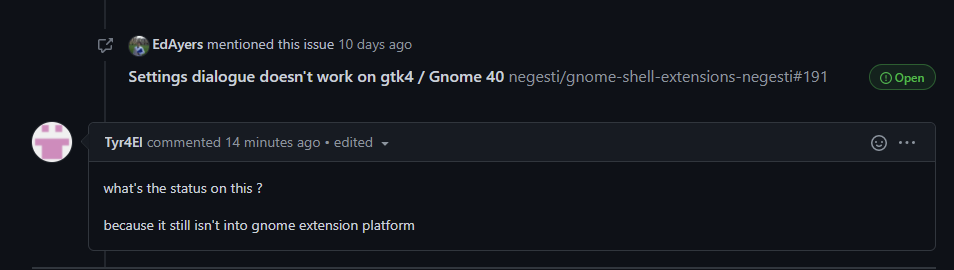
With an answer from owner a week ago.
So, it looks like not finished yet.
 AlexWayfer
on 25 May 2021
AlexWayfer
on 25 May 2021
@AlexWayfer That issue is on another repository, for another extension.
For this one, support for Gnome 40 is ready and mainlined, but right now the only option is manual install from git master branch, using the instructions in the README. To avoid automatic updates, just edit metadata.json and add
, "version": "1000"
Before the closing }
p91paul
on 26 May 2021
@AlexWayfer That issue is on another repository, for another extension.
Oh, my bad, sorry, It seems, I was too tired.
So, then we just wait for a release from @chrisspen (wrote here as a collaborator and merged the fix).
AlexWayfer
on 26 May 2021
What distro/release is everyone mostly using?
Fedora 34
gfoligna
on 23 Jun 2021
What distro/release is everyone mostly using?
Fedora 34
As Fedora 34 user just use the repo as suggested in README.md
Worked for me without problems
 LicoMonch
on 30 Jun 2021
LicoMonch
on 30 Jun 2021
@LicoMonch The "Repository installation" suggested in README.md does not work:
sudo dnf install gnome-shell-extension-system-monitor-applet

**snip!!**

Installed:
  gnome-shell-extension-system-monitor-applet-1:38-12.20210507gitbc38ccf.fc34.noarch

Complete!

gnome-shell-extension-tool [email protected]
gnome-shell-extension-tool is deprecated, use gnome-extensions instead
Extension “[email protected]” does not exist
If you're talking about the GIT repository, then it may work indeed, but it's a manual installation and I'd rather wait for a proper Fedora repository update.
UPDATE:
This works. It's just that a reboot/logout is required. see https://github.com/paradoxxxzero/gnome-shell-system-monitor-applet/issues/701
 Jerther
on 5 Jul 2021
Jerther
on 5 Jul 2021
@Jerther it works fine for me on Fedora 34. Please create a new issue and ping me there, so we can debug your specific issue.
 dreua
on 5 Jul 2021
dreua
on 5 Jul 2021
The _repository version_ doesn't work for me:
```
Error: No property border_width on GtkFrame

Stack trace:
  _init/Gtk.Widget.prototype._init@resource:///org/gnome/gjs/modules/core/overrides/Gtk.js:45:40
  SystemMonitor@/home/mschnirring/.local/share/gnome-shell/extensions/[email protected]/prefs.js:141:22
  SystemMonitor_App/<@/home/mschnirring/.local/share/gnome-shell/extensions/[email protected]/prefs.js:295:38
  SystemMonitor_App@/home/mschnirring/.local/share/gnome-shell/extensions/[email protected]/prefs.js:294:23
  buildPrefsWidget@/home/mschnirring/.local/share/gnome-shell/extensions/[email protected]/prefs.js:367:18
  _init@resource:///org/gnome/Shell/Extensions/js/extensionsService.js:209:40
  OpenExtensionPrefsAsync/<@resource:///org/gnome/Shell/Extensions/js/extensionsService.js:122:28
  asyncCallback@resource:///org/gnome/gjs/modules/core/overrides/Gio.js:115:22
  run@resource:///org/gnome/Shell/Extensions/js/dbusService.js:177:20
  main@resource:///org/gnome/Shell/Extensions/js/main.js:19:13
  run@resource:///org/gnome/gjs/modules/script/package.js:206:19
  start@resource:///org/gnome/gjs/modules/script/package.js:190:8
  @/usr/share/gnome-shell/org.gnome.Shell.Extensions:1:17
```
And when installing from git, it is always updated by _Gnome Extensions_...
darkdragon-001
on 6 Jul 2021
What distro/release is everyone mostly using?
Fedora 34
As Fedora 34 user just use the repo as suggested in README.md
Worked for me without problems
Steps that worked for me:
- Clone this repo from master / download .zip
- cd into
./gnome-shell-system-monitor-applet/[email protected] - Edit
metadata.jsonand change"version": -1into"version": 1000 cd ..- make install
- Reload Gnome Shell or logout and back in (Wayland)
gfoligna
on 6 Jul 2021
@darkdragon-001 See my message above :)
gfoligna
on 6 Jul 2021
The _repository version_ doesn't work for me:
Error: No property border_width on GtkFrame Stack trace: _init/Gtk.Widget.prototype._init@resource:///org/gnome/gjs/modules/core/overrides/Gtk.js:45:40 SystemMonitor@/home/mschnirring/.local/share/gnome-shell/extensions/[email protected]/prefs.js:141:22 SystemMonitor_App/<@/home/mschnirring/.local/share/gnome-shell/extensions/[email protected]/prefs.js:295:38 SystemMonitor_App@/home/mschnirring/.local/share/gnome-shell/extensions/[email protected]/prefs.js:294:23 buildPrefsWidget@/home/mschnirring/.local/share/gnome-shell/extensions/[email protected]/prefs.js:367:18 _init@resource:///org/gnome/Shell/Extensions/js/extensionsService.js:209:40 OpenExtensionPrefsAsync/<@resource:///org/gnome/Shell/Extensions/js/extensionsService.js:122:28 asyncCallback@resource:///org/gnome/gjs/modules/core/overrides/Gio.js:115:22 run@resource:///org/gnome/Shell/Extensions/js/dbusService.js:177:20 main@resource:///org/gnome/Shell/Extensions/js/main.js:19:13 run@resource:///org/gnome/gjs/modules/script/package.js:206:19 start@resource:///org/gnome/gjs/modules/script/package.js:190:8 @/usr/share/gnome-shell/org.gnome.Shell.Extensions:1:17And when installing from git, it is always updated by _Gnome Extensions_...
I have the same issue. I can not open "Preferences".
 Zesko
on 14 Jul 2021
Zesko
on 14 Jul 2021
Related issues
 Alexander-Serov
·
9Comments
Alexander-Serov
·
9Comments
 tryfon
·
5Comments
tryfon
·
5Comments
 Strykar
·
12Comments
Strykar
·
12Comments
 Ecron
·
12Comments
Ecron
·
12Comments
 udovdh
·
12Comments
udovdh
·
12Comments
Most helpful comment
Fedora 34