Gnome-shell-extension-gsconnect: GSConnect stuck on "Waiting for Service"
Describe the bug
when I log in, I have to click the status icons, Mobile Devices, and then Turn On.
Steps To Reproduce:
- Turn on computer
- Log into my account
- all logged in
Expected behavior
my notifications appearing whenever I get them
instead, I tend not to be aware it isn't connected until I get 2FA codes on my device and not on my computer
- GSConnect version: 27
- Installed from: GNOME Extensions Website
- GNOME/Shell version: 3.34
- Distro/Release: Fedora 31
GSConnect environment (if applicable):
- Paired Device(s): OnePlus 6T
- KDE Connect app version: 1.13.2
Additional Notes:
on KDE, KDE Connect connected automatically (it is not an issue with my device)
 mikelpr
All 9 comments
I have similar issue, started happening after the last update from the gnome site (v 27)
The extension is not connecting to the phone automatically. I need to go to extension -> mobile settings -> refresh devices (click a couple of times) and then the phone appears.
GSConnect version: 27
Installed from: GNOME Extensions Website
GNOME/Shell version: 3.34
Distro/Release: Ubuntu 19.04
Paired Device: Nokia 7.1 - Android One
KDE Connect app version: 1.13.2
 ivandotv
on 18 Oct 2019
ivandotv
on 18 Oct 2019
I have the same issue. With the same steps of reproduction using GSConnect 27, Fedora 30
I did notice something else. When I start playing music, there is no audio controls on my phone. Then, when I got 'mobile settings' it tells me it's waiting for the service. If I then refresh the overview (button top left) it does see my phone. Clicking on the phone indicator then restores the music playback controls on my phone.
 Eonfge
on 19 Oct 2019
Eonfge
on 19 Oct 2019
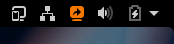
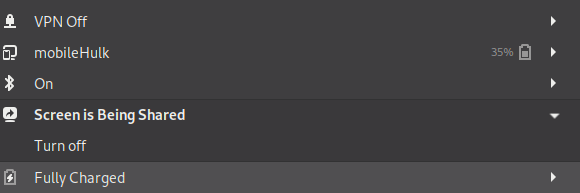
Also not connecting automatically, and after connecting icon for desktop sharing is activated.
 dac73
on 19 Oct 2019
dac73
on 19 Oct 2019
Same issue here since last update.
 gautierlabarre
on 22 Oct 2019
gautierlabarre
on 22 Oct 2019
Here's a tester (see the wiki for install instructions):
 andyholmes
on 23 Oct 2019
andyholmes
on 23 Oct 2019
@andyholmes I tried the zip, screen sharing problem is fixed, but the connection was still not automatic.
I stand corrected, after a fresh boot, everything works perfectly. Thank You.
dac73
on 24 Oct 2019
If the service has been stuck off, you will have to select Turn On in the Mobile Devices menu to enable it. After this the service should respect that settings, like Bluetooth and WiFi.
andyholmes
on 24 Oct 2019
I've updated this with the more-descriptive title from #682 and pinned it to the top of the issues list, for now. Hopefully that'll head off further duplicates until v28 is out the door.
 ferdnyc
on 1 Nov 2019
ferdnyc
on 1 Nov 2019
Good idea. I've gotten tied up all over the place this week, but I think I'll just push it out later today when I get home (after I get through the other extensions in the review queue, because otherwise I feel like selfish jerk :wink:).
We don't really get good stats for this, but no one's opened any new issues since the RC. I figured it was unlikely someone would want or be able to maintain older GNOME versions, but it was worth giving the opportunity.
andyholmes
on 1 Nov 2019
Related issues
 siegfriedhuber
·
6Comments
siegfriedhuber
·
6Comments
 nikolowry
·
4Comments
nikolowry
·
4Comments
 daleosm
·
6Comments
daleosm
·
6Comments
 AngusLogan02
·
4Comments
AngusLogan02
·
4Comments
 ricvelozo
·
4Comments
ricvelozo
·
4Comments
Most helpful comment
Also not connecting automatically, and after connecting icon for desktop sharing is activated.
