Gnome-shell-extension-gsconnect: Broken extension after update
After last update exenshon not working anymore.
Screenshots

System Details
- GSConnect version: [27]
- Installed from: [GNOME Extensions Website]
- GNOME/Shell version: [3.28.4]
- Distro/Release: [Ubuntu 18.04]
```
GLib.FileError: Failed to create file “/home/titan/.local/share/icons/hicolor/scalable/apps/org.gnome.Shell.Extensions.GSConnect.svg.QEKZ9Z”: No such file or directory
Stack trace:
gsconnect.installService@/home/titan/.local/share/gnome-shell/extensions/[email protected]/_gsconnect.js:213:9
init@/home/titan/.local/share/gnome-shell/extensions/[email protected]/prefs.js:20:5
_getExtensionPrefsModule@resource:///org/gnome/shell/extensionPrefs/main.js:76:9
wrapper@resource:///org/gnome/gjs/modules/_legacy.js:82:22
_selectExtension@resource:///org/gnome/shell/extensionPrefs/main.js:90:31
wrapper@resource:///org/gnome/gjs/modules/_legacy.js:82:22
_onCommandLine@resource:///org/gnome/shell/extensionPrefs/main.js:243:17
wrapper@resource:///org/gnome/gjs/modules/_legacy.js:82:22
main@resource:///org/gnome/shell/extensionPrefs/main.js:397:5
@
```
 fakhamatia
All 10 comments
Ubuntu 18.04
GSconnect 27 completely broke the application.
No devices found...
 patricklibert
on 22 Oct 2019
patricklibert
on 22 Oct 2019
👍1
Duplicate of #653
 andyholmes
on 22 Oct 2019
andyholmes
on 22 Oct 2019
This is not a duplicate of bug 653...
No GSconnect Desktop is found on KDEConnect and GSconnect can't find the phone.
No devices found.
They are on the same network...
The only way to make this work is by putting the IP address of the phone in GSconnect..
The other way putting the IP in KDEconnect doesn't work.
I have to do this every day again.
Happened from GSConnect 27
patricklibert
on 23 Oct 2019
👍1
The bug was opened with the same screenshot, reporting the same bug, for the same distribution.
The problems you are reporting are different from the original bug, but still relate to Ubuntu 18.04 LTS. As described in #653 we're probably just going to drop support for older versions of GNOME unless a volunteer offers to maintain it.
andyholmes
on 23 Oct 2019
@andyholmes I still have this problem.
I remove the extension and install again from extensions.gnome.org but not work.
I have exactly this error
fakhamatia
on 5 Nov 2019
@fakhamatia Since this is a closed report for a fixed problem, it's likely you have a _different_ issue. (Even though it may look the same, because a lot of things can cause the extension manager to show a generic "Error" message that provides no information whatsoever about the problem in question.)
The best thing would be to file a new report, using the bug report template, and provide all of the requested information about _your_ case, including the requested version information for your distro and GNOME installation.
Since the extension isn't starting, you won't be able to use the Generate Support Log feature, but it would be helpful if you could check your user journal for any error messages and provide them in the report. Use this command to see messages related to gsconnect:
journalctl --user -n 10000 --grep gsconnect -e
The most recent ones will be at the bottom.
 ferdnyc
on 5 Nov 2019
ferdnyc
on 5 Nov 2019
@andyholmes I wanted to create a new report bug, But journalctl --user -n 10000 --grep gsconnect -e show nothing.
Do you want to download manualy and copy files? or another way to install?
fakhamatia
on 5 Nov 2019
At this point your best bet is to install one of the older versions from https://extensions.gnome.org/extension/1319/gsconnect/. You should be able to use the dropdown menu to select an older version:
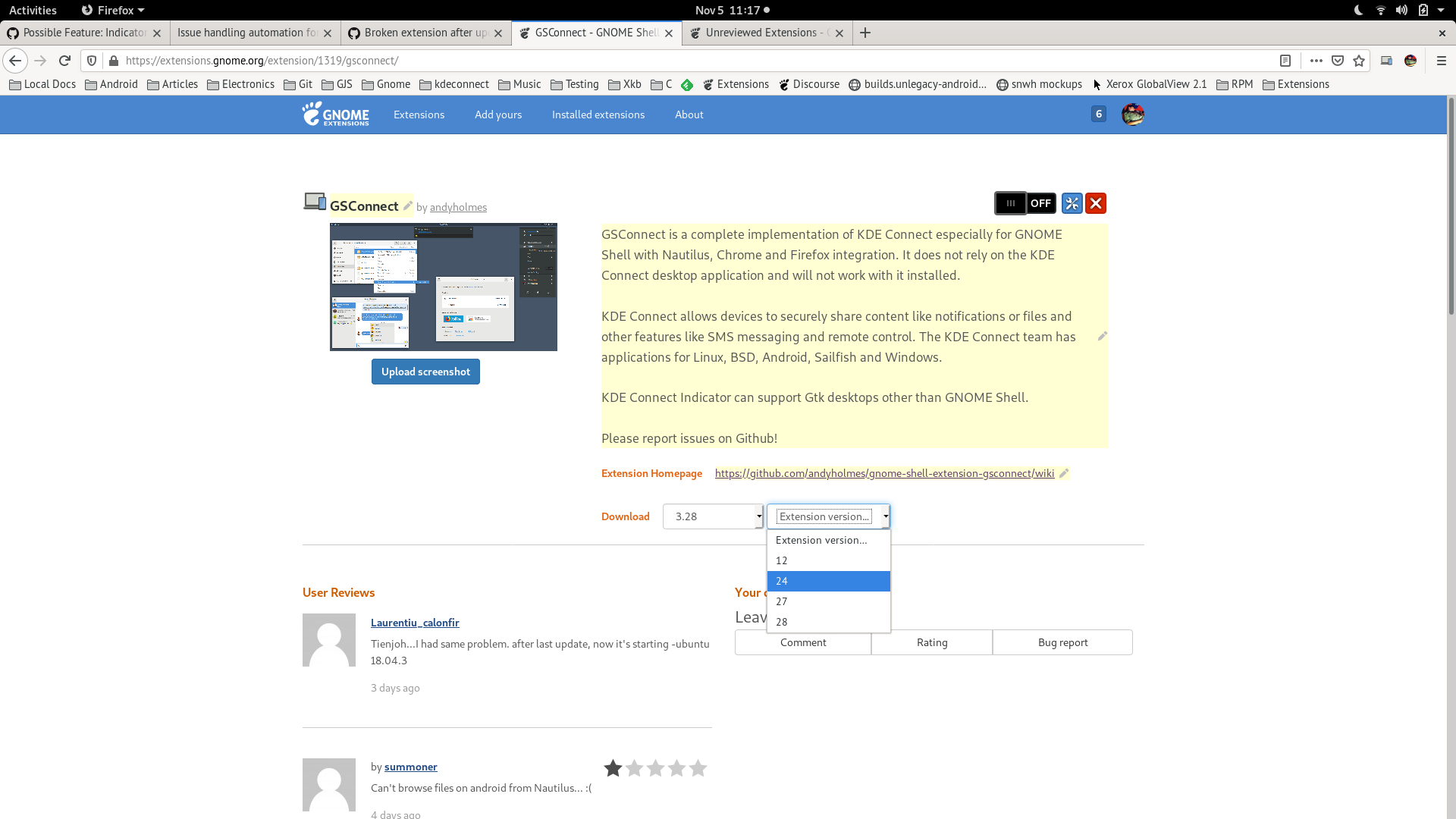
Unfortunately I just don't have the time or resources to support Ubuntu's LTS releases anymore. Canonical makes a commitment to backport security and bug fixes for 18.04 LTS, but GSConnect is not one the programs they do that for.
andyholmes
on 5 Nov 2019
@andyholmes
Version 28 and 27 not work. I download 26 from here and manualy copy and manualy install and work for now.
fakhamatia
on 5 Nov 2019
👍1
Okay, I will mark v26 as available on the extensions website, thanks for reporting back.
andyholmes
on 6 Nov 2019
👍1
Was this page helpful?
0 / 5 - 0 ratings
Related issues
 rugk
·
4Comments
rugk
·
4Comments
 amivaleo
·
5Comments
amivaleo
·
5Comments
 aia832003
·
6Comments
aia832003
·
6Comments
 AngusLogan02
·
4Comments
AngusLogan02
·
4Comments
 jeetsrs
·
4Comments
jeetsrs
·
4Comments