Gnome-shell-extension-gsconnect: Settings UI hints
I'd like to suggest a few changes to the settings window so that it will look like more 'gnomish':
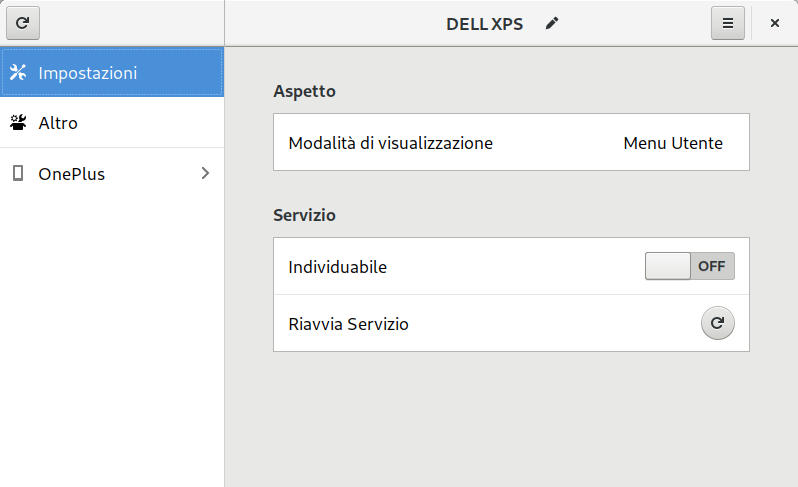
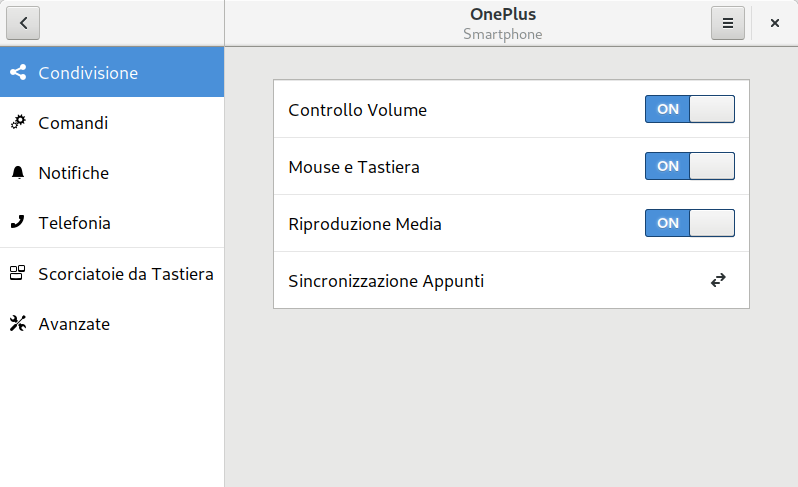
The main differences are:
- remove the "refresh" text button from the bottom of the list on the left and put an icon-only button on the headerbar on top (gnome-software does that).
- add a vertical-line/separator on the headerbar (gnome-control-center does that).
- correct the alignment of the text shown in the right half of the headebar.
- replace the 3-dots button with the 3-lines button
Let me know if you appreciate these hints. ;)
 amivaleo
All 8 comments
I'm just going to bed (finally), but I will comment tomorrow 👍
 andyholmes
on 27 Nov 2018
andyholmes
on 27 Nov 2018
Okay, v17 just got released so I think I'll be a bit busy today, but here's my thoughts:
remove the "refresh" text button from the bottom of the list on the left and put an icon-only button on the headerbar on top (gnome-software does that).
I like this :+1:. I'm a bit worried it might be unrecognized since it's different from KDE Connect, but I think we should do it anyways.
add a vertical-line/separator on the headerbar (gnome-control-center does that).
I'm asking in #gnome-design about this, because I'm not sure you're "supposed to" use a separator if there's no real content above the sidebar. Otherwise I'm okay with this, it will make something else easier actually.
correct the alignment of the text shown in the right half of the headebar.
If the above happens, then :+1:
replace the 3-dots button with the 3-lines button
This one I think is supposed to be this way (I recently changed it). There's a mockup in the App menu retirement page where "secondary" menus use the three-dot variation so it's clear it's specific to that sub-page. I think before I changed this it might have been unclear it was actually a different menu.
Do you want me to make the changes and add you as co-author or do you want me to help you through using Glade and submitting a PR?
andyholmes
on 27 Nov 2018
I like this . I'm a bit worried it might be unrecognized since it's different from KDE Connect, but I think we should do it anyways.
Uhm... I haven't understood what worries you: what does it mean "it's different from KDE Connect"?
The only thing I'd like to change is to make that refresh button rounded, just like it is on the same screen, close to "Riavvia Servizio" (Restart Service). But that's just my personal idea of how the refresh-button should always be.
I'm asking in #gnome-design about this, because I'm not sure you're "supposed to" use a separator if there's no real content above the sidebar. Otherwise I'm okay with this, it will make something else easier actually.
Well... You know, I didn't go deep into this, but I'd prefer to make it work exactly as gnome-control-center.
Try this: open Settings -> select any item on the list, say 'Bluetooth' -> the Bluetooth page will appear on the right AND the title 'Bluetooth' will be shown on the headerbar on the right.
Consider something similar on your app: you click on (well...) 'OnePlus' in my 1st screenshot -> the 2nd screenshot appear BUT:
- the title on the headerbar on the LEFT will be 'OnePlus \n Smartphone'.
- the title on the headerbar on the RIGHT will be the same as the active item you selected on the list on the left.
I don't want to use gimp right now, so I'll try to 'draw' the headerbar using characters:
[0] _ _ OnePlus _ _ _ | _ _ _ _ _ _ Condivisione _ _ _ _ [x]
[0] = refresh button
[x] = close button
But if you select, say "Notifiche", then the headerbar will look like
[0] _ _ OnePlus _ _ _ | _ _ _ _ _ _ _ Notifiche _ _ _ _ _ [x]
And so on.
I hope it is clear. :3
This one I think is supposed to be this way (I recently changed it). There's a mockup in the App menu retirement page where "secondary" menus use the three-dot variation so it's clear it's specific to that sub-page. I think before I changed this it might have been unclear it was actually a different menu.
Yes, I was not sure about this indeed. Also because it looked like something well-thought, something that you chose to do on that way after some investigation.
So yes, I withdraw this hint. :)
Do you want me to make the changes and add you as co-author or do you want me to help you through using Glade and submitting a PR?
:open_mouth: :open_mouth: :open_mouth:
Co-author!?
I don't deserve that., I suggested just a few changes. I should go at the end of the credit list at the best! :)
I would be honored to be credited as co-author, but really... It means much more than what I did/will do with this hints. :)
But... Yeah, I want to use glade... 🤤 So yes, I'd definitely appreciate such help. How do we start? ^_^
amivaleo
on 28 Nov 2018
Uhm... I haven't understood what worries you: what does it mean "it's different from KDE Connect"?
Oh, just mean the setting window has always looked like KDE Connect, so people who switch don't get confused. But no problem, I'm fine with this.
So yes, I'd definitely appreciate such help. How do we start?
Okay, first thing you want to do setup your github fork to so you can keep it up to date. I don't know how much you know about git, so I'll just go through it, it's pretty simple after the first time.
$ cd gnome-shell-extension-gsconnect/
$ git remote -v
origin  [email protected]:amivaleo/gnome-shell-extension-gsconnect.git (fetch)
origin  [email protected]:amivaleo/gnome-shell-extension-gsconnect.git (push)

$ git remote add upstream [email protected]:andyholmes/gnome-shell-extension-gsconnect.git
$ git remote -v
origin      [email protected]:amivaleo/gnome-shell-extension-gsconnect.git (fetch)
origin      [email protected]:amivaleo/gnome-shell-extension-gsconnect.git (push)
upstream    [email protected]:andyholmes/gnome-shell-extension-gsconnect.git (fetch)
upstream    [email protected]:andyholmes/gnome-shell-extension-gsconnect.git (push)
Now you have the my branch (upstream) in your sources, we'll make sure your fork is up to date and push any changes to your github fork (origin). Usually don't use --force, but this is your personal fork so it's fine.
$ git rebase upstream/master
$ git push --force
Now create a "feature branch" for your settings UI changes (you can name it whatever, I'll just use settings-ui-hints:
$ git checkout -b settings-ui-hints
Switched to a new branch 'settings-ui-hints'
Now you are on your feature branch which has the same code as the master branch. This is only on your local computer, so don't worry about making mistakes. Later we'll push your "feature branch" and Github will ask if you want to make a PR. After that both of us can push changes to that branch/PR.
Now you want to open Glade up and open gnome-shell-extension-gsconnect/data/settings.ui:
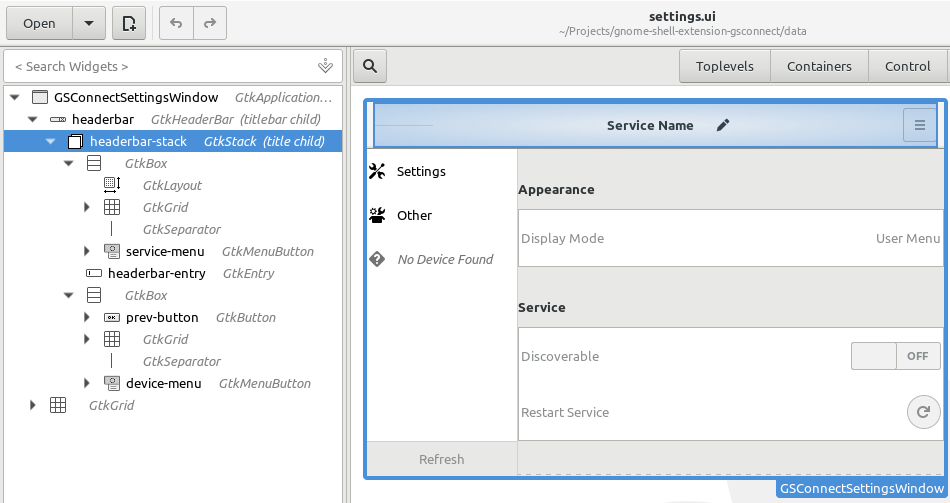
I use a GtkStack inside the headerbar, that's how the headbar fades between Service and Device. First thing I think you should do is add GtkGrid as a parent (eg. put the GtkStack into a grid). Then you can make the GtkGrid have three sections.
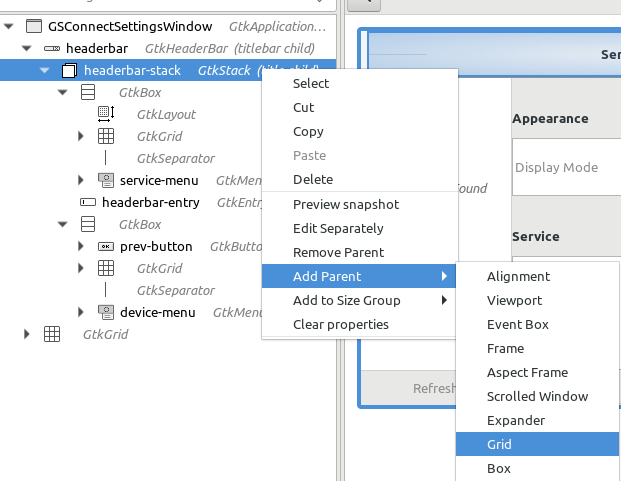
Section (1) will have the "sidebar title". Section (2) will just have a GtkSeparator. Section (3) will be where the current GtkStack is. I guess you can start with that and then let me know when you need more help/direction?
If you want to test your changes, just save the file and do the normal thing for meson:
$ pwd
   something/gnome-shell-extension-gsconnect
$ cd ..
$ meson gnome-shell-extension-gsconnect _build
$ ninja -C _build install-zip
After the first time, you only have to run ninja -C _build install-zip. That will install the changed extension and restart the service. No need to restart gnome-shell for these changes.
andyholmes
on 28 Nov 2018
I don't know how much you know about git
Very little indeed.
In fact, although the other commands work fine, I got this error:
$ git rebase upstream/master
fatal: Needed a single revision
invalid upstream 'upstream/master'
Still, it looks like everything works anyway.
I've started playing with glade. I'm using this repo https://github.com/GNOME/gnome-control-center as a reference. In particular I'm looking at cc-window.ui file which has the headerbar object.
I've pushed what I've done so far in the 'settings-ui-hints' branch (I kept that name for semplicity).
And here it is:
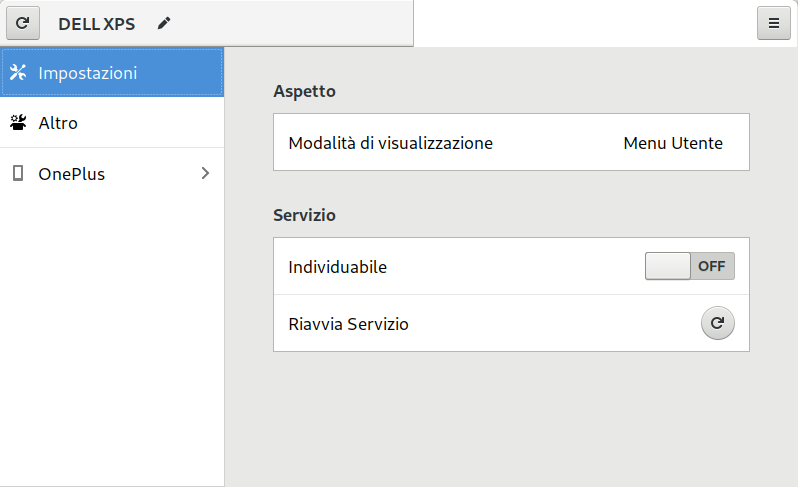
Everything is still messed up.
I've to work now, so... I'll keep working on this later. :(
This is awesome anyway. 🤤
amivaleo
on 29 Nov 2018
Please take a look at what I'm doing. I'm somewhat stuck: dunno how to change the left side width, how to center the gtkStack and... How to make everything work again... :sob:
amivaleo
on 29 Nov 2018
Going to close this one up, since I've included many of your suggestions in v18. Feel free to open a new issue if you have any more ideas.
andyholmes
on 25 Dec 2018
Andy! It's midnight! It's Christmas! Have some fun/party! :D
amivaleo
on 25 Dec 2018
Related issues
amivaleo
·
4Comments
 ricvelozo
·
4Comments
amivaleo
·
5Comments
ricvelozo
·
4Comments
amivaleo
·
5Comments
 wada3n
·
7Comments
wada3n
·
7Comments
 mavit
·
6Comments
mavit
·
6Comments
Most helpful comment
I'm just going to bed (finally), but I will comment tomorrow 👍