Gnome-shell-extension-gsconnect: Presentation remote support
In a recent update of KDE Connect for Android a feature for remote controlling presentations has been added. You can even lock the phone and control a presentation with volume buttons!
However, it doesn't work with GSconnect and applications like LibreOffice or Evince. Only the menu item "exit presentation" works. It would be awesome to see a full implementation of this feature in GSconnect and I'd be glad to test it.
 cbix
cbix
All 25 comments
Hi, thanks for the report.
The presentation remote is actually a convenient UI that re-uses the mousepad plugin to send keystrokes. If you are using Wayland it won't be possible to use this remote due to limitations synthesizing mouse/keyboard input.
If you aren't using Wayland, let me know and I might need you test the input. It should just show up in a terminal as ^[[5~ and ^[[6~, but you could also run this command for more detailed info:
$ xinput test-xi2 --root
I don't really use any presentation software myself, but I'll try and give it a test myself when I get a few minutes.
 andyholmes
on 17 Nov 2018
andyholmes
on 17 Nov 2018
No wayland here, xinput test works with normal input and input from the App's remote input, but doesn't show anything for "presentation remote" input except for the (working) "Exit presentation" button.
GSconnect debugger output:
Presentation remote:
DEBUG: [core.js:receive/<:404]: FloS5: {
"id": 1542562335302,
"type": "kdeconnect.mousepad.request",
"body": {
"specialKey": 9
}
}
DEBUG: [mousepad.js:pressKeySym:262]: Mousepad: pressKeySym(65366, 0)
DEBUG: [core.js:receive/<:404]: FloS5: {
"id": 1542562348014,
"type": "kdeconnect.mousepad.request",
"body": {
"specialKey": 8
}
}
DEBUG: [mousepad.js:pressKeySym:262]: Mousepad: pressKeySym(65365, 0)
DEBUG: [core.js:receive/<:404]: FloS5: {
"id": 1542562349603,
"type": "kdeconnect.mousepad.request",
"body": {
"specialKey": 9
}
}
DEBUG: [mousepad.js:pressKeySym:262]: Mousepad: pressKeySym(65366, 0)
DEBUG: [core.js:receive/<:404]: FloS5: {
"id": 1542562358827,
"type": "kdeconnect.mousepad.request",
"body": {
"specialKey": 25
}
}
DEBUG: [mousepad.js:pressKeySym:262]: Mousepad: pressKeySym(65474, 0)
^[DEBUG: [core.js:receive/<:404]: FloS5: {
"id": 1542562361139,
"type": "kdeconnect.mousepad.request",
"body": {
"specialKey": 14
}
}
DEBUG: [mousepad.js:pressKeySym:262]: Mousepad: pressKeySym(65307, 0)
switching to normal remote input ...
DEBUG: [lan.js:_onIncomingIdentity:202]: {
"id": 1542562369465,
"type": "kdeconnect.identity",
"body": {
"deviceId": "10f1fa738924d609",
"deviceName": "FloS5",
"protocolVersion": 7,
"deviceType": "phone",
"incomingCapabilities": [
"kdeconnect.sms.request_conversations",
"kdeconnect.telephony.request_mute",
"kdeconnect.telephony.request",
"kdeconnect.mpris",
"kdeconnect.notification",
"kdeconnect.sms.request_conversation",
"kdeconnect.findmyphone.request",
"kdeconnect.ping",
"kdeconnect.systemvolume",
"kdeconnect.notification.reply",
"kdeconnect.share.request",
"kdeconnect.sftp.request",
"kdeconnect.notification.request",
"kdeconnect.mousepad.request",
"kdeconnect.contacts.request_vcards_by_uid",
"kdeconnect.sms.request",
"kdeconnect.runcommand",
"kdeconnect.battery.request",
"kdeconnect.clipboard",
"kdeconnect.contacts.request_all_uids_timestamps"
],
"outgoingCapabilities": [
"kdeconnect.sms.messages",
"kdeconnect.telephony",
"kdeconnect.notification",
"kdeconnect.contacts.response_uids_timestamps",
"kdeconnect.findmyphone.request",
"kdeconnect.ping",
"kdeconnect.mousepad.keyboardstate",
"kdeconnect.share.request",
"kdeconnect.contacts.response_vcards",
"kdeconnect.notification.request",
"kdeconnect.mousepad.echo",
"kdeconnect.mousepad.request",
"kdeconnect.sftp",
"kdeconnect.runcommand.request",
"kdeconnect.mpris.request",
"kdeconnect.systemvolume.request",
"kdeconnect.battery",
"kdeconnect.clipboard"
],
"tcpPort": 1716,
"tcpHost": "10.42.0.57"
}
}
DEBUG: [lan.js:_onIncomingIdentity:230]: already connectedaDEBUG: [core.js:receive/<:404]: FloS5: {
"id": 1542562390188,
"type": "kdeconnect.mousepad.request",
"body": {
"key": "a"
}
}
DEBUG: [mousepad.js:pressKeySym:262]: Mousepad: pressKeySym(97, 0)
sDEBUG: [core.js:receive/<:404]: FloS5: {
"id": 1542562393862,
"type": "kdeconnect.mousepad.request",
"body": {
"key": "s"
}
}
DEBUG: [mousepad.js:pressKeySym:262]: Mousepad: pressKeySym(115, 0)
dDEBUG: [core.js:receive/<:404]: FloS5: {
"id": 1542562394664,
"type": "kdeconnect.mousepad.request",
"body": {
"key": "d"
}
}
DEBUG: [mousepad.js:pressKeySym:262]: Mousepad: pressKeySym(100, 0)
fDEBUG: [core.js:receive/<:404]: FloS5: {
"id": 1542562395331,
"type": "kdeconnect.mousepad.request",
"body": {
"key": "f"
}
}
DEBUG: [mousepad.js:pressKeySym:262]: Mousepad: pressKeySym(102, 0)
DEBUG: [core.js:receive/<:404]: FloS5: {
"id": 1542562400691,
"type": "kdeconnect.mousepad.request",
"body": {
"dx": 0,
"dy": 0
}
}
DEBUG: [core.js:receive/<:404]: FloS5: {
"id": 1542562400955,
"type": "kdeconnect.mousepad.request",
"body": {
"singleclick": true
}
}
cbix
on 18 Nov 2018
In further tests I could also reproduce a weird behaviour, that when I press the space bar on the Android keyboard, it doesn't get pressed on my Desktop, but when I quickly press it twice, it sometimes works, and sometimes it toggles the airplane mode, so my computer disconnects.
When I find time for more testing and breaking down this problem, I'll create a new issue for it.
EDIT: Ok nevermind, upgrade through extensions.gnome.org fixed this.
cbix
on 18 Nov 2018
Thanks, that's very helpful debug info.
It looks like the only difference between me and you, is that you have Caribou installed which means the specialKey (these are keys like F1, Home, etc) is being "pressed" by Caribou instead of Atspi.
I don't usually keep Caribou installed because I don't use any Unicode characters or anything (purely english speaker :wink:). I'll install Caribou and try this in a little bit. There is a really bad bug that will crash the desktop in <= v15 (current on extensions.gnome.org) if you send some keystrokes without Caribou so don't uninstall that for now.
andyholmes
on 18 Nov 2018
Ok, thanks for you response. I would do some testing with the current master branch, but I never managed to get a third party extension running from source code and it seems the Gnome Shell documentation about that is really poor. I could try to build with meson as described in your wiki though.
cbix
on 19 Nov 2018
Yup, it's pretty straight forward. Mostly the meson build script packs the resources and translations; it's really just for packagers that need it. Here's a Zip of master from today if it's easier for you:
andyholmes
on 19 Nov 2018
No wayland here, xinput test works with normal input and input from the App's remote input, but doesn't show anything for "presentation remote" input except for the (working) "Exit presentation" button.
Yeah, it doesn't appear that the keys for Prior, Next, or F5 (that's what's sent for "Fullscreen") make it to the desktop. Only Esc (that's the "Exit presentation" key) is delivered. That's even on my system, with Caribou installed and straight X11 top-to-bottom.
Another interesting thing I notice. If instead of xinput test-xi2 I run xinput test 5 (5 is the "Virtual core XTEST keyboard"), that _also_ registers the Esc keypress from the presentation remote's "Exit fullscreen", but not any of the other presses. (However, it doesn't register anything from my physical USB keyboard. Odd.) But here's where this gets weirder. When I go into the Remote Input mode...
- Most ASCII keys register normally. d registers
key press 40, 1 registerskey press 10, etc. - Pressing < generates a
key press 94, same as (correctly) >, and indeed both register as a>in the terminal. I'm... not sure how that got messed up like that, but I assume it's in the KDE Connect app. - Pressing lots of _other_ keys like ©, ¢, €, etc. all report as
key press 255.
They also seem to causegdm-x-sessionto freak out, as there's a journal entry:
The XKEYBOARD keymap compiler (xkbcomp) reports:
> Warning: Unsupported high keycode 372 for nameignored
> X11 cannot support keycodes above 255.
> This warning only shows for the first high keycode.
Errors from xkbcomp are not fatal to the X server
(Not fatal, maybe, but they seem to cause at least a partial reset.)

And those don't seem to be registering now (_some_ were at first), looks like Caribou and AT-SPI's link got broken by my fiddling. There's also this pair of journal entries from `gjs`:
> Unable to open bus connection: Failed to connect to socket /run/user/1000/at-spi2-KWU8SZ/socket: No such file or directory
> AT-SPI: Error in GetItems, sender=org.freedesktop.DBus, error=Message recipient disconnected from message bus without replying
I also experienced the "double-bouncing a key can trigger activation of Gnome Shell's Airplane Mode" weirdness. Since my network connection is wired, that didn't disconnect my phone's GSConnect session, just my bluetooth peripherals. Quite possibly it's also when the Caribou/AT-SPI connection broke.
(I also don't knowingly have _any_ key bound to "Activate Airplane Mode", as it's not one of the bindings in the
gnome-control-center keyboardlist. It must be a built-in, immutable binding, that knowing the GNOME developers is probably only documented in the source code.)
 ferdnyc
on 19 Nov 2018
ferdnyc
on 19 Nov 2018
@ferdnyc For me the double-bouncing problem got solved by an upgrade of the extension, can you confirm this?
cbix
on 19 Nov 2018
@ferdnyc For me the double-bouncing problem got solved by an upgrade of the extension, can you confirm this?
An upgrade past v15, I presume (which I'm currently running)?
Would v16 suffice, do you think, or are we talking newer than that? Should I just jump to building from the repo HEAD? (That's fine, if so, I'm certainly not averse to running devel code. I tend to stick to official releases simply to stay on par with what most users who report issues would be experiencing, since that's typically more conducive to troubleshooting and bug triage/confirmation. ...Except in cases like this, when it's the opposite. :grin: )
ferdnyc
on 19 Nov 2018
@ferdnyc Actually the upgrade to official v15 fixed it for me, but apparently it didn't for you, ok :D
cbix
on 19 Nov 2018
I've got some local fixes staged right now, although I am definitely having problems with Caribou. Specifically, unicode characters (eg, characters out of the ASCII range) require a quick double-send, or they don't register. Might be something to do with the press/release functions, but honestly Bertrand wrote all this stuff so this is my first time looking at it closely.
The documentation basically consists of function argument types and returns, so I'll have to dig into the code a bit to see what's happening.
EDIT: Just experience the airplane mode bug, posting output for reference:
DEBUG: [mousepad.js:_handleInput:213]: using libcaribou
DEBUG: [mousepad.js:pressKeySym:376]: 182, 0
DEBUG: [core.js:receive/<:404]: Nexus 4: {
  "id": 1542644518894,
  "type": "kdeconnect.mousepad.request",
  "body": {
    "key": "×"
  }
}
DEBUG: [mousepad.js:_handleInput:213]: using libcaribou
DEBUG: [mousepad.js:pressKeySym:376]: 215, 0
wlp2s0: deauthenticating from c4:a8:1d:8d:04:d0 by local choice (Reason: 3=DEAUTH_LEAVING)
Starting Load/Save RF Kill Switch Status...
<info>  [1542644521.3679] manager: rfkill: WiFi now disabled by radio killswitch
<info>  [1542644521.3682] device (wlp2s0): state change: activated -> unavailable (reason 'none', sys-iface-state: 'managed')
<info>  [1542644521.3686] dhcp6 (wlp2s0): canceled DHCP transaction
An active wireless connection, in infrastructure mode, involves no access point?
Started Load/Save RF Kill Switch Status.
iwlwifi 0000:02:00.0: RF_KILL bit toggled to disable radio.
iwlwifi 0000:02:00.0: reporting RF_KILL (radio disabled)
iwlwifi 0000:02:00.0: Adding station ff:ff:ff:ff:ff:ff failed.
iwlwifi 0000:02:00.0: Not sending command - RF KILL
iwlwifi 0000:02:00.0: Not sending command - RF KILL
iwlwifi 0000:02:00.0: Not sending command - RF KILL
iwlwifi 0000:02:00.0: Not sending command - RF KILL
wlp2s0: CTRL-EVENT-DISCONNECTED bssid=c4:a8:1d:8d:04:d0 reason=3 locally_generated=1
Interface wlp2s0.IPv6 no longer relevant for mDNS.
Leaving mDNS multicast group on interface wlp2s0.IPv6 with address 2001:569:7321:9a00:8fc7:50c:71f9:a013.
rfkill: WLAN hard blocked
DEBUG: [lan.js:broadcast:276]: Broadcasting to LAN
Interface wlp2s0.IPv4 no longer relevant for mDNS.
Leaving mDNS multicast group on interface wlp2s0.IPv4 with address 192.168.1.11.
Withdrawing address record for 2001:569:7321:9a00:8109:ca5e:98d4:6ee0 on wlp2s0.
Withdrawing address record for 2001:569:7321:9a00:8fc7:50c:71f9:a013 on wlp2s0.
Withdrawing address record for 192.168.1.11 on wlp2s0.
rfkill: WLAN hard blocked
Pushed a153c03 which fixes some things, but doesn't seem to solve any of the current problems unfortunately. Apparently the parts of libcaribou that we're using are just a thin wrapper around XTest, similar to XFakeKey.
It's pretty bizarre that this could cause Airplane Mode to engage, but then so was Unicode crashing Xorg. I'll do some more investigating, but I want to merge #332 since it's been sitting awhile and I think it's pretty stable since I've used it myself a fair amount and had decent feedback from @terencode about it.
andyholmes
on 19 Nov 2018
I honestly don't think the Airplane mode bug is a problem in GSconnect as sometimes it toggles when I close my laptop's lid, which is not supposed to happen... Upgrading GSconnect fixed it for me, however I might try to debug it upstream later :D
cbix
on 19 Nov 2018
I honestly don't think the Airplane mode bug is a problem in GSconnect as sometimes it toggles when I close my laptop's lid, which is not supposed to happen... Upgrading GSconnect fixed it for me, however I might try to debug it upstream later :D
It could still be in some _part_ of GSConnect, sounds like — even if it's really down to a bug/quirk of Caribou or AT-SPI that GSConnect is merely triggering, despite there being nothing technically wrong in the code.
Most likely a keypress is flipping Airplane Mode, and that keypress is most likely either XF86WLAN or XF86Bluetooth (or both!), which live high up in the keysym stratosphere.
(From /usr/include/X11/XF86keysym.h on my Fedora 29 box...)
#define XF86XK_Bluetooth    0x1008FF94   /* Enable/disable Bluetooth    */
#define XF86XK_WLAN     0x1008FF95   /* Enable/disable WLAN         */
So, if those require specialkey (as @andyholmes noted in an earlier comment), and would therefore be handled like Unicode, i.e.
Specifically, unicode characters (eg, characters out of the ASCII range) require a quick double-send, or they don't register. Might be something to do with the press/release functions,
Then it's entirely possible that it's something as "simple" (but frustratingly hard to pin down) as two key events coming so close together that Caribou starts the second sequence in the middle of the first one, and ends up delivering the wrong keypress as a result.
ferdnyc
on 19 Nov 2018
(Also, the machine I encountered it on is a desktop PC that has none of: A WiFi radio, any way to actually press an rfkill-triggering keyboard combination in the hardware, or any reason to be _using_ an "Airplane Mode" in the first place. Which is why the first time Airplane Mode was _ever_ toggled on the system was when I triggered it via KDE Connect's Remote Input yesterday.)
ferdnyc
on 19 Nov 2018
Then it's entirely possible that it's something as "simple" (but frustratingly hard to pin down) as two key events coming so close together that Caribou starts the second sequence in the middle of the first one, and ends up delivering the wrong keypress as a result.
That's a really good point actually. You can see in the link to the Caribou code above how simple the functions we're using are. I think a good guess is that the problem is a little higher-level and that something with gdk_unicode_to_keyval() is resulting in the two sequential key presses being interpreted as surrogate pairs of a single keypress. That would be in-line with requiring double-presses for Unicode characters.
andyholmes
on 20 Nov 2018
Okay, so after talking to garnacho in #gnome-shell the problem may actually be with Caribou creating keymaps on the fly. There's a possible alternative we can use that would even support Wayland keyboard input in ui/keyboard.js but it's only accessible from inside the gnome-shell process, which is problematic.
andyholmes
on 20 Nov 2018
I have the same problem with using presentation remote.
System info:
Ubuntu18.04.1: Linux Sun 4.15.0-43-generic #46-Ubuntu SMP Thu Dec 6 14:45:28 UTC 2018 x86_64 x86_64 x86_64 GNU/Linux
GSconnect: v17 install from https://extensions.gnome.org
Details:
xinput test: There is no response except exit presentation.
After remove libcaribou it shows caps lock off function. And xinput test info as follow with all key in presentation remote(previous, next, fullscreen and exit presentation).
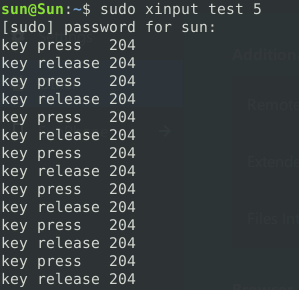
 SunicYosen
on 28 Dec 2018
SunicYosen
on 28 Dec 2018
I believe I may have fixed some issues, especially with the Presentation Remote. It appears libcaribou/XTest is really not working well, especially with the specialKey types.
libcaribou is still required for unicode and modifiers (Alt, Ctrl, etc), but if no modifiers are required, we now just prefer AT-SPI. This seems to fix the presentation remote for me, although the other unicode issues are still present.
Here's a Zip from master for you to test, let me know if the presentation remote is fixed:
andyholmes
on 30 Dec 2018
It works very well for me. Thanks a lot!
I believe I may have fixed some issues, especially with the _Presentation Remote_. It appears libcaribou/XTest is really not working well, especially with the
specialKeytypes.libcaribou is still required for unicode and modifiers (Alt, Ctrl, etc), but if no modifiers are required, we now just prefer AT-SPI. This seems to fix the presentation remote for me, although the other unicode issues are still present.
Here's a Zip from master for you to test, let me know if the presentation remote is fixed:
It works very well for me. Thanks a lot!
SunicYosen
on 30 Dec 2018
Okay, I'm going to close this for now since I think the original issue has been solved, while I continue to work on the unicode problem.
andyholmes
on 30 Dec 2018
I can confirm the fix works, thanks a lot! This is a really useful feature for me :D
cbix
on 2 Jan 2019
I saw this thread just now, sorry.
Some explanation on how Caribou works (and XFakeKey): when provided with a keyval (for ex. 65307 for Esc), it looks in the current keyboard table if it exists (meaning it can be generated with a Shift, AltGr + key combo); if it exists, Caribou emulates pressing the corresponding keys. Otherwise, it changes the keyboard table to include the keyval at the end of the table. So the last keycode, 255, is set to generate the required keyval. Then the keycode 255 is pressed.
XFakeKey is exactly doing that, Caribou includes (or at least it used to) some checks to avoid breaking the keyboard table (for instance, keycode 255 was restored to its former value after the key press).
However, Gnome has a buitin check (I could not pinpoint where) that restores the keyboard table everytime it is altered. So the XFakeKey trick cannot work, because everytime keycode 255 is changed, it is set back to its initial value. Before, Caribou had a workaround, like unregistering the keyboard table for changes just the time for the keycode 255 to be changed, pressed and changed back. But it is not working anymore apparently.
Keycode 255 is set to RFKill usually, see the output of xmodmap -pk, that is why airplane mode is triggered with some unicode characters, when the keycode 255 is pressed (see xinput test 5 output).
I don't understand why the special keyval are not pressed though (no output from xinput), it used to work, maybe it is a timing problem.
Caribou is deprecated so there is no hope of correcting these bugs.
The only alternative I found that could work on Wayland also was using lowlevel kernel input emulation. It needs root access though. evemu could work for instance: https://www.freedesktop.org/wiki/Evemu/
But it still requires changing the keyboard table on the fly, which is not allowed by Gnome...
 getzze
on 4 Jan 2019
getzze
on 4 Jan 2019
Thanks for the explanation, that makes a lot of sense. I guess this changed somewhat recently (maybe GNOME 3.28-3.30?) because I do remember testing it. I talked to garnacho upstream about this, but he was not very optimistic about the whole situation.
I guess that for GNOME 3.30+ they decided it was easier to do things in gnome-shell, which is what they did with the OSK. Apparently they added a DeviceManager to their built-in version of Clutter, but that seems to use XTest as well, at least on X11. One day I may try exporting a custom DBus interface from within gnome-shell for this.
I also read on some bug somewhere the only way they'll be happy with ATSPI on Wayland is to make it a privileged DBus service. I guess Wayland's security model is not compatible with a lot of these types of systems. I did see someone recently added modifier support to ATSPI, however.
andyholmes
on 4 Jan 2019
Keycode 255 is set to RFKill usually, see the output of
xmodmap -pk, that is why airplane mode is triggered with some unicode characters, when the keycode 255 is pressed (seexinput test 5output).
Aaaa-HA! Thanks for that. I never even thought to involve xmodmap in any of my testing/experimentation, simply because I'd long ago written it off as completely non-functional anymore (at least in a practical sense of being _useful_ for anything). That's presumably due to the same keymap monitoring-and-resetting issue you mentioned, which would presumably undo any xmodmap changes as well.
ferdnyc
on 5 Jan 2019
Related issues
 daleosm
·
6Comments
daleosm
·
6Comments
 AngusLogan02
·
4Comments
AngusLogan02
·
4Comments
 nikolowry
·
4Comments
nikolowry
·
4Comments
 rugk
·
4Comments
rugk
·
4Comments
 danieldeng2
·
4Comments
danieldeng2
·
4Comments
Most helpful comment
I can confirm the fix works, thanks a lot! This is a really useful feature for me :D