Gnome-shell-extension-gsconnect: [v15-v16] GNOME Shell UI errors, caused by failing to connect to service daemon
I received the notification a few minutes ago that an extension update was available for GSConnect, and visited extensions.gnome.org to update from v12 (which I'd been holding at, waiting to test the update path) to the newly-available release. That turned out to be v15 (they skipped right over our v14, which never got reviewed — oh well), which installed without triggering any crashes or error notifications.
To be honest, it wasn't strictly _usable_ after upgrade. Initially (right after the update), the user menu included only the "Mobile Devices" heading and the "Mobile Settings" item inside it, which brought up the settings interface. The user menu never showed any of the other expected menu items. "Restart Server" had no meaningful effect, everything was still in the same state after.
Logging out and logging back in added Do Not Disturb to the menu, and got the device name to show in the menu heading when it was connected. But none of the device function items were showing below it. Most confusingly, the "Mobile Settings" menu option suddenly didn't _work_. (Selecting it did absolutely nothing, unlike before logout/login when it did bring up the settings window.):
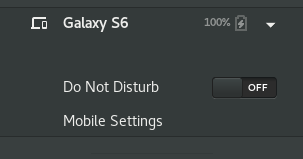
So then I restarted the system completely, and after some login troubles that turned out to be caused by a completely _different_ extension, managed to log in to a session that's showing the expected user menu, and everything appears to be working correctly so far:
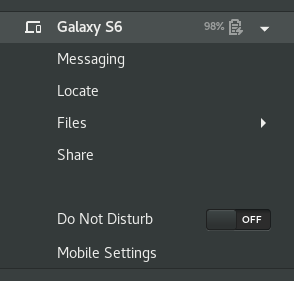
So... ... ... not the most _seamless_ update process, in all honesty, but ultimately everything did manage to sort itself out and reach a working state, which is the most important thing.
Still, maybe at a minimum it might be worth having some notes in the wiki, or in the extension description at e.g.o, advising users that due to the extent and magnitude of changes in the recent extension releases (v13 and v15), functionality may be impacted after installing updates? And/or simply advising that a restart is recommended if they encounter any problems.
 ferdnyc
All 18 comments
Hmm, this was also reported by @logix2 in the recent article on Linux Uprising (maybe there's more thoughts on that?).
I'm not entirely sure, but there is a weird corner case in the GMenu code. It watches the items-changed signal which is necessary on the off-chance the menu changes while you have it open, but it also auto-populates when it's mapped (meaning actually about to be drawn visibly to the user).
The trick with the second case, is if there are no items already, it won't actually be mapped because the menu has a height of 0, which is where the "actually drawn visibly to the user" part comes in. It opening the menu won't trigger that because technically the user won't see it, so Clutter thinks it's not going to map it.
@ferdnyc I'm not sure if you can see the Insights page with the permissions you have, but one reason I squashed the Wiki into a few pages is the stats showed no one was looking at anything but Home and FAQ (now Help). Maybe there's a convenient place near the top of Home we can put a little Latest News section that doesn't detract from the main intro for new users, since that page is where everything links now (eg. it's effectively the GSConnect homepage/website).
 andyholmes
on 9 Nov 2018
andyholmes
on 9 Nov 2018
@andyholmes In my case, I updated from v13 to v15, and the new Gnome Shell UI was there with all its items, but the settings dialog was missing "Keyboard" from Keyboard Shortcuts. I assume the settings was still the old version? A logout/login fixed this for me.
 logix2
on 9 Nov 2018
logix2
on 9 Nov 2018
...the settings dialog was missing "Keyboard" from Keyboard Shortcuts. I assume the settings was still the old version?
Ah, now that's interesting. To handle upgrades, the service (daemon.js) watches its own file, so if it's overwritten/removed it quits. At the same time, the shell extension watches the service DBus name, and starts it again if it quits.
So yeah, I guess that means somehow the service failed to quit (?) or didn't know it was replaced, so the old version was still running. I wonder how that could happen though...the only reason I've known that to happen is if bluez hangs, but that's why this ugly hack is here:
Well at least that's a place to start looking, maybe I should look closer at what happens when Gnome Shell updates and extension. It's possible that changed in 3.30.
andyholmes
on 9 Nov 2018
Now that I think of it, I did have some Dbus service crashing but I ignored it. Maybe it was related.
logix2
on 9 Nov 2018
Hmm, it might be. I think the browser extension for the extensions website uses a DBus service actually.
andyholmes
on 9 Nov 2018
I have been using the interim version that was provided after 3.30 hit Arch. Today I upgraded to new version from Gnome Extensions. I no longer have panel display. The user menu show do not disturb and settings. My phone shows up in settings menu but that is it. Should I delete it and repair the phone?
 grg3
on 9 Nov 2018
grg3
on 9 Nov 2018
First try logging in and logging out, most people reporting this have said that it fixes it. We're still trying figure out why this happens.
Additionally, the latest version won't show offline or unpaired devices anywhere in Gnome Shell, but will automatically try reconnecting known devices on a 5s timer.
andyholmes
on 9 Nov 2018
I tried that several times. I will try delete a repair to see if that
helps.
Thank you! rick
On Fri, Nov 9, 2018 at 8:23 AM, Andy Holmes notifications@github.com
wrote:
First try logging in and logging out, most people reporting this have
said that it fixes it. We're still trying figure out why this happens.Additionally, the latest version won't show offline or unpaired
devices anywhere in Gnome Shell, but will automatically try
reconnecting known devices on a 5s timer.—
You are receiving this because you commented.
Reply to this email directly, view it on GitHub, or mute the thread.
grg3
on 9 Nov 2018
I'm surprised logging out/in isn't effective, I wonder if a reboot _would_ do something more that a mere logout doesn't, for some reason? Coming from v12, even, I definitely didn't have to mess with any of my pairings or delete any settings to (eventually) get GSConnect back in full working order.
Before this latest exchange, I'd had this half-finished thought in the comment buffer, but hadn't gotten around to hitting the Post button yet...
@andyholmes : Hmm. Now that Uprising writeup has me second-guessing myself... where I wrote above that I logged out and back in, I think I may have only restarted Gnome Shell (I'm still running Xorg with the nvidia drivers), which is the point at which things got worse and the settings interface stopped working from the user menu.
I think my attempted log out / log in cycle got caught up in the problems I was having with that _other_ extension, which is why I eventually resorted to a reboot. (And then still had to disable the offending extension from a text console, before I could get my login to complete.)
So, if not for those unrelated difficulties, I assume that logging out and back in again would've been sufficient to get GSConnect working, as they indicate in their writeup. (It struck me as odd even while I was writing it up that I would've had to _reboot_, that seemed drastic. And I think it was just a red herring. But I know my earlier writeup isn't 100% accurate, because the Uprising article reminded me that I had _also_ tried using Alt+F2 r to restart the Shell (an action which wasn't accounted for in my timeline)... and I definitely remember that making things worse instead of better.
ferdnyc
on 9 Nov 2018
Now that I think about it, this might be related to how gnome-shell doesn't run a separate proc for gdm anymore.
andyholmes
on 9 Nov 2018
Delete and pair seems to have done the trick. I can now see my phone
again.
On Fri, Nov 9, 2018 at 9:38 AM, Andy Holmes notifications@github.com
wrote:
Now that I think about it, this might be related to how gnome-shell
doesn't run a separate proc for gdm anymore.—
You are receiving this because you commented.
Reply to this email directly, view it on GitHub, or mute the thread.
grg3
on 9 Nov 2018
@ferdnyc I'm not sure if you can see the _Insights_ page with the permissions you have, but one reason I squashed the Wiki into a few pages is the stats showed no one was looking at anything but _Home_ and _FAQ_ (now _Help_). Maybe there's a convenient place near the top of _Home_ we can put a little _Latest News_ section that doesn't detract from the main intro for new users, since that page is where everything links now (eg. it's effectively the GSConnect homepage/website).
Insights... yep, I can see that, and I see what you mean.
I can't say I'm surprised, though. The Github wiki interface is pretty terrible, especially for navigation. I _know_ what info's on the other pages of the wiki, but I still have to remind myself to even look for them.
Another option might be to move/duplicate the wiki info into a set of Github Pages documents, maybe using something like the ReadTheDocs theme, with its left-hand navigation sidebar / TOC. Just having that present tends to make the collected information feel a lot more coherent and navigable than the crappy repo Wiki-tab interface.
I actually started playing with the idea of pulling the existing Wiki into GitHub Pages, but I hate all of the default GitHub Pages themes and my attempts to get it to import the closest thing to a Jekyll ReadTheDocs theme I've been able to find so far (pawamoy/jekyll-readthedocs) will build _locally_, but the pages come up un-themed every time GitHub generates the site. I am clearly not GitHub Pages compatible, or something. *sigh* Dinnertime, for now.
ferdnyc
on 10 Nov 2018
That might not be a bad idea. An open wiki seemed like a good idea at first (and there's been no problems with bots), let people add helpful tips, but I think there's enough users now it might be better to curate help topics based on bug reports, etc.
andyholmes
on 11 Nov 2018
I think an open wiki would be great, if it's less ugly and unnavigable than GitHub's.
(Plus, ReadTheDocs / GitHub Pages sites generated from a public repo mean the page source can still be edited via pull request, so there's that. In fact the themes can usually be configured to display "edit this on Github"-type source links on each page.)
ferdnyc
on 11 Nov 2018
Copied from #328 for reference, which is most likely a duplicate of this.
[...] this is related to the upstream bug in gnome-shell #177.
A lot of the gnome-shell extension subsystem is quite old, and the part loads extensions basically repetitively loads extensions for no good reason (no one seems to remember or know why it did that in the first place).
So for example: load 1, unload 1, load 1 & 2, unload 1 & 2, load 1 & 2 & 3...(actually more complicated, but you get it).
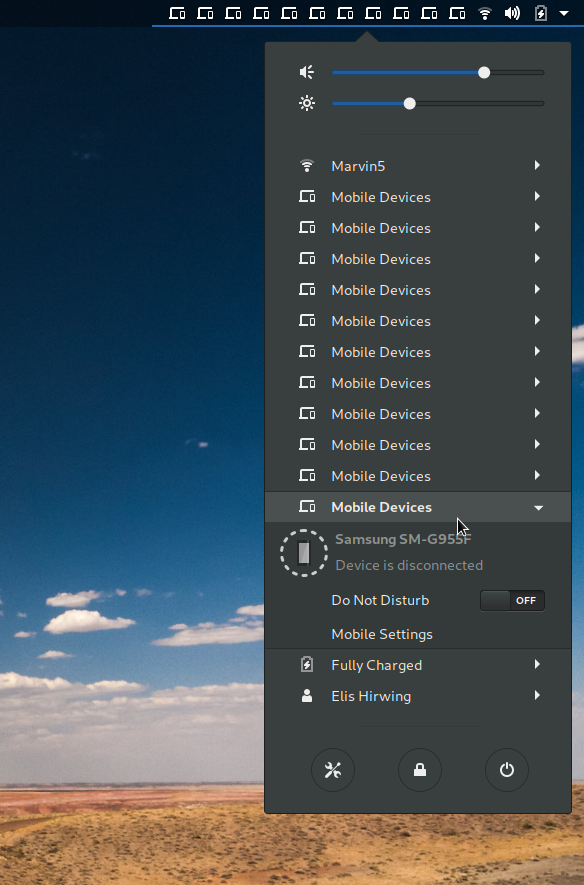
For most extensions, that's really slow especially if you have a lot of them installed, but doesn't cause any errors. For GSConnect, one of the first things that happens is the Shell extension starts the DBus service. But GSConnect was loading and unloading faster than the service activation was resolving. Another user posted this screenshot of what can happen:
So the solution I came up with was to just cancel any in progress service activation, which allowed the Shell extension to exit quick enough. Apparently what is happening is, one of the old instances of the extension loaded is what is left over, instead of the last instance which is presumably the one we want.
 andyholmes
on 15 Nov 2018
andyholmes
on 15 Nov 2018
Might as well post this here as well.
I believe the "Slow startup", this issue and number of the others are all related to gnome-shell's #177 bug and just surfaced in v13+ because of our usage of GDBusObjectManager (probably does some internal sync call to DBus).
The Zip below just waits 5s after the extension is loaded before trying to activate the service. If it's already activated (eg. returning from lock-screen) there's no difference:
cc @kirbyfan64
andyholmes
on 17 Nov 2018
I'm going to close this one up, since I think this particular problem has been addressed. There's more activity back on #328 now, which seems to still be a problem on v17.
If this problem does persist, please open a new issue so we can be sure it's v17+ and not a flaky upgrade problem.
andyholmes
on 1 Dec 2018
FWIW I can confirm it's working for me now! :+1:
 refi64
on 1 Dec 2018
refi64
on 1 Dec 2018
Related issues
 nikolowry
·
4Comments
nikolowry
·
4Comments
 rugk
·
4Comments
rugk
·
4Comments
 aia832003
·
6Comments
aia832003
·
6Comments
 wada3n
·
7Comments
wada3n
·
7Comments
 Noobsai
·
4Comments
Noobsai
·
4Comments