Gnome-shell-extension-gsconnect: Slow startup
After enabling the Gnome Shell extension, I get a pretty large pause at login. The logs show:
Nov 05 19:48:45 maru.home gjs[25655]: JS ERROR: Error: Requiring PackageKitGlib, version none: Typelib file for namespace 'PackageKitGlib' (any version) not found
                                      @/usr/share/gnome-shell/extensions/[email protected]/service/ui/packagekit.js:8:9
                                      @/usr/share/gnome-shell/extensions/[email protected]/service/ui/settings.js:11:7
                                      @/usr/share/gnome-shell/extensions/[email protected]/service/daemon.js:44:7
Nov 05 19:48:45 maru.home dbus-daemon[25227]: [session uid=1000 pid=25227] Successfully activated service 'org.gnome.Shell.Extensions.GSConnect'
Nov 05 19:49:10 maru.home gnome-shell[25449]: Error calling GetManagedObjects() when name owner :1.38 for name org.gnome.Shell.Extensions.GSConnect came back: Timeout was reached
 lnicola
All 35 comments
After installing PackageKit:
Nov 05 19:54:56 maru.home dbus-daemon[27098]: [session uid=1000 pid=27098] Activating service name='org.gnome.Shell.Extensions.GSConnect' requested by ':1.8' (uid=1000 pid=27320 comm="/usr/bin/gnome-shell ")
Nov 05 19:54:56 maru.home dbus-daemon[27098]: [session uid=1000 pid=27098] Successfully activated service 'org.gnome.evolution.dataserver.AddressBook9'
Nov 05 19:54:56 maru.home systemd[802]: Started Evolution address book service.
Nov 05 19:54:56 maru.home gnome-shell[27320]: Error looking up permission: GDBus.Error:org.freedesktop.portal.Error.NotFound: No entry for geolocation
Nov 05 19:54:56 maru.home dbus-daemon[27098]: [session uid=1000 pid=27098] Successfully activated service 'org.gnome.Shell.Extensions.GSConnect'
Nov 05 19:55:21 maru.home gnome-shell[27320]: Error calling GetManagedObjects() when name owner :1.38 for name org.gnome.Shell.Extensions.GSConnect came back: Timeout was reached
Nov 05 19:55:21 maru.home gnome-shell[27320]: AT-SPI: Could not obtain desktop path or name
The 25 seconds delay is still there.
lnicola
on 5 Nov 2018
The PackageKit error is unlikely to be related to a slow startup, since it is not required by GSConnect, just an optional convenience.
GSConnect is made of two parts; the Shell UI and the Service. Errors for the service are unlikely to show up in the logs for the gnome-shell process, but you should be able to view them by targetting gjs with journalctl (or possibly using Gnome Logs):
$ journalctl -f -o cat /usr/bin/gjs
Once you have this running in a terminal, you can try restarting the service by opening the preferences using the Mobile Settings item in the User Menu. Logs here should show you why the service is failing to start.
It's possible this is related to !177 in gnome-shell and #269 in GSConnect which was fixed in the latest release.
 andyholmes
on 6 Nov 2018
andyholmes
on 6 Nov 2018
An alternative possibility: GetManagedObjects() screams bluetooth to me. It's a method on the org.freedesktop.DBus.ObjectManager interface that obexd listens on. There are reports of it causing slow logins when PulseAudio times out querying it, as well.
Does the system in question have a bluetooth interface, @lnicola ? Do you happen to know if there are any devices paired/connected over it? Just in general (not related to GSConnect), whether it's a device like a phone(s), or peripherals like headphones or input devices.
 ferdnyc
on 6 Nov 2018
ferdnyc
on 6 Nov 2018
I'm also getting very long startup times, even with the brand new v15. Nothing about gsconnect in journalctl -f -o cat /usr/bin/gjs I'm running Fedora 29, in case this helps.
 FMuro
on 6 Nov 2018
FMuro
on 6 Nov 2018
The PackageKit error is unlikely to be related to a slow startup, since it is not required by GSConnect, just an optional convenience.
I figured, since installing PackageKit didn't help.
Once you have this running in a terminal, you can try restarting the service by opening the preferences using the Mobile Settings item in the User Menu. Logs here should show you why the service is failing to start.
There are no errors, and the service does start, I assume, since the extension works. I suspect it's not sending back a "started" notification to the shell.
It's possible this is related to !177 in gnome-shell and #269 in GSConnect which was fixed in the latest release.
I'll wait for v15 to show up in AUR to test in the latest version.
Does the system in question have a bluetooth interface
It's a laptop, so it does have one. I might have a paired device (my phone), but I don't think it's currently working -- I don't even know whether it's properly installed or enabled on my laptop. So yes, it's possible that something related to Bluetooth has issues starting.
On the other hand, the hang doesn't occur without the extension enabled. Does it try to use Bluetooth?
lnicola
on 6 Nov 2018
I'm also getting very long startup times, even with the brand new v15. Nothing about gsconnect in
journalctl -f -o cat /usr/bin/gjsI'm running Fedora 29, in case this helps.
Just FYI, journalctl with the -f flag will "--follow" the journal, meaning it'll show any _new_ messages that get logged after you start it.
To look at the messages _already_ logged, replace the -f with something like -b ("since the last reboot"), e.g. journalctl -b -o cat /usr/bin/gjs. (You can also add -e to start at the end of the output instead of the beginning, and scroll backwards from there.)
ferdnyc
on 6 Nov 2018
Just FYI, journalctl with the -f flag will "--follow" the journal, meaning it'll show any new messages that get logged after you start it.
Well, I tried that, there was nothing out of the ordinary.
lnicola
on 6 Nov 2018
You can also try journalctl -b -o cat -g gsconnect, which will search for the string "gsconnect" in all messages, including ones not logged by /usr/bin/gjs
On the other hand, the hang doesn't occur without the extension enabled. Does it try to use Bluetooth?
Yep. And what's more, it's _possible_ that's exactly where it's hanging at login:
Nov 05 19:54:56 maru.home dbus-daemon[27098]: [session uid=1000 pid=27098] Successfully
 activated service 'org.gnome.Shell.Extensions.GSConnect'
Nov 05 19:55:21 maru.home gnome-shell[27320]: Error calling GetManagedObjects() when
 name owner :1.38 for name org.gnome.Shell.Extensions.GSConnect came back: Timeout
 was reached
(Notice how the second message, "Timeout was reached", comes 35 seconds after the previous one.)
Can you provide the output of a couple more commands?
dnf list bluez bluez-obexd

systemctl status bluetooth
I can't imagine bluez/bluez-obexd aren't installed, since they're both required by gnome-bluetooth which is in turn required by gnome-shell. But maybe there's an issue with the service.
Also, if your laptop has a wireless cutoff switch, that'll usually disable the bluetooth radio in addition to the WiFi. You could see if logging in with the hardware disabled makes any sort of difference. If it does, that'll at least tell us we're on the right track.
ferdnyc
on 6 Nov 2018
● bluetooth.service - Bluetooth service
   Loaded: loaded (/usr/lib/systemd/system/bluetooth.service; enabled; vendor preset: disabled)
   Active: active (running) since Sun 2018-11-04 21:51:41 EET; 1 day 22h ago
     Docs: man:bluetoothd(8)
 Main PID: 479 (bluetoothd)
   Status: "Running"
    Tasks: 1 (limit: 4915)
   Memory: 3.2M
   CGroup: /system.slice/bluetooth.service
           └─479 /usr/lib/bluetooth/bluetoothd

Nov 05 19:48:35 maru.home bluetoothd[479]: RFCOMM server failed for Headset Voice gateway: rfcomm_bind: Address already in use (98)
Nov 05 19:48:35 maru.home bluetoothd[479]: RFCOMM server failed for :1.3318/Profile/HSPHSProfile/00001108-0000-1000-8000-00805f9b34fb: rfcomm_bind: Address already in use (98)
Nov 05 19:49:03 maru.home bluetoothd[479]: Endpoint unregistered: sender=:1.3318 path=/MediaEndpoint/A2DPSource
Nov 05 19:49:03 maru.home bluetoothd[479]: Endpoint unregistered: sender=:1.3318 path=/MediaEndpoint/A2DPSink
Nov 05 19:54:49 maru.home bluetoothd[479]: Endpoint registered: sender=:1.3584 path=/MediaEndpoint/A2DPSource
Nov 05 19:54:49 maru.home bluetoothd[479]: Endpoint registered: sender=:1.3584 path=/MediaEndpoint/A2DPSink
Nov 05 19:54:49 maru.home bluetoothd[479]: RFCOMM server failed for Headset Voice gateway: rfcomm_bind: Address already in use (98)
Nov 05 19:54:49 maru.home bluetoothd[479]: RFCOMM server failed for :1.3584/Profile/HSPHSProfile/00001108-0000-1000-8000-00805f9b34fb: rfcomm_bind: Address already in use (98)
Nov 05 19:55:13 maru.home bluetoothd[479]: Endpoint unregistered: sender=:1.3584 path=/MediaEndpoint/A2DPSource
Nov 05 19:55:13 maru.home bluetoothd[479]: Endpoint unregistered: sender=:1.3584 path=/MediaEndpoint/A2DPSink
I don't have any bluez-obexd package, but that seems to be part of bluez:
bluez /usr/lib/bluetooth/obexd
bluez /usr/lib/systemd/user/dbus-org.bluez.obex.service
bluez /usr/lib/systemd/user/obex.service
bluez /usr/share/dbus-1/services/org.bluez.obex.service
bluez /usr/share/doc/bluez/dbus-apis/obex-agent-api.txt
bluez /usr/share/doc/bluez/dbus-apis/obex-api.txt
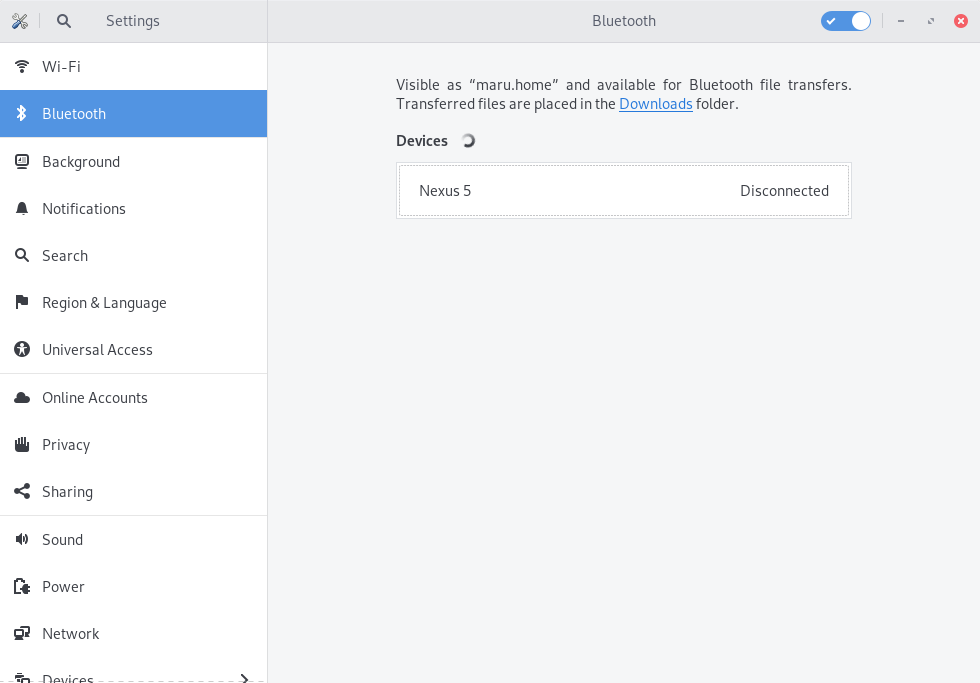
My Bluetooth Gnome settings look like this:
Also:
Python 3.7.1 (default, Oct 22 2018, 10:41:28)
[GCC 8.2.1 20180831] on linux
Type "help", "copyright", "credits" or "license" for more information.
>>> import dbus
>>>
>>> bus = dbus.SystemBus()
>>>
>>> manager = dbus.Interface(bus.get_object("org.bluez", "/"),
...                     "org.freedesktop.DBus.ObjectManager")
>>>
>>> objects = manager.GetManagedObjects()
>>>
>>> for path in objects.keys():
...     interfaces = objects[path]
...     for interface in interfaces.keys():
...         if interface in ["org.freedesktop.DBus.Introspectable",
...                     "org.freedesktop.DBus.Properties"]:
...             continue
...         properties = interfaces[interface]
...         print("%s" % properties.get("Name"))
...
None
None
maru.home
None
None
None
None
Nokia225
[TV] Samsung 6 Series (40)
Nexus 5
None
None
So it actually works fine.
lnicola
on 6 Nov 2018
@FMuro Do you have anything like my timeout in journalctl -e --user after login?
lnicola
on 6 Nov 2018
I just realized that this only happens after I log off, not after a reboot.
EDIT: No, it also happens on boot, but not every time.
lnicola
on 6 Nov 2018
I think this may be related to the way I've subclassed GDBusObjectManager to use as a "Bluetooth manager". I've done it in a way that avoids signal callbacks for speed, but it may result in a synchronous init (which shouldn't matter anyways since it's in it's own process).
I've asked someone more knowledgeable about this, but while I'm waiting on a reply you can comment out this line and see if it fixes it (especially if you're not testing/using bluetooth):
andyholmes
on 7 Nov 2018
@lnicola no, it seems I don't have that timeout.
@andyholmes unfortunately, after commenting that line the delay persists.
FMuro
on 7 Nov 2018
Okay, well that's good news actually, because dealing with bluez often ends up in a fist fight of sorts.
I can see that the GSConnect service is being activated successfully and that the 25s delay happens sometime after, and that makes sense because those calls are threaded and shouldn't ever block.
Nov 05 19:55:21 maru.home gnome-shell[27320]: Error calling GetManagedObjects() when name owner :1.38 for name org.gnome.Shell.Extensions.GSConnect came back: Timeout was reached
Nov 05 19:55:21 maru.home gnome-shell[27320]: AT-SPI: Could not obtain desktop path or name
AT-SPI tends to be a bit of a flaky whiner, but it doesn't seem to be using the DBusObjectManager interface, which GetManagedObjects() is a part of. I believe that's actually GSConnect's DBusObjectManager timing out, which would mean something _within_ GSConnect is hanging and causing the timeout.
In the case of AT-SPI, we use a C library to access it, but that's just a convenience for the DBus interface. AT-SPI should only be initialized if the _Mousepad_ plugin is loaded, so could you try disabling that plugin in Settings->Advanced for any devices you have, and then see if the problem still happens?
andyholmes
on 7 Nov 2018
Nope, no change. I commented out that line and disabled all plugins, yet
Nov 07 07:53:22 maru.home gnome-shell[5508]: Error looking up permission: GDBus.Error:org.freedesktop.portal.Error.NotFound: No entry for geolocation
Nov 07 07:53:22 maru.home dbus-daemon[5290]: [session uid=1000 pid=5290] Successfully activated service 'org.gnome.Shell.Extensions.GSConnect'
Nov 07 07:53:47 maru.home gnome-shell[5508]: Error calling GetManagedObjects() when name owner :1.38 for name org.gnome.Shell.Extensions.GSConnect came back: Timeout was reached
Nov 07 07:53:47 maru.home gnome-shell[5508]: AT-SPI: Could not obtain desktop path or name
Nov 07 07:53:47 maru.home org.gnome.Shell.desktop[5508]: The XKEYBOARD keymap compiler (xkbcomp) reports:
Nov 07 07:53:47 maru.home org.gnome.Shell.desktop[5508]: > Warning:          Unsupported maximum keycode 374, clipping.
Nov 07 07:53:47 maru.home org.gnome.Shell.desktop[5508]: >                   X11 cannot support keycodes above 255.
Nov 07 07:53:47 maru.home org.gnome.Shell.desktop[5508]: > Warning:          Unsupported high keycode 372 for name <I372> ignored
Nov 07 07:53:47 maru.home org.gnome.Shell.desktop[5508]: >                   X11 cannot support keycodes above 255.
Nov 07 07:53:47 maru.home org.gnome.Shell.desktop[5508]: >                   This warning only shows for the first high keycode.
Nov 07 07:53:47 maru.home org.gnome.Shell.desktop[5508]: Errors from xkbcomp are not fatal to the X server
Nov 07 07:53:47 maru.home gnome-session-binary[5477]: Entering running state
Nov 07 07:53:47 maru.home dbus-daemon[5290]: [session uid=1000 pid=5290] Activating via systemd: service name='org.freedesktop.Tracker1' unit='tracker-store.service' requested by ':1.48' (uid=1000 pid=5796 comm>
Nov 07 07:53:47 maru.home systemd[759]: Starting Tracker metadata database store and lookup manager...
Nov 07 07:53:47 maru.home dbus-daemon[5290]: [session uid=1000 pid=5290] Successfully activated service 'org.freedesktop.Tracker1'
Nov 07 07:53:47 maru.home systemd[759]: Started Tracker metadata database store and lookup manager.
Nov 07 07:53:47 maru.home tracker-store.desktop[5796]: (uint32 1,)
Nov 07 07:53:47 maru.home gjs[5712]: g_variant_new_string: assertion 'string != NULL' failed
Nov 07 07:53:47 maru.home dbus-daemon[5290]: [session uid=1000 pid=5290] Connection :1.52 (uid=1000 pid=5712 comm="gjs /usr/share/gnome-shell/extensions/gsconnect@an") became a monitor.
Nov 07 07:53:47 maru.home dbus-daemon[5290]: [session uid=1000 pid=5290] Activating via systemd: service name='org.bluez.obex' unit='dbus-org.bluez.obex.service' requested by ':1.53' (uid=1000 pid=5829 comm="py>
Nov 07 07:53:47 maru.home systemd[759]: Starting Bluetooth OBEX service...
Nov 07 07:53:47 maru.home obexd[5852]: OBEX daemon 5.50
Nov 07 07:53:47 maru.home dbus-daemon[5290]: [session uid=1000 pid=5290] Successfully activated service 'org.bluez.obex'
Nov 07 07:53:47 maru.home systemd[759]: Started Bluetooth OBEX service.
I've been scratching my head for awhile now. I think I'll just have to build you guys a Zip later tomorrow with a ton of numbered debug() calls to figure out where this is happening, because I'm becoming more and more convinced it's GSConnect's fault somehow.
I did improve a few cases of DBus stuff (even more threading) so you can give this one a try and maybe it will magically fix something, but even I sleep sometimes ;)
andyholmes
on 7 Nov 2018
No, unfortunately that didn't help:
Nov 07 21:39:24 maru.home dbus-daemon[11360]: [session uid=1000 pid=11360] Activating service name='org.gnome.Shell.Extensions.GSConnect' requested by ':1.8' (uid=1000 pid=11577 comm="/usr/bin/gnome-shell ")
Nov 07 21:39:24 maru.home gnome-shell[11577]: Error looking up permission: GDBus.Error:org.freedesktop.portal.Error.NotFound: No entry for geolocation
Nov 07 21:39:24 maru.home dbus-daemon[11360]: [session uid=1000 pid=11360] Successfully activated service 'org.gnome.Shell.Extensions.GSConnect'
Nov 07 21:39:49 maru.home gnome-shell[11577]: Error calling GetManagedObjects() when name owner :1.38 for name org.gnome.Shell.Extensions.GSConnect came back: Timeout was reached
Nov 07 21:39:49 maru.home gnome-shell[11577]: AT-SPI: Could not obtain desktop path or name
Nov 07 21:39:49 maru.home org.gnome.Shell.desktop[11577]: The XKEYBOARD keymap compiler (xkbcomp) reports:
Nov 07 21:39:49 maru.home org.gnome.Shell.desktop[11577]: > Warning:          Unsupported maximum keycode 374, clipping.
Nov 07 21:39:49 maru.home org.gnome.Shell.desktop[11577]: >                   X11 cannot support keycodes above 255.
Nov 07 21:39:49 maru.home org.gnome.Shell.desktop[11577]: > Warning:          Unsupported high keycode 372 for name <I372> ignored
Nov 07 21:39:49 maru.home org.gnome.Shell.desktop[11577]: >                   X11 cannot support keycodes above 255.
Nov 07 21:39:49 maru.home org.gnome.Shell.desktop[11577]: >                   This warning only shows for the first high keycode.
Nov 07 21:39:49 maru.home org.gnome.Shell.desktop[11577]: Errors from xkbcomp are not fatal to the X server
Nov 07 21:39:49 maru.home gnome-session-binary[11546]: Entering running state
even I sleep sometimes
Oh, don't worry :smile:. You'll figure it out.
lnicola
on 7 Nov 2018
@andyholmes : You may already be way ahead of me on this, but turns out 25 seconds is _exactly_ _DBUS_DEFAULT_TIMEOUT_VALUE, and in fact "25 second delay" is kind of a Linux-support trope at this point, with reports scattered all over the web detailing varying degrees of horribleness people have experienced in 25-second increments.
So, it's _definitely_ D-Bus, the question now is which interface and why.
ferdnyc
on 11 Nov 2018
This line here seems to indicate that it's GSConnect's DBusObjectManager timing out, but there's just no reason I can see that would happen. All of our calls to DBus run in dedicated threads and can't block so the timeout is irrelevant, while all of these calls are happening internally in Gio.DBusObjectManagerClient. So I'm not sure there's much we can do about them unless we want to write a whole new implementation of DBusObjectManager.
Nov 07 21:39:49 maru.home gnome-shell[11577]: Error calling GetManagedObjects() when name owner :1.38 for name org.gnome.Shell.Extensions.GSConnect came back: Timeout was reached
Since this seems to be a rare occurance (for GSConnect) this line below makes me think it's actually AT-SPI that's hanging and not GSConnect; it's just that the timeout message is printing before (though pretty much the same time as) the AT-SPI error. AT-SPI is the same situation as Gio.DBusObjectManager* in that it's actually just a C implementation/wrapper for the DBus API.
Nov 07 21:39:49 maru.home gnome-shell[11577]: AT-SPI: Could not obtain desktop path or name
Trouble in general here, is that I can't reproduce this myself, but logs about AT-SPI and why it's failing would probably help eliminate it. Since there are no other errors happening, I'm not sure anymore that spreading a bunch of debug() messages around is going to reveal much.
There does seem to be an upstream bug about AT-SPI in Fedora 29 #1646466 (and a number of older releases as well).
andyholmes
on 12 Nov 2018
Is there a way to disable the AT-SPI code in GSConnect? I disabled the mousepad plugin, to no avail.
lnicola
on 12 Nov 2018
If the Mousepad plugin is disabled, GSConnect only imports the library, but doesn't attempt to initialize it or do anything else. Does this definitely only occur when GSConnect is installed?
andyholmes
on 13 Nov 2018
Does this definitely only occur when GSConnect is installed?
I couldn't reproduce it otherwise.
I wanted to take a look at that plugin (maybe add some debugging statements to check if it gets loaded), but I've been rather busy these past few days, and I'm not really familiar with the language.
lnicola
on 15 Nov 2018
I've been rather busy these past few days
No problem, I know what that's like :wink:. I really want to get to bottom of this, these bugs are just tough to track down when I can't reproduce them myself.
FYI, in GSConnect debug() is a global function that will take either a string or an Error() object (what gets thrown in JS). So you can just type debug('any message'); basically anywhere you want and restart the service.
For reference these are the only two places Atspi is referenced, until the plugin is loaded and functions start getting called:
I don't think this can be called more than once (super bad/possible segfault), although it's probably only necessary for libraries like Gtk that have more than one version available. Probably safe to delete/comment out.
In principle this one could be setup to be called inside mousepad.js->Plugin._init() after super._init() like this:
try {
    var Atspi = imports.gi.Atspi;
} catch (e) {
    // may ignore; just leave this place empty or...
    debug(e);
}
Does writing imports.gi.Atspi trigger anything? I'm on Wayland, so it can't be the _init call.
lnicola
on 16 Nov 2018
It shouldn't? I'm a little unclear on what GJS actually does when importing libraries, or what Atspi does when imported for that matter. If you'll be around for a bit, I'm going to dig into some the GApplication DBus stuff and GDBusObjectManager code right now; this issue is bothering me :P
andyholmes
on 16 Nov 2018
This Zip prevents devices from registering with DBusObjectManager (they won't appear in the shell therefore). This will at least narrow things down a bit by telling us if it's something to do with devices since the GetObjects() call will just return {} immediately:
andyholmes
on 16 Nov 2018
Thanks, I'll try it tonight.
lnicola
on 16 Nov 2018
I may have discovered the problem; I just booted up Wayland (to investigate a different issue) and I believe I experienced the exact same startup issue. Will report back soon.
andyholmes
on 16 Nov 2018
I really can't figure out why this is happening, but give this Zip a shot. It just delays DBus activation for 5s (if activation is necessary):
It's not ideal, but if it works for you too we can at least get this out in the next release.
andyholmes
on 17 Nov 2018
Yeah, that seems to work.
lnicola
on 17 Nov 2018
I'm seeing very slow boot to gnome (randomly 30 secs - several minutes) with gsconnect installed. After removing it the boot seems back to normal. Running Ubuntu 19.04 which has gsconnect 20-0ubuntu1. Should this fix be in this gsconnect version or could there be a regression or a new bug?
 vranki
on 21 May 2019
vranki
on 21 May 2019
Are you using Wayland? The fix for this specific issue was included in v17, but you can try to update anyway.
lnicola
on 21 May 2019
Nope, normal X as Wayland crashes on my system.
vranki
on 21 May 2019
I'd try looking into journalctl -b --user for any large delays and filing a new issue, but only after testing with the latest version.
lnicola
on 21 May 2019
@vranki
v20 is a bit old at this point. Unfortunately Canonical didn't have the spare developer time for Q&A on the GSConnect package this cycle, and I didn't have the time to test GSConnect with Ubuntu 19.04 while it was in beta.
v20 had a number of problems with Ubuntu and GNOME Shell 3.32, so I would recommend you uninstall the system package and install the extension from the GNOME Extension Website. This bug reported by @lnicola was originally fixed using a workaround (with lots of help testing :wink:), then properly fixed v21.
andyholmes
on 22 May 2019
Related issues
 paulo8448
·
4Comments
paulo8448
·
4Comments
 mavit
·
6Comments
mavit
·
6Comments
 amivaleo
·
5Comments
amivaleo
·
4Comments
amivaleo
·
5Comments
amivaleo
·
4Comments
 neumannjan
·
3Comments
neumannjan
·
3Comments