Gnome-shell-extension-gsconnect: [DEVEL] Tighter integration with Nautilus
Is it possible to make the mounted SSHFS appear in Nautilus side bar, just like mounted external drives appear? Ideally it would be possible to mount it from there too, if the phone is connected to the same network.
 CarlosZaldivar
All 30 comments
Personally, I'll say I'd really like to make this happen since my vision of GSConnect has always been to integrate mobile devices and have as little of UI itself as possible. I have looked into this, but as of now there are some hurdles. So here's an overview:
Connect using gfvs's sftp backend
This would really be ideal, and I think would provide the best overall integration, with the least amount of diverging work. Unfortunately because of Bug #351725 which requires the deprecated DSS algorithm this is not really doable.
That might change if the Android app used a more up to date sftp server, but that would break backwards compatibility for them, might introduce new different bugs, and no one's really showed much tangible interest in doing the work.
Using a custom gvfs backend
In principle, it would probably be possible to use a custom backed, which would allow cool things like
gsconnect://, but as per the gvfs docs (way down at the bottom), they have to be built into gvfs. Even if I knew how to do that and it was approved to be merged, I'd stll have to wait for everyone to get that update.Using
sshfsBut that's not so bad because
sshfsis actually quite stable and having the remote device appear as part of the native filesystem is nice (eg. doing things in a terminal after mounting, etc). Currently, the devices are mounted under the/run/userdirectory because it's a decently secure place to do it, and that's also wherekdeconnectddoes it.Integrating
sshfsvolumes in NautilusAs far as I know the only two ways to automatically get a removable drive to show in Nautilus as such, is to either mount it under
/media(which is a no go without superuser permissions) or to mount it somewhere in a user's home directory.Mounting under the user's home directory works, but then there's Bug #607706 in gvfs. This bug prevents unmounting fuse (eg.
sshfs) volumes via the eject button in Nautilus. In fact trying to do so causes a bunch of problems, even if you manually unmount after trying, eventually requiring a restart of Nautilus (as in killing the process) and the GSConnect server.As far as having the drive appear before it's mounted, that I'm not sure of at all. Since a device's IP could change between connections I'm not sure it would be possible to do until at least the device is connected and even then might be tricky, but in either case the above problem would have to be fixed first.
Sorry if any of that's confusing. I'm little bit sick today, so I may have forgotten something I've tried or not explained something thoroughly that's obvious to me.
Like I said, I'm all for this, so if you've heard of anything or know anyone that could help make this a reality I'd love to hear it. To that end, I'm going to mark this as an enhancement/help wanted and leave the issue open.
 andyholmes
on 23 Apr 2018
andyholmes
on 23 Apr 2018
Thanks for the thorough explanation :) Unfortunately I'm a noob, so I don't know how to help with the problems you mentioned but I hope that someone else will or that KDEConnect guys will update their app.
CarlosZaldivar
on 24 Apr 2018
What about the use of the deprecated ssh-dss algorithm, isn't that a possible security issue? In that case I'd rather fix the ssh/sftp server in the app (that would probably in the plugin code, which seems to use Apache MINA).
This line is present in its build.gradle:
implementation 'org.apache.sshd:sshd-core:0.8.0' //0.9 seems to fail on Android 6 and 1.+ requires java.nio.file, which doesn't exist in Android
As for what I can see, NIO is not required anymore in version 2, so there seems to be the option to upgrade the server in that respect. Somebody already started this.
 wvengen
on 12 Oct 2018
wvengen
on 12 Oct 2018
TL;DR - Not something I personally consider a credible threat, and RSA should be used by Oreo+ devices in the next release of the Android app. But I hear you; a security risk is a security risk.
Fixing the usage of ssh-dss would have be addressed upstream with the KDE Connect team, and may have more to do with the Android OS version than Apache MINA. Generally ssh-dss is deprecated because it is possible to break with current technology allowing an attacker to impersonate you, but still not decrypt a session.
Even then, ssh-dss only comes into play after a request/response over the main TLS connection. A SSH connection is opened to a pseudo-random port and the IP of the already authenticated TLS connection, using a randomly generated, per-session password in combination with private key authentication.
Both GSConnect and KDE Connect (desktop) have changes in their master branches that prefer RSA, only falling back to DSA when necessary. There is also a branch in kdeconnect-android with changes allowing Oreo+ devices to use RSA encryption. This should be in the next release of the Android app.
andyholmes
on 12 Oct 2018
Thanks for explaining this in some detail, that helps.
With the upcoming changes, does it also mean that RSA will become available and the gvfs sftp approach would be a viable route? I'd be happy to see if I can lend a hand there.
wvengen
on 12 Oct 2018
Hmm, possibly. I had forgotten about that actually. I've just tried using the gio CLI tool and it seems to work (mostly):
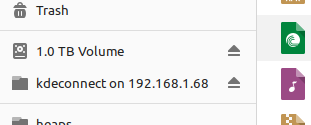
I had to turn off private key authentication and just use the password, although the entry added to the Places sidebar links to the root directory (/) and accessing that seems to crash Nautilus.
I'll have a quick look into Gio.MountOperation, but if you wanted to help that would be a good place to start. You could also look the source of the gio tool to see how it's implemented there and if it's possible to use a private key during connection.
Edit
Here's a quick example of how to do this, but more work would need to be done to use private key authentication, get the base directory right, set a proper title for Nautilus, etc.
https://gist.github.com/andyholmes/90c391f4bfd611cd916651ec590f5897
andyholmes
on 12 Oct 2018
Regarding the certificate.
Looking at the gvfs/gio sftp backend in ssh invocation and ssh args, I don't see an option to add a certificate directly. Nevertheless, there seems to be support for entering the password for key auth.
So from this I deduce that either we'd need to update ~/.ssh/config and specify connection details for the host before attempting to mount, or update gvfs to pass pass ssh config options IdentityFile to ssh. Or maybe the ssh agent could do this (but we probably can't count on everyone using the one we intend to communicate with).
Regarding the interface, something like a new g_mount_operation_set_certificate() or g_mount_operation_set_identity() could make sense in gio, which would pass IdentityFile to ssh. Too bad this needs to be a file.
wvengen
on 17 Oct 2018
Shall I open an issue upstream for specifying an (ssh) identity when mounting?
Allow specifying a private key or certificate when mounting an ssh/sftp connection.
This is necessary for integrating GS Connect storage with Nautilus cleanly (gnome-shell-extension-gsconnect#83).
I would expect something like
g_mount_operation_set_identity_file()(plus the getter) as part of GMountOperation, which would pass the option tossh. This option could be useful for other backends than ssh/sftp, like https based connections (but that's not part of the scope of this issue). What exactly the file would contain, would probably be backend-specific.
wvengen
on 17 Oct 2018
It seems like gvfs asks the keyring for an ssh environment:
https://gitlab.gnome.org/GNOME/gvfs/blob/master/daemon/gvfsbackendsftp.c#L437
That seems to indicate the keyring will integrate with the ssh agent, so I think interfacing with the ssh agent is the better way to go.
andyholmes
on 17 Oct 2018
Good one! So in theory, calling ssh-add with the SSH_AUTH_SOCK from dbus would be enough (the only downside is that _all_ known keys are tested, which might be a microscopic privacy issue) (perhaps this could be done via dbus as well, but I didn't see how at a glance). This may not work if IdentitiesOnly yes is in the ssh config.
wvengen
on 17 Oct 2018
Just for others to experiment, this is how I got the connection in Nautilus. Put in ~/.ssh/config:
Host <phone_ip_address>
  IdentityFile ~/.config/gsconnect/private.pem
  HostKeyAlgorithms +ssh-dss
Then I can see files (replace <..> with values from debug log when enabling _debug mode_ in _about_ after pressing the folder icon below the connected device in the GS Connect menu):
$ gio mount sftp://kdeconnect@<phone_ip_address>:<port>/
Enter password for kdeconnect on <phone_ip_address>
Password:
$ ls /run/user/`id -u`/gvfs/sftp*kdeconnect/sdcard
Alarms Documents Movies ...
And also in Nautilus: click on the kdeconnect connection, then press Ctrl-L and add sdcard at the end. This assumes that you have an sdcard, else you could use mnt or sys instead.
Somehow adding a path to the mount doesn't seem to matter (at least for me).
wvengen
on 17 Oct 2018
So if we can run ssh-add to add make the private key/certificate available, the most important remaining issue is how to handle that the root path is not browsable. I have not found a way to have a mount with a subdir. https://gitlab.gnome.org/GNOME/gvfs/issues/193 may be related here.
wvengen
on 19 Oct 2018
Sorry, I've been a bit swamped recently. This is great stuff and I think we should take a stab at it during the v14-v15 cycle. Hopefully by then the Android app will have been released with RSA support, which will make this all a lot easier since it's less likely we'll have to touch SSH config directly.
andyholmes
on 26 Oct 2018
Default location for sftp seems to be the homedir, perhaps this should be taken from the URL when given?
wvengen
on 26 Oct 2018
BTW could not you also somehow use libcloudproviders as Nextcloud did?
 rugk
on 26 Oct 2018
rugk
on 26 Oct 2018
BTW can we please discuss that DSS issue in a new issue: https://github.com/andyholmes/gnome-shell-extension-gsconnect/issues/267 @wvengen
rugk
on 26 Oct 2018
@wvengen this does seem to be a "default entry point", but as far as I can tell this is an internal API for writing backends or at least it's not offered in the bindings. Can you confirm that? If it is, we still might be able to use that by redirecting with a symlink or something to the real entry point.
@rugk As far as I can tell Nautilus doesn't yet support libcloudproviders and the first merge of GIR bindings only happened last week. It might be possible to expose the filesystem that way at some point, but the sftp connection still has to be made on our side.
andyholmes
on 26 Oct 2018
@andyholmes I can get the default location. After gio mount, running gjs-console:
const gio = imports.gi.Gio;
const vm = gio.VolumeMonitor.get();
var mounts = vm.get_mounts();
mounts[0].get_name()
// => "kdeconnect on <phone_ip_address>"
mounts[0].get_default_location().get_path()
// => "/run/user/1000/gvfs/sftp:host=<phone_ip_address>,user=kdeconnect"
mounts[0].get_root().get_path()
// => "/run/user/1000/gvfs/sftp:host=<phone_ip_address>,user=kdeconnect"
Okay, I see what you mean. For some reason I was thinking this referred to the remote entry point (eg. 192.168.0.100/entry/point) and it that it could be changed. A couple times I've read through the notion of volume shadowing, which seems like it might solve the remote entry point problem, but I'm still unclear on how exactly that works.
It seems to require implementing the GVolume interface, which doesn't seem that hard, but injecting that into the GVolumeMonitor I'm not sure about.
One thing we do have to make sure of is that any volume visible in Nautilus, especially unmounted but mountable, actually represents the current device state. For example it's totally acceptable for a KDE Connect device to arbitrarily change its IP or (in future) switch to a bluez connection where sftp is a no-go.
andyholmes
on 30 Oct 2018
Why not updating gio to allow specifying path on sftp mount, which would become the default location when present?
wvengen
on 30 Oct 2018
But when we want to keep the connection with an IP change or switch to bluetooth, I'd guess we'll need to write a custom backend (like google or gphoto2). But that's something to discuss with the gvfs people.
wvengen
on 30 Oct 2018
Why not updating gio to allow specifying path on sftp mount, which would become the default location when present?
I think it would a good addition, but changes in GLib can take awhile to land and longer to make it to distributions, so it could be awhile before we could count on everyone having such a fix.
It might be easier and quicker to get #607706 fixed in gvfs, especially since it would solve problems in other applications that are more urgent, but we'd have to stick with sshfs and still probably wait.
But when we want to keep the connection with an IP change or switch to bluetooth, I'd guess we'll need to write a custom backend
I can't find the phabricator task at the moment, but the author of the bluetooth backend implemented most of a custom FUSE fs for KDE Connect. I haven't seen any activity from him in a long time, but that's a way longer-term fix anyways.
What seems most promising is this shadow mounting:
One application of shadow mounts is when exposing a single file system that is used to address several logical volumes. In this situation, a GVolumeMonitor implementation would create two GVolume objects (for example, one for the camera functionality of the device and one for a SD card reader on the device) with activation URIs gphoto2://[usb:001,002]/store1/ and gphoto2://[usb:001,002]/store2/
From the description of how the gphoto backend works there, this sounds pretty much exactly like what we're doing. It's possible a feature request as you describe might even get that response. I guess a good place to start is to try and find where gphoto implements the GVolumeMonitor that does this. There is mention of "activation root" which might let us do a gsconnect://device-id like KDE Connect.
andyholmes
on 30 Oct 2018
Okay, I've obviously not been able to pay much attention here lately, but with DSA planned to be removed (in GSConnect v16) and the Android app _now_ supporting RSA (as of v1.10) I think we can focus a bit more on this.
It now seems like SFTP is only using password auth, which is okay because the password is random & per-session, we will have confirmed the host's IP _and_ be receiving connection info over TLS. The best part about this, if it doesn't change, is we shouldn't have to talk to an ssh agent, keyring or fool with local configuration making this even easier.
andyholmes
on 6 Nov 2018
Sorry it's been so long since the last update here. I have been working on this when I can, and I've been fairly successful.
Like I suspected private key auth is not being used for now, so at least we can delay dealing with ssh-agent until that's fixed upstream (which is planned). I suspect it will be possible to do this using gnome-keyring instead which is probably where we should store certificates anyways.
Since PackageKit has been removed for v17 (see #325), my plan is to remove the "Remote Filesystems" item from the Settings dialog and use Gio as a fallback when sshfs is not available. It's already possible to replace the device menu functionality ("All files", etc). Running this as fallback should keep everything working for current users and get us some good testing data for users that don't have sshfs installed.
If all goes well, we should be able to turf sshfs completely and go full GNOME. Stay tuned for a sftp-gio branch and some Zips; testers wanted :wink:
andyholmes
on 26 Nov 2018
Bad news on this front. Using the latest nightly of kdeconnect-android, it seems as though there is no way to disable HostKeyVerification with the Gio backend during runtime. This means host keys would have to be added to ~/.ssh/known_hosts on the fly, which is a bit sketchy and awkward as well.
Currently this is still only a fallback for sshfs, but it seems like using Gio might not really be worth the effort.
andyholmes
on 19 Dec 2018
@andyholmes : I'm just wondering if your take is still that host key checking is a problem / dealbreaker, because in testing this... so far, it's pretty OK. Far from perfect, but quite usable as-is, especially for early-days code. (The only real bummer is that it seems to disconnect (on idle?) pretty quickly, and GSConnect doesn't notice, requiring a tedious manual "Unmount", "Mount" cycle to revive the link.) Still, I'm hopeful even the less-than-great things about it can still be improved to make Gio "worth it".
(Then again, didn't I say that about PackageKit?)
 ferdnyc
on 27 Dec 2018
ferdnyc
on 27 Dec 2018
I'm just wondering if your take is still that host key checking is a problem / dealbreaker, because in testing this... so far, it's pretty OK.
It's seems like the issue is that if the remote host key changes, GVFS will refuse to update it or even warn the user, it just bails. It's unclear if this is a system key for Android, or if it's per-instance (eg. KDE Connect app).
The problem is that when this does happen, there's really no way to programatically deal with. GVFS actually just spawns ssh processes, so it uses whatever the user's settings are. sshfs lets us just ignore the HostKey (which we do since we already know the host and get the information directly from it).
We could probably use ssh-keyscan to update it, but that's really easy to MITM, especially since you could cause a HostKey failure on purpose by being a MITM. And we'd still probably have to edit known_hosts manually.
Another option is to export the remote's public key from the connection's certificate, convert it to a ssh fingerprint, use ssh-keygen -F to find the key in known_hosts, open the file and delete it...but you can see how flaky and sketchy that is.
The only real bummer is that it seems to disconnect (on idle?) pretty quickly, and GSConnect doesn't notice, requiring a tedious manual "Unmount", "Mount" cycle to revive the link.
I think that's just an over sight, I'll just have to connect to GMount::unmounted to watch for externally caused unmounts.
andyholmes
on 27 Dec 2018
I'm going to mark this for the next release (v20). At that point, I think everything we can do about this issue will be done.
Host key failures are now automatically handled by removing the offending key with ssh-keygen, at which point the user has to re-initiate mounting manually, which I think is the sanest route in terms of security.
Currently, the mount does appear in Nautilus, but points to the root directory of Android since that's the exposed mount point. 99% or people will find this is unreadable, but we can't fix that on our end and it should be fixed once Eric finished SAF support in kdeconnect-android.
sshfs will remain as the default for another few releases, just to give it some good testing, then that should be safe to remove.
andyholmes
on 1 Jan 2019
Currently, the mount does appear in Nautilus, but points to the root directory of Android since that's the exposed mount point. 99% or people will find this is unreadable, but we can't fix that on our end and it should be fixed once Eric finished SAF support in kdeconnect-android.
That's unfixable on the local end? Huh, crap, I guess it must be, looking at my own setup.
I keep my home fileserver mounted on my desktop machine using an sftp:// mount. While the _entire_ filesystem is mounted, the mount starts at my account's home directory on the fileserver. That's also what the Nautilus sidebar entry leads to, even though I'm still _able_ to navigate upwards to reach directories outside of /home/ferd/ if I want.
The secret appears to be the default_location property of the mount:
$ gio mount -l -i
Mount(0): ferd on host.local -> sftp://[email protected]/
  Type: GDaemonMount
  default_location=sftp://[email protected]/home/ferd
  themed icons:  [folder-remote]  [folder]  [folder-remote-symbolic]  [folder-symbolic]
  symbolic themed icons:  [folder-remote-symbolic]  [folder-symbolic]  [folder-remote]  [folder]
  can_unmount=1
  can_eject=0
  is_shadowed=0
But tellingly, I _don't_ mount that directory at all, in fact I mount the fileserver using just gio mount sftp://[email protected]/ — the default_location must be set by the remote end, presumably based on my account's homedir on the other end. Seems like the sshd on the Android end would need to return the standard "SDCard" path as the kdeconnect user's homedir, effectively.
ferdnyc
on 2 Jan 2019
Closing this now since I think we've done everything we can for basic support. Feel free to open new issues for any GVFS related problems you encounter!
andyholmes
on 10 Jan 2019
Related issues
 wada3n
·
7Comments
wada3n
·
7Comments
 mavit
·
6Comments
mavit
·
6Comments
 aia832003
·
6Comments
aia832003
·
6Comments
 jeetsrs
·
4Comments
jeetsrs
·
4Comments
 amivaleo
·
5Comments
amivaleo
·
5Comments
Most helpful comment
Closing this now since I think we've done everything we can for basic support. Feel free to open new issues for any GVFS related problems you encounter!