Gltf-blender-io: Objects with semi-transparent PNGs are not semi-transparent
Hi,
I'm trying to create a leaf, which is typically a rectangle with a semi-transparent PNG texture.
I have the following node setup:
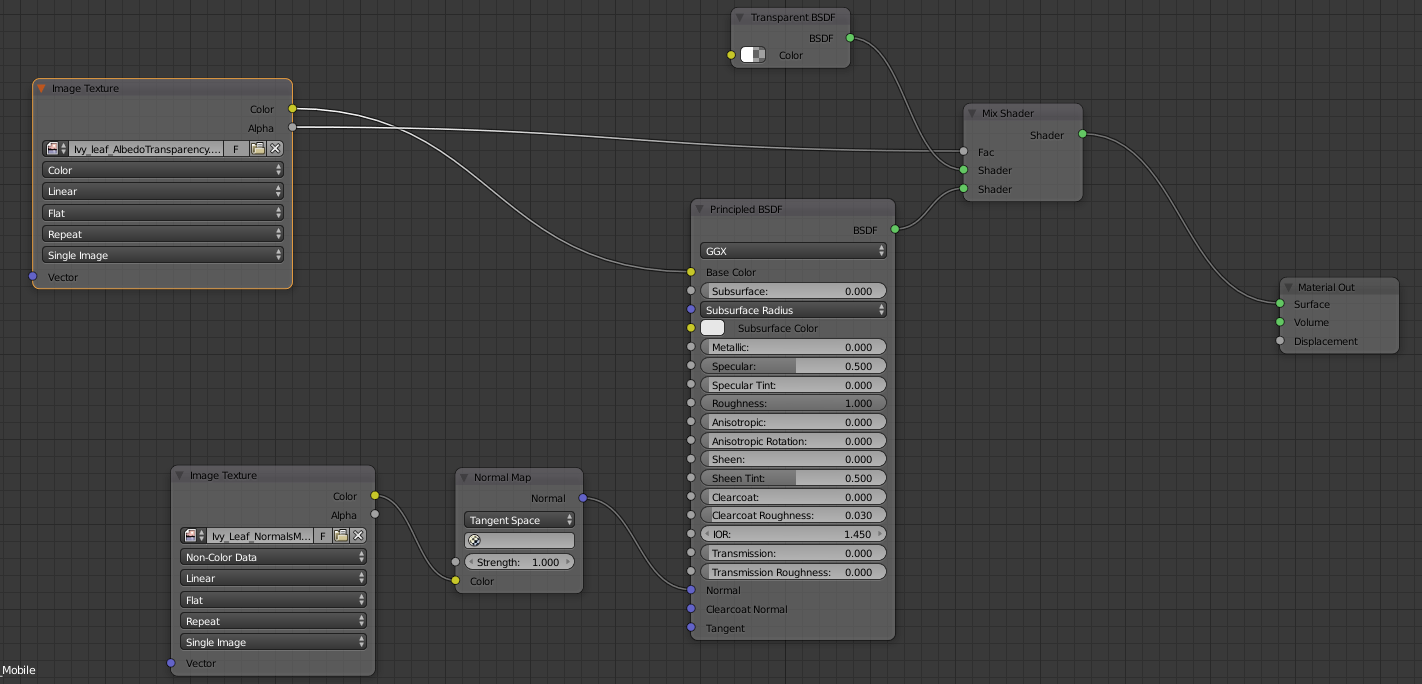
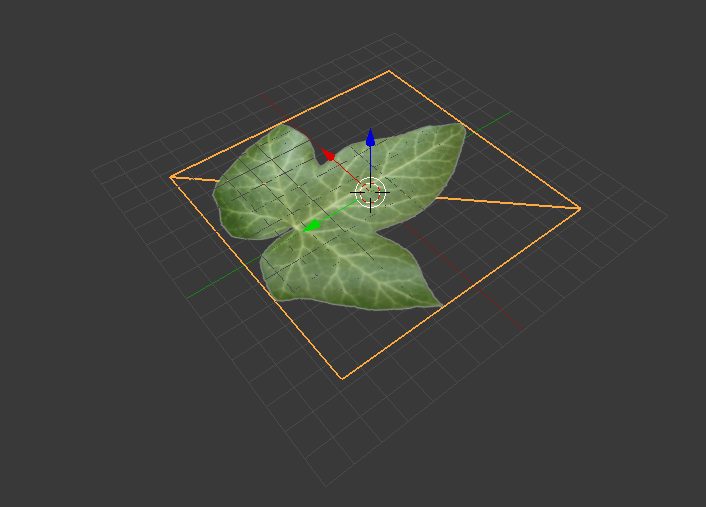
And while it looks correct within blender (with viewport alpha: alpha blend):
It looks very strange after exported:
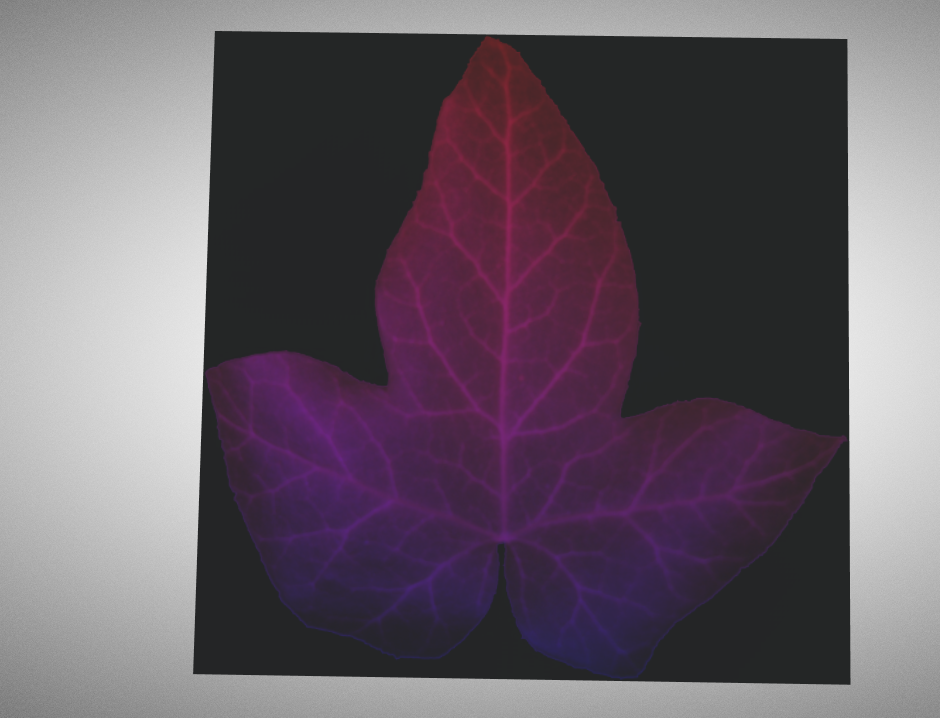
Not only it's not transparent where it should be, but my guess is that the R and G channels are swapped for some reason.
Am I doing something wrong with the node setup? Or is it something else?
Here's the blend file, if anyone wants to test:
test.zip
 soadzoor
All 12 comments
Definetly [Edit: NOT] a bug, but I don't think it's related to transparency. I re-exported your PNG on a white background with no transparency, plugged it straight into the Base Color node and I still get funky colors.


 AlexMuir
on 27 Dec 2018
AlexMuir
on 27 Dec 2018
Definitely a bug, but I don't think it's related to transparency. I re-exported your PNG on a white background with no transparency, plugged it straight into the Base Color node and I still get funky colors.
Oh, thanks for checking. This gradient color gave me an idea that it might have vertex colors, so I checked, and it does!
Removing the vertex colors solved this "funky-color-issue", but it's still not transparent where it should be. Any idea on that?
soadzoor
on 27 Dec 2018
Ah good. I've tried a few things but nothing working so far. I think that the exporter only really works with the Principled BSDF node, and anything like a mix shader that comes after that isn't exported. That's my understanding anyway. I notice that the BaseColor input for the principled node accepts RGBA values, not just RGB. I can't figure out how to recombine the RGBA from the Image Texture node using its 'Color' and 'Alpha' outputs. I might be heading in the wrong direction here anyway!
AlexMuir
on 27 Dec 2018
From the docs, here's an example for a basic node setup for gltf: https://gltf-blender-io-docs-gbueavkvns.now.sh/_images/addons_io-gltf2-material-principled.png
So I guess transparency should work in a similar way to emission. I know we still have problems with emission as well, so I guess we have to wait (or contribute) to get these things done.
soadzoor
on 27 Dec 2018
I hadn't seen this manual. What route did you use to get to that image? The addons -> glTF 2 section is a 404 at the moment.
AlexMuir
on 27 Dec 2018
I hadn't seen this manual. What route did you use to get to that image? The addons -> glTF 2 section is a 404 at the moment.
I've found it among the issues, right here: https://github.com/KhronosGroup/glTF-Blender-IO/issues/97
This is the link for the current prototype of the docs: https://gltf-blender-io-docs-fuznnktuig.now.sh/addons/io_gltf2
soadzoor
on 27 Dec 2018
Docs are now live, here: https://docs.blender.org/manual/en/dev/addons/io_gltf2.html
Are you using the Alpha Clip mode on the material? I think you'll need that.
 donmccurdy
on 14 Feb 2019
donmccurdy
on 14 Feb 2019
Docs are now live, here: https://docs.blender.org/manual/en/dev/addons/io_gltf2.html
Are you using the
Alpha Clipmode on the material? I think you'll need that.
I can confirm that it looks the same if I use Alpha Clip
soadzoor
on 14 Feb 2019
Oops, should have said using Alpha Clip mode, and also setting a clip threshold >0. With 0.5, and vertex colors disabled, I see:

... the edges are a bit rough, but adjusting the clip threshold should resolve that.
donmccurdy
on 14 Feb 2019
Oh, you're right, it works that way. So is it the correct behavior? I guess this method only works if I want either fully opaque, or fully transparent pixels. But what if I want a semi-transparent look on some parts?
soadzoor
on 14 Feb 2019
If you want semi-transparent pixels, use the Alpha Blend mode instead. But note that semi-transparency will be subject to various limitations in realtime engines (example, example) – for cutout/mask shapes like leaves on a tree, Alpha Clip will be much better.
This exporter cannot parse nodes like Mix Shader, so the alpha mode must be set appropriately.
donmccurdy
on 14 Feb 2019
Ok, thanks!
soadzoor
on 14 Feb 2019
Related issues
 rainclaws
·
3Comments
rainclaws
·
3Comments
 Nehon
·
5Comments
Nehon
·
5Comments
 capnm
·
5Comments
capnm
·
5Comments
 Quinten123
·
5Comments
Quinten123
·
5Comments
 spiraloid
·
3Comments
spiraloid
·
3Comments
Most helpful comment
I've found it among the issues, right here: https://github.com/KhronosGroup/glTF-Blender-IO/issues/97
This is the link for the current prototype of the docs: https://gltf-blender-io-docs-fuznnktuig.now.sh/addons/io_gltf2