Gltf-blender-io: Tangent are not exported
I'm trying to export a model and the tangent are not exported even if I check the "Tangents" check box under the mesh tab.
The tangent exports works if I export a simple sphere for example. So maybe I'm doing something wrong?
I've included a example as attachment. The "bunny" is the one that do not export correctly and sphere is the one that works.
 gabdube
All 17 comments
Ok after some digging I found the warning message "WARNING: Could not calculate tangents. Please try to triangulate the mesh first." hidden in the console.
Rather than silently outputing an error, shoudn't the export just fails if it cannot match the requested export parameters?
gabdube
on 16 Dec 2018
@UX3D-nopper Marking this as a bug, since this seems to be an error rather than a feature request.
 donmccurdy
on 8 Jan 2019
donmccurdy
on 8 Jan 2019
I can reproduce this in Blender latest master (2.82), glTF 2.0 addon version 1.1.11.
 zlsa
on 24 Nov 2019
zlsa
on 24 Nov 2019
This might be a feature request but related to this bug, it would be nice if there was an option to triangulate the mesh when exporting.
 larsjarlvik
on 29 Mar 2020
larsjarlvik
on 29 Mar 2020
I'm still having this issue with Blender 2.83.0 and "Import-Export as glTF 2.0" version 1.2.75.
In my case, there isn't a warning about mesh triangulation even though I'm exporting a mesh consisting mostly of quads. This behavior is likely more correct than emitting a warning given what @donmccurdy wrote in #145.
Meshes are triangulated automatically when they're exported, because the glTF format disallows n-gons.
Since there doesn't seem to be much activity on this issue, I've decided to try various combinations of actions in Blender to see which ones make the exporter happy and which ones don't.
Exporting tangents works on:
- @gabdube's sphere (which is a UV Sphere)
- The default cube in a "General" project
- A newly created Plane
- A newly created Cube
- A newly created UV Sphere
- A newly created Icosphere
- A newly created Torus
- Any of the above after being deformed by any Sculpt Mode brush.
Exporting tangents doesn't work:
- On @gabdube's "bunny"
- On a newly created Cylinder (remesh is also broken)
- On a newly created Cone (remesh is also broken)
- On anything after a remesh (I've tried remeshing all of the things which worked and some of the things which didn't work)
- With a new "Sculpting" project
It seems like certain topologies break the exporter in some way, but I have no idea what exactly the criteria for breaking the exporter are. I'd also like to note that I didn't try triangulating any of the meshes after remeshing, but I suspect that the outcome would be the same.
 maroider
on 9 Jul 2020
maroider
on 9 Jul 2020
I have no idea what exactly the criteria for breaking the exporter are
For calc_tangents to work, the mesh needs be all tris/quads, and there has to be a UVMap.
 scurest
on 9 Jul 2020
scurest
on 9 Jul 2020
there has to be a UVMap
That explains a lot, actually. I think I've got reasonable explanations now for why the stuff that broke, broke.
- @gabdube's "bunny" needed triangulation (by applying the "Triangulation" modifier) to successfully export tangents.
- Selecting "Triangle Fan" as the "Cap Fill Type" when creating a Cyllinder makes the exporter happy.
- The Cone has the same solution as the Cyllinder, except for the parameter being called "Base Fill Type".
- Remeshes completely destroy UV Maps, selecting all of the vertices and using the built-in unwrap functionality seems to fix the export.
- The "Sculpting" template doesn't give you a UV Map, creating one fixes the export.
I guess the warning that can be emitted here ought to be shown more prominently to the user. Ideally, you should be able to see that the export will fail before you run it, but I'm not sure how feasible such a check would be. This conditional should also show the user a prominent error message if it fails, since this is probably the check for whether or not a UV Map exists.
I'm more than willing to try implementing proper warnings, but I'd probably need a little help since I'm unfamiliar with both Blender add-on development and this code-base.
maroider
on 9 Jul 2020
We could copy what the FBX exporter does and show that little warning popup (but go on with the export):

diff --git a/addons/io_scene_gltf2/__init__.py b/addons/io_scene_gltf2/__init__.py
index 3ea1ce1..ce82553 100644
--- a/addons/io_scene_gltf2/__init__.py
+++ b/addons/io_scene_gltf2/__init__.py
@@ -404,6 +404,7 @@ class ExportGLTF2_Base:
         # All custom export settings are stored in this container.
         export_settings = {}

+        export_settings['exporter'] = self
         export_settings['timestamp'] = datetime.datetime.now()

         export_settings['gltf_filepath'] = bpy.path.ensure_ext(self.filepath, self.filename_ext)
diff --git a/addons/io_scene_gltf2/blender/exp/gltf2_blender_extract.py b/addons/io_scene_gltf2/blender/exp/gltf2_blender_extract.py
index e2d224c..9197f10 100644
--- a/addons/io_scene_gltf2/blender/exp/gltf2_blender_extract.py
+++ b/addons/io_scene_gltf2/blender/exp/gltf2_blender_extract.py
@@ -167,7 +167,11 @@ def extract_primitives(glTF, blender_mesh, library, blender_object, blender_vert
             blender_mesh.calc_tangents()
             use_tangents = True
         except Exception:
-            print_console('WARNING', 'Could not calculate tangents. Please try to triangulate the mesh first.')
+            export_settings['exporter'].report(
+                {'WARNING'},
+                "Mesh '%s' has polygons with more than 4 vertices, "
+                "cannot compute/export tangent space for it" % blender_mesh.name
+            )

     #
The description in the tooltip here could also be better. FBX points out (will only work correctly with tris/quads only meshes!) in its tooltip.
This conditional should also show the user a prominent error message if it fails, since this is probably the check for whether or not a UV Map exists.
I'm not sure. It doesn't show a warning if eg. "UVs" is selected and a mesh doesn't have UVs, it just doesn't export any UVs. I think the case of selecting "Tangents" and not having UVs is similar. The FBX exporter also doesn't show a warning for this. The tooltip could point out UVs are necessary though.
scurest
on 10 Jul 2020
I didn't realize we could report warnings in the export process! That would actually be helpful for any number of things, like unsupported materials...
donmccurdy
on 10 Jul 2020
@donmccurdy You need the top-level ExportGLTF2_Base object. I just stuffed it into export_settings.
scurest
on 10 Jul 2020
@scurest
We could copy what the FBX exporter does and show that little warning popup (but go on with the export):
That warning popup seems reasonable.
I'm not sure. It doesn't show a warning if eg. "UVs" is selected and a mesh doesn't have UVs, it just doesn't export any UVs. I think the case of selecting "Tangents" and not having UVs is similar. The FBX exporter also doesn't show a warning for this. The tooltip could point out UVs are necessary though.
I'm not sure what you're advocating for here (other than better tooltips), but I think showing a warning whenever the exporter can't meet the users' demands should be reasonable. If I select some option which requires me to have UVs, then the exporter should warn me if I don't have UVs when I run it.
maroider
on 12 Jul 2020
Let's be consistent with other exporter. (like FBX for example)
 julienduroure
on 12 Aug 2020
julienduroure
on 12 Aug 2020
If the glTF exporter triangulates the mesh, why can't it calculate tangents after triangulation?
If I triangulate the mesh myself before exporting, the exporter will export tangents correctly. Is there any difference between those two processes?
 LPGhatguy
on 16 Sep 2020
LPGhatguy
on 16 Sep 2020
There's a difference.
Any quads or n-gons in a mesh are _really_ drawn as triangles. For example, if you bend a quad its easy to see the two tris that make it up.
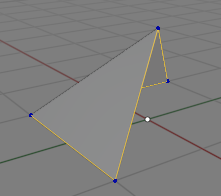
So every mesh has a "soft" triangulation that always exists even if the mesh has quads and n-gons. The exporter really just reuses this "soft" triangulation. This means the tris that get exported always match the tris Blender draws in the viewer.
But to calculate tangents this "soft" triangulation isn't good enough. You need a "hard" triangulation: the kind you get from applying a Triangulate modifier. However there doesn't seem to be a way to apply a Triangulate modifier that will give you the same triangulation as the "soft" triangulation. For example, the above quad might get triangulated this way instead
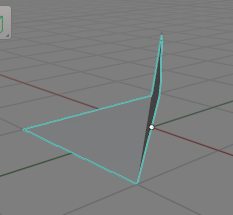
So basically the two kinds of triangulations are different things.
There might be a good way to do this but I don't know what it is.
scurest
on 16 Sep 2020
Is this eventually going to get fixed? Otherwise it may be interesting to add some kind of warning in the documentation, as the error is very hard to spot.
 tatjam
on 30 Sep 2020
tatjam
on 30 Sep 2020
I've been intending to implement in-editor warnings, but I've been a bit busy with other things.
maroider
on 30 Sep 2020
Filing a separate feature request for in-export warnings: https://github.com/KhronosGroup/glTF-Blender-IO/issues/1273
donmccurdy
on 28 Nov 2020
Related issues
 capnm
·
5Comments
capnm
·
5Comments
 Quinten123
·
4Comments
Quinten123
·
4Comments
 KannebTo
·
3Comments
KannebTo
·
3Comments
 Nehon
·
5Comments
Nehon
·
5Comments
 spiraloid
·
5Comments
spiraloid
·
5Comments
Most helpful comment
I can reproduce this in Blender latest master (2.82), glTF 2.0 addon version 1.1.11.