Gltf-blender-io: simple scene with animation causes exporter to crash
Here is the blender scene (v2.79)
untitled.zip
And this is the error that the latest TOT produces:
`INFO: Starting glTF 2.0 export
Traceback (most recent call last):
File "C:\Program Files\Blender Foundation\Blender\2.79\scripts\addons\io_scene_gltf2__init__.py", line 370, in execute
return gltf2_blender_export.save(self, context, export_settings)
File "C:\Program Files\Blender Foundation\Blender\2.79\scripts\addons\io_scene_gltf2\blender\exp\gltf2_blender_export.py", line 62, in save
scenes, animations = gltf2_blender_gather.gather_gltf2(export_settings)
File "C:\Program Files\Blender Foundation\Blender\2.79\scripts\addons\io_scene_gltf2\blender\exp\gltf2_blender_gather.py", line 32, in gather_gltf2
animations += __gather_animations(blender_scene, export_settings)
File "C:\Program Files\Blender Foundation\Blender\2.79\scripts\addons\io_scene_gltf2\blender\exp\gltf2_blender_gather.py", line 60, in __gather_animations
animations += gltf2_blender_gather_animations.gather_animations(blender_object, export_settings)
File "C:\Program Files\Blender Foundation\Blender\2.79\scripts\addons\io_scene_gltf2\blender\exp\gltf2_blender_gather_animations.py", line 39, in gather_animations
animation = __gather_animation(blender_action, blender_object, export_settings)
File "C:\Program Files\Blender Foundation\Blender\2.79\scripts\addons\io_scene_gltf2\blender\exp\gltf2_blender_gather_animations.py", line 54, in __gather_animation
channels=__gather_channels(blender_action, blender_object, export_settings),
File "C:\Program Files\Blender Foundation\Blender\2.79\scripts\addons\io_scene_gltf2\blender\exp\gltf2_blender_gather_animations.py", line 84, in __gather_channels
return gltf2_blender_gather_animation_channels.gather_animation_channels(blender_action, blender_object, export_settings)
File "C:\Program Files\Blender Foundation\Blender\2.79\scripts\addons\io_scene_gltf2\blender\exp\gltf2_blender_gather_cache.py", line 50, in wrapper_cached
result = func(args)
File "C:\Program Files\Blender Foundation\Blender\2.79\scripts\addons\io_scene_gltf2\blender\exp\gltf2_blender_gather_animation_channels.py", line 31, in gather_animation_channels
channel = __gather_animation_channel(channel_group, blender_object, export_settings)
File "C:\Program Files\Blender Foundation\Blender\2.79\scripts\addons\io_scene_gltf2\blender\exp\gltf2_blender_gather_animation_channels.py", line 48, in __gather_animation_channel
sampler=__gather_sampler(channels, blender_object, export_settings),
File "C:\Program Files\Blender Foundation\Blender\2.79\scripts\addons\io_scene_gltf2\blender\exp\gltf2_blender_gather_animation_channels.py", line 81, in __gather_sampler
export_settings
File "C:\Program Files\Blender Foundation\Blender\2.79\scripts\addons\io_scene_gltf2\blender\exp\gltf2_blender_gather_cache.py", line 50, in wrapper_cached
result = func(args)
File "C:\Program Files\Blender Foundation\Blender\2.79\scripts\addons\io_scene_gltf2\blender\exp\gltf2_blender_gather_animation_samplers.py", line 36, in gather_animation_sampler
input=__gather_input(channels, blender_object, export_settings),
File "C:\Program Files\Blender Foundation\Blender\2.79\scripts\addons\io_scene_gltf2\blender\exp\gltf2_blender_gather_animation_samplers.py", line 61, in __gather_input
keyframes = __gather_keyframes(channels, export_settings)
File "C:\Program Files\Blender Foundation\Blender\2.79\scripts\addons\io_scene_gltf2\blender\exp\gltf2_blender_gather_cache.py", line 50, in wrapper_cached
result = func(*args)
File "C:\Program Files\Blender Foundation\Blender\2.79\scripts\addons\io_scene_gltf2\blender\exp\gltf2_blender_gather_animation_samplers.py", line 294, in __gather_keyframes
for c in channels
File "C:\Program Files\Blender Foundation\Blender\2.79\scripts\addons\io_scene_gltf2\blender\exp\gltf2_blender_gather_animation_samplers.py", line 294, in
for c in channels
IndexError: list index out of range
location:
Cheers and thanks for a great tool!
 aguaviva
All 18 comments
I reproduced it on a simplier file:
- On default Cube, frame 1, insert keyframe on location X, Y and Z
- On default Cube, frame 10, insert keyframe on location Z only
--> Try to export
 julienduroure
on 8 Nov 2018
julienduroure
on 8 Nov 2018
Same error with shift animation on 2 differents keyframes. See file in attachment
untitled.blend.zip
julienduroure
on 8 Nov 2018
the problem leading to a crash in the exporter is fixed, but there still seems to be a problem with the .gltf of the original file by @aguaviva.
 UX3D-becher
on 15 Nov 2018
UX3D-becher
on 15 Nov 2018
the animation should now work as expected in the .gltf.
@aguaviva you might need to move some keyframes into the playback range and/or extend it
UX3D-becher
on 15 Nov 2018
It doesn't crash anymore but the animation is incorrect. You can repro that by importing the model again. Also the materials colors seem to be gone.
aguaviva
on 15 Nov 2018
Material colors are currently not supported by the exporter. It is trivial to implement if you really need it though.
I can see what is wrong after importing it, but the exported .gltf seems to animate as specified in blender. So I suppose it's an import issue.
UX3D-becher
on 16 Nov 2018
54 is the material factor issue
UX3D-becher
on 16 Nov 2018
@UX3D-becher my gltf visualizer animates the scene in the same exact way blender does after importing it. And so far it has been working with all the models I have tested it with.
aguaviva
on 16 Nov 2018
which one do you use?
UX3D-becher
on 16 Nov 2018
A visualizer that is not public yet :)
aguaviva
on 16 Nov 2018
material factors are now exported with 0e80d7c37d7faa28cfd4f35c429280de9a54b75f
UX3D-becher
on 16 Nov 2018
Thanks! As for this being an issue of the importer, I am not so sure TBH. What other test could you use to determine what is causing the issue?
aguaviva
on 17 Nov 2018
I think the best action would be to wait for a response from Julien. He might be able to tell us what could trigger the wrongful behaviour.
Currently neither the validation nor Babylon or three.js notice a problem.
UX3D-becher
on 17 Nov 2018
by validating, you mean that the animations display properly on other visualizers? then you've got a point there
aguaviva
on 17 Nov 2018
I meant using the validator https://github.com/KhronosGroup/glTF-Validator
Of course if there is something strange with the exported gltf we should fix the exporter. Otherwise there may be an ambiguity in the spec, which could also explain the differing behaviour.
UX3D-becher
on 17 Nov 2018
I just inspected the binary buffers using VisualStudio and I noticed where the shrinking rectangle is coming from. If you look at the time line, when the time is 0, that gives us an index of 0, and in the table on the left hand side with the scales that means a (0,0,0), if the time is 1.6 that gives us the next value in the scales table, which is (1,1,1), and hence for intermediate values it makes the thing shink and grow
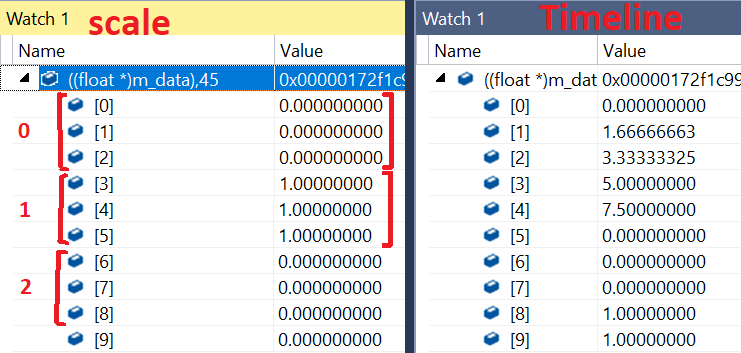
On the other hand this viewer displays the right results, however a box that should be spinning is still
aguaviva
on 18 Nov 2018
Hello,
I didn't implement import of CUBICSPLINE interpolation yet. That's why the animation is weird.
I will close this ticket, because original export bug is now fixed, and open a new one for enhancement about animation import
julienduroure
on 18 Nov 2018
you are absolutely right, I forgot about the interpolation method, I was using linear instead of cubic! Thanks for the help!
aguaviva
on 19 Nov 2018
Related issues
 KannebTo
·
3Comments
KannebTo
·
3Comments
 cstfan
·
4Comments
cstfan
·
4Comments
 Nehon
·
5Comments
julienduroure
·
3Comments
Nehon
·
5Comments
julienduroure
·
3Comments
 capnm
·
5Comments
capnm
·
5Comments