Glpi: [9.1.4] Ticket Reopen reloads page without reopening ticket.
Hi,
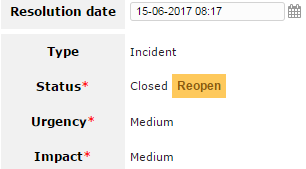
I tried to reopen a ticket after it was closed too early only to find out it doesn't work. The old dropdown menu where you could choose which status you want to give a closed ticket is replaced by a button between versions 9.1.3 and 9.1.4. And the button only seems to refresh the page.
Thanks
Operating system: Windows NT HOSTNAME 6.1 build 7601 (Windows Server 2008 R2 Datacenter Edition Service Pack 1) i586
PHP 7.0.0 cgi-fcgi (Core, PDO, Phar, Reflection, SPL, SimpleXML, apcu, bcmath, calendar, cgi-fcgi, ctype, curl, date, dom,
    fileinfo, filter, gd, gettext, hash, iconv, imap, json, ldap, libxml, mbstring, mcrypt, mysqli, mysqlnd, openssl, pcre,
    pdo_mysql, session, soap, standard, tokenizer, wddx, xml, xmlreader, xmlrpc, xmlwriter, zip, zlib)
Setup: max_execution_time="300" memory_limit="128M" post_max_size="8M" safe_mode="" session.save_handler="files"
    upload_max_filesize="20M"
Software: Microsoft-IIS/7.5
    Mozilla/5.0 (Windows NT 6.1; Win64; x64) AppleWebKit/537.36 (KHTML, like Gecko) Chrome/58.0.3029.110 Safari/537.36
Server Software: MySQL Community Server (GPL)
    Server Version: 5.5.46
    Server SQL Mode:
    Parameters: [email protected]/glpidatabase
    Host info: 127.0.0.1 via TCP/IP

OKC:\inetpub\wwwroot\glpi/config : OK
OKC:\inetpub\wwwroot\glpi/files : OK
OKC:\inetpub\wwwroot\glpi/files/_dumps : OK
OKC:\inetpub\wwwroot\glpi/files/_sessions : OK
OKC:\inetpub\wwwroot\glpi/files/_cron : OK
OKC:\inetpub\wwwroot\glpi/files/_graphs : OK
OKC:\inetpub\wwwroot\glpi/files/_lock : OK
OKC:\inetpub\wwwroot\glpi/files/_plugins : OK
OKC:\inetpub\wwwroot\glpi/files/_tmp : OK
OKC:\inetpub\wwwroot\glpi/files/_rss : OK
OKC:\inetpub\wwwroot\glpi/files/_uploads : OK
OKC:\inetpub\wwwroot\glpi/files/_pictures : OK
OKC:\inetpub\wwwroot\glpi/files/_log : OK
Web access to files directory is protectedWeb access to files directory is protected : OK
 Aijt
Aijt
All 6 comments
I confirm this bug only if
- you use timeline in your settings
- you don't have "Keep Tabs Replaced by the Ticket Timeline" set to Yes in your settings.
 yllen
on 20 Jun 2017
yllen
on 20 Jun 2017
👍3
Thank you very much, solved my issue ^ ^
 pkyogurt
on 21 Jun 2017
pkyogurt
on 21 Jun 2017
@yllen Thanks, but I am used to the current layout of things. I found another workaround and that is selecting the ticket under the overview (ticket.php) Actions > Update > Status > The status I want.
Aijt
on 21 Jun 2017
This is a bug of timetine tab and will be corrected
yllen
on 21 Jun 2017
👍1
I didn't expect anything less @yllen . But what I described works best for me for the time being. :+1:
Aijt
on 21 Jun 2017
Duplicates #2412
 trasher
on 13 Jul 2017
trasher
on 13 Jul 2017
Was this page helpful?
0 / 5 - 0 ratings
Related issues
 jfg
·
6Comments
jfg
·
6Comments
 Megachip
·
6Comments
Megachip
·
6Comments
 zoriax
·
4Comments
trasher
·
5Comments
zoriax
·
4Comments
trasher
·
5Comments
 stonebuzz
·
3Comments
stonebuzz
·
3Comments
Most helpful comment
I confirm this bug only if