Glimpse: Build and upload continuous AppImage for Linux
@TrechNex wrote in https://github.com/glimpse-editor/Glimpse/issues/99#issuecomment-524847059:
We have so far established that Glimpse 0.1 will be a Flatpak and an AppImage on Linux.
This ticket is about tracking the progress of AppImage packaging.
First off, as "the AppImage guy" I would like to offer my help.
In addition, there is someone _far_ more knowledgable about compiling and packaging the upstream project of Glimpse in AppImage format: @aferrero2707. He has doing a terrific job in producing AppImages of the GNU Image Manipulation Project over the years, and has been prolific on the https://discuss.pixls.us/t/community-built-software/2137 forum. Because he is building on CentOS 7, the resulting binaries can run on pretty much all still-supported distribution versions.
Here is the repository that holds his Travis CI build scripts (using Docker):
https://github.com/aferrero2707/gimp-appimage
I think this could be used more or less 1:1 to build Glimpse AppImages, too. His AppImages have been street-tested and refined over the years, so instead of starting from scratch I'd suggest checking out his work. He has been in discussion with the GNU Image Manipulation Project about upstreaming his work, but so far it has not happened yet.
 probonopd
All 89 comments
Yeah I haven’t gotten around to starting on the AppImage packaging yet, I should probably at least use their work as a base for glimpse’s AppImage. (Of course with proper attribution)
 LunaTheFoxgirl
on 28 Aug 2019
LunaTheFoxgirl
on 28 Aug 2019
Also, you may want to consider a "with plugins" version which would be very convenient for users.
probonopd
on 28 Aug 2019
After the renaming of the functions in the source, etc. We don't expect a lot of upstream plugins to work anymore. At that point Glimpse would become its own ecosystem. But we'll see how stuff pans out.
If you have any ideas for plugins to remove/add there's an issue for that.
LunaTheFoxgirl
on 28 Aug 2019
Addendum:
@probonopd If you have any ideas for plugins we should include with Glimpse, feel free to leave them in #74 :)
LunaTheFoxgirl
on 28 Aug 2019
@Member1221 did you have a chance to have a look at https://github.com/aferrero2707/gimp-appimage?
probonopd
on 5 Sep 2019
I'm a little busy at the moment, but i'll try to make time during the weekend to do so.
LunaTheFoxgirl
on 5 Sep 2019
The current plan is that there will be an AppImage, but it will be shortly after the Flatpak & Windows installers have been released for 0.1.
 TrechNex
on 23 Sep 2019
TrechNex
on 23 Sep 2019
I've brought this back in for 0.1.0 as I think it's sensible for us to provide an alternative for Flatpak.
It also looks fairly straightforward to make a Jenkins job, but I need to set aside time to do it.
TrechNex
on 31 Oct 2019
I plan to work on this between 15th-18th November as we are aiming to be code complete by that time and it will be the last outstanding packaging task to resolve for 0.1.0
TrechNex
on 10 Nov 2019
Let me know if you are running into any issues @TrechNex, I am here to help.
probonopd
on 10 Nov 2019
Thank you.
The approach I am currently planning is to essentially follow these steps, but on a Ubuntu 18.04 LTS server instead of a virtual machine: https://github.com/glimpse-editor/Glimpse/blob/dev-g210/HACKING - the idea here would be that I'd package up the end result in the "prefix" folder as the AppImage.
I am taking some time to look over what was done on the CentOS 7 docker container though in case that is a more straightforward way of doing things. I am shying away from using virtual machines or docker containers because it would increase the project's hosting costs.
TrechNex
on 10 Nov 2019
Please build on a system no newer than the oldest still-supported LTS release of Ubuntu (currently 16.04) if possible. Then the resulting binaries will run on all still-supported releases of Ubuntu, but probably not on CentOS 7.
Why don't you re-use as much as possible, including the Docker containers, from https://github.com/aferrero2707/gimp-appimage? That should give the best results. @aferrero2707 has invested years into this.
probonopd
on 10 Nov 2019
Fair enough. I will see how running Docker impacts resource usage on the VPS we host all the Glimpse stuff on. If it works fine then I'll configure Jenkins to use it and we can look at just forking that repository :)
TrechNex
on 10 Nov 2019
Alternatively if it does indeed all run on Travis-CI that's excellent. Then we have to just make sure it builds using tagged versions of dependencies for BABL, GEGL, MyPaint, etc before we make it Glimpse-specific.
TrechNex
on 10 Nov 2019
Why on Jenkins or Travis when you now have GitLab? Its GitLab CI (at least on .com) could do this easily, I guess.
probonopd
on 10 Nov 2019
Which git site we use is a whole can of worms we would rather not open. We're damned if we do and damned if we don't stick to Github :sweat_smile:
We currently use Travis CI to do sanity builds on our dev branches & pull requests. Jenkins is used to build the Flatpak from dev branch, and will eventually be used to package the Windows build as well. So it makes sense for us to use one of those two tools as we are using them already.
TrechNex
on 10 Nov 2019
Uh, I was under the impression the project had moved to GitLab. Apparently "moved" is too strong a word ;-)
probonopd
on 10 Nov 2019
To confirm, we have not! :+1:
(There was a long discussion on Matrix recently that resulted in people agreeing that Github and Gitlab made them angry for similar political reasons, and the other options cost money and aren't as good. If that was the source of the confusion, my apologies)
TrechNex
on 11 Nov 2019
I've had a chat with others in the contributors channel about this btw. If building the AppImage turns out to not be straightforward this will be kicked out as an "after 0.1 releases" task. But I am hopeful it can be completed quickly.
I have a four day weekend coming up wherein I need to fix all the problems with the Windows port, resolve some last remaining bugs and make sure everything is release ready. That way all we will be waiting on is some documentation & for the CA to verify I can have a code signing certificate for the Windows installer.
TrechNex
on 11 Nov 2019
@probonopd
Please build on a system no newer than the oldest still-supported LTS release of Ubuntu (currently 16.04) if possible. Then the resulting binaries will run on all still-supported releases of Ubuntu, but probably not on CentOS 7.
Out of curiosity, is there a specific reason why you prefer Ubuntu LTS over CentOS7 for the AppImage packaging?
CentOS7 comes with an older libc and generally newer packages, so in my experience it is very well suited...
 aferrero2707
on 11 Nov 2019
aferrero2707
on 11 Nov 2019
tbqh I don't understand why AppImage is dependent on the external Linux environment you build it on. It is supposed to be a self-contained blob with its own dependencies, no?
If an AppImage built on a Debian-based system won't run on a RHEL-based system, then what is the big advantage of using it as a technology? :confused:
(For comparison we directly support Flatpak, and have merged changes to indirectly support Snapcraft)
TrechNex
on 11 Nov 2019
Out of curiosity, is there a specific reason why you prefer Ubuntu LTS over CentOS7 for the AppImage packaging?
I am assuming that most users will run on variants of Ubuntu and therefore I want to ensure that well-built AppImages will at least run on all still-supported releases of that distribution. If someone wants to build on systems that support even more target systems, that's great. (In the AppImage project we use some CentOS 6 .)
tbqh I don't understand why AppImage is dependent on the external Linux environment you build it on. It is supposed to be a self-contained blob with its own dependencies, no?
Well, the author of an AppImage (yes, that's you) decides what to put inside. While it would technically be possible (and is being done by some projects) to put in _everything_ (down to glibc and ld-linux), some people consider this "bloat" and want to use at least the basic system libraries from what comes with the system.
If an AppImage built on a Debian-based system won't run on a RHEL-based system, then what is the big advantage of using it as a technology? confused
An AppImage built on a Debian-based system will run on a RHEL-based system for sure.
But an AppImage built on a system with glibc version X will not run on target systems with earlier versions of glibc. Unless you bundle _everything_.
(For comparison we directly support Flatpak, and have merged changes to indirectly support Snapcraft)
Then it's now time for AppImage ;-)
probonopd
on 11 Nov 2019
Hmm... in that case leave it with me. The VPS we use for Jenkins, Glimpse website & the dev build directory needed rebuilding at some point anyway. I initially chose Ubuntu 18.04 LTS for it because I assumed that was a "known good" system for our builds, but there are better choices. I will see how well (or not) it runs docker before proceeding.
TrechNex
on 11 Nov 2019
Realistically, this is going to get pushed out to 0.2.0 at the earliest. This looks a lot more involved than I was initially led to believe.
Also not bundling core components means time has to be set aside to verify which Linux distributions and versions our AppImage actually works with. We are going into code freeze tomorrow and releasing 0.1.0 next week, so that is not practical.
TrechNex
on 17 Nov 2019
Also not bundling core components means time has to be set aside to verify which Linux distributions and versions our AppImage actually works with.
Your choice, you can also bundle _everything_ like Scribus and Inkscape do...
What I don't understand is why we can't reuse the work of @aferrero2707 more or less 1:1, as he has really figured it all out already.
probonopd
on 17 Nov 2019
Using bionic as a base is a good idea. Better get started with an AppImage at some point, even if you disappoint 4.214% of the Linux user base. It can be improved at any time.
 TheAssassin
on 22 Nov 2019
TheAssassin
on 22 Nov 2019
Using bionic as a base is a good idea
Such AppImages will not run on all still-supported Ubuntu versions unless you bundle _everything_ which adds approximately 10 MB of overhead but makes things really robust against ABI changes.
probonopd
on 23 Nov 2019
I've brought this in for 0.1.x releases, but there will be a couple of weeks' delay on it because this is contingent on us building an appropriately-sized Jenkins server to generate them.
There is increased urgency because we've been made aware that Flathub does not provide 32-bit builds for Linux.
TrechNex
on 1 Mar 2020
Repositories I found from @aferrero2707 that will be of interest to us:
https://github.com/aferrero2707/gimp-appimage
https://github.com/aferrero2707/gimp-plugins-collection
Having taken a cursory glance I think previous suggestions from OP @probonopd about using a pre-existing CentOS 7 docker container makes a lot more sense than creating a new one based on Ubuntu.
It would be useful to know what the ramifications are in terms of compatibility. Basically we need AppImage to be our "fallback" option for all Linux users on 32-bit systems, and those Linux users on 64-bit systems that don't like Flatpak.
I think these repos also use Travis CI to do the build/publishing. In principle we could do that, but seeing as we're building a server specifically to run a Jenkins agent and a Docker server I think it makes sense to use that once it's provisioned. cc @chaomodus as they're working on that.
As we said in our release notes, I want to make AppImage files for 0.1.0 and 0.1.2 before this month is out, and have the automated infrastructure set up so we can make use of it for development on 0.2.0.
TrechNex
on 6 Mar 2020
The other thing we should check is what the deal is with https://appimage.github.io/
Is that a publishing platform like Flathub? Is this something we should support? Can we reuse the existing appdata file in our desktop/ folder?
Although I think this is probably something to consider after we have working AppImage files attached to release tags on Github. :)
TrechNex
on 6 Mar 2020
https://appimage.github.io/
Is that a publishing platform like Flathub?
It checks AppImages by trying to run them through an automated test, and if AppImages pass, they get published to https://appimage.github.io/. Application pages have a link back to the original author's download page. Unlike Flathub, applications are not distributed through the site; the site merely points to the original download page.
Other websites, app stores, and app centers use (syndicate) the content from https://appimage.github.io/, so by having your application in there, it will also appear in a lot of other places as well.
probonopd
on 6 Mar 2020
Coming from #340. Just want to add my two cents and mention the awesome work done on AppImageUpdate by the AppImage guys and contributors and also suggest if this can be considered to be embedded onto Glimpse's AppImage.
Also AppImageLauncher is such a nice tool too : )
 cristianovitorino
on 21 Mar 2020
cristianovitorino
on 21 Mar 2020
Hi, is there anything holding back Glimpse from being published as an AppImage at this point? Anything the project could need help with?
probonopd
on 3 Jun 2020
Hi @probonopd!
It just kept getting pushed back because other stuff kept taking priority, but we definitely want it added to the upcoming 0.2.0 in the next couple of weeks.
I've already completed the first step in that I've created a Github Action that does a Linux build automatically on dev branch and then stores a ZIP with the result.
What needs to happen next is creating our AppImage scripts and putting them in the build-aux/appimage directory so the same Github Action can make use of them for the packaging step.
Any assistance you can provide is most welcome. I am not an expert on AppImage at all, so if it's left to me I'll end up spending a fair while trying to get it to work!
TrechNex
on 3 Jun 2020
Hi @TrechNex. Glad to hear that. As for myself I don't have much of a clue about GitHub Actions yet, but @azubieta sure has - maybe he can have a look in case you might run into any issues?
probonopd
on 3 Jun 2020
Hi @probonopd @TrechNex, I'll add this project to my todo list. I will send you a PR for building AppImages using github actions soon. It would be great if you can point me out the way to the build instructions (haven't read the project readme yet).
 azubieta
on 3 Jun 2020
azubieta
on 3 Jun 2020
@azubieta our current workflow file looks like this (assuming I don't need to set privileges for you to see it): https://github.com/glimpse-editor/Glimpse/actions/runs/118679043/workflow
The first place to start with build instructions is the HACKING file. The README.md files we have added to the build-aux folder are mostly to assist with packaging, so it might be that you find something useful in there you can borrow from snapcraft or Flatpak too.
For reference, our development branch is dev-g210.
TrechNex
on 4 Jun 2020
@TrechNex Perhaps this could be helpful: https://github.com/marketplace/actions/build-appimage
cristianovitorino
on 18 Jun 2020
@aferrero2707 let's keep discussing the evolution of the AppImage packaging here.
So far I have been able to create a bundle but it fails to start because of some fixed paths:
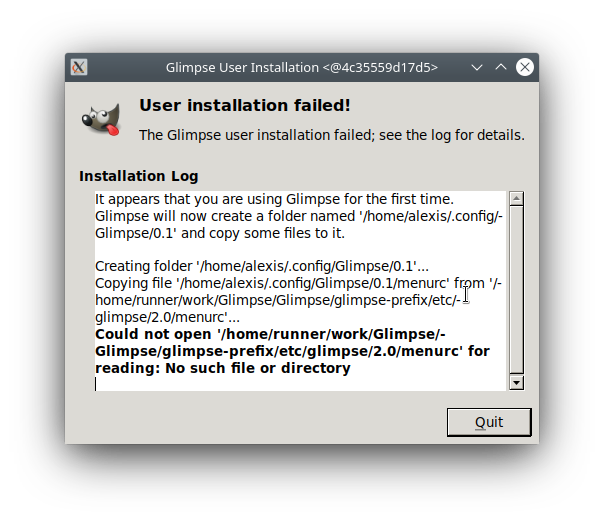
I already tried, looking for environment variables like the ones used by GIMP but I wasn't lucky.
export GIMP2_DATADIR="$DIR/usr/share/gimp/2.0"
export GIMP2_LOCALEDIR="$DIR/usr/share/locale"
export GIMP2_SYSCONFDIR="$DIR/usr/etc/gimp/2.0"
So, we need to change the glimpse code in order to support setting all paths relative to the APPDIR.
@TrechNex could you help us with that, or give us hint ?
azubieta
on 16 Jul 2020
@azubieta tbh I've never seen this problem before. Whenever I've packaged the software (whether that's been Flatpak, Snapcraft or a Windows MSI) it has never fallen back to fixed paths.
My suggestion would be to take a look at the flatpak and snapcraft folders in build-aux folder for hints. We have extensively documented how to build the software in our wiki.
It is also possible you may need to build the software locally. These artefacts we're generating on Github haven't been tested, so it is possible there's something we're doing (or not doing) in our CI that needs to be fixed.
TrechNex
on 16 Jul 2020
@azubieta: @aferrero2707 posted the solution at https://github.com/glimpse-editor/Glimpse/pull/410#issuecomment-653770661
In the GIMP AppImage case, the path to the bundled etc folder is specified at runtime via an environment variable, see here: https://github.com/aferrero2707/gimp-appimage/blob/master/AppRun.sh#L62
Could you please add it to your AppImage? Can it be downloaded somewhere for testing?
probonopd
on 30 Jul 2020
At this point the Linux AppImage has missed the window to be tested & released with the other installers next week. I've added some breathing room by saying it'll be available "shortly after" 0.2.0 is released.
If there's nothing to show by the weekend after next, I'll have a crack at it myself. We've been promising this for a while now, and Arch users in particular are chewing my ear off about it! 😂
TrechNex
on 30 Jul 2020
Rather predictably, events overtook that promise.
Here are tasks that are currently taking precedence:
- Releasing 0.2.0
- Fixing
make distcheckon Linux #455 - Fixing the blocked release of 0.2.0 on Windows (it increasingly looks like we may have to write our own cross-compiler) #449
- Developing a port for 0.2.0 on MacOS distributed through Homebrew #402
By the time I've resolved those, it'll probably be October/November, when I'm going to have to move on to the new features in 0.2.2 (due in January 2021).
Realistically, if no one comes in to do this work and I'm left to do it, this is not going to get done until some time around Spring next year. So to placate Arch users I'm tempted to just write some wiki instructions about building from source so they can keep their AUR patched.
TrechNex
on 16 Aug 2020
Spring next year
Really?
Given @aferrero2707's work, why can't we "just" use that work in the meantime? I'd assume that Glimpse has not deviated _that_ much from GIMP yet, so I'd think (but haven't tested) that much of it should be applicable 1:1?
Also @azubieta seems to be _very_ close to a working Glimpse AppImage...
So I hope you get some helping hands @TrechNex. In any case, thanks for your patience and persistence with this topic!
probonopd
on 16 Aug 2020
My cursory glance at that work is that it's a lot more complicated than it needs to be because we're not supporting two different codebases or (for now) bundling extra third party plugins in an AppImage (we would need to update translations for them as part of the GIMP -> Glimpse thing). So to make it something we can maintain when you all move onto bigger and better things, it's going to need some refactoring!
It would be good to hear an update on how the most recent effort is progressing. I haven't seen or heard anything for a while, so I don't have much information to go on re: estimating timescales and priorities.
re: the "next spring" estimate, I'm very good at figuring out how to build/package this very complicated codebase, but I have zero experience of building AppImages. So it's not just a case of me just going in and doing it, I actually have to set aside time to learn the technology so I understand how to do it properly.
Relying on other people to do our Linux packaging is not unprecedented for this project. Our Flatpak was created by Mathieu Bridon, and the Snap (which was based on that work) was created by Heather Ellsworth and psymole. We just update the manifest files between branches and releases.
TrechNex
on 16 Aug 2020
it's a lot more complicated than it needs to be because we're not supporting two different codebases or (for now) bundling extra third party plugins in an AppImage
Just so that I get it right - you do _not_ want 3rd party plugins bundled in the AppImage? That should make it _easier_ then.
@azubieta are your Glimpse packaging scripts public somewhere?
probonopd
on 16 Aug 2020
That is correct. Third-party plugin support is a secondary objective that we can defer to some later date.
I think aside from it just being a bog standard AppImage with a vanilla version of Glimpse Image Editor, we had a request from @estatra to include an update mechanism. However, you will know a lot more about that than I do 😅
TrechNex
on 16 Aug 2020
Update mechanism as in "can be updated using an external AppImageUpdate tool" or as in "integrated into Glimpse's GUI"? Both are possible, but for the latter someone would need to code a Gtk UI for libappimageupdate... as we currently only have Qt-based ones.
probonopd
on 16 Aug 2020
I believe it was the first one that was asked for. 👍
The best we have in the program code is an update checker we inherited from upstream. It's currently only used on the Windows port!
TrechNex
on 16 Aug 2020
Yeah, it was the AppImageUpdate tool I suggested.
cristianovitorino
on 16 Aug 2020
That should then be the easiest part of the whole operation ;-)
probonopd
on 16 Aug 2020
It would be a lot quicker to do if there was a way in GitHub Actions to pin the resulting state of "Build in-development version of Glimpse Image Editor" and work iteratively from there without having to rebuild the whole thing each time one wants to change the final packaging steps...
Maybe actions/cache@v2 can be used to that effect?
probonopd
on 16 Aug 2020
The other way would be to install gegl, babl, mypaint-brushes and libmypaint from your distribution package manager. They don't actually have to be rebuilt each time you build Glimpse Image Editor, and so long as the versions in the repositories are similar it should still work.
(Our Flatpak and Snap fetch pre-built tarballs and extract them, which might prove more reliable?)
The reason our dev CI goes to the trouble of building them is mostly as a sanity check to make sure the build environment or CI script haven't broken the build.
TrechNex
on 16 Aug 2020
Yes, but they take comparatively little time... see those (too) dark right-hand side timing numbers?
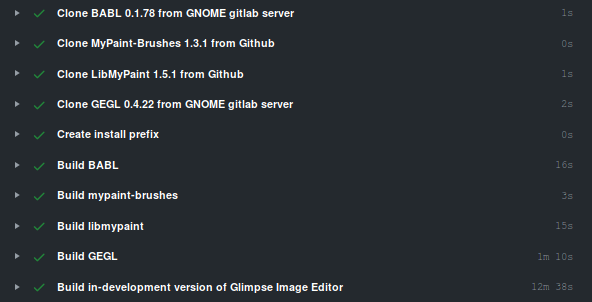
probonopd
on 16 Aug 2020
It's possible I might be misunderstanding the question, as we actually upload build artifacts for jobs on dev branch already: https://github.com/glimpse-editor/Glimpse/actions/runs/210759864
TrechNex
on 16 Aug 2020
The way I work is I edit .yml files and then watch the build on GitHub Actions. Say GitHub Actions has 15 steps, and I am only changing step 13. Still I have to wait for 15 steps each time. What I am looking for is to skip step 1-12 (by re-using last run's resulting state of step 12) because I changed only step 13...
Also I think we are currently doing the equivalent of make clean && make for each build which (especially for quickly testing things) seems a bit wasteful and slow to me. I'm a bit impatient at times ;-/
probonopd
on 16 Aug 2020
It's possible I've been overly-cautious here because I spent five years as a Java middleware microservices developer. I learned to fear cached automation on development/testing branches because it can sometimes mask problems that leap up and bite you in production 😂
I could set it to add an extra build artifact before the unit tests are run if that would be useful?
TrechNex
on 16 Aug 2020
Nevermind, almost there ;)
Btw, if you like we can chat in #AppImage on irc.freenode.net
probonopd
on 16 Aug 2020
We have _something_ at https://github.com/probonopd/Glimpse/releases/tag/continuous... __but...__
- Python needs to be bundled
- Something is broken about fonts/fontconfig - I don't know what yet
- We are getting "Unable to locate theme engine in module_path: "pixmap"," - I don't know why yet
ÀppRunneeds to be edited manually along the lines of
HERE="$(dirname "$(readlink -f "${0}")")"

# Glimpse spefific environment variables
mkdir -p ~/.config/Glimpse/0.2/gradients
export LD_PRELOAD="$HERE"/exec_wrapper.so
export BABL_PATH=$(readlink -f "$HERE"/usr/lib/x86_64-linux-gnu/babl-*)
export GEGL_PATH=$(readlink -f "$HERE"/usr/lib/x86_64-linux-gnu/gegl-*)
export GI_TYPELIB_PATH="$HERE/usr/lib/girepository-1.0:${GI_TYPELIB_PATH}"
export GIMP2_SYSCONFDIR=$(readlink -f "$HERE"/usr/etc/glimpse/2.0)
export GIMP2_DATADIR=$(readlink -f "$HERE"/usr/share/glimpse/2.0)
export GIMP2_LOCALEDIR="$HERE/usr/share/locale"
export GTK_PATH="$HERE"/usr/lib/x86_64-linux-gnu/gtk-2.0

<rest of the existing AppRun>
To edit ÀppRun, run the AppImage with --appimage-extract, then edit squashfs-root/AppRun, then run it.
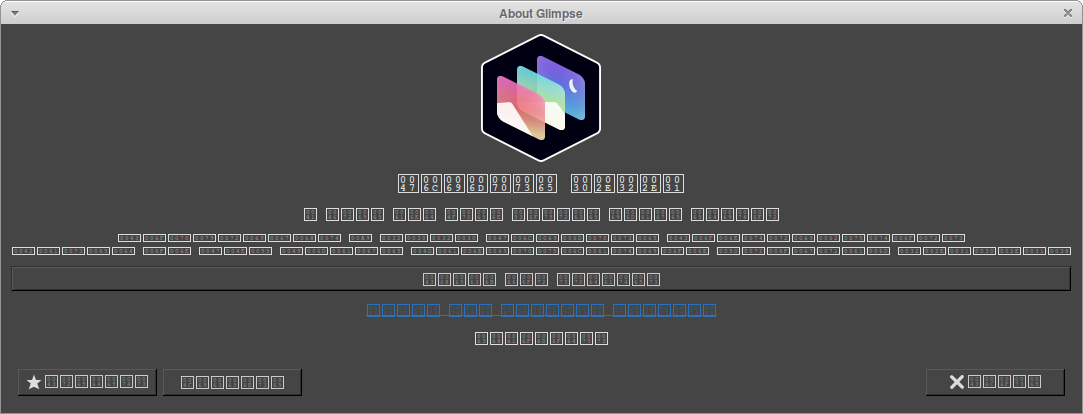
From here on, it's probably mainly porting over all the good things @aferrero2707 has done in https://github.com/aferrero2707/gimp-appimage...
probonopd
on 17 Aug 2020
Thank you for your time this evening @probonopd. It's very cool that you've gotten this far in such a short time.
Hopefully some of the chatter from me on your IRC channel turned out to be helpful 😅
TrechNex
on 17 Aug 2020
Please try the latest build from https://github.com/probonopd/Glimpse/releases/tag/continuous. Here it is, running on KDE neon from __2016__:
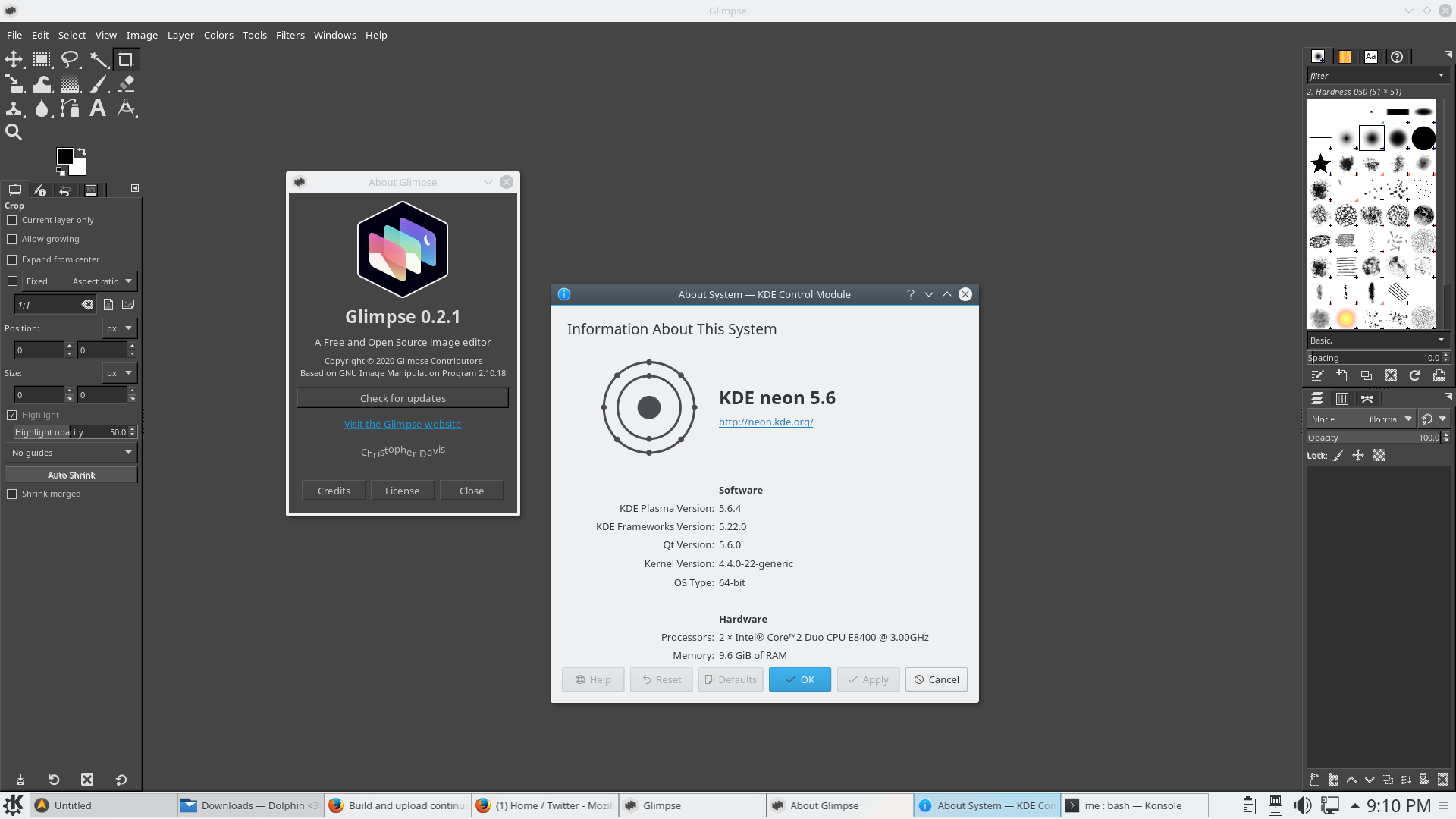
probonopd
on 17 Aug 2020
Confirmed it works fine on Ubuntu 20.04 LTS.
cc @estatra & @Member1221 who may be able to try it out on their Arch setups
TrechNex
on 17 Aug 2020
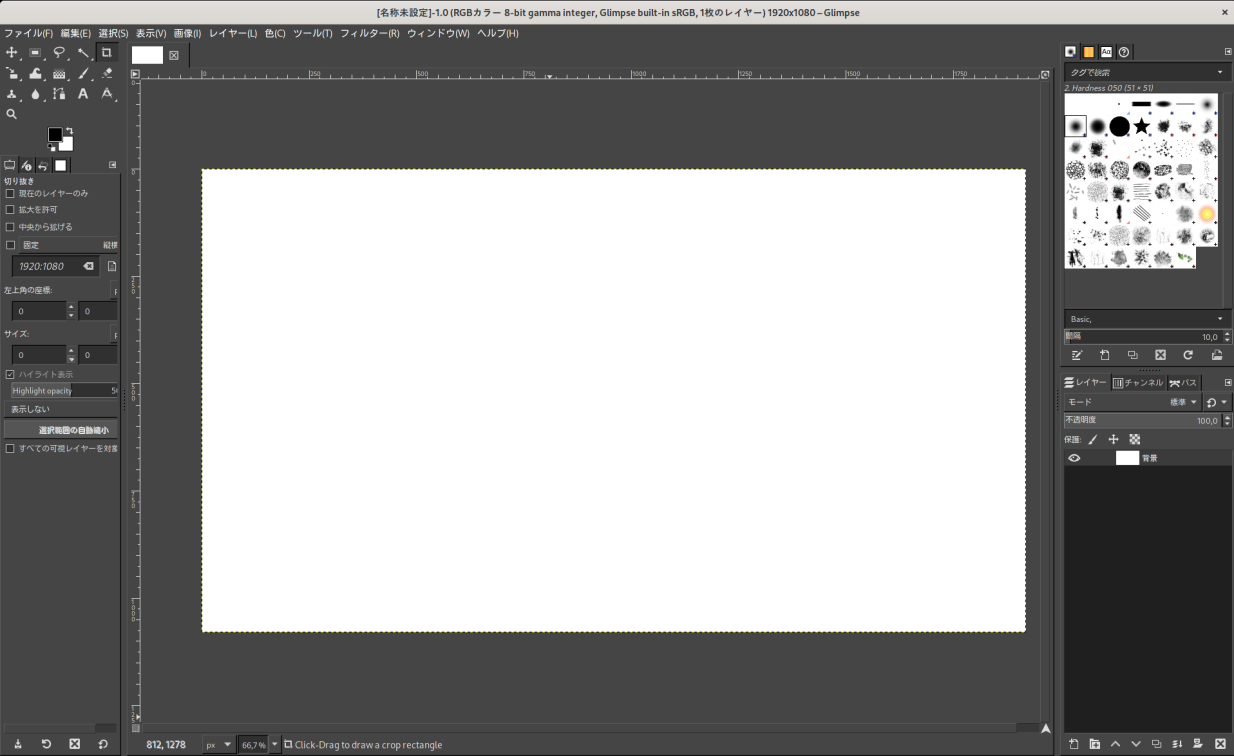
Theming is currently broken as seen above as well languages are not displayed properly in properties.

Also, the application does not seem to respond properly to LANG environment variables, eg setting LANG=da failed to make the application Danish but rather it defaulted to the English version. Don't know whether this is an AppImage issue or general Glimpse issue.
LunaTheFoxgirl
on 17 Aug 2020
Currently only one theme is being bundled. You can decide which one should be bundled.
In AppRun, we are setting
export GIMP2_LOCALEDIR="$HERE/usr/share/locale"
and inside the AppImage, there is
me@host:~/squashfs-root$ find usr/share/locale/da/
usr/share/locale/da/
usr/share/locale/da/LC_MESSAGES
usr/share/locale/da/LC_MESSAGES/libmypaint.mo
usr/share/locale/da/LC_MESSAGES/gimp20.mo
usr/share/locale/da/LC_MESSAGES/gimp20-tips.mo
usr/share/locale/da/LC_MESSAGES/gimp20-std-plug-ins.mo
usr/share/locale/da/LC_MESSAGES/gimp20-script-fu.mo
usr/share/locale/da/LC_MESSAGES/gimp20-python.mo
usr/share/locale/da/LC_MESSAGES/gimp20-libgimp.mo
usr/share/locale/da/LC_MESSAGES/gegl-0.4.mo
Does anyone know why they apparently are not getting used?
probonopd
on 18 Aug 2020
They get used if set in the settings, so maybe it's on Glimpse's side that LANG doesn't work?
Also an other issue, these are the only supported file formats

Is the various image loader dependencies included? (eg. libpng)
LunaTheFoxgirl
on 18 Aug 2020
re: supported file formats, that's potentially on me to fix in the Github Action. Atm we only pull in the bare minimum dependencies to actually build the software.
For a proper AppImage packaging job, I would add all the optional dependencies
TrechNex
on 18 Aug 2020
I faced the same issues as Luna's. Toolbar lacks a lot of icons. Theming is in the GTK bare-bones, and the inverted icons are almost not visible.
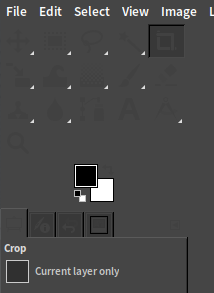
cristianovitorino
on 18 Aug 2020
I have made a recipe for packaging Gimp as an AppImage, this uses a new AppRun that it's able to patch file paths at runtime. I guess that the same can be used for Glimpse. I'll start working on it tomorrow.
https://appimage-builder.readthedocs.io/en/latest/examples/gimp_path_mapping.html
azubieta
on 21 Aug 2020
That's great work @azubieta, and my apologies for doubting you 😅
If you are able to get it done by Tuesday/Wednesday next week, then I can get Github Actions that use it done fairly quickly. We would also be able to release the AppImage for 0.2.0 on Friday (2020-08-28) at the same time as two Windows installers and the Linux builds for Snap Store and Flathub.
(The delay on the Windows build and the fact I have next week booked as vacation time from my day job have helped on that score!)
TrechNex
on 21 Aug 2020
Once @azubieta's solution works, it's probably preferable to mine.
probonopd
on 21 Aug 2020
@azubieta just checking in to see how things are going?
We're about 99% ready for the 0.2.0 release, so I'm approaching the point where I need to make a call about delaying any further. It's not a big deal if we release without the AppImage to begin with, as that gives us some extra time to test it once the recipe is done.
TrechNex
on 25 Aug 2020
Hi! I forked the @probonopd recipe.
Had some issues with the icons but I'm about to finish it. I'll post the download link here for testing in a few minutes. Nevertheless it would be better to wait until the next release so we can do some additional internal testing.
azubieta
on 25 Aug 2020
That sounds fine to me @azubieta. The next "major" release is in January, so I think doing it as a secondary release of 0.2.0 some time in September is probably a good shout. That makes sure there's time to get the AppImage right, set up the automated build jobs, and spend a couple of weeks beta testing it.
TrechNex
on 25 Aug 2020
I'm having a "build on my machine issue" :(
This AppImage was build manually in a docker container following the same instructions I use to build the one in github. It runs fine: https://transfersh.com/147DcC/Glimpse%20Image%20Editor-latest-x86_64.AppImage
This one was build in github using the very same recipe and doesn't load the icons: https://github.com/azubieta/Glimpse/releases/download/continuous/Glimpse.Image.Editor-latest-x86_64.AppImage
@probonopd @TrechNex could you please take a look at my build script and check if I'm missing something:
https://github.com/azubieta/Glimpse/blob/feature/pack_appimage_using_appimage_builder/.github/workflows/dev-g210.yml
azubieta
on 25 Aug 2020
@azubieta try installing gnome-icon-theme.
This is the Ansible file I used to use when we still supported Vagrant VMs in the 0.1.x releases. You might find it handy: https://github.com/glimpse-editor/Glimpse/blob/glimpse-0-1/glimpse-vagrant.yml
TrechNex
on 25 Aug 2020
One difference i can see is that the failing one prints
WARNING: icon 'gimp-default-colors' failed to load. Check the files in your icon theme.
WARNING: icon 'glimpse-icon' failed to load. Check the files in your icon theme.
WARNING: icon 'gimp-swap-colors' failed to load. Check the files in your icon theme.
WARNING: icon 'glimpse-icon' failed to load. Check the files in your icon theme.
WARNING: icon 'gimp-image' failed to load. Check the files in your icon theme.
WARNING: icon 'glimpse-icon' failed to load. Check the files in your icon theme.
WARNING: icon 'gimp-image' failed to load. Check the files in your icon theme.
WARNING: icon 'glimpse-icon' failed to load. Check the files in your icon theme.
whereas the working one doesn't - on a Xubuntu 18.04 system.
__Both seem to contain files with the same names at the same paths__ except for one difference that probably does not matter, ./usr/share/metainfo/org.glimpse_editor.Glimpse.appdata.xml.
Strange...
probonopd
on 25 Aug 2020
Seems to be one of the libs that is to blame. When I copy the libs from the failing AppImage over the libs in the working AppImage like this, then the icons disappear:
cp -r ./fails.AppDir/usr/lib/* ./works.AppDir/usr/lib/
Now one would need to bisect those libs until one has identified the failing one, and then compare them...
- Narrowed it down to something in
usr/lib/x86_64-linux-gnu/ - Narrowed it down to something in
usr/lib/x86_64-linux-gnu/gdk-pixbuf-2.0/
probonopd
on 25 Aug 2020
Nailed it down to
me@host:~/test2$ diff -Naur fails/usr/lib/x86_64-linux-gnu/gdk-pixbuf-2.0/2.10.0/loaders.cache works/usr/lib/x86_64-linux-gnu/gdk-pixbuf-2.0/2.10.0/loaders.cache
--- fails/usr/lib/x86_64-linux-gnu/gdk-pixbuf-2.0/2.10.0/loaders.cache  2020-08-25 23:20:09.614515476 +0200
+++ works/usr/lib/x86_64-linux-gnu/gdk-pixbuf-2.0/2.10.0/loaders.cache  2020-08-25 23:53:16.132661962 +0200
@@ -65,6 +65,13 @@
 "abcdidsc" "xxxx    " 100
 "abcdidat" "xxxx    " 100

+"libpixbufloader-svg.so"
+"svg" 6 "gdk-pixbuf" "Scalable Vector Graphics" "LGPL"
+"image/svg+xml" "image/svg" "image/svg-xml" "image/vnd.adobe.svg+xml" "text/xml-svg" "image/svg+xml-compressed" ""
+"svg" "svgz" "svg.gz" ""
+" <svg" "*    " 100
+" <!DOCTYPE svg" "*             " 100
+
 "libpixbufloader-tga.so"
 "tga" 4 "gdk-pixbuf" "Targa" "LGPL"
 "image/x-tga" ""
For whatever strange reason, the failing AppImage does not contain an entry for libpixbufloader-svg.so in its loaders.cache file whereas the working one does.
@azubieta, try running gdk-pixbuf-query-loaders similar to what the postinst script of libgdk-pixbuf2.0 runs before you create the AppImage. Just a wild guess here.
#!/bin/sh
set -e

LOADERS_DIR=/usr/lib/x86_64-linux-gnu/gdk-pixbuf-2.0/2.10.0/loaders
LOADERS_DIR_OLD=/usr/lib/gdk-pixbuf-2.0/2.10.0/loaders

if [ "$1" = triggered ]; then
    for trigger in $2; do
        if ! [ -d $trigger ]; then
            continue
        fi
        case $trigger in
          $LOADERS_DIR|$LOADERS_DIR_OLD)
            # This is triggered everytime an application installs a
            # GdkPixbuf loader
            /usr/lib/x86_64-linux-gnu/gdk-pixbuf-2.0/gdk-pixbuf-query-loaders \
                $(find $LOADERS_DIR $LOADERS_DIR_OLD -name *.so 2> /dev/null) \
            > /usr/lib/x86_64-linux-gnu/gdk-pixbuf-2.0/2.10.0/loaders.cache || true
            ;;
        esac
    done
    exit 0
fi


# Also handle the initial installation
if [ -d $LOADERS_DIR ] || [ -d $LOADERS_DIR_OLD ]; then
    /usr/lib/x86_64-linux-gnu/gdk-pixbuf-2.0/gdk-pixbuf-query-loaders \
        $(find $LOADERS_DIR $LOADERS_DIR_OLD -name *.so 2> /dev/null) \
    > /usr/lib/x86_64-linux-gnu/gdk-pixbuf-2.0/2.10.0/loaders.cache || true
fi
Maybe running sudo gdk-pixbuf-query-loaders --update-cache before making the AppDir would already help?
probonopd
on 25 Aug 2020
@probonopd thanks a lot, you were right, that fixed the icons issue. I was a bit blind yesterday :)
@TrechNex It would be great to have a checklist for testing
azubieta
on 26 Aug 2020
We have a working github built Glimpse AppImage:
@TrechNex how would you like to proceed ?
azubieta
on 26 Aug 2020
@azubieta I will try to find time later on this week (or over the weekend) to create a new branch with your changes in it.
It's probably better to do it that way because I can "cherry-pick" the right commits, then figure out how the job would need to vary between different branches.
dev-g210branch is more about sanity checking and making sure nothing we did broke anything else.beta-g210needs to create something representative of the final product for testing purposes, but it's okay if some things are missingglimpse-0-2needs to be good enough to be the final product, because those are the reproducible builds we now use in the actual releases
Thank you for your hard work with this. I'm sure I will have questions when I start looking at this more closely myself 👍
TrechNex
on 27 Aug 2020
Sounds great, I'll squash all the changes so it's easier to cherry pick. The good thing is that I just changed the AppImageBuilder.yml and the github action files. So it should be simple to copy, If you want I can make you a PR with only those changes.
azubieta
on 27 Aug 2020
Re-opened issue as it was automatically closed by a PR incorrectly.
I will be opening new PRs in the next week or two that will bring the amazing work @azubieta did in #461 to our dev, beta and release branches so that it is fully reproducible. There will be a period of testing needed (maybe a couple of weeks), but then we would link to a "known good" AppImage for 0.2.0 on our Downloads page.
TrechNex
on 9 Sep 2020
And I'm pleased to say we now have a continuously-released Linux AppImage being produced for the tip of our development branch!
It is built without Python 2 support though, so I will be intrigued to see if Arch Linux users complain about that being missing or not. If not, then the only difference between this and beta build will be creating a ZIP file instead of a Github release.
https://github.com/glimpse-editor/Glimpse/releases/tag/continuous
TrechNex
on 13 Sep 2020
@probonopd merged your change earlier today #474
Do you have any objections to me just saying "If you want to use AppImage, use the one that follows the tip of our dev branch"? I figure that's relatively low maintenance for our project, and would probably work with your update system.
The policy for our project is basically that Flathub/Flatpak is the distribution platform we directly support as our "reference" implementation on Linux, with AppImage being the fallback if you either prefer it or can't get Flatpaks working on your system.
Only downside as far as I can tell is the lack of Python support, but given the number of distros deprecating Python 2 from their package repositories (and upstream's unwillingness to port to Python 3 until GNU Image Manipulation Program 3.0 is released) I think that's a reasonable compromise.
TrechNex
on 17 Sep 2020
Our policy on Snaps for people who are wondering btw is "We support it with Canonical's help".
We host and maintain the metadata they asked us to in build-aux/snap, but we have no direct control or access over the storefront you see on the Ubuntu Store. This is why the "edge" and "beta" channels for Snap are up to date, but you can still only install 0.1.2 through the stable channel.
TrechNex
on 17 Sep 2020
cc @BrainBlasted @Member1221 in case my understanding of project policy re: Linux packaging needs clarifying/correcting 🙂
TrechNex
on 17 Sep 2020
For reference I've submitted our appimage to a number of distribution mechanisms here: https://github.com/AppImage/appimage.github.io/pull/2345
TrechNex
on 20 Sep 2020
I am now closing this issue because the work for it has been completed. Once our website is updated we will make an announcement on social media and to backers.
TrechNex
on 20 Sep 2020
Related issues
 lorendias
·
7Comments
cristianovitorino
·
8Comments
lorendias
·
7Comments
cristianovitorino
·
8Comments
 sketchbuch
·
3Comments
sketchbuch
·
3Comments
 nanjizal
·
4Comments
nanjizal
·
4Comments
 HumanG33k
·
3Comments
HumanG33k
·
3Comments
Most helpful comment
Re-opened issue as it was automatically closed by a PR incorrectly.
I will be opening new PRs in the next week or two that will bring the amazing work @azubieta did in #461 to our dev, beta and release branches so that it is fully reproducible. There will be a period of testing needed (maybe a couple of weeks), but then we would link to a "known good" AppImage for 0.2.0 on our Downloads page.