
 olivieryuyu
All 37 comments
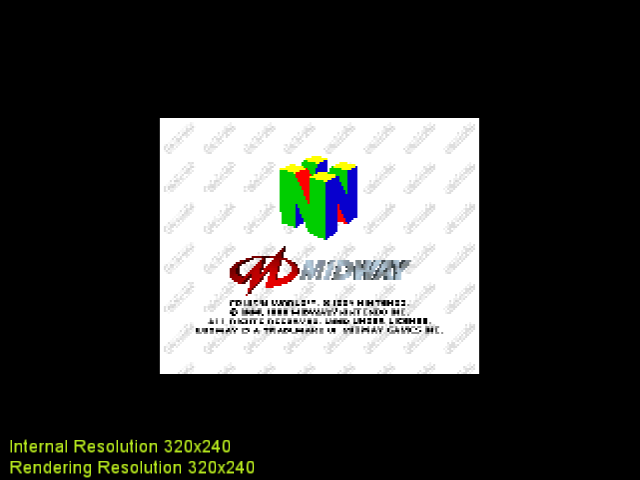
Fixed in LLE.
 AmbientMalice
on 25 Apr 2016
AmbientMalice
on 25 Apr 2016
It is HLE only issue. The game uses ability to set clipping area larger than viewport. I don't know how to do it with GL. Polygons are clipped by RSP in LLE mode, so it is not an issue for LLE.
 gonetz
on 25 Apr 2016
gonetz
on 25 Apr 2016
I'm not an OpenGL specialist but trying to help i came across https://www.opengl.org/archives/resources/faq/technical/clipping.htm "10.030 How do I render to a nonrectangular viewport?" Can this help?
 rcaridade145
on 8 May 2016
rcaridade145
on 8 May 2016
No. Viewport is rectangular. The problem is that part of the logo is out of viewport, and thus clipped.
gonetz
on 8 May 2016
Oh ok. I thought it could be of some use do to this text
"After a single bit is painted in the area outside the viewport, an application may render geometry to either the area inside or outside the viewport. To render to the inside area, use glStencilFunc(GL_EQUAL,0x0,0x1), as the code above shows. To render to the area outside the viewport, use glStencilFunc(GL_EQUAL,0x1,0x1)." .
I thought it would work as if you have two blank sheet, one A4 sheet placed over one A3 sheet. If you consider the viewport the A4 sheet but your drawing is bigger then some of the drawing will end on the A3.So the clipping would have to bigger than the A4 sheet to include the part of the drawing that spilled over to the A3. I believed that linked contained the answer to drawing all of the picture.
Still learning :)
rcaridade145
on 9 May 2016
I never worked with stencil buffer. May be it can help somehow.
gonetz
on 9 May 2016
issue still remains on 3.0
 theboy181
on 2 Feb 2018
theboy181
on 2 Feb 2018
I think that the logo is displayed in its own viewport. GLideN64 seems to have issue with more than one VP.
theboy181
on 23 Aug 2018
GLideN64 have no issues with more than one VP. The problem is that part of the logo is out of viewport, and thus clipped.
gonetz
on 23 Aug 2018
Was this not FB related?
theboy181
on 20 Oct 2018
It is not fb related.
gonetz
on 20 Oct 2018
The game uses ability to set clipping area larger than viewport. I don't know how to do it with GL.
I gave some thought to this concept. OpenGL performs clipping at the vertex post processing step. After the vertex shader has run, if a primitive contains a vertex whose x or y coordinate is outside of the [-w,w] range, the primitive is clipped. Since the vertex post processing is non-programmable, the only way to avoid clipping such a vertex is multiplying its w value by some factor n.
However, due to the perspective divide, this means that all vertices are in the range [1/n,1/n] and thus use a smaller part of the regular viewport.
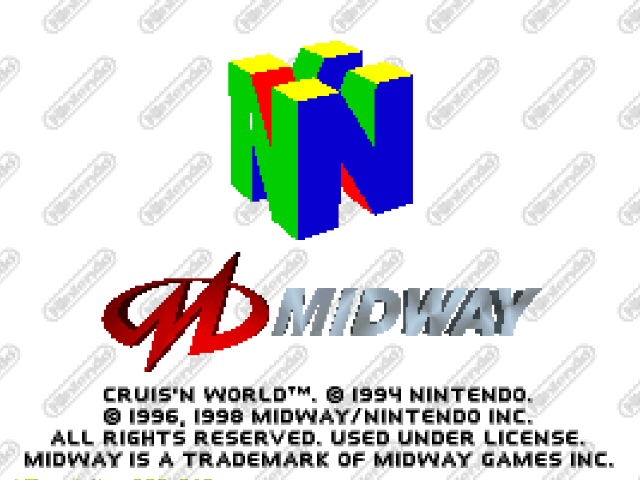
n=2: the logo doesn't get clipped but the image is half the original size.
I thought of compesating for this by changing the viewport transform to map the center of that picture into the whole screen. If w has been multiplied by n, then the normalized device coordinates x_nd and y_nd have been divided by factor n.
The equations for the viewport transform are
x_w = (x_nd + 1) * width/2 + x
y_w = (y_nd + 1) * height/2 + y
where x, y, width and height are the parameters passed to glViewport(x,y,width,height).
As stated before, after changing the w component we have
x'_nd = (1/n)*x_nd
y'_nd = (1/n)*y_nd
Therefore, by defining
x' = x - (n-1)/2*width
y' = y - (n-1)/2*height
width' = n*width
height' = n*height
the function call glViewport(x',y',width',height') gets the same window coordinates as the original ones, thus magnifying the clipping space while mantaining the original geometry.
The goal would be to link this factor n with the call gSPClipRatio() as described in the programming manual.
Upon testing this theory I came up with this pictures,
n=2: clipping space is doubled so the logo shows correctly. however the picture is twice the actual size, which shouldn't be happening in theory

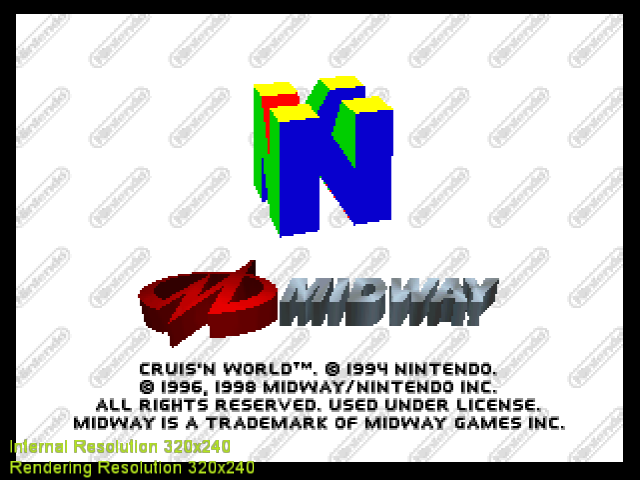
n=1.2: enough to prevent the logo from clipping, slight zoom in the center. showcases the idea better.
Upon some tries, I realized that multiplying the viewport width and height by 2 makes the picture 4 times bigger, even in master branch. I suspect this is happenning because setViewport() is being used both to render the scene and post processing of the framebuffer (like inverting the output in the y direction, perhaps?). If the latter doesn't go through the vertex stage where w is doubled, I would get an image twice the size.
So I though of separating setViewport() for calls related to the rendering of primitives and calls for post processing so that the changes only affect the former cases, but I'm not sure which calls to change and which ones to keep. @gonetz Any hint as to which setViewport() calls I shouldn't modify?
I put some experimental code in this branch in case anyone wants to toy with it.
https://github.com/standard-two-simplex/GLideN64/tree/clip_ratio
 standard-two-simplex
on 31 Mar 2020
standard-two-simplex
on 31 Mar 2020
I did manage to avoid the zooming issue by moving the viewport modifications to GraphicsDrawer.cpp. It seems only GraphicsDrawer::_updateViewport() and _updateScreenCoordsViewport needed it, but I figured this out by trial and error so I'm not sure at all if this is correct.
standard-two-simplex
on 1 Apr 2020
I also implemented the use of gSP.clipRatio (which was already being populated by microcode) to decide whether and how much to magnify. Therefore, clipping is now performed in the same boundaries as for a N64, if I did it all correctly.
standard-two-simplex
on 1 Apr 2020
Cool, thanks! I'll check it.
gonetz
on 2 Apr 2020
I noticed one potential problem with the implementation.
glViewport() only accepts integers as inputs, and this formulas contain a division by two.
x' = x - (n-1)/2*width
y' = y - (n-1)/2*height
Therefore, if the game runs a resolution with odd width or height and on top of that sets clip ratio to a even number, x' and y' will be rounded before being passed to glViewport(), resulting on a 0.5 shift on vertices.
Now, I haven't found a single game with a resolution with odd width or height, even games with "strange" resolutions use even numbered dimensions. But perhaps it is worth writing a warning as a debug message or something.
By the way, I cleaned up the code so it will be neater when commits are squashed into one.
standard-two-simplex
on 2 Apr 2020
@standard-two-simplex I've tested your clip_ratio branch. That math magic works well, I see no issues.
The only issue is that it now works always, since default gSP.clipRatio is 2. It must be 2 for Rej ucodes because some Rej ucodes do not set clipRatio and use default value of 2. Since clipping space is magnified with it, it can be bad for performance. Besides, clipping space magnification has no sense for LLE mode.
So, I corrected code for gSP.clipRatio a little bit. I set it to 1 by default for all ucodes but Rej ones, where default is 2. Everything works as before with clip ratio 1.
The changes are in master.
Thanks, the idea is cool!
gonetz
on 3 Apr 2020
Hmm, Zelda sets clip ratio to 2. Just a note.
gonetz
on 3 Apr 2020
The only issue is that it now works always, since default gSP.clipRatio is 2.
Do you mean that the N64 hardware initializes clipRatio to 2 or that the plugin does it?
Since clipping space is magnified with it, it can be bad for performance.
Increasing clip ratio means less triangles are clipped, so the graphics processor doesn't have to convert one triangle outside the viewport into many triangles that are inside. It has the side effect of rendering outside of the viewport, so if it happens more fragments have to be processed. This is where the scissor test steps in. The scissor test, compares the fragments screen coordinates to a threshold set by the programmer, which discards the fragment if it is outside of the scissor rectangle.
The N64 programming manual encourages increasing the clip ratio and then scissoring to boost performance, because scissoring is less expensive than clipping.
There is some overhead for drawing sections of polygons which are then scissored away, but it is much smaller than the time to draw actual onscreen pixels and is usually faster than clipping.
I'm not sure the same happens in OpenGL. The scissor test is guaranteed to happen before the fragment shader runs in OpenGL 4.2 or with ARB_shader_image_load_store enabled. For older cards, however, there is no guarantee in spite of being completely logical to do the scissor test before.
I think you can expect higher clip ratios to perform as well as clipRatio=1, but the latter may be safer for older cards (perhaps, mobile phone cards too). So you may choose default clip ratio as you prefer.
Zelda sets clip ratio to 2
I thought that not many games would employ it, but now that I realize that setting gDPSetScissor() and gSPViewport() to the same parameters produces the same image with any clip ratio, I'm not so surprised.
standard-two-simplex
on 3 Apr 2020
Beetle Adventure Racing and Extreme G-2 are negatively affected by this change. They look like a game with a broken widescreen hack, with the borders disappearing.
 DonelBueno
on 3 Apr 2020
DonelBueno
on 3 Apr 2020
Confirmed, Beetle Adventure Racing looks like it's zoomed in 2x
 loganmc10
on 3 Apr 2020
loganmc10
on 3 Apr 2020
@gonetz actually I just deleted my shader cache and problem fixed, you should increase the shader storage version
loganmc10
on 3 Apr 2020
Actually I do see a new issue in Beetle Adventure Racing, even after deleting shaders:
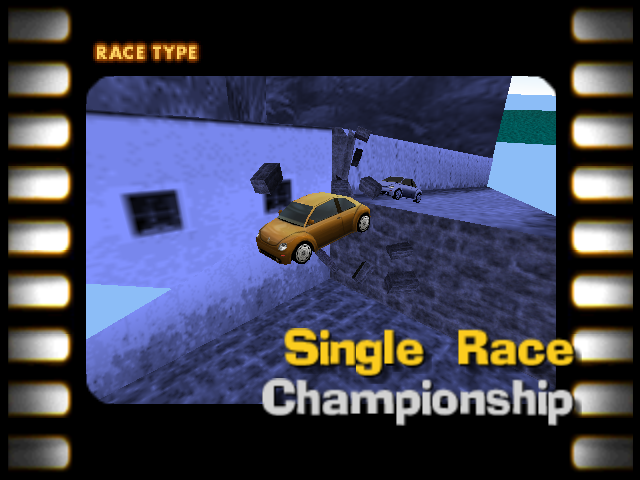
See the top right area of the image. I confirmed that the issue is caused by these commits. This is on an Intel GPU
loganmc10
on 3 Apr 2020
Pretty strange situation with Beetle Adventure Racing. If I enforce clipRatio=1 it works. If I enforce clipRatio=2 it works as well. Same situation with Extreme-G.
The game seems to use clipRatio=2 most of the time, but sometimes switches to clipRatio=1. I suspect that the uniform is not updated in time, so a few triangles end up drawn in the wrong place.
I will look into it in detail tomorrow.
standard-two-simplex
on 3 Apr 2020
Beetle Adventure Racing, assert in _adjustViewportToClipRatio because
gSP.viewport
    vscale  0x7a169d54 {159.500000, 119.500000, 0.499023438, 0.000000000}   float[4]
    vtrans  0x7a169d64 {159.000000, 121.000000, 0.499023438, 0.000000000}   float[4]
    x   -0.500000000    float
    y   1.50000000  float
    width   319.000000  float
    height  239.000000  float
"Render 2D in N64 resolution" is incompatible with this feature.
gonetz
on 4 Apr 2020
I reset master HEAD back. New code is in clipratio branch.
gonetz
on 4 Apr 2020
I fixed clipping issues in BAR: 1ee30e9b2
gonetz
on 4 Apr 2020
Clipratio is 2 by default for F3DEX2 and 1 for F3DEX and other fast3d ucodes, except .Rej which is indeed 2.
olivieryuyu
on 4 Apr 2020
I fixed "Render 2D in N64 resolution" too.
Clipratio is 2 by default for F3DEX2 and 1 for F3DEX and other fast3d ucodes, except .Rej which is indeed 2.
Thanks! I corrected the code accordingly.
gonetz
on 4 Apr 2020
I fixed clipping issues in BAR: 1ee30e9
Cool!! Extreme G-2 is also working well now.
Beetle Adventure Racing, assert in _adjustViewportToClipRatio
I hadn't noticed. Anyway, vertices moving slightly shouldn't be noticeable for 3D but they may create visual artifacts in 2D.
standard-two-simplex
on 4 Apr 2020
I hadn't noticed.
I removed the asserts. Odd value for width and height seems to be normal.
but they may create visual artifacts in 2D.
Yes. May be it is worth to force clip ratio to 1 for 2D.
gonetz
on 4 Apr 2020
May be it is worth to force clip ratio to 1 for 2D.
Done in 3a7b32f365.
I think, this feature can be landed again.
gonetz
on 5 Apr 2020
I notice explosions from eggs in Yoshi's story are half the size.
Edit: My bad, it seems explosions change size with your hp. They work correctly.
standard-two-simplex
on 5 Apr 2020
Ok, I put it in the master again.
gonetz
on 6 Apr 2020
Was the shader storage version incremented? I didn't see it in the commits but I may have missed it
loganmc10
on 6 Apr 2020
The shader storage version was incremented for dithering feature right before.
gonetz
on 7 Apr 2020
Related issues
 NurioHin
·
10Comments
NurioHin
·
10Comments
 Roggieh123
·
7Comments
Roggieh123
·
7Comments
 m4xw
·
15Comments
gonetz
·
14Comments
m4xw
·
15Comments
gonetz
·
14Comments
 fzurita
·
7Comments
fzurita
·
7Comments
Most helpful comment
I also implemented the use of gSP.clipRatio (which was already being populated by microcode) to decide whether and how much to magnify. Therefore, clipping is now performed in the same boundaries as for a N64, if I did it all correctly.
build.zip