Gliden64: Issue with N64 Depth Compare enabled as default
I ran into an issue recently where N64 Depth Compare being enabled by default caused m64p to not be able to startup any of my games, as detailed here:
https://github.com/m64p/mupen64plus-GLideN64/issues/115
loganmc10 suggested I file a report here, so figured I'd go ahead. Only way I got it to work again was by turning off N64 Depth Compare.
 HenWilOliPin
All 48 comments
Can you post your OS and graphics card here as well?
 loganmc10
on 21 Dec 2018
loganmc10
on 21 Dec 2018
Sure, OS is Windows 10 and gfx card is Radeon RX 580, version 22.19.677.257
HenWilOliPin
on 21 Dec 2018
That is a somewhat old version of the GPU drivers is it not? Based on my reading, I assume updating the driver to something with a 24.x or 25.x version would fix the issue for you
loganmc10
on 21 Dec 2018
To explain why I say that:
It appears that older versions of the RX 580 drivers declare support for the GL_INTEL_fragment_shader_ordering OpenGL extension, which when present, will allow N64 Depth Compare to work.
Later versions of the driver remove support for that extension. It's possible that it was included by accident, or perhaps it was so broken they decided to remove it from the driver.
By updating your GPU driver, support for that extension should go away, and N64 Depth Compare will disable itself automatically
loganmc10
on 21 Dec 2018
Interesting. Like I mentioned in the first thread, I just hit update in the device manager and let windows sort it out. Guess I'll try updating again or track down updated drivers manually, but for now I'll just keep it disabled.
HenWilOliPin
on 21 Dec 2018
I would just grab the latest drivers from AMD's site if I was you. If you're doing any kind of gaming it's best to have the latest drivers from the manufacturer
loganmc10
on 21 Dec 2018
Radeon 17.x drivers support N64 style depth compare just fine¹, I used it before, the performance was good and there were never any glitches with it whatsoever. However, the latest 18.x, do not support N64 style depth compare.
It's such a damn pity that AMDs OpenGL drivers are so bad, they seem to be regressing a lot with each new driver version.
¹ https://www.geeks3d.com/20171212/amd-adrenalin-17-12-1-released-opengl-4-5-4-6-vulkan-1-0-65/
 oddMLan
on 21 Dec 2018
oddMLan
on 21 Dec 2018
Radeon 17.x drivers support N64 style depth compare just fine¹, I used it before, the performance was good and there were never any glitches with it whatsoever. However, the latest 18.x, do not support N64 style depth compare.
This is bad news to know. I don't remember when I updated drivers for my Radeon. From my experience, its better to not update drivers if your card is more than 3 years old. So, I have no issues with N64 style depth compare, but if the problem exists with newer drivers, we can't have that option enabled by default. Users will not downgrade drivers just to solve that issue.
 gonetz
on 21 Dec 2018
gonetz
on 21 Dec 2018
If they don't support it, it will just get disabled, the issue is when the GPU drivers have broken implementations of the needed extensions
loganmc10
on 21 Dec 2018
broken implementations
Well, like I said before N64 Depth Compare worked perfectly with the older driver versions, so I don't think that thier implementation for the needed extension was broken
This is bad news to know. I don't remember when I updated drivers for my Radeon.
Yeah, I just had found out about this when I reinstalled Windows recently :(
oddMLan
on 21 Dec 2018
Two more issues with N64 depth compare found:
- 1080 two players node
- Indiana Jones
gonetz
on 10 Jan 2019
Got a new laptop i7 @3.7 Ghz, nVidia NVS 5200M, Windows 10 Pro x64. It has OpenGL 4.6, but doesn't support N64 depth compare.
It also has integrated Intel HD 4000 Graphics, no depth compare support either. :(
 Frank-74
on 10 Jan 2019
Frank-74
on 10 Jan 2019
@gonetz
1080 has issues with my HD Enhanced Hack.
It used to work back in March with no issues.
Please test with this GameShark Code on.
1080 Snowboarding (U)
Improve Draw Distance.
81109A5A 3F00
81109A5C 4612
Note: Broken and March update of GLideN64
This code increases the Draw Distance, and is part of the HD cheat I created for this game. Code works on console, and old versions of of GLideN64 from March. Looks like a possible regression.
Any thing you can do to find its cause would be helpful.
 theboy181
on 10 Jan 2019
theboy181
on 10 Jan 2019
@theboy181 does the hack work with angrylion?
loganmc10
on 10 Jan 2019
Yes, and real HW. As I was explaining it looks like a regression from after the March release. :(
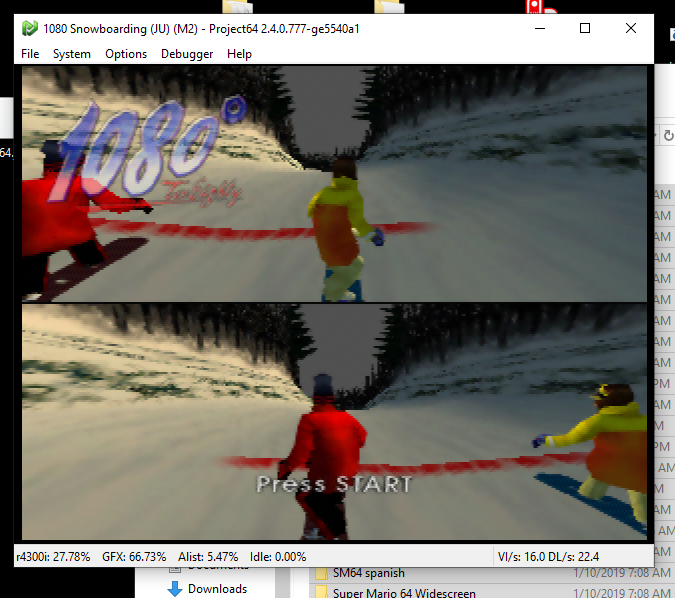
theboy181
on 10 Jan 2019
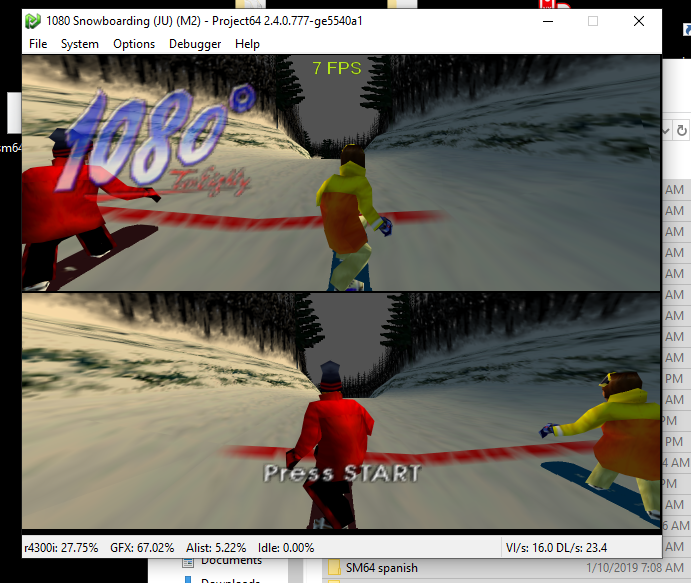
LLE GLideN64
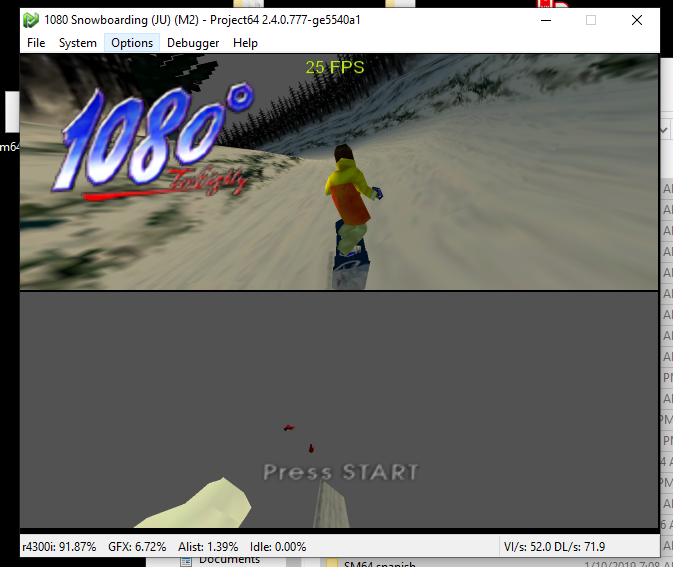
HLE GLideN64
theboy181
on 10 Jan 2019
I tried one of the latest PCSX2 builds recently and they somehow managed to get PS2 Depth compare to a good speed, using the DirectX 11 backend. I remember it coming with a huge performance penalty using the OpenGL backend before, because similarly to older GLideN64 it wasn't caching the triangles. Maybe it's worth taking a look at how they managed to get it fast using DirectX? Although Idk how useful that would be for OpenGL GLideN64...
oddMLan
on 10 Jan 2019
Found the relevant commits... apparently they use stencil buffer?
https://github.com/PCSX2/pcsx2/commit/4328d099c41ca10f02e79db1c702e8892ce06071
https://github.com/PCSX2/pcsx2/commit/ade00f8a7098f629a17e1f01f014733303cd74b2
https://github.com/PCSX2/pcsx2/commit/7928cff3546a913d5089515190a61f6abbc3372f
https://github.com/PCSX2/pcsx2/commit/c3a1cc3801153c38133f5226d7c2d08bc9400fcc
https://github.com/PCSX2/pcsx2/commit/7215618621df2def572ef3cccada3914bdb5e8e6
oddMLan
on 10 Jan 2019
Do they have any videos or screenshot comparisons?
theboy181
on 11 Jan 2019
There's still a performance penalty with the option enabled but not as bad as with OGL+Depth Emulation, maybe DX11+Depth Emulation it's just faster because AMD's OpenGL drivers suck.
oddMLan
on 11 Jan 2019
I fixed compatibility of N64 depth compare with Indiana and 1080.
I have no visible performance penalty when I enable that option: fullscreen + widescreen, works smooth.
I use Radeon drivers 17.7
Thus, the feature is ready to be set by default again. The only obstacle is bug in current Radeon drivers:
https://github.com/gonetz/GLideN64/issues/1970#issuecomment-449242717
gonetz
on 12 Jan 2019
Someone should nag AMD on their forums to re-enable the GL_INTEL_fragment_shader_ordering extension. I don't see a good reason why they would've disabled it in the first place, it wasn't buggy.
oddMLan
on 12 Jan 2019
@gonetz You can add driver version specific checks like done here:
 fzurita
on 12 Jan 2019
fzurita
on 12 Jan 2019
I can, but I don't like such things.
It is better to write good FAQ with setup instructions.
gonetz
on 12 Jan 2019
@fzurita That is not necessary, N64 Depth Compare will get disabled automatically if the driver won't support it. That would help only if there was an alternate codepath, like the Depth Compare without triangle caching, the way it was before, but it is incredibly taxing and probably not worth it.
oddMLan
on 12 Jan 2019
@oddMLan my comment was in regards disable N64 depth compare with drivers that say that they have support for the correct extensions but the extensions don't work correctly.
fzurita
on 12 Jan 2019
Just ran OpenGL Extensions Viewer. Clicked on GL_INTEL_fragment_shader_ordering. Apparently only 41 renderers out of 1181 support that extension.
Could another method be used which would be more compatible? Maybe do it in CPU instead?
Edit: list of all supported cards...
```
All (2 Vendors)
ATI Technologies Inc.
Intel
All (41 Renderers)
67EF:C0(4.5.13497 Compatibility Profile Context 23.20.782.259)
67EF:CF(4.5.13497 Compatibility Profile Context 23.20.788.0)
AMD FirePro D700 (FireGL V)(4.4.13407 Core Profile Forward-Compatible Context FireGL 15.201.2001.0)
AMD FirePro M4150(4.4.13087 Core Profile Forward-Compatible Context FireGL 14.301.1002.1004)
AMD FirePro W7100(4.5.13493 Core Profile Forward-Compatible Context FireGL 22.19.693.256)
AMD FirePro W9100 (FireGL V)(4.4.13092 Core Profile Forward-Compatible Context FireGL 14.301.1010.0)
AMD FirePro W9100(4.5.13445 Compatibility Profile Context FireGL 16.300.0.0)
AMD Radeon (TM) R7 360(4.5.13497 Compatibility Profile Context 23.20.793.1024)
AMD Radeon (TM) R7 M260(4.5.13399 Compatibility Profile Context 15.201.1101.0)
AMD Radeon (TM) R7 M360(4.5.13476 Core Profile Forward-Compatible Context 22.19.171.1024)
AMD Radeon (TM) R7 M370(4.5.13456 Compatibility Profile Context 21.19.164.257)
AMD Radeon (TM) R9 Fury(4.5.13506 Compatibility Profile Context 23.20.15007.1005)
AMD Radeon HD 7700M(4.5.13491 Compatibility Profile Context FireGL 22.19.662.4)
AMD Radeon HD 8330(4.5.13399 Compatibility Profile Context 15.200.1062.1004)
AMD Radeon HD 8400(4.5.13474 Compatibility Profile Context 22.19.162.4)
AMD Radeon HD 8500M(4.5.13506 Compatibility Profile Context 23.20.15017.3010)
AMD Radeon HD 8600(4.5.13399 Core Profile Forward-Compatible Context 15.200.1062.0)
AMD Radeon HD 8600M(4.5.13476 Compatibility Profile Context 22.19.171.1024)
AMD Radeon HD 8950(4.4.13092 Core Profile Forward-Compatible Context FireGL 14.301.1013.0)
AMD Radeon R5 M200(4.5.13491 Compatibility Profile Context 22.19.662.4)
AMD Radeon R5 M230(4.5.13447 Core Profile Forward-Compatible Context 0)
AMD Radeon R5 M330(4.5.13399 Compatibility Profile Context 15.201.1101.0)
AMD Radeon R6(4.5.13416 Compatibility Profile Context 15.300.1025.0)
AMD Radeon R7 200(4.5.13506 Core Profile Forward-Compatible Context 23.20.15017.4003)
AMD Radeon R7 240(4.5.14008 Compatibility Profile Context 21.19.137.1)
AMD Radeon R7 M260(4.5.13417 Compatibility Profile Context 15.200.1062.1004)
AMD Radeon R7 M265(4.5.13474 Compatibility Profile Context 22.19.165.1)
AMD Radeon R9 200(4.5.13506 Compatibility Profile Context 23.20.15017.3010)
AMD Radeon R9 M265X(4.4.13283 Core Profile Forward-Compatible Context 14.501.1003.0)
AMD Radeon R9 M275X(4.4.13283 Compatibility Profile Context 14.501.1003.0)
AMD RADEON R9 M395X(4.5.13464 Compatibility Profile Context 21.19.407.0)
AMD Radeon(TM) HD8970M(4.5.13476 Compatibility Profile Context 0)
AMD Radeon(TM) R2(4.5.13491 Compatibility Profile Context 22.19.662.4)
AMD Radeon(TM) R5 240(4.4.12874 Compatibility Profile Context 14.100.0.0)
AMD Radeon(TM) R6(4.5.13474 Core Profile Forward-Compatible Context 22.19.163.2560)
AMD Radeon(TM) R7 250(4.5.13447 Compatibility Profile Context 20.19.0.32832)
AMD Radeon(TM) R7 M260DX(4.4.13283 Compatibility Profile Context 14.501.1003.0)
AMD Radeon(TM) R7(4.5.13492 Compatibility Profile Context 22.19.677.257)
ASUS R7 250X(4.4.12874 Core Profile Forward-Compatible Context 14.100.0.0)
ATI FirePro V(FireGL V) Graphics Adapter(4.4.13293 Core Profile Forward-Compatible Context FireGL 14.502.1019.0)
Intel(R) HD(3.2.0 - Build 10.18.10.3910)
Frank-74
on 13 Jan 2019
N64 Depth Compare currently requires 1 of 3 possible extensions
GL_INTEL_fragment_shader_ordering
GL_ARB_fragment_shader_interlock
GL_EXT_shader_framebuffer_fetch
loganmc10
on 13 Jan 2019
Mario Golf in-game depth compare issues with N64 depth compare enabled.
gonetz
on 13 Jan 2019
Mario Golf uses depth buffer copy, see issue #312.
It is well emulated with standard FBO texture depth attachment, since it can be fetched in shaders as regular texture. Image texture requires special treatment, as it was done for BAR fog.
gonetz
on 14 Jan 2019
I see no more issues with N64 depth compare except for Mario Golf.
Thus, it can be enabled as default again and disabled for Mario Golf in custom.ini
gonetz
on 7 Feb 2019
@loganmc10 I started to test current version before release and found that many games have performance issues with N64 depth compare enabled. For example, Banjo Tooie (U) runs full-speed without it, but VI drops to below 40 with it. It is pity because that game runs more correct with that option.
gonetz
on 5 Mar 2019
Yeah I suppose even with the improvements it may still not be fast enough on every game for every PC.
I can't think of any further ways to optimize it, unless there is some opportunity to simplify the shader or solve the problem in a completely different manner.
loganmc10
on 5 Mar 2019
Yes, I understand it. My point is that N64 Depth Compare should not be enabled as default atm, even if all graphics glitches will be fixed.
gonetz
on 7 Mar 2019
Another issue on goldeneye results.
Depth compare on
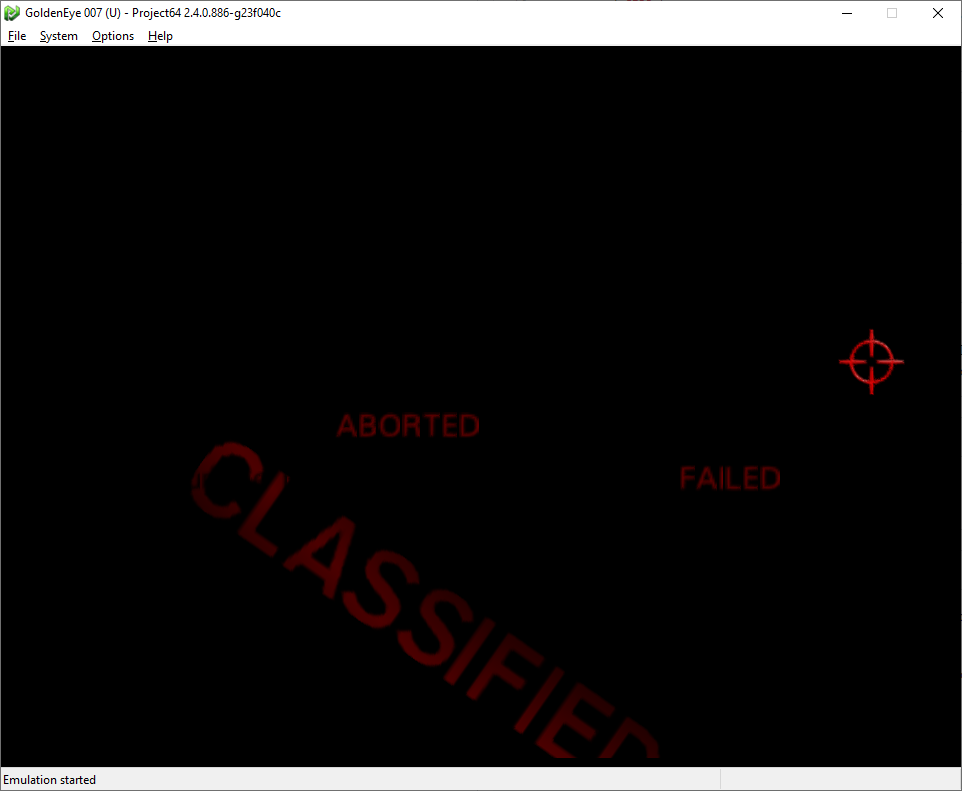
Depth compare off

 Craftyawesome
on 23 Aug 2019
Craftyawesome
on 23 Aug 2019
My system decided to upgrade graphics drivers. So. I have 19.x now.
17.x is the last known version of Radeon drivers, which supported necessary extensions to run N64 depth compare. Pity. I'm thinking to return the old implementation of N64 depth compare, which works slow but without extra extensions.
gonetz
on 8 Feb 2020
Can both methods exist at the same time and the fast can be used if the right extensions exist?
fzurita
on 8 Feb 2020
@gonetz are you able to generate a list of the extensions your graphics card supports? Sometimes vendors have their own implementations of GL extensions, I could see if the card supports any alternatives that might work
It's been so long since I've looked at this, but it looks like it currently requires GL_EXT_shader_framebuffer_fetch and (GL_ARB_fragment_shader_interlock || GL_INTEL_fragment_shader_ordering)
loganmc10
on 8 Feb 2020
Actually reading back through the history, I guess the issue is that newer versions of the AMD drivers remove support for GL_INTEL_fragment_shader_ordering
I wouldn't remove the current fast version, I guess you could probably add back support for the slow code path, but you'd probably have to create a new option where people need to specifically enable it, because there are games that have it enabled in the custom.ini file, and most people would rather have it disabled than use the slow code path
loganmc10
on 8 Feb 2020
https://community.amd.com/thread/240004
https://github.com/GPUOpen-Drivers/AMDVLK/issues/108#issuecomment-524159358
Looks like they had a reason to remove it. Fuck AMD :(
oddMLan
on 8 Feb 2020
@gonetz Actually, your old implementation of N64 depth compare might be faster on AMD HW since GL_fragment_shader_ordering or similar is a proven slow path on AMD HW ...
Also, I doubt GL_Intel_fragment_shader_ordering truly worked as intended on AMD HW prior to GCN5/Vega since I saw in a research paper (I can't remember where exactly) where the authors encountered ordering bugs when using that extension on AMD GPUs. If you used the equivalent feature in D3D11.3/12 where AMD properly implements the feature you'll get a real idea of just bad it is to use that feature on AMD HW ...
 Degerz
on 9 Feb 2020
Degerz
on 9 Feb 2020
Can both methods exist at the same time and the fast can be used if the right extensions exist?
Yes. I already re-implemented it and I'm testing it now.
I wouldn't remove the current fast version, I guess you could probably add back support for the slow code path
Yes, it will fall into slow code path when ext_fetch is false, image textures are supported but fragment ordering extensions are not.
you'd probably have to create a new option where people need to specifically enable it, because there are games that have it enabled in the custom.ini file, and most people would rather have it disabled than use the slow code path
It is a good point, thanks.
Actually, your old implementation of N64 depth compare might be faster on AMD HW since GL_fragment_shader_ordering or similar is a proven slow path on AMD HW
As I remember, optimized N64 depth compare worked pretty fast on my hardware with older drivers.
I will not re-install the drivers to check it though. I just need this feature to run on my current hardware with current drivers, no matter slow or fast.
the authors encountered ordering bugs when using that extension on AMD GPUs.
We have this issue: #2066. It looks as ordering bugs, but it was first reported for NVidia and then confirmed for AMD.
gonetz
on 9 Feb 2020
As I remember, optimized N64 depth compare worked pretty fast on my hardware with older drivers.
I will not re-install the drivers to check it though. I just need this feature to run on my current hardware with current drivers, no matter slow or fast.
In all likelihood it was a buggy implementation if you were using AMD's OpenGL drivers so this invalidates all performance comparisons. Only GCN5/Vega truly supports fragment shader ordering or interlocks as people now know them because AMD just recently added an SOPP opcode to support the feature ...
We have this issue: #2066. It looks as ordering bugs, but it was first reported for NVidia and then confirmed for AMD.
Also it sounds like you're missing a memory barrier after every draw call ? Did you make sure to insert a memory barrier after every draw call ? This is absolutely required because interlocks don't automatically synchronize access to texture data at draw call granularity.
Degerz
on 9 Feb 2020
Also it sounds like you're missing a memory barrier after every draw call ? Did you make sure to insert a memory barrier after every draw call ? This is absolutely required because interlocks don't automatically synchronize access to texture data at draw call granularity.
Ops! Probably not. Do you mean glMemoryBarrier or memoryBarrier for GLSL?
gonetz
on 9 Feb 2020
Ops! Probably not. Do you mean glMemoryBarrier or memoryBarrier for GLSL?
That depends on your use case.
I found this on the OpenGL wiki maintained by Khronos.
The following guidelines may be helpful in choosing when to use coherent memory accesses and when to use barriers.
- Data that are read-only or constant may be accessed without using coherent variables or calling glMemoryBarrier. Updates to the read-only data via API calls such as BufferSubData will invalidate shader caches implicitly as required.
- Data that are shared between shader invocations at a fine granularity (e.g., written by one invocation, consumed by another invocation) should use coherent variables to read and write the shared data.
- Data written by one shader invocation and consumed by other shader invocations launched as a result of its execution ("dependent invocations") should use coherent variables in the producing shader invocation and call memoryBarrier() after the last write. The consuming shader invocation should also use coherent variables.
- Data written to image variables in one rendering pass and read by the shader in a later pass need not use coherent variables or memoryBarrier(). Calling glMemoryBarrier with the SHADER_IMAGE_ACCESS_BARRIER_BIT set in barriers between passes is necessary.
- Data written by the shader in one rendering pass and read by another mechanism (e.g., vertex or index buffer pulling) in a later pass need not use coherent variables or memoryBarrier(). Calling glMemoryBarrier with the appropriate bits set in barriers between passes is necessary.
Or alternatively you could just use another extension such as GL_ARB_texture_barrier if you want draw call ordered access to a texture.
Degerz
on 9 Feb 2020
Truly speaking, I don't quite understand that explanation by Khronos.
Our scenario is quite simple. The plugin uses image texture to keep depth buffer values. Each fragment shader has "depth_compare" function, which reads from and writes to that texture. The function does not use memoryBarrier. The old _slow_ method of synchronization was to draw polygons one-by-one and to call glMemoryBarrier(GL_SHADER_IMAGE_ACCESS_BARRIER_BIT) between draw calls. Logan implemented current _fast_ method using various techniques and extensions. New method insures the synchronization when several polygons rendered by a single draw command, and thus works way faster. Old method was removed. As I see, the current code does not use glMemoryBarrier and memoryBarrier at all.
gonetz
on 9 Feb 2020
It sounds like you want to revert back to your old method or just use glMemoryBarrier on your existing solution ...
TBH, interlocks sounds like one of those ideas that are good on paper but then turns out to be sh*t because of slow hardware implementation like geometry shaders or it doesn't cover cases like this in the end. Once Intel enters the discrete GPU market and if they _ever disrecommend_ using interlocks _altogether_ in the future, I would probably at that point pretend that the feature never exists and never use it again because the idea is already deeply unpopular with AMD and Nvidia. It'd be a crazy turn to see Intel who originally championed (only one left as well to care) this feature to be standardized only for them advise against using it in future HW but that aside since it's getting off-topic ...
I guess were all out of options until desktop IHVs implement "tile memory" just like mobile GPUs to make the case of ordered access between draw calls faster as well ?
If you still want to maximize performance without any advanced features, you can try implementing per-pixel linked lists and store the blend parameters (need this to store blend states), depth, color, next id (serves as a pointer to the previous fragment), primitive order id (need this for sorting) and then sort the fragments by primitive order but that's going to be more complex than any of your previous solutions.
Degerz
on 9 Feb 2020
Another problematic case #2074
 Jj0YzL5nvJ
on 9 Feb 2020
Jj0YzL5nvJ
on 9 Feb 2020
Related issues
 schubertguilherme
·
19Comments
schubertguilherme
·
19Comments
 Roggieh123
·
7Comments
Roggieh123
·
7Comments
 m4xw
·
15Comments
gonetz
·
14Comments
m4xw
·
15Comments
gonetz
·
14Comments
 ImSpecial
·
10Comments
ImSpecial
·
10Comments
Most helpful comment
My system decided to upgrade graphics drivers. So. I have 19.x now.
17.x is the last known version of Radeon drivers, which supported necessary extensions to run N64 depth compare. Pity. I'm thinking to return the old implementation of N64 depth compare, which works slow but without extra extensions.