Gliden64: Please add support for legacy blending on zilmar spec GLideN64.
It would help greatly for Interpreter performance and would run even faster than Glide64/Project64 Video thanks to the Async and threading optimizations.
It already proved to me that it could outperform Glide64mk2 on the other version of it within BizHawk when set to 1x Native and the fastest settings quite a long while back thanks to enabling legacy blending for the speed boost.
For codes,I don't care about sacrificing some visual accuracy because I need Interpreter for real-time ASM changes currently until zilmar finds a solution for writing RDRAM ASM to cache when changes are made and Shygoo adds recompiler support for the Commands window and setting breakpoints.
 retrobenny
All 79 comments
Can someone please point out if I could just use an ini parameter to enable legacy blending?
I won't need the change to UI if I can just exploit that to access much faster performance.
Edit: I can't find the parameters like I was able to in Mupen64Plus AE source files,there is no wiki files.
retrobenny
on 26 Aug 2017
The Zilmar version passes all configuration through the UI.
 AmbientMalice
on 27 Aug 2017
AmbientMalice
on 27 Aug 2017
Don't know how to deal with that. This probably means it lacks the setting parameter within PJ64 source code files as well.
retrobenny
on 27 Aug 2017
@retrobenny I don't want to add legacy blending option to desktop builds. If you really need it, I can make a build specially for you with legacy blending always enabled.
 gonetz
on 12 Sep 2017
gonetz
on 12 Sep 2017
Cool,I can only hope its able to outperform everything else I have tried (it should at least be faster than Glide64) like it did comparing legacy mode GLideN64 to Glide64mk2 on BizHawk regardless of GPU choice.
It beat out Glide64mk2 in performance with legacy blending checked so it should really help for use with Interpreter to debug with BPs in order to make interesting new codes and to improve basic older codes if I can reduce freezing and crashing due to "mods" (corrupted ASM bytes) breaking things too much.
retrobenny
on 13 Sep 2017
Current master with forced legacy blending:
https://drive.google.com/file/d/0B0YqMPjGo3B2bEVHYmRvaWxqQ1E/view?usp=sharing
gonetz
on 13 Sep 2017
Thank you!
I do wish there was someone that would try to make legacy blending render more stuff without impacting on performance like at least the lighting effects in SSB64.
Even a version of Jabo can do that and still have great performance,but that is a D3D closed-source plugin so its hard to compare it to anything else. Having legacy blending optimized for functionality and sustained performance gains would make the plugin the best of both worlds. (e.g. legacy blending on Android would look better with working Smash Bros. lighting since its the only decent performing mode for that port)
retrobenny
on 13 Sep 2017
Forgot to mention,you should be able to set really high scale rendering with less slowdown and enhancements maxed out using this legacy blending build,so that is the largest benefit as a trade-off for several rendering effects missing. For some games,its definitely worth it!
Edit: Still can't touch 16x Multiple Scale,lol! (it keeps overloading and crashing,8x scale worked just fine but 16x wrecks my processors,even 12 doesn't work but I guess because its also larger than 4k by a small margin)
retrobenny
on 13 Sep 2017
There might be a memory leak. My last attempt was to try 10x then apart from other tests seizing up PJ,this next test freaked out and got me stuck waiting for excessive PC lag to eventually wear off and my memory went to 99% usage,this being on an 8GB memory! Might need to figure out what is causing that to happen. I had both Anti-aliasing and Anisotropy maxed out but 8x never gave me any trouble like 10x does. It should've just performed poorly,not overload my system. I wonder if its ironically DK64 to blame since that game was designed around its own memory leak. The last time I tried the public release 2 (modern blending) with extreme scales,it only had really bad performance and didn't cause these issues. I can also blame Windows 10 updates since patch Tuesday is being forced on me now every week or so,still on Win10 1607 though so not CU related.
retrobenny
on 13 Sep 2017
Okay,everything is fine after that and System using up to insane 85MB speeds on my Hard Disk to clean up the mess I made with those overkill settings. Still would suggest searching for memory leaks with excessive/overkill settings.
retrobenny
on 13 Sep 2017
Does legacy blending work really faster on desktop for you? Could you provide some info for comparison?
As for MSAA level, it should be power of two. Thus, 16x should work, 10x and 12x does not. I'll check, what is going on with 16x, if my GPU supports it.
gonetz
on 14 Sep 2017
Using 8x multiple scale doesn't slow to a crawl like it does on standard GLideN64 versions,at least it seems that its staying at a minimal loss of speed. I have yet to test extensively.
retrobenny
on 14 Sep 2017
Unfortunately its oddly getting slowdown much like modern blending when visual effects are onscreen via Windows.
Here is the infamous Banjo-Tooie fire torch lag happening on Windows PJ64 even on legacy blending.
Legacy Blending Lag Windows.pj.zip
A manual 60fps RDRAM patch is in use (80014F50 range and 80015180 range) to test the full force and the HailFire Peaks (Icy Side) oil rig ledge actually runs really well at around 50fps.
Settings;
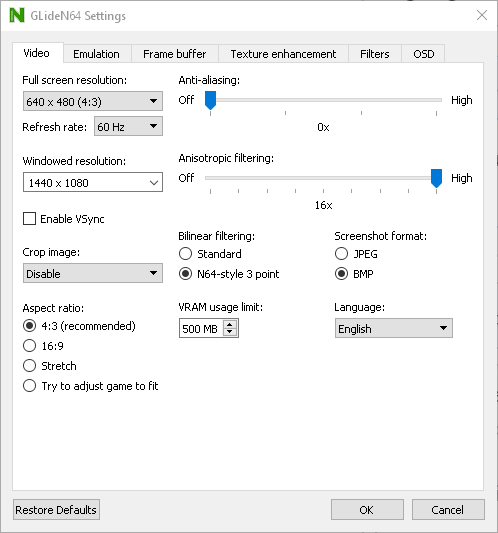
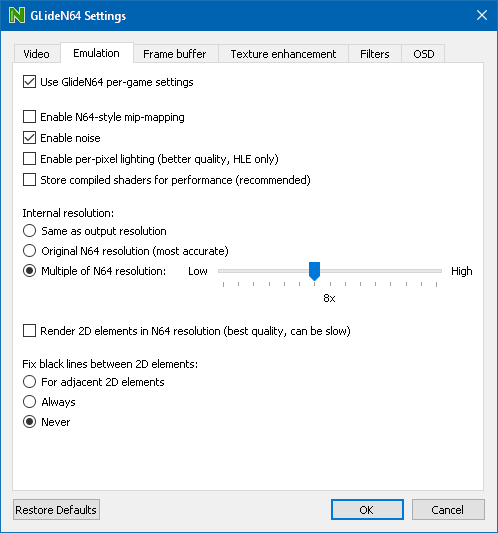
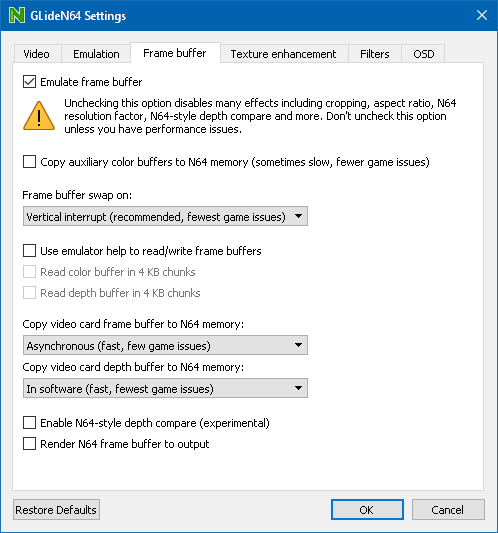
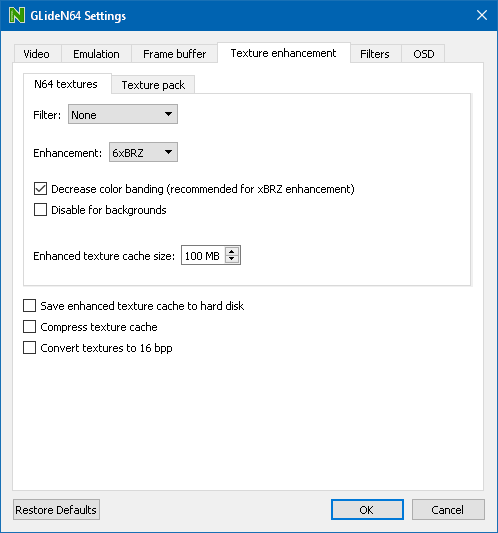
I think performance would be less good if it was caching stuff in my hard drive,so that's why its unchecked to avoid the chance of stutters.
retrobenny
on 14 Sep 2017
The culprit is the "Multiple of N64 resolution" when set to anything higher than 4x like using 6x for example.
Using "Same as output resolution" has less of an impact with the highest resolution I can pick in windowed mode which is 1600x1200 and it runs half decently.
Running on this setting with my favored 1024x768 has it performing really well.
The performance is bad at 8x for me on legacy blending because I can only reach up to 4x on Android so using 4x on Windows (legacy blending) would yield great performance and 8x on Android would likely cause it to struggle.
retrobenny
on 14 Sep 2017
I see, 8x native res, not 8x MSAA
If native res is 320x240 and you use 8x native res, one frame buffer will take circa 20MB. Generally you need 3 color buffers and one depth buffer, 80MB of video memory. Plus you need 2 main color buffers, another 9MB for full hd resolution. Plus textures, shaders etc. Quite a lot for android device. Also, rendering at 2560x1920 (8x native) is a hard task.
gonetz
on 14 Sep 2017
High native res also causes severe performance issues on desktop. Additionally, textures begin to corrupt.
AmbientMalice
on 14 Sep 2017
High native res also makes me get frame drops, even though the game is running at 60 VI/s (or more if frame limiter is disabled)
 oddMLan
on 14 Sep 2017
oddMLan
on 14 Sep 2017
Default settings in GLideN64, I get approx 10 VI/s speed increase with legacy blending, and from 48 FPS to ~60 FPS. I tested with Perfect Dark, latest PJ64, frame limiter off.
However, turning frame limiter back on, and FPS drop back to 48 with legacy blending.
 Frank-74
on 14 Sep 2017
Frank-74
on 14 Sep 2017
I am getting terrible frame drops (60fps looks like 30fps) even on minimal settings with Banjo-Tooie at 60fps much like Android used to do and even though I am on Counter Factor 1 and also with Synchronous mode,even with PJ set to an OC of 2 or 4 I still get these frame drops,all tests of this were on the VI mode which should sustain the full 60VI/s ratio to maintain the 60fps code's smoothness.
This still being the case in a spot that can reach the full 60 on Synchronous mode and the patch is 2 areas because of one locking the pace to 1:1 60fps pacing and the other forcing the frame rendering ratio (frameskip?) to 60fps as well,meaning lag would cause matrix style slowdown with no frame chops.
This means the plugin or emulator is senselessly dropping frames like a madman.
I had recently changed my resolution a few weeks ago for use on my large monitor and that made frame-rates much smoother,so this is caused by the plugin and/or emulator for some reason or some BS caused by patch tuesday's updates which would be unfortunate.
My best 60fps ASM code for Tooie;
Banjo-Tooie (U)
Sixty Frames
81014F54 2402
81014F56 0001
8101518C 2402
8101518E 0001
If you try to do the washing machine Banjo movement glitch (shoot while moving) with this particular code,it zips forward with smoother visuals instead of jagged movement because pacing never goes above the 60fps pace.
retrobenny
on 14 Sep 2017
This result with the 60fps patch code and all speedup settings of PJ64 applied like both caches and Advanced Block Linking.
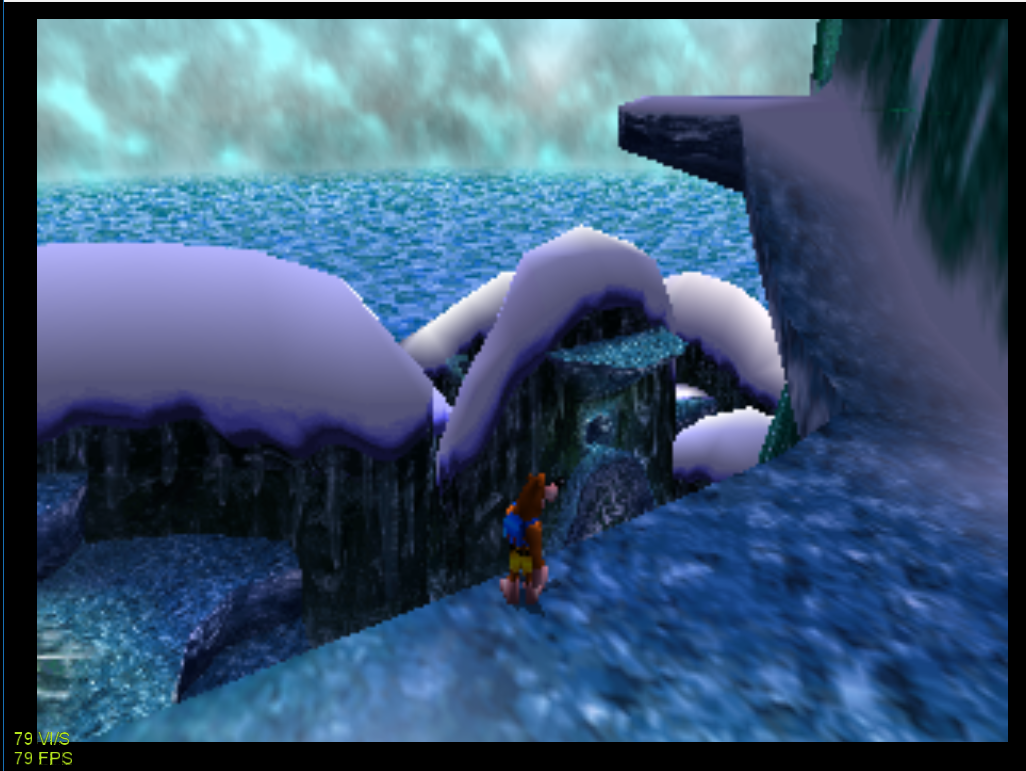
This alone deserves appreciation because I could barely even reach 60fps here with any other plugin and legacy blending with GLideN64 (native resolution) reaches 80fps thanks to Async.
Edit: Mudlord Rice 6.1.4 is toe-to-toe or faster in performance because of its low CPU usage but lacks many features and Jabo 1.7.0.56 is slower than both but still runs pretty fast yet also lacks the shadow transparency but the pause screen buffer works. Any version of Rice can't be used fully for Banjo-Tooie though since the JiggyWiggy challenges are crash-prone with all versions of Rice with glitched rendering.
Edit 2: Using emulator help and turning off both color buffer and depth buffer makes it reach 90-100fps in the same spot so GLideN64 is faster than them all when on legacy blending and these settings!
retrobenny
on 14 Sep 2017
"Using emulator help and turning off both color buffer and depth buffer makes it reach 90-100fps in the same spot"
Does Project64 support FBInfo feature?
gonetz
on 16 Sep 2017
Does Project64 support FBInfo feature?
No.
AmbientMalice
on 16 Sep 2017
This something that one of the mupen devs would car to port over?
 theboy181
on 16 Sep 2017
theboy181
on 16 Sep 2017
It still doesn't work 100% right in mupen64plus, Fbinfo is currently broken in GLideN64, so I'm waiting for it to get fixed so I can properly test it and get it working in mupen64plus
 loganmc10
on 16 Sep 2017
loganmc10
on 16 Sep 2017
Looking forward you hearing about your success.
theboy181
on 16 Sep 2017
Whether or not FBInfo is supported,it still causes fps gains but looks just as broken as it does on Mupen Android,it would be really nice if graphics could work right on FBInfo AND a performance boost can still be had.
Too bad the Conker Interpreter performance is nearly unphased by even this on PJ64 due to a late 1.7 and 2.x related core issue.
retrobenny
on 16 Sep 2017
@retrobenny Please compare legacy_blending build with this shade blending build:
https://drive.google.com/file/d/0B0YqMPjGo3B2QW1TMkRIZmVMSnM/view?usp=sharing
I forced blender shader version optimized by loganmc10.
I need to know, is it slower than legacy blending and how much.
gonetz
on 17 Sep 2017
At first glance,it seems to match performance with legacy blending,but I need to test more thoroughly.
What settings should I use? Should FBInfo be enabled fully?
retrobenny
on 17 Sep 2017
Read last part for proper comparison,it was a pain to test because I had to copy around each plugin since their names match in the selection menu.
I can at least compare another GLideN64 build that isn't either one of those,the forced blender shader version is a decent amount faster than the another build which has the normal modern blending.
Upon comparing the forced legacy blending build to the forced blender shader build,it seems that the blender shader is actually a little faster in normal activities but takes a slightly harder hit with stuff like the fire torch in Tooie. Its a really great performance improvement on at least Banjo-Tooie as of my testing.
I wonder if this improvement would show on Android,as performance is so much more limited with Android so I hope that it would at least perform a bit better if those optimizations could be applied on there as well.
retrobenny
on 17 Sep 2017
I rebuilt it to simplify comparison: It has different internal name and different file name:
https://drive.google.com/file/d/0B0YqMPjGo3B2cGVBTGY3MzU4ZXM/view?usp=sharing
gonetz
on 17 Sep 2017
Thanks.
Okay,this time I did "Same as output resolution" and used 1600 x 1200 as my rez and performance compared between legacy blending and shade blending for normal activities is nearly identical in some spots!
Much of its slower on shade blending but with erratic speedups when set to unlimited fps mode.
At least it runs better than before on modern blending with those improvements.
The main thing left that needs optimization is whatever causes the lag-spikes with visual effects like smoke in many games,particle effects,and that fire torch.
Either that or find a way to make an option to not upscale any of those effects to sustain better performance.
Sorry for the greatly delayed testing and response.
retrobenny
on 18 Sep 2017
@retrobenny Please give me saves for slowdown problems.
gonetz
on 18 Sep 2017
Two saves with the first one being without any codes and the second one with the 60fps patch applied...
Simply zoom in with C-right for the offending lag problem and out with C-left to check the performance at a reasonable distance,savestates are from a fresh save I was using to try and figure out why PJ64 keeps breaking my save file while other emulator versions and Mupen Android both allow it to continue existing and PJ64 1.7 even lets it persist with excessive code glitch abuse and some save states to a certain extent.
But if a save state is made and loaded during a load sequence (never do this obviously) it will indeed break the native save on basically any emulator.
Finding a way to optimize stuff like particle effects/smoke/etc. should hopefully eliminate all of shader blending's major performance impacts seeing that it now matches legacy blending's speed in most normal areas and lag-out views alike.
(Oil Rig Ledge is performing identically between blending types since the last time I checked)
I feel that this fire torch is the best kind of test because of the fairly small area and the angle facing a direction that has nothing beyond it so that nothing else would be causing lag.
Testing in 1600 x 1200 windowed was really advantageous.
I never use fullscreen for anything because it bugs out my setup regardless of the program and I need windowed mode anyway for the ASM code hacking fun.
retrobenny
on 19 Sep 2017
Wait,I just checked legacy blending build and its slow just like the optimized shader blending build.
This is quite the conundrum as normally legacy blending has unchanged performance when zooming into the fire torch,maybe it is a threshold limit when at 1600 x 1200 resolution.
If you compare legacy blending to shader blending on Mupen64Plus FZ Edition,the legacy blending mode is considerably faster,then again modern blending is incredibly slow on Android normally but legacy blending not excessively slowing down when zooming in on the fire torch means something is different now since then.
Guess I will have to wait until @fzurita releases the latest FZ Edition update to check out the most up-to-date GLideN64 which seems to match that optimization build in the commit value tag.
retrobenny
on 19 Sep 2017
Another PJ64 test done,I set resolution to exactly 1920 x 1080 via custom and used 4x scale Multiple of N64 resolution to match closely to Android limits and Optimized Shader Blending has nearly exactly the same performance during the fire torch lag as legacy blending but is not as fast as legacy runs when zoomed out in front of it.
So,technically the bug is indeed fixed or alleviated possibly,I will check some more stuff just in case.
Legacy blending zoomed out runs at about 120+fps of the 60fps hack while Optimized Shader Blending runs just above 100+fps.
A sidenote: Would it be possible to make a forced VI speed syncing for Asynchronous to fix the framedrops?
My example is Dolphin Emu on Dual Core and its dropped frames on normal settings where applying "Sync on Skip Idle" fixes the frame drop issues at the cost of a little performance (and even game clock slowdown for something like Sonic Heroes when at stock clock speed) for the sake of smoothness,so,what could be done to fix the GLideN64 issue of frame dropping when plenty of performance is available due to said frame drops? (note: frame dropping on my end may be related to my monitor bugging out on its hz rate recently when I previously had it at a silky smooth 59hz setting)
Edit: I blame Windows 10 recent updates for this,it wasn't choppy for the longest but now its happening again despite my improved settings. :rage1:
Edit 2: To re-confirm,the optimized shader blending is indeed faster than original modern blending by a huge chunk and competes with legacy blending by being only a small margin slower due to better rendering accuracy but it manages to match performance during the slowdown caused by those heavy effects when zoomed in on them.
retrobenny
on 19 Sep 2017
@gonetz For you build, are you just forcing the GLES2.0 path in ShaderBlender1 and ShaderBlender2? It's interesting that all that additional boolean logic actually improves performance.
 fzurita
on 20 Sep 2017
fzurita
on 20 Sep 2017
@fzurita I believe that's all it is yes. That was first implemented because I got this error on the Raspberry Pi: Support for indexing array/vector/matrix with a non-constant is not mandated in the fragment shader. Re-writing it as a bunch of if statements made the Raspberry Pi happy, so obviously some GLSL compilers can't tell the difference between the 2 implementations, even though they produce the same output.
Writing it as a bunch of if statements makes everything constant, and I think that the GPU can better optimize things when that is the case. I'm guessing when some GPU's see something like muxA[uBlendMux1[1]] they treat it as a non-constant and maybe some optimizations get disabled.
loganmc10
on 20 Sep 2017
Yeah, that would make sense. Maybe we should force that fast path all the time. I would still keep the slow path since it's easier to understand what it's doing, but never activate it.
fzurita
on 20 Sep 2017
Maybe we should force that fast path all the time. I would still keep the slow path since it's easier to understand what it's doing, but never activate it.
I think that is @gonetz's plan (https://github.com/gonetz/GLideN64/pull/1566#issuecomment-330895318)
Regarding original blending implementation : yes, retrobenny says that your optimized version works almost as fast as legacy blending. However I will not completely remove it from code. I'll disable it by #ifdef and keep as reference, because it has much more simple and clean form.
loganmc10
on 20 Sep 2017
Yep :)
gonetz
on 20 Sep 2017
One interesting thing I was thinking about is I'm not sure why increasing rendering resolution reduces performance with that shader. I thought that shader only applied to textures and textures don't change resolution based on rendering resolution.
Is it being applied to the output frame buffer somehow?
fzurita
on 20 Sep 2017
One interesting thing I was thinking about is I'm not sure why increasing rendering resolution reduces performance with that shader. I thought that shader only applied to textures and textures don't change resolution based on rendering resolution.
No I don't think so, fragment shaders are sometimes called "pixel shaders", for instance, from wikipedia:
Pixel shaders, also known as fragment shaders, compute color and other attributes of each "fragment" - a technical term usually meaning a single pixel.
loganmc10
on 20 Sep 2017
By the way @gonetz I just tested this on my laptop (Windows 10, Nvidia). I reset everything to defaults, I disabled shader storage, and I set NativeResFactor to 10.
With current blender code, in the opening Smash Bros scene where the hand pulls a character out, I got ~21 VI/s. With the optimized/GLES2 version, I got 45 VI/s, with legacy blending I got ~55 VI/s.
So I think that confirms @retrobenny's tests, it's not quite as fast as legacy blending, but it's a lot faster! It's encouraging that it works better on an Nvidia GPU too, since they have some of the better drivers out there.
I can't believe this code has just been sitting there for so long, only being applied to GLES2 when it can benefit every platform...
loganmc10
on 20 Sep 2017
I can't believe this code has just been sitting there for so long, only being applied to GLES2 when it can benefit every platform...
I agree :smile: . I'd like to see if the GLES 2.0 method for copying framebuffer is better on intel, because sync mode is kinda slow right now.
 LegendOfDragoon
on 20 Sep 2017
LegendOfDragoon
on 20 Sep 2017
I can't help but wonder what the tech differences are between original and GLES 2.0 shader blending that would cause performance to cave in with massive slowdowns and how 2.0's method runs so amazingly fast in comparison.
I am guessing that the method from GLES 2.0 being so ancient,that modern GLES updates and Desktop GL all have that coding but with heavy optimizations since its existance.
What game has the most complex blending effect that would most likely fail to render correctly on GLES 2.0's shader blending but should render properly on the original shader blending so it can be test viewed for accuracy?
retrobenny
on 20 Sep 2017
What game has the most complex blending effect that would most likely fail to render correctly on GLES 2.0's shader blending but should render properly on the original shader blending so it can be test viewed for accuracy?
The GLES2/optimized build will produce the same output as the original/current blending code. It's just 2 ways of writing the same thing. It was written for the Raspberry Pi/GLES2 because the Raspberry Pi wouldn't accept how the original blending code was written. I re-wrote it in a way that the Raspberry Pi was happy with, and it also happens to run much faster as it turns out.
loganmc10
on 20 Sep 2017
Can you rewrite more of the other slower code too then? ;)
theboy181
on 20 Sep 2017
Can you rewrite more of the other slower code too then? ;)
Lol this was basically just a happy coincidence. The rewritten code looks like it was written by a 10 year old that just learned what a programming language is, which is why we all assumed there is no way that it would work faster or had any benefit outside the Raspberry Pi
loganmc10
on 20 Sep 2017
What? lol!
This makes me wonder if doing all of that (accuracy maintained) could make it possible to run higher accuracy on old GLES 2.0 devices at decent performance instead of how it normally was with nasty visual bugs.
retrobenny
on 20 Sep 2017
I was only kidding, but more happy accidents are appreciated, if you can reproduce them.
theboy181
on 20 Sep 2017
"We're gonna paint a little framebuffer here..."
Can hardly wait to check that Android update whenever its ready.
retrobenny
on 20 Sep 2017
run higher accuracy on old GLES 2.0 devices at decent performance instead of how it normally was with nasty visual bugs.
Most of the GLES2 code does make sacrifices in accuracy. This was one of the only cases where the GLES2 code and mainline code produce the same output. There may be other opportunities though, perhaps around how framebuffers are copied, but it's unlikely and would require testing
loganmc10
on 20 Sep 2017
Maybe compiler does more to optimize simple code written by a 10 year old :)
But cannot make sense of 'intelligent' code, so doesn't optimize at risk of breaking something.
Frank-74
on 20 Sep 2017
Kids are brought into technology teachings so much these days. * jealous *
I have an old FireTV that is collecting dust,but I don't know if it survived the mice attack.
Now I always keep strong light sources at very late hours in the night with my fairly bright lamp on the floor to keep it nicely lit and to have a cozy dim lighting in the room during each night instead of a less powerful night light.
retrobenny
on 20 Sep 2017
Out of curiosity, what is the optimization consist in? Using the if/else statements instead of accesing the arrays with the indices?
You may want to try doing
muxa = muxA[0] * (uBlendMux2[1] == 0) + muxA[1]*(uBlendMux2[1] == 1) + muxA[2]*(uBlendMux2[1] == 2) + muxA[3]*(uBlendMux2[1] == 3)
and similar to get rid of the if/elses. Not sure if it will compile to something faster but you might wanna try.
There might even be nicer ways of acomplishing the same, like a dot product between muxA and some sort of indicator function comparing uBlendMux2[1] to (0,1,2,3).
Edit: Just checked Khronos, you could do muxa=dot(muxA,equal(vec4(uBlendMux2[1]),vec4(0,1,2,3))). Check it compiles, you might need to cast the variables to the right type.
Also corrected a mistake.
 standard-two-simplex
on 20 Sep 2017
standard-two-simplex
on 20 Sep 2017
Out of curiosity, what is the optimization consist in? Using the if/else statements instead of accesing the arrays with the indices?
Yes correct.
(uBlendMux2[1] == 0) is still an if statement, so you still have 4 if statements to determine the value of muxa
There might even be nicer ways of acomplishing the same, like a dot product between vec4[muxA[0]] and some sort of indicator function comparing uBlendMux2[1] to (0,1,2,3).
I'm not sure about anything like that, I don't have any knowledge of GLSL or N64 blending, gonetz might know more
loganmc10
on 20 Sep 2017
(uBlendMux2[1] == 0)is still an if statement, so you still have 4 if statements to determine the value of muxa
I think it is just a comparison, which returns 1 or 0. It definitely doesn't brach code. If/elses usually do, but I don't know how simple cases are compiled.
standard-two-simplex
on 20 Sep 2017
The dot() solution seems pretty elegant, I get this when I try your code though:
shader_compile error: 0(93) : error C1115: unable to find compatible overloaded function "dot(vec4, bvec4)"
any tips?
loganmc10
on 20 Sep 2017
@standard-two-simplex I got it to work by wrapping equal() in vec4().
However muxPM is a mat4, not a vec4, how would you write the dot() statement for that?
loganmc10
on 20 Sep 2017
Probably best to write it manually
muxPM[0]*equals(...)[0]+muxPM[1]*equals(...)[2]+muxPM[0]*equals(...)[3]
Maybe its also possible to do matrix times vector operation, but I'm not sure if you'd get the column or the row (nor which one you need). I think one of the following two should do the trick. More info here.
https://en.wikibooks.org/wiki/GLSL_Programming/Vector_and_Matrix_Operations
muxpm0 = muxPM*vec4(equals(...)) or muxpm0 = vec4(equals(...))*muxPM
I hope the pseudocode is clear. Ask if not.
standard-two-simplex
on 20 Sep 2017
@standard-two-simplex thanks! that works. I opened a PR for this so it can be reviewed, can you take a look and make sure it all looks right? https://github.com/gonetz/GLideN64/pull/1581
loganmc10
on 20 Sep 2017
@loganmc10 Yes, it looks right! I thought the if/elses would be slower, but it seems compilers are smart!!
standard-two-simplex
on 20 Sep 2017
@loganmc10 Yes, it looks right! I thought the if/elses would be slower, but it seems compilers are smart!!
This new method is a little faster than the if/elses, but I am testing on a Windows machine with an Nvidia GPU. That's sort of "as good as it gets" for driver support as far as I know, so there may be many mobile devices or integrated GPU's that have worse compilers than might benefit to a greater extent.
loganmc10
on 20 Sep 2017
As far as comparing performance is concerned,I want to see how Android fares with this heightened level of better performance compared to legacy blending.
If its a mere few VI/s difference when I test 1080P on Android using the "same as output resolution" to get higher than 4x scaling,then it would seem likely that legacy blending won't be needed anymore.
I will need to do extensive testing between enabling heavier settings and toggling legacy blending on each phase for multiple comparisons.
Anxious to test on a quick build of Mupen64Plus FZ Edition with those changes applied if one can be provided sooner rather than later. 😉
It can wait,but it will be a little tough for me the longer I wait.
retrobenny
on 21 Sep 2017
Here is a test build for Android, be aware that touchscreen controls don't work on this build, only controller input. The Android SDK update broke the touchscreen input for some reason....
https://drive.google.com/file/d/0B57Ioy26LWegbTZ3elF2V1lfTFE/view?usp=sharing
fzurita
on 22 Sep 2017
That kinda stinks,I wonder if part of that is why RetroArch has crippled touch input while also related to which version of Android is on the device and/or OTA update versions.
I am still on OTA 5.0.2 with my ShieldTV Pro.
The problem with that RetroArch issue is that it only occurs on some varied devices while the majority of them have touch working.
I will try to test ASAP. 😄
retrobenny
on 22 Sep 2017
Ok, I found the source of the problem, it wasn't the SDK update the broke something.... it was the mupen64plus core update. I need to do something for controller input it seems. So controls won't work at all until I fix that or revert the update.
fzurita
on 22 Sep 2017
By the way, it's only save states that have controller issues. If you restart a game instead of loading a save state, it works fine. Also, you can load a save state after starting a game.
fzurita
on 23 Sep 2017
I never use that resume feature usually anyway,so I could still test it if its really not very broken so much that everything fails to detect anything.
retrobenny
on 23 Sep 2017
New build with working resume option:
[removed]
Last link had an issue, use this one instead:
https://drive.google.com/file/d/0B57Ioy26LWegaEJUZ2M4QUtaNGs/view?usp=sharing
fzurita
on 25 Sep 2017
It won't run,the app immediately fails.
I had to uninstall another beta 0.10 build to install that apk but its not doing anything. :rage2: 💻
retrobenny
on 25 Sep 2017
Huh oh... Sounds like something is not building right. I'll get another build tonight.... Probably a bad build was produced due to Android instant run...
fzurita
on 25 Sep 2017
Ok, one more time. Try this build:
https://drive.google.com/file/d/0B57Ioy26LWegTzdWd0JJQ25FSmc/view?usp=sharing
fzurita
on 26 Sep 2017
Okay,it works fine this time. Why is it always using the same version number?
My tests with Banjo-Tooie at 1080P on non-legacy (freshly made profile with proper settings for rendering) at 60fps via the ASM code and CountPerOp=1 and VI Refresh Rate=3000 has it never getting abnormally sluggish anymore like it usually would.
I got an average of 100VI/s (60fps scale/100fps) in the title screen as the slowest speed and consistent speeds on starting.
It still dips below 60fps due to the HW limitations coupled with port limits but no slower than legacy blending.
The fire torch area still slows down if zoomed in when using 1080P but doesn't heavily impact the system itself at all,as I was able to move the mouse cursor smoothly on my wireless keyboard where previously it would chop along the screen from the huge lag-spike it had.
So both issues can be closed since blending performance is no longer demandingly sluggish at high resolutions compared to the older method and legacy method.
I will bide some time before closing them though to test a little more to check graphical rendering on stuff like SSB64.
retrobenny
on 26 Sep 2017
Lighting is working fine on Super Smash Bros. but I forgot what needs to additionally be enabled to make the red explosion effect appear on the intro sequence.
retrobenny
on 26 Sep 2017
DK64 looks perfect with all transparencies fully functional.
But I ran into a problem with Conker,many rendering effects are buggy on Android.
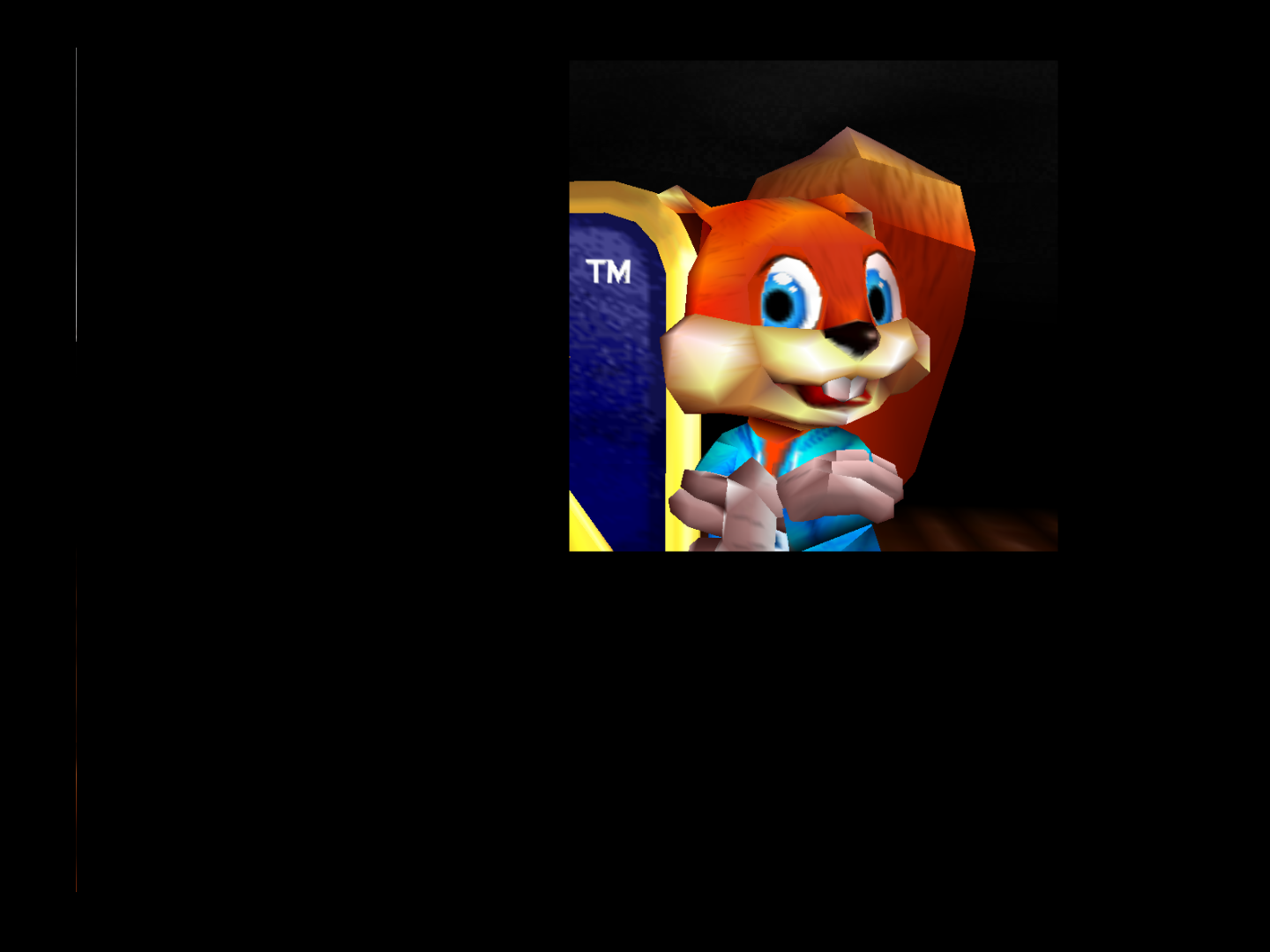
Square instead of circle,shadows are broken and other model lighting quirks.
Edit: Fragment based depth was needed for shadows to work properly but visuals are still buggy with everything else.
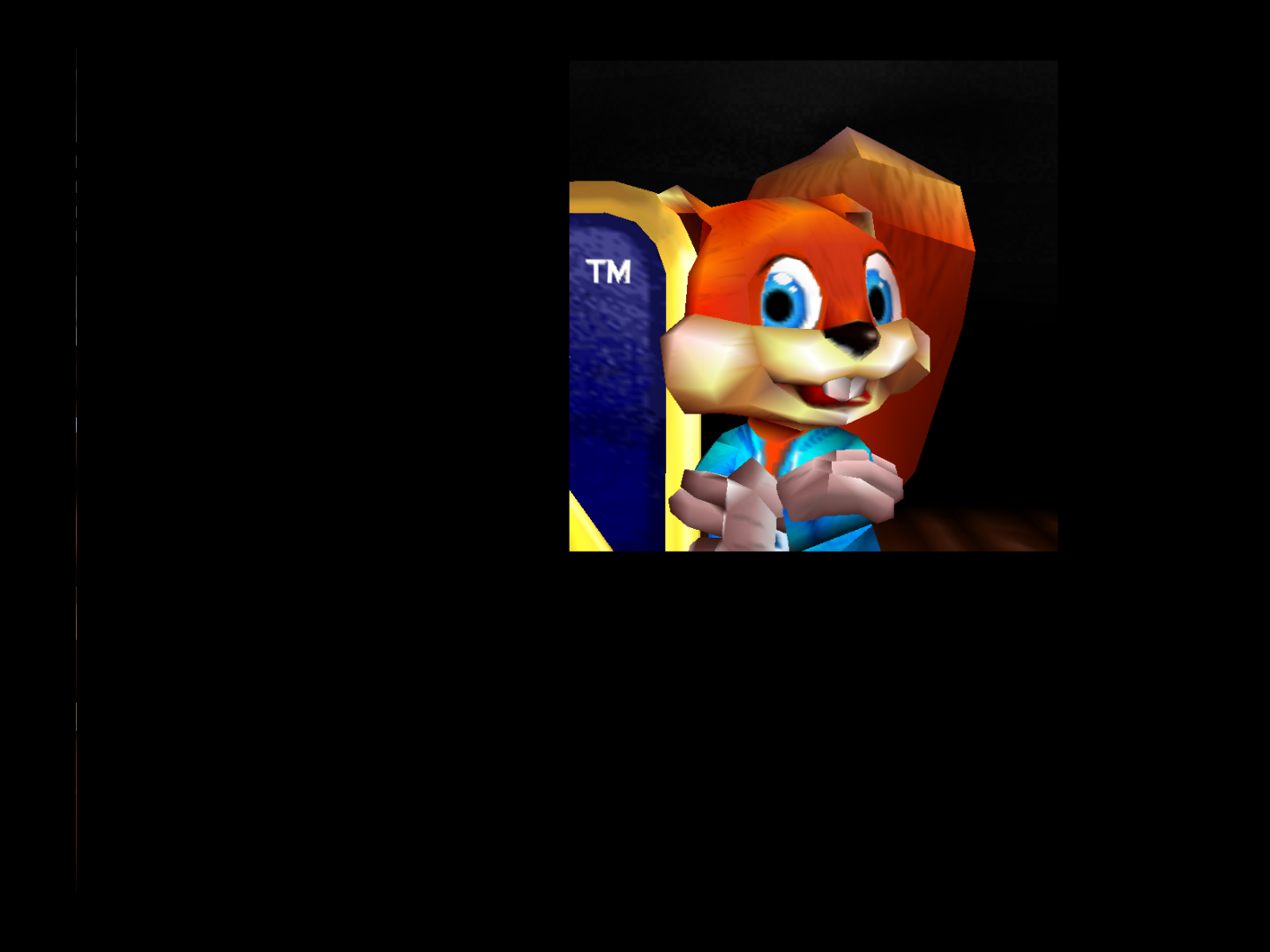
This stinks if anyone wants to check out Conker and wants it to not look weird.
Sorry that both images look the same but that is the issue even with Fragment Depth enabled.
retrobenny
on 26 Sep 2017
To clarify,legacy blending looks the same with the missing effects and fractured lighting chunks.
I can close this issue and post a new form about this Conker issue then.
retrobenny
on 26 Sep 2017
please post it is the same with my desktop PC. What a regression!
 olivieryuyu
on 26 Sep 2017
olivieryuyu
on 26 Sep 2017
What,its doing this on PC as well??? I never encountered it there.
Although,I always use "oringal N64 resolution" within a 1024 x 768 sized window for maxed out performance due to PJ64's horrendous Interpreter lag issue.
Already made it,should I rename my issue post then to apply to PC in some cases like yours?
Edit: Sorry to ask,but can you post an image of this happening on PC to clarify this?
retrobenny
on 26 Sep 2017
Related issues
standard-two-simplex
·
20Comments
gonetz
·
10Comments
gonetz
·
14Comments
 Nerrel
·
8Comments
Nerrel
·
8Comments
 andrea-petrucci-1975
·
8Comments
andrea-petrucci-1975
·
8Comments
Most helpful comment
Current master with forced legacy blending:
https://drive.google.com/file/d/0B0YqMPjGo3B2bEVHYmRvaWxqQ1E/view?usp=sharing