Glide: Glide loads with lower image quality when height is set to wrap_content
I'm a bit new to coding, and I decided to use Glide to load some images, and I get the following result:
Using a width of match_parent and a predefined height will load the image with good quality, but using the following ImageView layout
 <ImageView
            android:id="@+id/item_post_picture"
            android:layout_below="@id/item_post_text"
            android:layout_width="match_parent"
            android:layout_height="wrap_content"
            android:paddingBottom="@dimen/padding_medium"
            android:scaleType="fitCenter"
            android:adjustViewBounds="true"
            android:visibility="gone"
            tools:ignore="ContentDescription" />
Produces a much worse image. The proportions are correct though.

This is how I'm using Glide now:
 ImageView photo = (ImageView) itemView.findViewById(R.id.item_post_picture);
                photo.setVisibility(View.VISIBLE);
                Glide.with(mContext)
                        .load(sPost.getFullPicture())
//                        .fitCenter()
//                        .centerCrop()
//                        .bitmapTransform()
//                        .asBitmap()
//                        .atMost()
                        .into(photo);
I was looking around some other questions from others and tried a combination of the commented lines above, but it didn't change anything.
Should I be setting the height to a defined value and then change it with onMeasure as mentioned in some other posts?
 AllanWang
All 7 comments
Spoke too soon.
Using .dontTransform() did the trick.
AllanWang
on 20 May 2016
It's a bad workaround for this issue, it'll force Glide to load a bigger image than required. Remove the padding from the ImageView and all will be fine, see #939. You can use margin instead.
Nice report though, thanks for creating this.
 TWiStErRob
on 20 May 2016
TWiStErRob
on 20 May 2016
It worked. Thanks for the quick response
AllanWang
on 20 May 2016
I am running Glide version 4.9.0. And I am still getting blurry gif.
My XML:
<ImageView
        android:id="@+id/launch_screen_9890_animation"
        android:layout_width="match_parent"
        android:layout_height="wrap_content"
        android:layout_margin="@dimen/_15sdp"
        android:adjustViewBounds="true"
        android:contentDescription="@string/launch_screen_animation"
        android:focusable="false"
        android:focusableInTouchMode="false"
        android:scaleType="fitXY"
        app:layout_constraintBottom_toTopOf="@id/launch_screen_9890_route_number_txt"
        app:layout_constraintEnd_toEndOf="parent"
        app:layout_constraintStart_toStartOf="parent"
        app:layout_constraintTop_toBottomOf="@id/launch_screen_9890_version_txt"
        tools:src="@drawable/anim_truck_loading" />
And My Java Code:
Glide.with(LaunchActivity9890.this)
                .load(R.drawable.anim_truck_loading)
                .apply(new RequestOptions()
                        .override(Target.SIZE_ORIGINAL)
                        .format(DecodeFormat.PREFER_ARGB_8888))
                .into(imageView);
And I downloaded the Gif from here:
https://dribbble.com/shots/1651085-Load-up-Move-out
 uzair19
on 21 Apr 2019
uzair19
on 21 Apr 2019
It's a bad workaround for this issue, it'll force Glide to load a bigger image than required. Remove the padding from the ImageView and all will be fine, see #939. You can use margin instead.
Nice report though, thanks for creating this.
I'm not giving any padding still image shows low quality
this is my imageview in xml :
<ImageView
                        android:id="@+id/myimageView"
                        android:layout_width="fill_parent"
                        android:layout_height="wrap_content"
                        android:layout_below="@+id/txtView"
                        android:adjustViewBounds="true"
                        android:visibility="gone" />
but .dontTransform() work for me
 bctpl
on 13 Dec 2019
bctpl
on 13 Dec 2019
The issue still occurred if I use different ratio proportions without any padding.
For instance for image view with 16 : 9 ratio for placeholder I will insert rotated image with 9 : 16 ratio.
I suppose the cached image size calculated by inserted 9 : 16 image into 16 : 9 ImageView and then due to android:adjustViewBounds="true" stretched to 9 : 16 with low quality.
<ImageView
        android:id="@+id/image"
        android:layout_width="match_parent"
        android:layout_height="wrap_content"
        android:adjustViewBounds="true"
        android:src="@drawable/16_9_placeholder" />
P.S. .dontTransform() is worked for me also but I would prefer to have smaller correct cached image.
 volic
on 9 Jan 2020
volic
on 9 Jan 2020
It's a bad workaround for this issue, it'll force Glide to load a bigger image than required. Remove the padding from the ImageView and all will be fine, see #939. You can use margin instead.
Nice report though, thanks for creating this.
In case no padding is set, .dontTransform() also works well. Even if you have source and thumbnail images in a good quality and size. Even if thumbnail image equals to source.
Look at the picture: 1) common loading, 2) loading with .dontTransform().
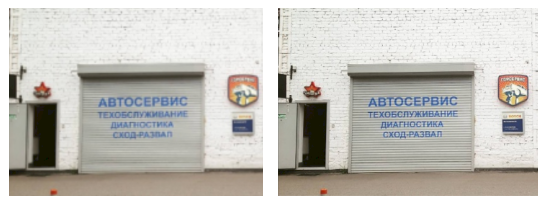
I suppose, Glide doesn't know the size of a resulting ImageView and then Android resizes a Glide image (android:adjustViewBounds="true" and android:scaleType="fitCenter").
Thanks to https://github.com/bumptech/glide/issues/531 .override(SIZE_ORIGINAL, SIZE_ORIGINAL) also works instead of .dontTransform(). See https://github.com/bumptech/glide/issues/781 for better resizing.
 CoolMind
on 18 Sep 2020
CoolMind
on 18 Sep 2020
Related issues
 StefMa
·
3Comments
StefMa
·
3Comments
 technoir42
·
3Comments
technoir42
·
3Comments
 Anton111111
·
3Comments
Anton111111
·
3Comments
 AndroidJohnsonWang
·
3Comments
AndroidJohnsonWang
·
3Comments
 kenneth2008
·
3Comments
kenneth2008
·
3Comments
Most helpful comment
Spoke too soon.
Using .dontTransform() did the trick.