Github: Git identity pane typing email/login text editor bug
Prerequisites
- [x] Put an X between the brackets on this line if you have done all of the following:
- Reproduced the problem in Safe Mode: https://flight-manual.atom.io/hacking-atom/sections/debugging/#using-safe-mode
- Followed all applicable steps in the debugging guide: https://flight-manual.atom.io/hacking-atom/sections/debugging/
- Checked the FAQs on the message board for common solutions: https://discuss.atom.io/c/faq
- Checked that your issue isn't already filed: https://github.com/issues?utf8=✓&q=is%3Aissue+user%3Aatom
- Checked that there is not already an Atom package that provides the described functionality: https://atom.io/packages
Description
When I try to enter something in the Git identity pane, it removes some of the charecters!

Steps to Reproduce
- Open git identity tab
- Try to enter something
Expected behavior:
Don't remove the chars
Actual behavior:
Removes chars randomly
Reproduces how often:
Always
Versions
❯ apm -v
apm 2.5.2
npm 6.14.8
node 12.4.0 x64
atom 1.53.0
python 3.6.8
git 2.29.2.windows.3
visual studio
Additional Information
 aminya
All 26 comments
YES!!! This is very annoying and also the fact that it doesn't remember credentials and one has to enter them every time Atom is started.
 jano23
on 18 Dec 2020
jano23
on 18 Dec 2020
I think what you're seeing is filesystem events fighting keyboard input (D'oh). We probably just shouldn't listen to filesystem events at all, here.
 smashwilson
on 21 Dec 2020
smashwilson
on 21 Dec 2020
Yes. I am having a lot of problems with the Git identity page. Have you made any changes to the git identity tab recently? By recent I mean, in the past couple of months.
Sometimes it even forgets me, as mentioned.

aminya
on 23 Dec 2020
@aminya and @jano23, I think you're both seeing some related problems that I've recently addressed. (These are the primary things I'm trying to release in https://github.com/atom/atom/pull/21782, by the way).
In the meantime, you could install atom/github from source and see if your problems are fixed: https://github.com/atom/github/blob/master/docs/installation.md#live-on-the-edge
smashwilson
on 23 Dec 2020
I just reinstalled the package using "apm install atom/github", but that did not solve the issue.
This git identity page feature itself adds pretty no much no value. Perhaps it could be made optional, or removed until a fix is ready? Currently the package is pretty much unusable. The page keeps coming back with no way to get rid of it.
 juliuscrn
on 6 Jan 2021
juliuscrn
on 6 Jan 2021
I just reinstalled the package using "apm install atom/github", but that did not solve the issue.
Does it address this problem, if not the stutter?
[..] also the fact that it doesn't remember credentials and one has to enter them every time Atom is started. [..]
But I'd expect the typing stutter to be improved on master, too, at least 🤔 I wonder if it's actually installed properly for you. Does the identity panel look like this, with the three buttons at the bottom?
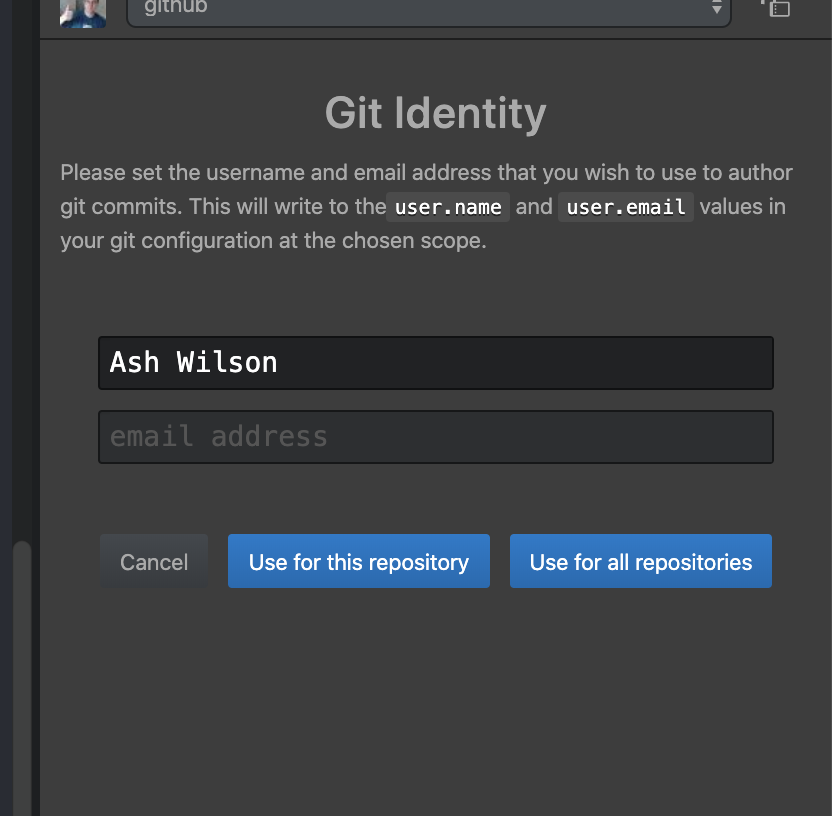
Also, just to make sure, do you have user.email and user.name actually set to nonempty values in your git config? Do you set them globally, or local to a repository?
This git identity page feature itself adds pretty no much no value.
Without it, it's impossible to create commits if you download Atom on a fresh machine. This was a significant functionality gap, especially for beginners, and one that we'd heard about from users pretty much since release. Our ultimate goal was always to allow people to download Atom, open it, and be able to work.
Perhaps it could be made optional, or removed until a fix is ready?
I've thought about taking it out entirely, yes, especially because I have no time to work on this these days and I've been slow-motion dogpiled about it over the past month or so. Unfortunately, shipping _that_ would take about as long as shipping the fixes that I've already put together, so it wouldn't really buy us anything.
smashwilson
on 6 Jan 2021
Thanks, I see. Unfortunately not, the text still disappears just like in the screenshot. I do have user.email and user.name set, and this is why it was a bit confused why am I being asked for it again. I love this package despite this quirk, good luck in the bughunting!
juliuscrn
on 7 Jan 2021
this seems to work now. i am no longer seeing the prompt!
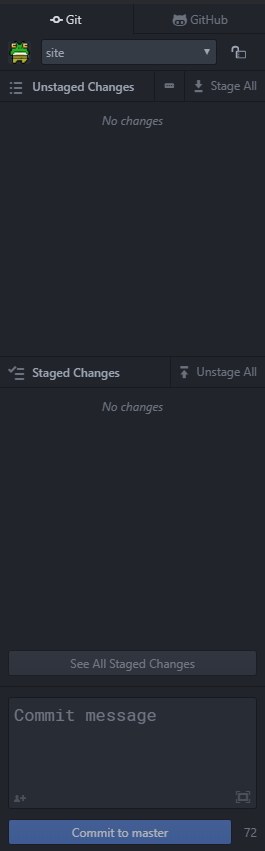
I get the above image for repos that i already connected to and own rather than a identity prompt Ash Wilson mentioned earlier. Didn't want to mention you in case you're busy. Anyhow, thanks for fixing this! 💯
Tested on: Atom 1.54.0 x64 using windows 10 Version 20H2 OS build 19042.746
 gothicserpent
on 15 Jan 2021
gothicserpent
on 15 Jan 2021
In the meantime, you could install atom/github from source and see if your problems are fixed: https://github.com/atom/github/blob/master/docs/installation.md#live-on-the-edge
I installed the latest version via apm install atom/github and it seems that both the ghostwriter bug (removing of characters) and the loss of credentials (#2558) are fixed in this version.
Thank god.
Cheers,
Robin
 RobinZergiebel
on 18 Jan 2021
RobinZergiebel
on 18 Jan 2021
Yes. This is fixed for Atom 1.54.0 x64 (Windows).
 nelson6e65
on 18 Jan 2021
nelson6e65
on 18 Jan 2021
Hi Nelson,
I'm sorry, I still have problems with the identity pane.
Versions: Windows 10, Atom (1.54), Git 2.14.
It is a gamble every time whether Atom finds the identity information stored in HOME.
uv7044@scc-uv7044-01 MINGW64 ~/git
$ cat ~/.gitconfig
# This is Git's per-user configuration file.
# Please adapt and uncomment the following lines:
[user]
        name = Xavier Mol
        email = [email protected]
And not just when starting Atom, but also when changing between Git working directories. Sometimes both credentials are lost, sometimes only one. Typing them in works better now, although the @ notoriously needs to be typed twice. Funny thing is, whenever this happens, ~/.gitconfig is changed, too. So Atom starts up, reads the info from ~/.gitconfig, then a fight starts removing and adding the information, flipping the content of the form fields in and out. Eventually that stops and I have to manually fill in the lost information again.
None of the repositories I'm working with have a .gitconfig, so there should be no conflict there. The issue occurs in safe-mode, too, so plugins can be excluded as source of trouble.
Ciao,
Xavier.
 XMol
on 20 Jan 2021
XMol
on 20 Jan 2021
@XMol maybe check
git config --list --show-origin
and look at https://git-scm.com/book/en/v2/Getting-Started-First-Time-Git-Setup
to verify your git config settings and their paths? maybe check the permissions on the directories and files?
have you tried closing atom, re-initializing git using the first time git setup instructions starting from scratch to make a new git config file and credentials, ensure atom is fully upgraded, and re-opening atom 1.54?
gothicserpent
on 20 Jan 2021
H Rohin,
unrelated to these issues with Atom, I have updated my Windows to such a degree that I needed to install everything again, while keeping my personal data. That means, Atom and Git were reinstalled, too, but all my plugins and settings were retained, including ~/.gitconfig. Now, the identity pane for Git does not even show up anymore, "it just works". 🙂
Ciao,
Xavier.
XMol
on 21 Jan 2021
Now the issues are back. Switching between repositories in Atom still might simply wipe the settings from ~/.gitconfig on occasion:
uv7044@scc-uv7044-01 MINGW64 ~/git
$ ll ~/.gitconfig
-rw-r--r-- 1 uv7044 1049089 121 Jan 22 17:20 /c/Users/uv7044/.gitconfig

uv7044@scc-uv7044-01 MINGW64 ~/git
$ cat ~/.gitconfig
# This is Git's per-user configuration file.
# Please adapt and uncomment the following lines:
[user]
        name =
        email =
Yes, uv7044 is my personal alias.
XMol
on 22 Jan 2021
The form fill seems fixed, but when I switch project it ask me for credentials again and again (#2556/#2555/##2558). 😢
nelson6e65
on 24 Jan 2021
The issue of dissapearing text, flickering avatar icon, removal of git credentials persisting on windows 10 x64 Atom version 1.54.0.
There are only two projects opened in the project pane, both of them are git projects with the .git folder at the root.
 cezar1
on 4 Feb 2021
cezar1
on 4 Feb 2021
The issue of dissapearing text, flickering avatar icon, removal of git credentials persisting on windows 10 x64 Atom version 1.54.0.
Can confirm. And I don't have any of these issues before 1.53.0 :(
 Stikus
on 4 Feb 2021
Stikus
on 4 Feb 2021
The latest Atom nightly build now has the most recent version of this package which includes a fix. Can you install that and verify?
smashwilson
on 4 Feb 2021
Beautiful! It is working for me in the nightly build
jano23
on 4 Feb 2021
any files we could drag over to the current build to make it work?
jano23
on 4 Feb 2021
It's not that easy. That's why there are separate release channels!
You _could_ install this package separately into a stable or beta installation. See the "Live on the edge" section in the installation guide for instructions and trade-offs. But, I'd recommend using nightly until the next release ships. Then you have a chance to let us know if the newer version causes you any more pain... get fixes for _those_ problems more quickly, _and_ save an order of magnitude more developers from experiencing the same problem.
smashwilson
on 4 Feb 2021
Alrighty then. I'll go with purple instead of green for now
jano23
on 5 Feb 2021
Okay, I'm going to close this now since there's no more work to be done in this repo for it. Thanks for the report and for having patience with me 🙇🏻
smashwilson
on 5 Feb 2021
When is this going to be released? Unfortunately I cannot use nightly.
juliuscrn
on 11 Feb 2021
That depends on the core team's schedule. It will certainly be in the next beta release and might be in the next stable.
smashwilson
on 11 Feb 2021
I understand. Thank you for your work on this!
juliuscrn
on 14 Feb 2021
Related issues
 sebastianroming
·
4Comments
sebastianroming
·
4Comments
 JamesChevalier
·
4Comments
JamesChevalier
·
4Comments
 Hreacon
·
3Comments
Hreacon
·
3Comments
 HidekiHokuto
·
4Comments
HidekiHokuto
·
4Comments
 Ben3eeE
·
4Comments
Ben3eeE
·
4Comments
Most helpful comment
YES!!! This is very annoying and also the fact that it doesn't remember credentials and one has to enter them every time Atom is started.