Github: Stage All button not work on huge commits
Description
When I want to commit huge file it not work,(more than 700 files)
Steps to Reproduce
I have files to commit
2.
Click on git stage
3.
Click on stage all button
4.
nothing happen
Expected behavior:
All file moved to staged changes
Actual behavior:
button or function not work
Reproduces how often:
with big commits(more than 700 files)
Versions
1.18.0 x64 Windows
Additional Information
I use gitlab

Steps to repro from @rsese:
git clone https://github.com/atom/atom atom-tmpcd atom-tmpmv .git .git-backatom --safe .- Enable the
Gitpanel - Click "Create repository"
- Click "Stage All"
 khaninejad
All 42 comments
3.
Click on stage all button
4.
nothing happen
Thanks for the report! Just to confirm, does Atom hang at this point and you can't do anything else?
 rsese
on 21 Jun 2017
rsese
on 21 Jun 2017
Oh also maybe /cc https://github.com/atom/github/issues/958 and https://github.com/atom/github/issues/959?
rsese
on 22 Jun 2017
@rsese no, it does not hang. everything work and also button is clickable.
khaninejad
on 22 Jun 2017
Yep, I have this issue too. Click the Stage All button and nothing happens, except for a temporary rise in Atom's CPU usage. There's no crash, but everything slows down in that instance of the editor (if I switch to another project in another window/tab, everything's fine).
I'm on Mac OS X Sierra 10.12.5
Atom : 1.18.0
Electron: 1.3.15
Chrome : 52.0.2743.82
Node : 6.5.0
 ninthart
on 22 Jun 2017
ninthart
on 22 Jun 2017
@khaninejad @ninthart - if you open dev tools (Window: Toggle Dev Tools from the command palette) are there any errors in console?
rsese
on 23 Jun 2017
@rsese Nope, nothing.
ninthart
on 23 Jun 2017
@rsese nothing either
khaninejad
on 24 Jun 2017
Thanks for confirming @ninthart @khaninejad - can you try enabling diagnostics for the GitHub package and share what you see in console after trying to stage all (feel free to redact any private details)? The setting is at Settings > Packages > GitHub > Git Diagnostics.
rsese
on 26 Jun 2017
@rsese OK, I've just tried this, but on clicking the stage all button, absolutely nothing is written to the console, even after turning on Git Diagnostics. I've confirmed that the Diagnostics are on, see below:
git:git rev-parse --resolve-git-dir /Users/XXXXX/Dropbox\ \(Personal\)/work/htdocs/site_directory/.git in /Users/XXXXX/Dropbox\ \(Personal\)/work/htdocs/site_directory
<embedded>:175975 git:git rev-parse --resolve-git-dir /Users/XXXXX/Dropbox (Personal)/work/htdocs/site_directory/.git in /Users/XXXXX/Dropbox (Personal)/work/htdocs/site_directory
<embedded>:175975 git:git config atomGithub.historySha in /Users/XXXXX/Dropbox (Personal)/work/htdocs/site_directory
<embedded>:175975 git:git config atomGithub.historySha in /Users/XXXXX/Dropbox\ \(Personal\)/work/htdocs/site_directory
<embedded>:175975 git:git config atomGithub.currentRemote in /Users/XXXXX/Dropbox (Personal)/work/htdocs/site_directory
<embedded>:175975 git:git config --local --get-regexp ^remote\..*\.url$ in /Users/XXXXX/Dropbox (Personal)/work/htdocs/site_directory
<embedded>:175975 git:git for-each-ref --format=%(refname:short) refs/heads/** in /Users/XXXXX/Dropbox (Personal)/work/htdocs/site_directory
<embedded>:175975 git:git log --pretty=%H%x00%B%x00 --no-abbrev-commit -1 HEAD in /Users/XXXXX/Dropbox (Personal)/work/htdocs/site_directory
<embedded>:175975 git:git status --porcelain=v2 --branch --untracked-files=all --ignore-submodules=dirty -z in /Users/XXXXX/Dropbox (Personal)/work/htdocs/site_directory
<embedded>:175975 git:git config branch.master.remote in /Users/XXXXX/Dropbox (Personal)/work/htdocs/site_directory
<embedded>:175975 git:git config branch.master.atomPrUrl in /Users/XXXXX/Dropbox (Personal)/work/htdocs/site_directory
Hmmm, do either of you see the same behavior with a simple test repo?
@khaninejad from your report you mention you see this when you have a lot of changes, but can you confirm if you have only a small number of changes if you see the same behavior?
rsese
on 28 Jun 2017
@rsese
Hmmm, do either of you see the same behavior with a simple test repo?
Yes
@khaninejad from your report you mention you see this when you have a lot of changes, but can you confirm if you have only a small number of changes if you see the same behavior?
No with small changes everything works fine.
khaninejad
on 28 Jun 2017
@khaninejad did you have any output with diagnostics enabled?
rsese
on 28 Jun 2017
@rsese yes but it is nothing on output.
khaninejad
on 29 Jun 2017
Yes, I did
On Thu, Jun 29, 2017 at 12:12 AM Robert Sese notifications@github.com
wrote:
@khaninejad https://github.com/khaninejad did you have any output with
diagnostics enabled?—
You are receiving this because you were mentioned.
Reply to this email directly, view it on GitHub
https://github.com/atom/github/issues/960#issuecomment-311766202, or mute
the thread
https://github.com/notifications/unsubscribe-auth/AEM1FPi6gvyRq_IjbYJ3OHO1NdqdYpBEks5sIqy-gaJpZM4OAd4N
.>
Sent from iPhone
khaninejad
on 29 Jun 2017
I'm having the same problem as well. Trying to init a local repo with 4500 files, click the Stage All button and nothing happens. I am also unable to stage even a single file manually. Windows 7, Atom 1.18.0.
 ccu-jesseg
on 4 Jul 2017
ccu-jesseg
on 4 Jul 2017
Having the same issue on Windows 10 Version 1703 Build 15063.483 Atom Version 1.18.0 x64 with 1458 files. Able to individually stage only files with deletions, but unable to stage multiple or stage all.
 darkmastermindz
on 16 Jul 2017
darkmastermindz
on 16 Jul 2017
@ccu-jesseg @darkmastermindz - do you also have no errors in console? And can you both confirm if you have the same problem with a simple test repository?
rsese
on 4 Aug 2017
Oh also, if anyone is able to try on the latest beta (1.19.0-beta7), it would be great to know if you still have the same problem there.
rsese
on 4 Aug 2017
Hi!
I'm on version 1.19.0 ia32 and having the same issue as everyone else. I'm getting nothing in the console either.
 courseiam
on 11 Aug 2017
courseiam
on 11 Aug 2017
same issue with OS X version 10.12.6 and Atom 1.19.0
 paulwan
on 12 Aug 2017
paulwan
on 12 Aug 2017
Going to go ahead and tag as a bug since I can reproduce by:
git clone https://github.com/atom/atom atom-tmpcd atom-tmpmv .git .git-backatom --safe .- Enable the
Gitpanel - Click "Create repository"
- Click "Stage All"
Sorry it took me so long to work that out, thanks again everyone for the reports :bow:
rsese
on 15 Aug 2017
Same issue with Windows 10
Atom : 1.20.0 X64
Node : 6.5.0
 writingdeveloper
on 15 Sep 2017
writingdeveloper
on 15 Sep 2017
Same issue with Atom 1.20.1
 audererm
on 20 Sep 2017
audererm
on 20 Sep 2017
Same issue with Ubuntu, 1.20.1, 6123 files to commit cause of the Google Repository I added...
 halesyy
on 6 Oct 2017
halesyy
on 6 Oct 2017
Fixed it for myself on my machine, I tried to do a smaller commit and I got the issue first: insufficient permission for adding an object to repository database which I did some research into and found this Stack Overflow article, once I skipped it all and realised it was a permission issue, I executed the following command on my git repository:
sudo find /usr/dev/your-repo-directory -type d -exec chmod 777 {} \;, notice the 777 is BAD, I was just doing this to test if the permissions would fix it.
That fixed my issue then I could stage, commit and push my current change in the GitHub Atom plugin.
I added the Google_Client library which was the reason that I had 6000+ files in my commit, staged and fixed it!
Hope this helps. :)
halesyy
on 6 Oct 2017
I doubt that this is related to wrong permissions. Issuing a git add . manually from the CLI -- without changing the permissions -- solved the issue for me. If it were related to permissions, manually staging the files shouldn't have worked either..? Additionally, this is also an issue on Windows machines where permissions work completely different.
 niklaas
on 6 Oct 2017
niklaas
on 6 Oct 2017
same problem here
 pushqrdx
on 18 Oct 2017
pushqrdx
on 18 Oct 2017
I believe this bug related to git add
while running Atom, try to run git add . with console then you will see all of unstaged files will be staged successfully then you can commit and push.
khaninejad
on 31 Oct 2017
Problems occur when uploading more than 800 files. So I am currently using Github Desktop. In Github Desktop, there is no problem.
writingdeveloper
on 7 Nov 2017
I am still having this problem with atom 1.25.0 on windows.
I am trying to stage 16 files including some latex files, images and a pdf. Even staging by enter does not work.
 PaulFrost
on 4 Apr 2018
PaulFrost
on 4 Apr 2018
I figure out why it's not working.
When you click to stage button, there is a huge timeout until process complete so it seems not working but if you wait you will see the result.
We need an animation or progress bar.
khaninejad
on 5 Apr 2018
Hi everyone, I also have the problem, is a fix planned for that?
 iboxgithub
on 25 Apr 2018
iboxgithub
on 25 Apr 2018
Solved it by closing Atom, then "git add .", then push.
Reopened Atom and all my files were staged, so I added a Commit message and pushed again, all good. I think there is still set to fix (edge case though, I had 16k new files)
iboxgithub
on 25 Apr 2018
If you're still seeing this issue and have a reproducible case, please open a new issue and fill out the issue template and we'll take a look.
rsese
on 25 Apr 2018
I am having same problem. I am using Debian 9, atom 1.27.2 x64. My project folder has only 19 files to stage. After i closed and opened Atom again, Atom showed 0 file to stage, and my project has no repository, no branch. I had to clone my project to an other folder.
 dmknght
on 15 Jun 2018
dmknght
on 15 Jun 2018
If you can open a new issue and fill out the issue template @dmknght we can take a look.
rsese
on 15 Jun 2018
Same behavior on macOS 10.13.6, Atom 1.30.0. I've created a new branch using Atom, switched to it and then pressed "Stage All" button. Nothing happened, even after 10 minutes. My repo contains approximately 20 files. After closing the Atom, manual commit and push GUI interface also starts working.
 ussserrr
on 9 Sep 2018
ussserrr
on 9 Sep 2018
Thanks @ussserrr - can you create a new issue and fill out the issue template? I can no longer reproduce with the steps I added in the issue body so it's not clear that it's the exact same issue.
rsese
on 10 Sep 2018
@rsese Wasn't be able to dig into the problem, I was needed to do my job quickly.
I now tried to reproduce my issue in the similar way and it seems like there is no such behavior anymore. Though I still periodically faces up weird GUI actions (for example, "Unstaged" panel is remaining empty til I restart the Atom). I'll let you know and create an issue about any new occasions if they'll appear.
ussserrr
on 14 Sep 2018
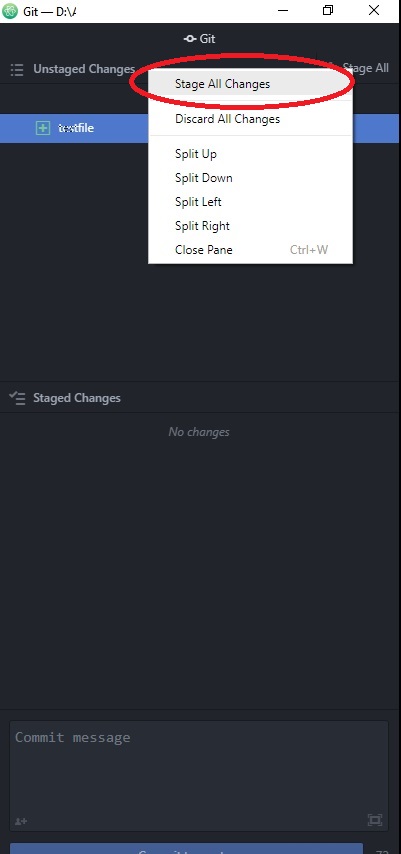
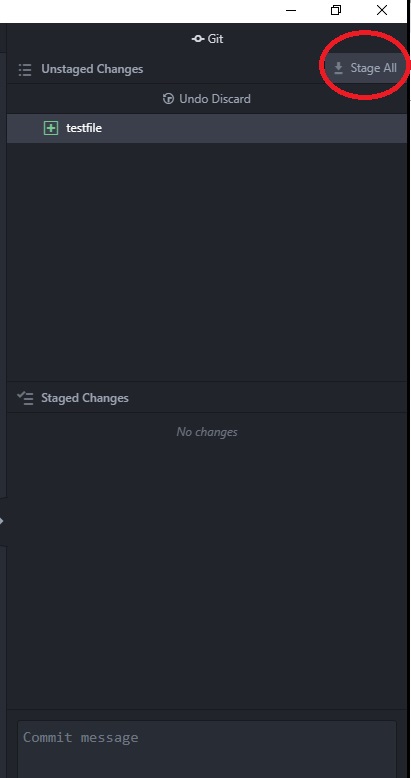
I'm on Windows and have this similar issue. The GUI circled in red are clickable but nothing happens, not even if waited for a long time. Unlike previous comments, I don't have large amounts of files/data to stage when reproducing such behavior. The testing for these screenshots has only one single empty file.
Atom version: 1.31.1
OS: Windows 10 Education 64bit
git add . works and Atom shows the file(s) staged after this command. I can then either push by command or use Atom's push button; both works. It's just the Stage All GUI that's not working.
 alfieyfc
on 5 Oct 2018
alfieyfc
on 5 Oct 2018
@alfieyfc - can you open a new issue and fill out the issue template so we can take a look? Like you mentioned, your issue doesn't involve a large amount of files so does seem like a different issue. Thanks!
rsese
on 17 Oct 2018
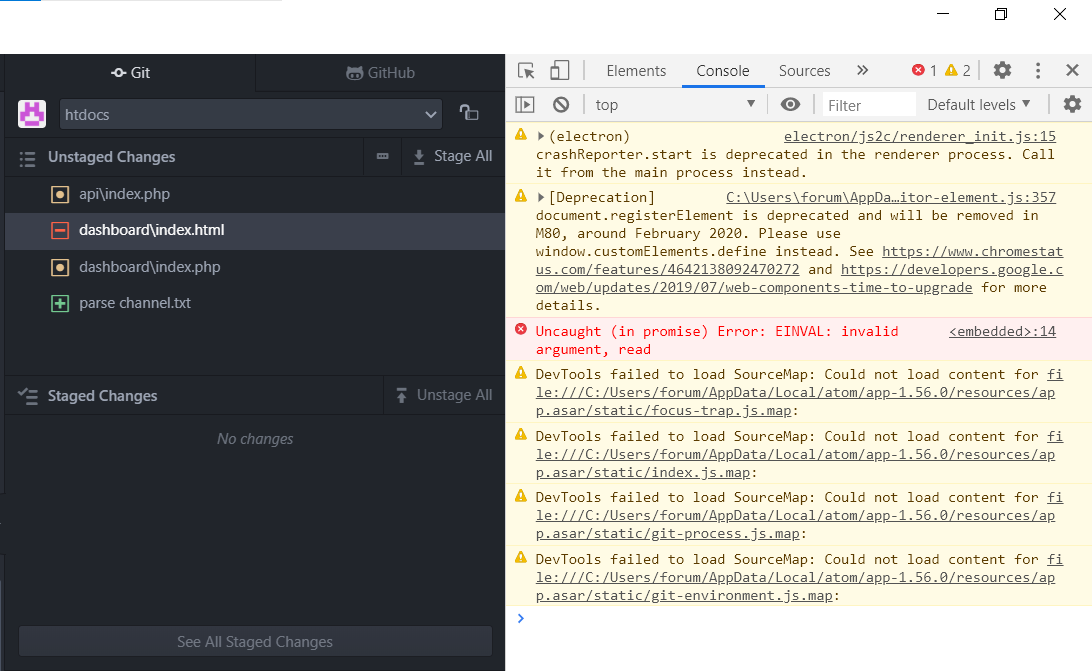
Atiom v1.56.0 The same problem even on 1 file
Windows 10 Pro 20H2
 forumrulez
on 14 Apr 2021
forumrulez
on 14 Apr 2021
Related issues
 joshaber
·
4Comments
joshaber
·
4Comments
 JamesChevalier
·
4Comments
JamesChevalier
·
4Comments
 yubaoquan
·
3Comments
yubaoquan
·
3Comments
 danielbayley
·
5Comments
danielbayley
·
5Comments
 UziTech
·
4Comments
UziTech
·
4Comments
Most helpful comment
Same issue with Windows 10
Atom : 1.20.0 X64
Node : 6.5.0