Github: Allow for caching of Username and PW with GitHub Package
Each time you go to interact with a GitHub repository through Atom, you are required to enter Username and PW. For those using a token due to 2FA, this is painful. Please allow for caching/saving user login information.

 jcastle
All 44 comments
Do you have a credential helper installed for git?
If not, for the moment that's what we're recommending for credential caching, because Atom will be able to use cached credentials entered at the command line and vice versa. In this case we definitely have a usability problem, though. I've contemplated either implementing a "remember me" checkbox or linking out to that help article from the credential dialog itself as a kind of hint.
If you do, then there's something wrong with the way we interact with the credential helpers! To help us diagnose, can you enable "git diagnostics" in the package settings (via the settings view), trigger a fetch, push, or pull, then expand the appropriate git command in your developer console? That will run git commands with GIT_TRACE=1 and enable a lot of logging that'll be helpful for seeing why it isn't working for you.
/cc @mauriciord who's reported encountering a similar issue in #436.
 smashwilson
on 24 May 2017
smashwilson
on 24 May 2017
@smashwilson, took me a while to check this out. Been using terminal in the meantime. Have credential helper installed and ran some tests on Atom 1.18 with it. Still didn't change the login process to push files to GitHub. Not a big deal to regenerate the token as PW but still easier to use terminal than to generate on a fresh start. I use terminal for file manipulation so usually have open. Ultimately need a way to store credentials in Atom/Git.
Thanks for you feedback, def a great product, keep it up!
jcastle
on 27 May 2017
@jcastle Hmm. Can you try the PATH workaround in #436?
smashwilson
on 29 Jun 2017
@smashwilson Hi! Same problem here as @jcastle described above. I tried the PATH workaround in #436 but no luck. Really looking forward to a Remember Github credentials button :) Meanwhile, will have to suffer with the username/password copy-pasta at each push/pull.
 Bohdan-Khomtchouk
on 10 Jul 2017
Bohdan-Khomtchouk
on 10 Jul 2017
@Bohdan-Khomtchouk did you also add the command export PATH=${PATH}:$(git --exec-path) to your ~/.bash_profile file (and reboot)? That finally did it for me, after I'd tried all the other suggestions/steps.
 rcrooks
on 11 Jul 2017
rcrooks
on 11 Jul 2017
Just to review the issue's history here:
- Ticket 861 closed as a duplicate of ticket 1033
- Ticket 1033 closed as a duplicate of ticket 861
- Ticket 436 closed referencing ticket 1033
Maybe I'm missing something. How is this helpful @rsese?
 jonnylink
on 22 Aug 2017
jonnylink
on 22 Aug 2017
@jonnylink #861 (this issue) is not closed.
 Ben3eeE
on 22 Aug 2017
Ben3eeE
on 22 Aug 2017
My mistake, but it was closed. All three tickets were closed on the same day with a weird circular logic. I'm not trying to pick a fight—I'm just really hoping that this issue will get an honest resolution before being closed again.
My apologies.
jonnylink
on 22 Aug 2017
@jonnylink Apologies for the confusion. Maybe it would be helpful if you could point out when this issue was previously closed, as it appears to me that this issue hasn't been closed since it was opened.
 50Wliu
on 22 Aug 2017
50Wliu
on 22 Aug 2017
I join this issue as it's a pain to rewrite credentials over and over.
I hope we can get something here
 AGraber
on 22 Aug 2017
AGraber
on 22 Aug 2017
@50Wliu ....it wasn't. I'm a dope. Sorry. Got myself confused looking at all the tickets.
jonnylink
on 22 Aug 2017
No problem - happens sometimes, given the amount of issues :).
Have you tried @smashwilson's suggestions in https://github.com/atom/github/issues/861#issuecomment-303553662?
50Wliu
on 22 Aug 2017
Why not do a GitHub OAuth process so you wouldn't have to do this stupid authenticating thing over and over and over?
 CmdrNorthpaw
on 29 Aug 2017
CmdrNorthpaw
on 29 Aug 2017
@OctoPenguin That's fine, and I support your idea, but it wouldn't work with Bitbucket or other services. You need to think of a universal Git solution.
 rafaelalvessa
on 29 Aug 2017
rafaelalvessa
on 29 Aug 2017
Well, since GitHub boasts it's integration with Atom, just continue boasting and make it's integration better. For other Git services, maybe you could have a built-in credential caching function.
CmdrNorthpaw
on 29 Aug 2017
What I don't get is:
- Github will happily accept my ssh key from a git CLI commit
- Atom can use and uses that key from some packages
- 1+2=
 netizen-ais
on 29 Aug 2017
netizen-ais
on 29 Aug 2017
I tried running git config --global credential.helper wincred as per this help page someone linked near the top of this thread. I also tried git config --global credential.helper cache as mentioned by someone in this duplicate issue. Neither seemed to work (the first command actually did seem to work but only until I restarted Atom for some reason).
The following seemed to fix the problem for me on Windows:
- Go to Control Panel > User Accounts > Credential Manager.
- Click the Windows Credentials button.
- Under Generic Credentials there was a credential called
atom-github/https://api.github.com.
Edit this credential to contain your GitHub username and password.
(For me previously it only contained a password.)
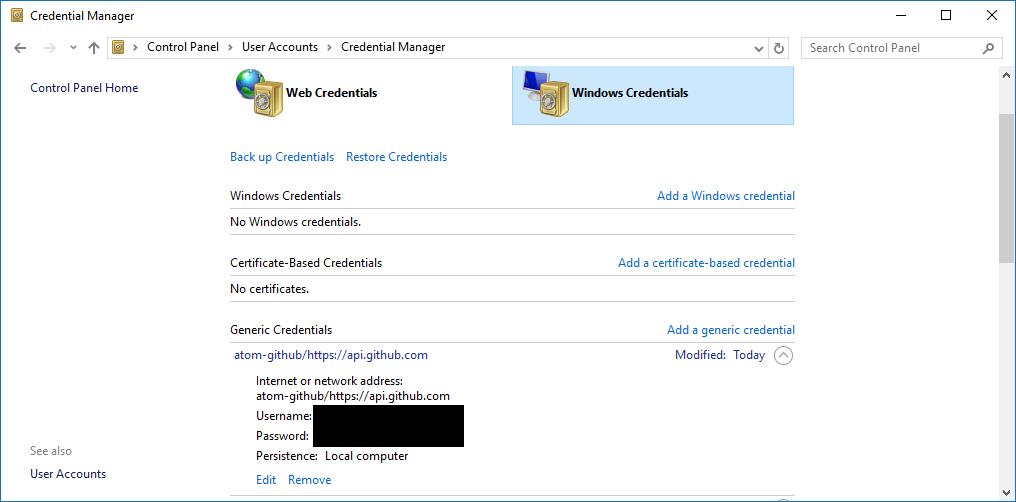
Maybe the fact the credential only initially contained a password indicates that the GitHub plugin in Atom isn't storing credentials correctly.
 Ruben9922
on 6 Sep 2017
Ruben9922
on 6 Sep 2017
I don't know the conversation so far, but for me (1.20.0 on macOS), Atom doesn't remember login credentials regardless of any previous pushes. Not only that but even with the credential helper installed, I'm still prompted everytime.
I don't get prompted when I use the Terminal though.
 timrossback
on 16 Sep 2017
timrossback
on 16 Sep 2017
Was also getting prompted for credentials every time I hit push, and usual username and password were being rejected, which I guess is expected with 2FA ... I've generated a personal access token, entered that as my 'password', and followed instructions on https://help.github.com/articles/caching-your-github-password-in-git/ and things seem to be working now. But would love if that process was a bit more intuitive!
 zchsh
on 17 Sep 2017
zchsh
on 17 Sep 2017
Is there any movement on this? Specifically the remember me button >.>. A simple solution would be very nice for those of us not terribly savvy at such things :/
 Selindrile
on 21 Oct 2017
Selindrile
on 21 Oct 2017
For me, atom doesn't ask for credentials in my windows10 machine, but in my ubuntu it does
 sivaneshl
on 7 Nov 2017
sivaneshl
on 7 Nov 2017
Storing credentials in Atom through a check box would be great. Switching back and forth between Atom and the terminal or re-entering credentials in Atom on every push is getting to be a bit of an annoyance.
 Hamberfim
on 15 Nov 2017
Hamberfim
on 15 Nov 2017
I've been switching to terminal to do pushes because of this issue too.
It would be great to have Atom remember the credentials.
 Mei152
on 28 Dec 2017
Mei152
on 28 Dec 2017
This is the one issue that is preventing me using Github with my students in a lab of MACs. Although I can use the credential helper as admin an a MAC, the students don't have that privilege.
I appreciate that they should be using command line via the terminal, but this is for creating a web site and delivering in GitHub pages all via github classroom. Strange that Dreamweaver now uses GitHub and saves the username / password. Also strange that GitHub Desktop saves the credentials as well.
 ghost
on 5 Jan 2018
ghost
on 5 Jan 2018
I'll echo @ChrisAtBrookes about the strangeness of GH Desktop being able to do this but no Atom package for it.
I thought I was losing my mind today setting up a new dev laptop: trying to figure out where I had entered a personal token on my iMac to make it not prompt me for creds, then recalling that I have GH Desktop installed there. Since there is no Desktop client for Linux, I'm stuck with this issue on the laptop.
I'm also seeking a solution to streamline this for CS students. Having them enter creds every push just doesn't fly with teenagers; not that it really flys with me either.
Does anyone know why the Github integration panel accepts a token but does not apply it within the Git panel?
 evansharp
on 25 Jan 2018
evansharp
on 25 Jan 2018
Hi all. Since I still see activity on this thread, and for anyone coming here from Google, this is due to a misconfiguration in Atom over the path to the installed version of git.
tl;dr Follow the process here
Longer: The issue stems from Atom not using the built-in git executable, and it's associated configuration. Since a system git is typically configured to use one or more credential helpers, it must know to delegate to a credential helper when authentication is requested. A slight change in the way Atom detects the paths for git (and it's configuration) in the system caused it to fall back to the default behavior, which is to prompt for credentials on every request. With a properly configured path to the correct git, this doesn't happen.
For me, an update to the Canary branch of Atom around August of 2017 corrected the original issue. For manual fixes see this part of the thread.
Hopefully this closes this issue for everyone having this problem and ending up here
 timfallmk
on 25 Jan 2018
timfallmk
on 25 Jan 2018
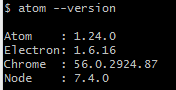
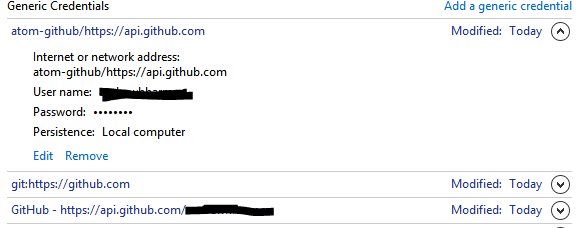
I'm having this same problem on Windows. Tried to follow the process linked to above but could not get it to work. git bash for windows is working fine as well as other 3rd party tools like Eclispe. But Atom requests username and password every time. Any fixes for windows users?


 andrewhharmon
on 23 Feb 2018
andrewhharmon
on 23 Feb 2018
I’ve been using Atom on windows for about a year with flawless github integration. This issue only recently popped up I think after an atom update. Hoping it’s a quick bug fix or some settings need to be tweaked
andrewhharmon
on 27 Feb 2018
since following the instructions higher in this thread, I've had no issues (I'm on a Mac though, so don't know how well it works on Windows)
rcrooks
on 27 Feb 2018
It's strange that it takes such a detour to do such a simple thing.
 BoBBer446
on 27 Feb 2018
BoBBer446
on 27 Feb 2018
and to clarify, I'm not using two factor authentication. Just regular old un/pw and it's still an issue. I see above the short term road map mentions 2FA so not sure if the issue is specifically related to that.
andrewhharmon
on 27 Feb 2018
well i have this working now. For what it's worth, I went into Control Panel\User Accounts\Credential Manager and in Windows Credentials i delete any credentials relating to github. I issued this command
git config --global credential.helper wincred Then in git bash i did a pull and it prompted me for un/pw. I supplied it and it created new entries in Windows Credentials. I ran another pull in git bash and did not get the un/pw prompt so i knew my creds were stored. I then opened Atom and did a pull and it worked fine with no prompt for un/pw. Hope that helps anyone else out there
andrewhharmon
on 27 Feb 2018
@BoBBer446 your comment was deleted as a violation of the Atom Code of Conduct as it was insulting or derogatory. You may consider this an official warning.
 rsese
on 27 Feb 2018
rsese
on 27 Feb 2018
It is of course easy to decide for yourself what should be censored / deleted instead of leaving it to the public. I didn't use swearwords or insult anyone. It's a real pity such a childish attitude here.
BoBBer446
on 27 Feb 2018
This issue is here in order to keep track of a problem and help resolving it. Spamming our mailboxes with what seems to be a meaningless fight does not help the cause at all.
The developers of Atom are coding for the community and they don't get paid for their efforts, so let them do what they do best, contributing to an open source project. Being impatient does not help you or the community.
Thanks for understanding.
 rdnt
on 27 Feb 2018
rdnt
on 27 Feb 2018
Hello Guys, the solution I did was pretty much the same as @andrewhharmon.
- Go to Windows credentials
- Check all the credentials that are stored for ATOM/GITHUB
- Replace them if needed or complete if any of them are blank
- open CMD
- type :git config --global credential.helper wincred
- close and open atom again and push something to GITHUB
This worked just fine for me :+1:
 brunotdantas
on 1 Mar 2018
brunotdantas
on 1 Mar 2018
@andrewhharmon @brunotdantas What about Ubuntu?
ghost
on 1 Mar 2018
ooh, you got me there. Not familiar with how Ubuntu stores these creds
andrewhharmon
on 1 Mar 2018
I'm having this issue on Windows and it's very frustrating, since it worked perfectly not long ago.
Every time I try fetching, pulling, or pushing using the atom github package I have to put in my credentials.
I don't use 2FA, I followed @brunotdantas instructions (all github/atom related credentials filled + CMD command) and I still have the same issue.
 sguergachi
on 1 Mar 2018
sguergachi
on 1 Mar 2018
did you see my post above? I had to delete (not edit) the credentials for it to work.
andrewhharmon
on 1 Mar 2018
@andrewhharmon That worked! Thanks!
sguergachi
on 1 Mar 2018
1327 adds a "remember" checkbox to the credential handler dialog. Check it and your credentials will be stored and retrieved from your OS keychain, which should alleviate this pain considerably :old_key:
The credential helper still takes pains to use git's configured credential helpers if you have any installed, and you may wish to use one regardless. Credentials you store there will be used from both Atom and the command line (or other git tooling!), but credentials you save in Atom will only be used in Atom.
As an added enhancement, if you've logged in to the GitHub panel, that token will be used to auth. I wasn't sure if it had enough permissions but it seems so :tada:
smashwilson
on 6 Mar 2018
Cool, Thanks
andrewhharmon
on 6 Mar 2018
For me what worked is turning on credential caching in git, and setting the timeout (which is in seconds) to a high value:
[credential]
    helper = cache --timeout 1000000
The above means that if I don't commit for more than 11.5 days, I will have to re-enter the password; I can live with that :)
Caching has the advantage that password is not stored in a file, only in memory.
 schollii
on 10 Apr 2018
schollii
on 10 Apr 2018
Related issues
smashwilson
·
4Comments
 ccavolt
·
3Comments
ccavolt
·
3Comments
 simurai
·
3Comments
simurai
·
3Comments
 UziTech
·
4Comments
UziTech
·
4Comments
![move[bot] picture](https://avatars.githubusercontent.com/in/6673?v=4&s=40) move[bot]
·
3Comments
move[bot]
·
3Comments
Most helpful comment
I don't know the conversation so far, but for me (1.20.0 on macOS), Atom doesn't remember login credentials regardless of any previous pushes. Not only that but even with the credential helper installed, I'm still prompted everytime.
I don't get prompted when I use the Terminal though.