Git: Git-Bash cygwin dll errors on launch - Win10Pro_64bit
Setup
- Which version of Git for Windows are you using? Is it 32-bit or 64-bit?
64 bit
$ git --version --build-options

git version 2.16.2.windows.1
cpu: x86_64
built from commit: e1848984d1004040ec5199e749b5f282ddf4bb09
sizeof-long: 4

 - Which version of Windows are you running? Vista, 7, 8, 10? Is it 32-bit or 64-bit?
Win10Pro 64 bit
Microsoft Windows [Version 10.0.16299.248]
$ cmd.exe /c ver
 - What options did you set as part of the installation? Or did you choose the
   defaults?
One of the following:
type "C:Program FilesGitetcinstall-options.txt"
type "C:Program Files (x86)Gitetcinstall-options.txt"
type "%USERPROFILE%AppDataLocalProgramsGitetcinstall-options.txt"
$ cat /etc/install-options.txt
Editor Option: VisualStudioCode
Path Option: Cmd
SSH Option: OpenSSH
CURL Option: OpenSSL
CRLF Option: CRLFAlways
Bash Terminal Option: ConHost
Performance Tweaks FSCache: Enabled
Use Credential Manager: Enabled
Enable Symlinks: Enabled```
- Any other interesting things about your environment that might be related
to the issue you're seeing?
Nothing interesting I can think of
Details
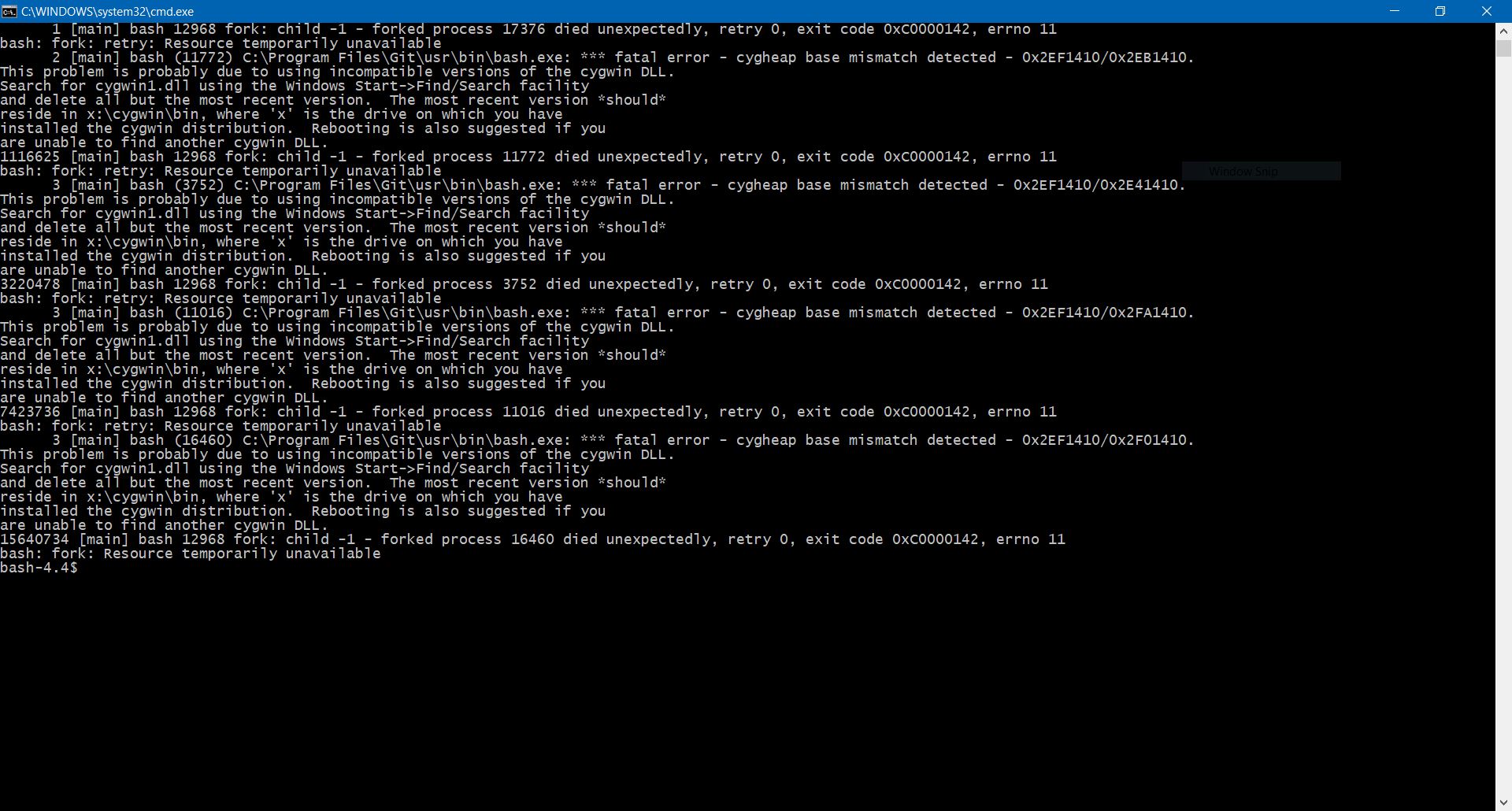
Which terminal/shell are you running Git from? The problem is if I launch Git-bash which i want to use. Currently my workaround is to launch cmd and run git manually from cmd
What commands did you run to trigger this issue? If you can provide a
Minimal, Complete, and Verifiable example
this will help us understand the issue.
Simply Launch Git-Bash
- What did you expect to occur after running these commands?
to get the standard git bash prompt to allow me to use git
- What actually happened instead?
instead I see the messages as seen on the screenshot provided above
- If the problem was occurring with a specific repository, can you provide the
URL to that repository to help us with testing?
Not applicable
 gopinaath007
All 22 comments
I am jumping on here because I have the same issue on appearance. I'm not sure if there is multiple causes of it but in my case I can narrow it down with ASLR compatibility with Mintty.exe and Msys-2.0.dll. I have tested git 2.16.2 and 2.9.2.
Setup
Which version of Git for Windows are you using? Is it 32-bit or 64-bit?
64 bit$ git --version --build-options
git version 2.16.2.windows.1
cpu: x86_64
built from commit: e1848984d1004040ec5199e749b5f282ddf4bb09
sizeof-long: 4Which version of Windows are you running? Vista, 7, 8, 10? Is it 32-bit or 64-bit?
Win10Pro 64 bit
Microsoft Windows [Version 10.0.16299.248]
Details
In Windows Defender Exploit Guand, I enabled _Mandatory ASLR_ and _Bottom-up ASLR_.
Executing git-bash.exe or usr\bin\mintty.exe:
Error: Could not fork child process: Resource temporarily unavailable (-1).
DLL rebasing may be required; see 'rebaseall / rebase --help'.
Executing bin\bash.exe bin\sh.exe usr\bin\bash.exe usr\bin\sh.exe:
      1 [main] bash (14112) C:\Shared\PortableGit\usr\bin\bash.exe: *** fatal error - cygheap base mismatch detected - 0x2E51410/0x2E81410.
This problem is probably due to using incompatible versions of the cygwin DLL.
Search for cygwin1.dll using the Windows Start->Find/Search facility
and delete all but the most recent version.  The most recent version *should*
reside in x:\cygwin\bin, where 'x' is the drive on which you have
installed the cygwin distribution.  Rebooting is also suggested if you
are unable to find another cygwin DLL.
      0 [main] bash 17448 fork: child -1 - forked process 14112 died unexpectedly, retry 0, exit code 0xC0000142, errno 11
bash: fork: retry: Resource temporarily unavailable
bash-4.4$
bin\git.exe operates normally.
I have not had issue with previous version of Windows 10 without Windows Defender Exploit Guand.
I can see it possible to break Cygwin forking compatibility shims by force relocating memory segments.
More information on _Mandatory ASLR_: https://blogs.technet.microsoft.com/srd/2017/11/21/clarifying-the-behavior-of-mandatory-aslr/
Possible related issues: https://github.com/git-for-windows/git/issues/1406 https://github.com/git-for-windows/git/issues/910
 yangshengf
on 25 Feb 2018
yangshengf
on 25 Feb 2018
Reading into issue #910. The cause in my case is exactly what I have suspected as outlined in https://cygwin.com/faq/faq.html#faq.using.bloda Cygwin makes sure every fork has to have parent's address space layout. It means one cannot use the bash that comes with _Git for Windows_ if they are enabling _Mandatory ASLR_. (or have to whitelist every possible program to be executed in bash)
yangshengf
on 25 Feb 2018
- Any other interesting things about your environment that might be related to the issue you're seeing?
Nothing interesting I can think of
@gopinaath007 do you have mandatory ASLR?
 dscho
on 26 Feb 2018
dscho
on 26 Feb 2018
Sorry, please clarify what is ASLR without having to click a link to find out what it stands for. ASLR is Address Space Layout Randomization - For those who are wondering what it is. I don't like making assumptions around acronyms as they can mean different things in multiple contexts. In the interest of readability and for the benefit of everyone, I suggest avoiding the use of acronyms unless it is very popular and unique. ASLR is not a widely known acronym that is unique. I have not heard of it.
gopinaath007
on 27 Feb 2018
It would be good to use git-bash. My current workaround is to use Anaconda Prompt. If I install Anaconda with python in the system path, my Anaconda doesnt work properly. Maybe that extra information may help.
May I add, I am not clear of the concept of Address Space Layout Randomization (ASLR). The links above did not help me answer your question on mandatory ASLR. Or rather as a visual learner, it confused me further. Sorry.
HELP!!!! is all I can add.
gopinaath007
on 27 Feb 2018
@yangshengf: with regards to my issue, git bash does not crash. It still opens and every time you enter a command in it, the errors on the screenshot appear again. There seems to be some cygwin.dll conflict. Never come across this sort of technical issue before so happy for anyone like yourself to join me in the search for a solution. Currently, I'm not sure where to even start to look. I tried looking for multiple cygwin dlls. I can only find one so dont know where the conflict is.
gopinaath007
on 27 Feb 2018
@gopinaath007 Mandatory ASLR indeed refers to "Address Space Layout Randomization" (an option to force the applications to be mapped into random locations in the address space, so that malicious software cannot rely on a set of fixed addresses for attack vectors, i.e. it is a measure to make it harder to exploit software bugs).
Cygwin (and MSYS2, used by the Bash) cannot work with ASLR enabled, and Mandatory ASLR is this option where you can tell Windows that it must apply ASLR to all applications.
In your case, it could be a much more mundane issue. Please open an elevated cmd, then issue these two commands:
cd "\Program Files\Git"
usr\bin\dash -c '/usr/bin/dash /usr/bin/rebaseall -p'
(obviously, if you did not install Git for Windows into C:\Program Files\Git, you have to adjust the first command accordingly.)
Then, try to open Git Bash again.
dscho
on 27 Feb 2018
@dscho gave a very nice summary about Address Space Layout Randomization. Just means your program's stack/data/text and other memory region may be at location X, but when you start it again it is at location Y. So the malware can't say I know location X always has code that I can use to do something bad.
In fact everything in @gopinaath007 's description also matches my case. If Bash backend is used (as opposed to Mintty), bash doesn't crash. It displays error messages at startup (because Bash has startup scripts in profile). Then it gives you a bash prompt but anything you enter that require executing another program also gives the error message.
That in my understand is because MSYS2 is trying to mimic fork and exec, which is a common idiom to start another program in Unix, and failing at fork. There are possible replacements such as posix_spawn, but require careful consideration about how it is implemented. Where is the bash shell source residing? (MSYS2 or cygwin?) I may be able to look at the source code though I am not an expert in reading C code.
yangshengf
on 28 Feb 2018
@yangshengf you're right.
@dscho If I reinstall with use git from gitbash only option, I get a rebase error. i then issued your two commands and restarted my pc. same rebase error. For the record, I have tried MinTTY installlation option too.
Workaround at the moment is to use git via Windows Powershell. It allows Unix ls commands unlike traditional command prompt.
gopinaath007
on 3 Mar 2018
I get a rebase error
It might be enlightening to others if the exact rebase error was pasted here.
dscho
on 5 Mar 2018
@dscho I get the rebase error when I have git configured with install option (use git from git-bash only). When i do that, I cannot use it through powershell. After 25th May, i will reinstall with use git from gitbash only to show you the rebase error. When i do not select use git from git bash only and allow git through command prompt, i am able to use git via powershell and anaconda prompt. I am going to leave git bash alone until 25th May. Until I finish my General Assembly Data Science Immersive on 25th May, I do not want to fiddle with my current git configuration. I am time poor and cannot afford to fiddle with my git anymore until I finish my course on 25th May. I am going to invite the GA instructors to this open issue too.
gopinaath007
on 5 Mar 2018
I get the rebase error
@gopinaath007 what error? You still have not pasted it.
dscho
on 5 Mar 2018
Look, I really want to work with you, but I do need some information, and I asked for it...
dscho
on 4 Apr 2018
Code of conduct breach: Showing empathy towards other community members
I have already pasted the error. I did mention that I will get back to you on the rebase error after 25th May. I really do not have time to look into this issue now and am using a workaround. Appreciate if you would respect my time and be a bit patient and more respectful.
The abrupt closure of this issue indicates your ignorance and lack of respect for others.
 gopinaathragavan
on 4 Apr 2018
gopinaathragavan
on 4 Apr 2018
If I reinstall with use git from gitbash only option, I get a rebase error
Please paste the exact output.
dscho
on 4 Apr 2018
Calm down @gopinaath007 . @dscho is trying to help you. The issue can be re-opened when you post an update after May 25th. Take your time.
Correct me if I am wrong, unchecking "use git from gitbash only" puts git.exe's directory into PATH. That allows you to call git from cmd or powershell or Ubuntu shell for Win 10. That should not have much effect to git bash itself and thus reinstalling is not a good way to diagnose the problem.
yangshengf
on 4 Apr 2018
@yangshengf noted your reference to #910 which I didn't see in my initial search for similar issues to mine. My issue is resolved credits to you. Thank you. Issue closed
gopinaath007
on 5 Apr 2018
This guy has the same rebase error message I had. Just copied it for your reference
gopinaath007
on 5 Apr 2018
This problem appears now in Azure Pipelines (CI service), probably after a Windows image update came with mandatory ASLR: https://dev.azure.com/nimbus-dev/e48a97ce-60bd-4c43-a919-71a3ababfa4c/_apis/build/builds/1387/logs/18
2020-01-28T15:39:39.6201057Z       0 [main] bash (4784) C:\Program Files\Git\usr\bin\bash.exe: *** fatal error - cygheap base mismatch detected - 0x180331408/0x180317408.
2020-01-28T15:39:39.6201467Z This problem is probably due to using incompatible versions of the cygwin DLL.
2020-01-28T15:39:39.6203209Z Search for cygwin1.dll using the Windows Start->Find/Search facility
2020-01-28T15:39:39.6203373Z and delete all but the most recent version.  The most recent version *should*
2020-01-28T15:39:39.6203459Z reside in x:\cygwin\bin, where 'x' is the drive on which you have
2020-01-28T15:39:39.6203593Z installed the cygwin distribution.  Rebooting is also suggested if you
2020-01-28T15:39:39.6203666Z are unable to find another cygwin DLL.
Upstream bug report: https://developercommunity.visualstudio.com/content/problem/891929/windows-2019-cygheap-base-mismatch-detected-git-ba.html
 stefantalpalaru
on 29 Jan 2020
stefantalpalaru
on 29 Jan 2020
with mandatory ASLR
That is a serious problem: the Bash (or more precisely, the MSYS2 runtime) simply won't work with ASLR (see e.g. https://github.com/git-for-windows/git/issues/1412).
dscho
on 30 Jan 2020
I found a workaround by manipulating PATH so "Git for Windows" binaries (and DLLs) take precedence over that weird Git instance that appeared in the new Azure Pipelines image: https://developercommunity.visualstudio.com/content/problem/891929/windows-2019-cygheap-base-mismatch-detected-git-ba.html?childToView=901185#comment-901185
So this might not be directly caused by ASLR, but by the wrong version of a DLL being loaded when we try to execute a Bash binary that was linked to another version.
stefantalpalaru
on 30 Jan 2020
If your Bash works, then ASLR is definitely not mandatory.
In any case, it seems that the team is aware of, and working on, it.
dscho
on 30 Jan 2020
Related issues
 yegorich
·
3Comments
yegorich
·
3Comments
 rangka-kacang
·
3Comments
rangka-kacang
·
3Comments
 Jarmos-san
·
3Comments
Jarmos-san
·
3Comments
 kc22033
·
4Comments
kc22033
·
4Comments
 0x7cc
·
4Comments
0x7cc
·
4Comments
Most helpful comment
Reading into issue #910. The cause in my case is exactly what I have suspected as outlined in https://cygwin.com/faq/faq.html#faq.using.bloda Cygwin makes sure every fork has to have parent's address space layout. It means one cannot use the bash that comes with _Git for Windows_ if they are enabling _Mandatory ASLR_. (or have to whitelist every possible program to be executed in bash)