Git: fatal error on running "man" remotely
Hi
I'm getting a fatal when calling man on a remote Ubuntu Trusty:
~$ man bash
      0 [main] ssh 9412 C:\Program Files\Git\usr\bin\ssh.exe: *** fatal error - cmalloc would have returned NULL
angup
However, its fine to do the same on an Ubuntu Precise running in a Vagrant box.
Host: Windows 10 x64
Git4Win 2.5.0
 lusitania
All 65 comments
Render me absolutely confused. Ubuntu? What does that have to do with Git for Windows? Please clarify. In fact, you really want to volunteer information that allows others to understand the problem. If you expect others to ask for clarification, you will find that most people just don't.
 dscho
on 6 Sep 2015
dscho
on 6 Sep 2015
It is the ssh.exe bundled with Git4Win that raises the error. I connected to a Linux/Ubuntu machine using ssh.exe from within a Git Bash shell (Mingw). I assume the issues does not originate from Git itself rather than MinGW under particular* circumstances. If that is the case you may need to update your dependencies... hopefully the MinGW team is aware of this and you'd just pull in the proper fix.
Best,
L
*) After I reduced my screen buffer from 10k down to 1k lines the error wasn't raised any more.
lusitania
on 7 Sep 2015
Unfortunately, this is wrong on at least three accounts:
- there is still no MCVE, despite the fact that it _should_ be possible for you to install Vagrant and test whether it already fails with that. I do expect a _little_ assistance in resolving the bug, after all
- ssh is _not_ a MinGW program. It is an MSys2 program. This may be important, so it is really necessary to be very precise in communicating.
- "hopefully the MinGW team is aware" just cries out _loud_ for some proper investigation rather than hoping.
dscho
on 7 Sep 2015
Unfortunately I fail to understand what you are trying to tell me. MCVE is an abbreviation unknown to me. And whether ssh is a part of MinGW or MSys2 is not transparent to me. All I am able to see is MinGW's prompt. So there is no way for me to be any more precise than done already. You are the one who has the answers. I can only guess. In the end it is _your_ package that breaks, and again, I can only tell you.
Best
lusitania
on 7 Sep 2015
An MCVE is a Minimal, Complete and Verifiable Example. You cannot seriously expect a maintainer of a highly popular software to spend three or more days to chase a bug for you. You really want to make it as easy as possible for others to reproduce your problem. You are asking other to spend time for you, after all. It should be self-evident that you are more likely helped if you respect the time and expertise of those you ask for help.
Now, I gave you a very good hint how to make such an MCVE: by using Vagrant, you essentially install an Ubuntu Virtual Machine into which you can ssh. That is not exactly the intention of Vagrant, but it just happens to be the fastest way for you to set up a _reproducible_ environment.
And just for fun, I _did_ ssh into an Ubuntu Trusty machine I have access to (which you should not have assumed) and I _did_ call man bash and (probably surprising to you, but not me) it worked without a hitch. No problem. Certainly no crash.
Of course, my account would be incomplete without the following information (which BTW should be provided with _every_ bug report, as per our guidelines linked from our _Contribute_ section on our home page):
Git Bash 64-bit on Windows Server 2008 R2, connecting to an Ubuntu Trusty 64-bit machine. Works.
dscho
on 8 Sep 2015
@dscho seems like I'm getting the same errors while using newer builds of Git for Windows which has the bundled ssh:
1 [main] ssh 5852 C:\bin\Git\usr\bin\ssh.exe: *** fatal error - cmalloc would have returned NULL1194 [main] ssh 5852 cygwin_exception::open_stackdumpfile: Dumping stack trace to ssh.exe.stackdump
The stackdump mentioned in the dump just has the same text.
This happens usually when I have ssh'd into a server and try to cat or less a large file (not always, but rather frequently).
Try downloading this file and less-ing it: https://1drv.ms/u/s!ArGqE3U0XhYmu5wtGK-qFiiPvUvfdQ
Setup:
ConEmu 180114 Alpha - 64-bit
> git --version
git version 2.16.1.windows.4
> ssh -V
OpenSSH_7.6p1, OpenSSL 1.0.2n  7 Dec 2017
 kumarharsh
on 22 Feb 2018
kumarharsh
on 22 Feb 2018
@kumarharsh is ConEmu important here? Or can you reproduce with Git Bash or Git CMD? I ask because I do not want to spend the time setting up ConEmu (which I personally do not prefer) just to reproduce this issue (and I do ssh into a Linux VM all the time, without any of the indicated problems, although I did hit the error message recently when calling vim.exe but the problem went away on its own accord.).
dscho
on 22 Feb 2018
@dscho - yes, it happens with vim too from time to time. As for you, it also goes away for me after some time. I'll try to reproduce it with git bash.
Maddeningly enough, the less is now working when I've put the file in the onedrive folder.
kumarharsh
on 22 Feb 2018
Maddeningly enough, the less is now working when I've put the file in the onedrive folder.
Which file?
dscho
on 22 Feb 2018
The same one I shared with you above (onedrive link). I moved the file from my Downloads folder to the Onedrive folder for uploading it. Now, the less command is working on it. Weird thing is that:
lesson the same file was crashing when I had ssh'd into a linux machine and was runninglesson the same file. This was causingssh.exeto also crash, producing the stackdump I posted above.- My local machine's
less.exefrom the Git for Windows installation also was crashing on the same file, with a similar stackdump. - I moved the file from it's then location to my Onedrive folder.
- After about 4-5 hours (since I posted this comment), when I tried to
lessthe same file again, it was magically working. - It's also started working magically if I
sshinto the linux machine (described in 1). I'm doing all this from the same directory as in point 1, and no environment variable as changed.
kumarharsh
on 22 Feb 2018
The same one I shared with you above (onedrive link).
Ah. For the record, I tried to reproduce the issue with that file, and failed. I used a Hyper-V Ubuntu for my test, but it should not matter, should it.
Now, I investigated a little where this issue comes from. Turns out that it is not altogether clear how this issue comes about, it could be a lot of things.
First things first: this is where the error message is written: https://github.com/git-for-windows/msys2-runtime/blob/27e5516d7e7bb17c5c9c69462e1b5d5cebd4d2a0/winsup/cygwin/cygheap.cc#L407
Obviously, the call stack is very important. As the error message says cmalloc, this is most likely the caller: https://github.com/git-for-windows/msys2-runtime/blob/27e5516d7e7bb17c5c9c69462e1b5d5cebd4d2a0/winsup/cygwin/cygheap.cc#L425
And it triggers only when this function returns NULL (and there are a couple of candidate sites that do that): https://github.com/git-for-windows/msys2-runtime/blob/27e5516d7e7bb17c5c9c69462e1b5d5cebd4d2a0/winsup/cygwin/cygheap.cc#L326-L361
Now, the only caller of cmalloc() that would result in such an error message is this one (which is the only one passing in an fn parameter that is not NULL): https://github.com/git-for-windows/msys2-runtime/blob/27e5516d7e7bb17c5c9c69462e1b5d5cebd4d2a0/winsup/cygwin/cygheap.cc#L434-L438
Sadly, there are many, many, many callers of cmalloc_abort(): https://github.com/Alexpux/Cygwin/search?q=cmalloc_abort&type=Code&utf8=%E2%9C%93
It is not altogether clear that it is important which is the exact code path leading to this problem, either. It might be more important to know the size of the block that needs to be allocated.
Another thing that may play a role is this sad issue with the DLL base address. See https://github.com/git-for-windows/git/wiki/32-bit-issues for details. As suggested in a post to the Cygwin mailing list (https://cygwin.com/ml/cygwin/2013-08/msg00514.html), there may be another .dll involved that occupies the favored DLL base address of the MSYS2 runtime (obviously, Cygwin talks about cygwin1.dll, but we use MSYS2, a derivative of Cygwin, that renamed it to msys-2.0.dll to avoid clashes). The post suggests to use listdlls.exe to figure out where msys-2.0.dll is loaded. According to rebase -i /usr/bin/msys-2.0.dll, it is supposed to be loaded to base 0x000180040000 size 0x005d1000, but according to ListDLLs, it gets loaded to 0x0000000080040000 0x5d1000 instead (but I could imagine that ListDLLs somehow casts the 64-bit value to 32-bit first, as all the addresses start with eight zeroes). Maybe in a case where you can reproduce this, your msys-2.0.dll does not get loaded to its preferred base address?
dscho
on 22 Feb 2018
@dscho This has been happening to me a lot with less and vim. It would probably happen with other things, it's just that's where I always see it.
With respect to dlls preferred addresses, I thought that basically wasn't a thing anymore since Windows Vista and address space layout randomization (ASLR), or is ASLR probably disabled for cygwin/msys?
This has been a relatively recent problem, but it takes a while to happen and so I can't reproduce it on-demand AFAIK.
It would be nice to find the right people to get together to figure this out, it's a pretty disruptive annoyance when it happens!
Do you think this is really some generic msys2 or cygwin bug?
 dakotahawkins
on 22 Feb 2018
dakotahawkins
on 22 Feb 2018
Are there any steps you can recommend to take or record logs or stuff in case of future occurences. I'll keep them in mind for the next time it happens.
Also, its a little more heartening to see the bug affecting more than me 😋
kumarharsh
on 22 Feb 2018
With respect to dlls preferred addresses, I thought that basically wasn't a thing anymore since Windows Vista and address space layout randomization (ASLR), or is ASLR probably disabled for cygwin/msys?
It is not disabled for Cygwin/MSYS2 specifically. Instead, it is not enabled (because Cygwin's fork() emulation won't work with ASLR).
This has been a relatively recent problem, but it takes a while to happen and so I can't reproduce it on-demand AFAIK.
Yeah, I only encountered it after updating the MSYS2 runtime to v2.10.0, but this bug has been reported a lot earlier. So maybe something made it more likely. Maybe there has been a change in the base address?
dscho
on 22 Feb 2018
@dscho Do you have any suggestions for trying to debug this? Because it always fails immediately in a forked process I can't think of a way to catch it in my debugger (tried an extension that's supposed to auto-attach to child processes but I don't think it works for however these are created).
Do you think using the SDK to build everything in debug would get me any closer?
I find that once it happens in a bash.exe, it will apparently always happen from that bash.exe (I've been killing them and making new ones usually, today I tried to see what I could do from a "bad" one for a while).
dakotahawkins
on 23 Feb 2018
@dakotahawkins does the ListDLLs tool show a different base address than usual in that case?
dscho
on 25 Feb 2018
@dscho Even not in that case they're all loaded at 0x0000000080040000, and I see the same preferred address you do.
I can't find anything loaded at 0x0000000180040000, so it doesn't seem like a conflict.
Could whatever loads that dll be truncating that address to its low half?
Edit: ListDlls doesn't report _anything_ with a base address starting with 0x0000000[1-9], so maybe it's just misreporting for 64-bit DLLs.
Edit2: Process Explorer reports the expected base address. I'll check with that the next time this happens. I kind-of expect it to still be loaded at the correct address though I don't think I'll be able to catch it if the spawned process that will fail tries to load it again at a different address or something like that.
dakotahawkins
on 26 Feb 2018
Yes, my take on the upper 32-bits of ListDLLs is the same: it probably truncates inappropriately.
So the next thing is that we might really be out of heap space. That could happen if the memory fragmentation gets too large, if too many individual too-large blocks were allocated. I have no idea so far how to test this hypothesis, though...
dscho
on 26 Feb 2018
There's some back-and-forth in this email soup where they discuss raising the size of "cygheap" to 2 megs. They're also talking about upping /HKLM/Software/Cygwin/heap_chunk_in_mb and working around the problem, so it _sounds_ like maybe cygheap tracks individual allocated heap chunks? Maybe either bigger chunks or a bigger cygheap could work around a problem if you're running out of the space you're using to reference allocated memory?
Even if either of those helped because it's actually running out of heap space, I think the _actual_ root cause would have to be some kind of recently exacerbated memory leak/mismanagement.
dakotahawkins
on 26 Feb 2018
Even if either of those helped because it's actually running out of heap space, I think the actual root cause would have to be some kind of recently exacerbated memory leak/mismanagement.
I would agree. But I have nothing to back up that hunch.
BTW the email thread you mentioned is from 2011... ;-)
dscho
on 27 Feb 2018
Can you set this issue as "open" again?
kumarharsh
on 27 Feb 2018
@kumarharsh can you research how to debug these cygheap issues?
dscho
on 27 Feb 2018
@dscho Is the SDK installer in a decent state / recommended? Looks like it hasn't changed in a while so I figured I'd ask :)
dakotahawkins
on 27 Feb 2018
@dakotahawkins sadly, the SDK installer is in a really bad shape right now.
The new way to install the SDK will be to call
git clone --depth=1 https://github.com/git-for-windows/git-sdk-64
For the moment, you still have to do some stuff manually such as run git-bash.exe in the worktree, and then
mkdir -p /usr/src &&
for d in build-extra MSYS2-packages MINGW-packages; do
    git init /usr/src/$d &&
    git -C /usr/src/$d config core.autocrlf false &&
    git -C /usr/src/$d remote add origin https://github.com/git-for-windows/$d;
done
I hope that we will have all of this automated soon, and more.
dscho
on 27 Feb 2018
@dscho @kumarharsh I asked Stephan T. Lavavej on reddit to see if he had any ideas, and he pointed out that there's a list of programs known to interfere with cygwin and it may be that one of these is the culprit.
My problems may have started after work made me enable Windows Defender (which was only disabled because we have ESET, so now both are running. Hooray.) I've tried disabling real-time protection and excluding the Git/ConEmu install dirs, maybe that will make a difference.
dakotahawkins
on 28 Feb 2018
I only have Windows Defender from that list, apart from ConEmu. I'll also try to put those files in exclusion - though reproducibility of the crash/stackdump is still a challenge.
kumarharsh
on 28 Feb 2018
vim.exe would stackdump when I ran git commit fairly consistently. FWIW, I added overrides to Windows Defender (see below) and it didn't make a difference. Then I tried closing every application and git commit successfully launched vim. I'm using git version 2.16.1.windows.2 (x64) on Windows 10 Enterprise 64 bit.
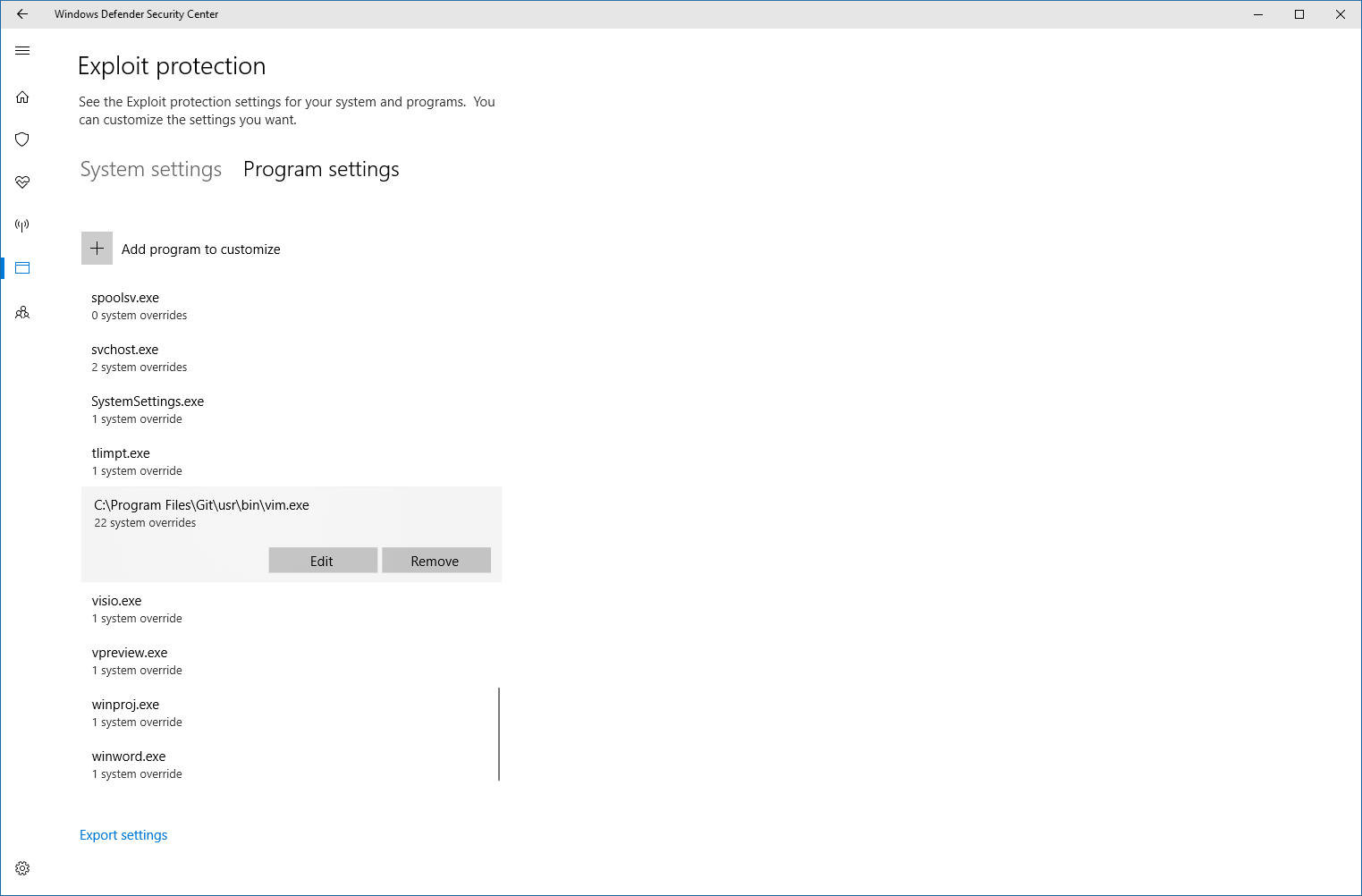
 hashtagchris
on 1 Mar 2018
hashtagchris
on 1 Mar 2018
@hashtagchris I have this issue on my work computer, which is still Win7. The settings look much different for me.
You might try more overrides (git.exe, bash.exe, etc.) since it _seems_ like a problem caused by the parent process, not necessarily the exe that crashes.
Edit: lol, nope. Nevermind. Hadn't happened to me since I changed windows defender, but it just happened running git commit --amend to try to look at vim's process tree.
dakotahawkins
on 2 Mar 2018
I've been getting similar errors for a while now. Closing and reopening the Git Bash prompt "fixes" the problem, for a while at least. I tried setting my editor to Visual Studio Code, but that doesn't seem to work fully:
incom@Jael MINGW64 /c/Development/atlassian/bitbucket/server (BSERV-10888-bturner-allow-rebase-after-failed-merge)
$ git commit --allow-empty
hint: Waiting for your editor to close the file...       0 [main] vim 4276 C:\Development\git-2.17.1\usr\bin\vim.exe: *** fatal error - cmalloc would have returned NULL
    842 [main] vim 4276 cygwin_exception::open_stackdumpfile: Dumping stack trace to vim.exe.stackdump
As you can see, it displays a hint about Visual Studio Code, but that never actually _launches_, and then vim crashes. (The --allow-empty is just the fastest way to show the error. Once it gets into this state, any time I try to commit I get the same crash until I restart Git Bash.) The Code part is likely something else (running EDITOR="code -w" git commit launches Visual Studio Code as expected), but the vim error looks to be related to whatever's going on here.
Happy to do some additional testing if there are suggestions what I could look at.
 bturner
on 6 Jun 2018
bturner
on 6 Jun 2018
another workaround I have found (without requiring to restart a new cmd.exe) is to change the "screen buffer size" (it is normally 9001, but when this happens changing it to 3000 causes things to mysteriously start working).
c:sourcemyrepo>git commit --amend
hint: Waiting for your editor to close the file... 0 [main] vim 19964 C:Program FilesGitusrbinvim.exe: * fatal error - cmalloc would have returned NULL
1088 [main] vim 19964 cygwin_exception::open_stackdumpfile: Dumping stack trace to vim.exe.stackdump
 jtnord
on 8 Jun 2018
jtnord
on 8 Jun 2018
@jtnord That's interesting. I keep mine set at 9999 (even in ConEmu, though I'm just seeing it has a higher maximum). I've never seen it work again in the same window after it happens, so I'll have to try it next time.
dakotahawkins
on 8 Jun 2018
Strangely enough I had the same today. Instead of changing the scroll back size i just did a cls to clear the buffer. That worked too!
jtnord
on 11 Jun 2018
@jtnord So, I don't see it with cmd.exe as much as with bash, but that's probably just from use.
I wonder: when a "full screen" terminal application starts, does it copy the current console's contents/history so it can put it back when it's done?
@dscho, do you happen to know whether that's what it's probably trying to do when it fails to allocate?
dakotahawkins
on 11 Jun 2018
FTR: I do have mridgers/clink installed so it's not just a vanilla cmd.exe
jtnord
on 11 Jun 2018
@dakotahawkins I have no idea :-(
dscho
on 17 Jun 2018
Here is my observation with ConEmu
Reproduce (consistent with my desktop and laptop):
- Make sure your ConEmu's
Console buffer heightsetting is something large
- for me, >3277 in order to get
vimto crash (this number happens to be "max value / 10") - for me, >2184 in order to get
sshto crash (this number happens to be "max value / 15")
- for me, >3277 in order to get
- Restart ConEmu and open a new terminal (above setting does not take effect until then)
- Run git vim, verify that it doesn't crash
- Run a command that produces a lot of lines of output (e.g.
find | head -n 4000ordir /s) - Run git vim again, at this time, it should crash
- Same can be done to crash ssh, use git ssh, simply run any curses app on the remote server after ConEmu buffer reaches above size
Workaround:
Just set Console buffer height to 2814 or lower. Must restart ConEmu for it to take effect.
These numbers might have something to do with screen resolution, as I was able to crash it at a lower number by stretching ConEmu window across multiple monitors to create a bigger buffer. So if your screen resolution is not 1080p, you might need to experiment with it.
 leonyu
on 20 Jun 2018
leonyu
on 20 Jun 2018
@leonyu Do you have "Long console output" checked in ConEmu? I do, but idk what it does really.
dakotahawkins
on 22 Jun 2018
Just tried both, it doesn't matter whether "Long console output" is check or not.
Additionally, this happens only when invoking vim/ssh from CMD or PowerShell while inside ConEmu, it doesn't happen when running them from git-bash in ConEmu.
I am using Windows 10 64-bit, dual monitor. Here's my stack dump for vim, if it helps.
Stack trace:
Frame        Function    Args
00180000000  0018005E0DE (00180230639, 00180230C39, 001802412F0, 000FFFFB6E0)
00180000000  001800468F9 (CCCCCC00009CC1, FF783B00767676, D6D661000CC616, 000003000C0)
00180000000  00180046932 (00180230616, 000000001E7, 001802412F0, 76767600CCCCCC)
00180000000  00180043543 (00000000000, 00180000000, 7FF8E429888E, 001800004EC)
00180000000  0018006BF01 (CCCCCC00009CC1, FF783B00767676, D6D661000CC616, 9E00B4005648E7)
00180000000  0018006CD8E (00000000000, 00000000000, 00000000000, 00000000000)
00180000000  0018006ED24 (00000000000, 00000000008, 00000000000, 00000000000)
00000000001  001801372B1 (00100666960, 00000000008, 00000000000, 00000000000)
00000000001  0018011DE4B (00100666960, 00000000008, 00000000000, 00000000000)
00000000001  001004F8574 (00100577CA4, 0010066D398, 00000000000, 0010066D39C)
00000000001  001005872D3 (00000000008, 00000000000, 00000000000, 00000000000)
00000000001  00100578C76 (00010171D5C, 0005AFE4BE3, 00010171D5C, 00000010000)
00000000001  001005DB4DF (0017FF845B0, 0010000000E, 000FFFFCCD0, 001801D6AF0)
00000000001  001005E9807 (00000000020, FF0700010302FF00, 00180047EB8, 00000000000)
000FFFFCCD0  00180047F24 (00000000000, 00000000000, 00000000000, 00000000000)
00000000000  00180045A03 (00000000000, 00000000000, 00000000000, 00000000000)
End of stack trace (more stack frames may be present)
@leonyu I get this running git-bash from ConEmu (actually, sh.exe, I think). Here's how that ConEmu task is configured:
"%_GIT%\bin\sh.exe" --login -i -new_console:C:"%_GIT%\mingw64\share\git\git-for-windows.ico":t:"Git":d:"%_CONEMU_CONSOLE_DIR%":P:<xterm>
Where %_GIT% is just set to C:\Program Files\Git for me.
dakotahawkins
on 25 Jun 2018
using similar steps from https://github.com/git-for-windows/git/issues/356#issuecomment-398627875 I can reproduce this with a boring plain cmd.exe window (no clink no extensions at all).
jtnord
on 4 Jul 2018
I've also been getting the cmalloc error when git c --amend tries to run vim.
Windows 10 Home Version 10.0.17134 Build 17134
git version 2.16.2.windows.1
Restarting cmd fixed it.
 Almenon
on 5 Jul 2018
Almenon
on 5 Jul 2018
Confirmed from here with less.exe. It depends on number of lines in console (not actual buffer size). Typing cls in command prompt works around the issue temporarily.
For me the limit is currently 3340 lines printed before running less.exe. At my current 159 characters per line, that corresponds to 512 KiB (1024 KiB data if you count the color codes in the windows console). 3339 lines just below is 511.937 KiB which is fine.
This crashes:
cls && python -c "for x in range(1, 3340): print(x)" && less.exe <somefile>
This doesn't:
cls && python -c "for x in range(1, 3339): print(x)" && less.exe <somefile>
 larsch
on 12 Jul 2018
larsch
on 12 Jul 2018
I've pinged the msys2 mailing list. I think debugging this will require debug builds of msys2 and some of its packages, but so far I haven't had any luck doing that.
It _must_ have to do with how msys2 implements alternate screen buffers, and though I've been able to find the handling for that in the source I haven't been able to successfully build myself, much less build with debug information turned on.
dakotahawkins
on 12 Jul 2018
I tried reproducing this using something like above (cls && python2 -c "for x in range(1, 4040): print(x)" && less.exe c89) in:
- slightly outdated Cygwin - no crash
- up-to-date MSYS2 - no crash
- up-to-date MSYS2 with GfW's
msys2-runtimeinstalled -fatal error - cmalloc would have returned NULL
My current theory is that the cause is an ABI incompatibility between the MSYS2-supplied Less and Git-for-Windows-supplied runtime.
HTH.
 elieux
on 12 Jul 2018
elieux
on 12 Jul 2018
@dscho I have found the problem was apparently introduced between v2.15.1.windows.2 and v2.16.0.windows.2
v2.16.0.windows.2 says it "Comes with patch level 7 of the MSYS2 runtime (Git for Windows flavor) based on Cygwin 2.9.0."
How can I tell which commits of git-for-windows/msys2-runtime were included in those releases? I took a stab at diffing --since=2017-11-29 --until=2018-01-18 but I don't know if that's the actual set of changes.
Also I can't reproduce this issue with an up-to-date cygwin or msys2 x64, but it happens every time for me in GFW bash if I set the scrollback to something high like 9999 lines and run:
clear; touch test.txt && python -c "for x in range(1, 8000): print('{}\t{}'.format(x, '-' * int($COLUMNS - 1 - len(str(str(x) + '\t').expandtabs()))))" && less ./test.txt
@elieux Thanks for jumping in :) Note I'd expect this to happen with vim or any other console application that switches to a "full screen" alternate buffer.
dakotahawkins
on 12 Jul 2018
More tests:
- Git for Windows 2.18.0.1 -- crash
- Git for Windows 2.18.0.1 with MSYS2 "stock"
msys2-runtimedropped in -- no crash
But since the last comment I also realized Git for Windows ships with what should be an ABI compatible version of the runtime, so the culprit is probably in the patches or in the way it's built.
elieux
on 12 Jul 2018
I tried the runtime versions between the one shipped with v2.15.1.windows.2 (v2.9.0-4), reported by @dakotahawkins to be the last working one and the one shipped with v2.16.0.windows.2 (v2.9.0-7) reported to be the first broken.
Seems like v2.9.0-5 is the first runtime that crashes, which suggests this commit introduced the issue: https://github.com/git-for-windows/MSYS2-packages/commit/c8e710e5525f29abaf8cd18d5e8851133faf9035
elieux
on 12 Jul 2018
Of those patches the only one still around is the PDB generation one. I'm testing another patch that pulls back the .dgb behavior from before, and generates the modified .dll and .pdb in a "windebug" subfolder. So, it would still exist (because it's probably helpful to the maintainers, at least) but you'd have to go swap it in and live with this behavior.
@dscho If it turns out that was the culprit, could you live with that?
Edit: seems to work!
dakotahawkins
on 13 Jul 2018
@dscho It's telling that dumpbin doesn't like msys-2.0.dll after cv2pdb messes with it:
C:\Program Files\Git\usr\bin>dumpbin /summary msys-2.0.dll
Microsoft (R) COFF/PE Dumper Version 14.14.26433.0
Copyright (C) Microsoft Corporation.  All rights reserved.


Dump of file msys-2.0.dll

File Type: DLL
msys-2.0.dll : fatal error LNK1106: invalid file or disk full: cannot seek to 0x1A1800C
It doesn't have a problem when built with the old .dbg generation. It I had hoped to compare dumpbin outputs to see what cv2pdb might be doing wrong, but obviously I didn't get that far. There have been some recent fixes/improvements to cv2pdb I'm trying out, but no luck yet.
dakotahawkins
on 16 Jul 2018
objdump complains that the dll is truncated, and what I think might happen is that some of the cygheap section (or similar) gets cut off.
The 64-bit .dll should have an image base address of 0x180040000 (as discussed in previously). cv2pdb, however, calls exe.relocateDebugLineInfo(0x400000) where 0x400000 is an image base address (and the Windows default base address for .DLLs).
Further, relocateDebugLineInfo takes an unsigned int, so 0x180040000 won't fit in it. Even worse, there are lots of unsigned int variables used to calculate offsets that involve doing math with the image base address (in these cases the base address wasn't hard coded, so I assume it's correct) and I suspect a lot of these over/underflow and cause most of the problem.
I'm not sure how much work would be involved to fix all those types in cv2pdb, but another option might be to build with the windows-default base address and then set it after the fact. I'm not sure if there's a mingw equivalent to editbin which might let you do that.
dakotahawkins
on 17 Jul 2018
Update: I've tried using objcopy to change various addresses, but it doesn't have any apparent effect on the resulting DLL generated by cv2pdb.
dakotahawkins
on 17 Jul 2018
Epilogue:
FYI @elieux @dscho
Even with my "fix" to restore msys-2.0.dll, this can still happen.
With scrollback lines set really high and running the python snippet from above to 15000 lines instead of 8000:
In mintty (so, the "default" way to run), nothing crashes. Of note:
- msys2: best experience. exactly what you'd expect.
- cygwin and git bash: no crash, but less doesn't come up until a key is pressed, and when you quit it the scrollback is truncated (in my case from what was 14999 lines to part of the way through line 14600-ish. Here's a screenshot.
Under ConEmu, all 3 crash. They'll do 8000 lines over and over if the scrollback max is 9999, but if you set something high for scrollback lines (ConEmu supports 32766, so I used that) everything has the same problem. Tasks are set up like so:
- msys2:
set MSYSTEM=MSYS & set MSYS=winsymlinks:nativestrict & set MSYS2_PATH_TYPE=inherit & set MSYSCON= & "%_MSYS%\usr\bin\bash.exe" --login -i - git bash:
"%_GIT%\bin\sh.exe" --login -i - cygwin:
set CHERE_INVOKING=1 & %ConEmuDrive%\cygwin64\bin\sh.exe --login -i
So, at least with my changes I can go back to 9999 and not have my terminal permanently die when I try to edit a commit message or rebase -i. That's a marked improvement, and since all 3 have the same problem with a higher ConEmu scrollback I don't think there could be many other important differences between the GfW/MSYS2 runtime builds. The lack of problems under mintty and the different behavior running python ... && less ... are weird, and possibly some other small difference, but they're not weird enough to make me want to investigate them right now. :)
Edit: @Maximus5 I assume the ConEmu behavior difference here can be explained by some way I've configured it... tagging you in case you happen to be interested and have any insight or have seen similar behavior before.
dakotahawkins
on 17 Jul 2018
@dakotahawkins thanks so much for your tenacity (and @elieux, too). I would never have dreamed that the .pdb generation might be responsible for that.
dscho
on 18 Jul 2018
Frankly I'm amazed it works to the extent that it does. I'd be kind-of interested to find a tool that dumps whatever sections _are_ in the .dll to confirm exactly what's missing/wrong with it.
dakotahawkins
on 18 Jul 2018
Out of curiosity, is this fix included in the v2.19.0-rc0.windows.2 release made 2 days ago? I read:
So here is a test: is this robust enough for end users? Please test
thoroughly, in particular any rebase/stash scenarios you use reguarly.
Those are my favourite 2 commands! :-) I'd be happy to beta test this if it also saves me from having to restart my console 3-4 times a day due to the cmalloc error.
(FYI: I run cygwin.bat still (so cygwin's bash in the Windows terminal) to avoid various problems with git-for-windows, so I'm very excited to hear this might be solved! I'd always assumed it was some cygwin vs Mingw incompatibility & unlikely to ever be solved.)
 lukeu
on 26 Aug 2018
lukeu
on 26 Aug 2018
Out of curiosity, is this fix included in the v2.19.0-rc0.windows.2 release made 2 days ago?
Yep.
I'd be happy to beta test this
Looking forward to it!
I run cygwin.bat still
Please be advised that Cygwin and Git for Windows are considered incompatible. That is, if you run Cygwin, you should use Cygwin's Git. It might work for you if you run Git for Windows from inside Cygwin's Bash, but sooner or later you will run into trouble, and all I can say to help you, then, is that you had been warned. :-)
dscho
on 27 Aug 2018
@dakotahawkins thank you so much for your detailed analysis (and @elieux for joining in!). AFAICT cmalloc() is a really old malloc() implementation that suffers from quite a few limitations, and nobody fixed it because it did not cause problems so far. Of course, changing the base address as cv2pdb does leads to problems, so we did the best thing we could in a reasonable amount of time by simply not using cv2pdb on msys-2.0.dll.
dscho
on 27 Aug 2018
@dscho Happy to help! I'm super-excited for the next release :)
dakotahawkins
on 27 Aug 2018
I downloaded the RC and tried it. It is a magnitude improvement, it no longer crashes at around buffer height of 2500 lines, which was very restrictive.
However, it still crashes at higher buffer height in ConEmu. For me that is around 13106 (happen to be max value / 2.5). This might be a ConEmu limitation?
I am still excited to have 10000 buffer height, than the previous!!!
leonyu
on 29 Aug 2018
@leonyu That's what I found.
https://github.com/git-for-windows/git/issues/356#issuecomment-405501452
Under ConEmu, all 3 crash. They'll do 8000 lines over and over if the scrollback max is 9999, but if you set something high for scrollback lines (ConEmu supports 32766, so I used that) everything has the same problem.
I think I also found it was somewhere around 13k where it started happening.
It might not be a ConEmu issue, it might just be ConEmu allows you to set more than msys can handle. @Maximus5 care to weigh in on this? Do you think it might be a ConEmu issue?
dakotahawkins
on 29 Aug 2018
Conhost supports up to 32K lines (short is used in console WinAPI). Properly written console applications should not crash on such buffers.
 Maximus5
on 29 Aug 2018
Maximus5
on 29 Aug 2018
That's kind-of what I suspected, thanks!
dakotahawkins
on 29 Aug 2018
I'd be happy to beta test this
Looking forward to it!
Well I've been heavily rebasing for 2 days with the RC and so far so good! 9000-lines of history. Not conclusive yet, but I'd be guessing something like "2 sigma" significance c.f. the crashes I saw before.
[Off-topic]
Please be advised that Cygwin and Git for Windows are considered incompatible.
Consider me well-advised ;-) I've been happily running this way 5-6 years or something.
The only thing I found that falls over really horribly is the cygwin's default terminal. I enjoy being able to update a few key tools (git, python) independently from cygwin - like this RC. (I've developed an unfortunate "if it ain't broke don't fix it" attitude with the rest of Cygwin so it might fall many years behind, but the rest of my tool-chain doesn't need bleeding edge updates anyway.)
So using the slow Windows terminal to side-step the issues is not a big deal for me, I realise this might not be workable for others... But then again it, maybe it could be soon though? (interesting development)
lukeu
on 30 Aug 2018
Wow, thanks for the link @lukeu. It seems Windows might get PTY support in the next build (October?). This is great news.
kumarharsh
on 31 Aug 2018
 dakotahawkins
on 14 Sep 2018
dakotahawkins
on 14 Sep 2018
Related issues
 jesterKing
·
3Comments
jesterKing
·
3Comments
 educhana
·
5Comments
educhana
·
5Comments
 yegorich
·
3Comments
yegorich
·
3Comments
 vocaviking
·
5Comments
vocaviking
·
5Comments
 Unknow0059
·
3Comments
Unknow0059
·
3Comments
Most helpful comment
https://github.com/git-for-windows/git/releases/tag/v2.19.0.windows.1