Git-point: Doubled packager for start:ios & start:android?
Hey team,
Every time I run either yarn start:android or yarn start:ios I get two packager launched:

The line being executed is: concurrently -r 'react-native start' 'react-native run-android'
It seems to me that react-native run-X starts its own packager, so we don't really need to concurrently react-native start
It's been the case since I started contributing on GitPoint, and since no one complained about so far, I'm wondering if you guys are also experiencing this, or if it's only affecting me.. 🤔
 machour
All 8 comments
@machour No, I didn't meet. Everything is running in my unique cmd.
 chinesedfan
on 6 Nov 2017
chinesedfan
on 6 Nov 2017
Same here hahaha I never understood why is set like that
 jouderianjr
on 6 Nov 2017
jouderianjr
on 6 Nov 2017
@chinesedfan what do these commands give on your end?
🍺  ~/git-point (master)*$ which react-native
/usr/local/bin/react-native
🍺  ~/git-point (master)*$ react-native --version
react-native-cli: 2.0.1
react-native: 0.48.4
🍺  ~/git-point (master)*$ node --version
v8.5.0
Gotcha! Adding the --no-packager option to the run-android call fixes it for me 🕺
-    "start:android": "concurrently -r 'react-native start' 'react-native run-android'",
+    "start:android": "concurrently -r 'react-native start' 'react-native run-android --no-packager'",
@machour I don't think it has relationship with global react-native. My global react-native is linked to a strange place. Let's talk in gitter. :)
[zhong@localhost git-point]$ react-native --version
Looks like you installed react-native globally, maybe you meant react-native-cli?
To fix the issue, run:
npm uninstall -g react-native
npm install -g react-native-cli
[zhong@localhost git-point]$ ll `which react-native`
lrwxr-xr-x  1 zhong  admin  98  9  6 22:32 /usr/local/bin/react-native -> ../../../Users/zhong/.config/yarn/global/node_modules/react-native/local-cli/wrong-react-native.js
Dug into react-native start-android code to find out what's happening:
/**
 * Starts the app on a connected Android emulator or device.
 */
function runAndroid(argv, config, args) {
  if (!checkAndroid(args.root)) {
    console.log(chalk.red('Android project not found. Maybe run react-native android first?'));
    return;
  }

  if (!args.packager) {
    return buildAndRun(args);
  }

  return isPackagerRunning().then(result => {
    if (result === 'running') {
      console.log(chalk.bold('JS server already running.'));
    } else if (result === 'unrecognized') {
      console.warn(chalk.yellow('JS server not recognized, continuing with build...'));
    } else {
      // result == 'not_running'
      console.log(chalk.bold('Starting JS server...'));
      startServerInNewWindow();
    }
    return buildAndRun(args);
  });
}
isPackagerRunning() does a fetch('http://localhost:8081/status') and parses the .text() answer.
As we added more dependencies to GitPoint over time, the server starts up take more time than when our yarn script was originally written:
Scanning 1000 folders for symlinks in /Users/didou/git-point/node_modules (9ms)
This is why we end up having two packager running.
Voilà, all is clear now :)
machour
on 6 Nov 2017
@machour Please forgive me that I am still a little suspicious about it. Can you add a timeout in isPackagerRunning and check again?
chinesedfan
on 7 Nov 2017
@chinesedfan no problems at all.
Added some console.log() statement in both files, here's what's happening:
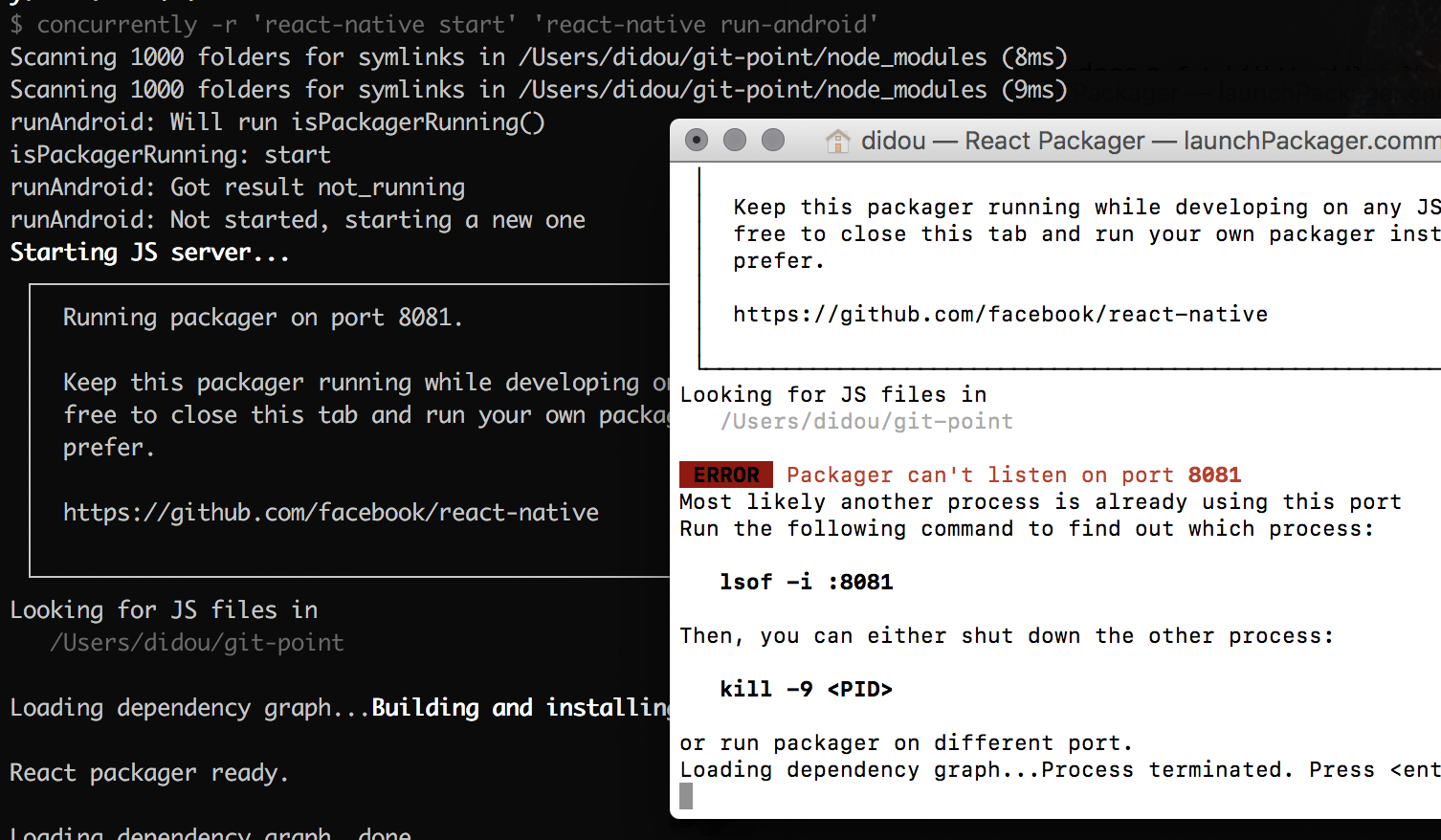
As you can see, the fetch() completed quickly with "not_running", so runAndroid starts a new one. (the one it starts is opened in the white window). Immediately after this first test fails, the packager supposed to be started by "react-native start" is finally up & running, so the new packager fails.
If I add for (var i = 0; i < 10000000000000; i++) {} in runAndroid before the isPackagerReady() test is executed, the double popup disappears. This is because by the time the fetch() is done, our first packager is already up and running.
machour
on 7 Nov 2017
Related issues
 Antoine38660
·
3Comments
Antoine38660
·
3Comments
 housseindjirdeh
·
5Comments
housseindjirdeh
·
3Comments
housseindjirdeh
·
5Comments
housseindjirdeh
·
3Comments
 patw0929
·
5Comments
patw0929
·
5Comments
 andrewda
·
4Comments
andrewda
·
4Comments