Git-point: Authentication problem on old devices
Logging this issue reported on gitter by @MrZhang123:
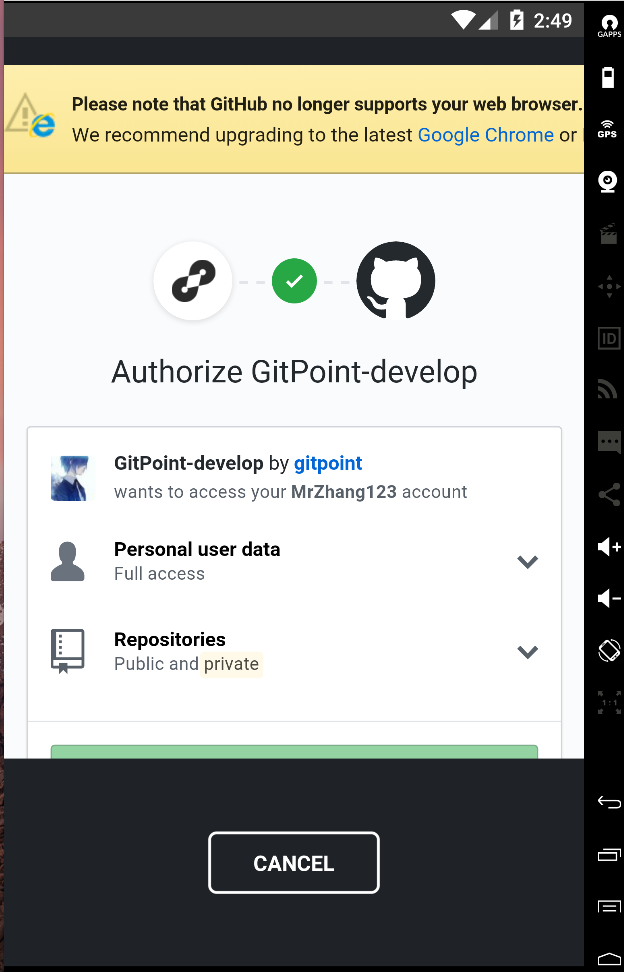
I use genymotion to run git-point , but when i hope authorise github to login , it give me "no longer supports your web browser , please upgrade chrome or firefox "( i install chrome in simulator ), how to solve this problem and Continue to develop ?
 machour
All 8 comments
Hey @MrZhang123, can you try adding userAgent="Mozilla/5.0 (Macintosh; Intel Mac OS X 10_12_6) AppleWebKit/537.36 (KHTML, like Gecko) Chrome/61.0.3163.91 Safari/537.36" in login.screen.js line 259 ?
Let me know if it works 🙏
machour
on 25 Sep 2017
@machour Thanks for your help , add this code
userAgent="Mozilla/5.0 (Macintosh; Intel Mac OS X 10_12_6) AppleWebKit/537.36 (KHTML, like Gecko) Chrome/61.0.3163.91 Safari/537.36"
can fixed the not support in your browser, but not use in button disabled.
I guess my Genymotion run slow cause this problem , when i run client in android device for develop , the button can touch and login . github authorise just once and then can develop , so I can give authorise and then login the Genymotion to fixed this problem.
 MrZhang123
on 26 Sep 2017
MrZhang123
on 26 Sep 2017
@MrZhang123 i had this problem and tried a lot of things.
The only solution i found was installing chrome and fix it that way.
 TautFlorian
on 26 Sep 2017
TautFlorian
on 26 Sep 2017
@FlorianTaut was that on a real device or an emulator? I'm a bit worried by the problem :/
machour
on 26 Sep 2017
@FlorianTaut I installing chrome x86 in Genymotion , but not fix it , I have to use real device.
MrZhang123
on 26 Sep 2017
@MrZhang123 should I go ahead and close this issue?
You got me a bit worried about old (real) devices.. is there a way you can test on a physical device with an old OS ?
machour
on 29 Sep 2017
@MrZhang123 @machour i had this issue on Android emulator. Searched the hole internet and even asked github for support.
They told me the same as the browser. Its not supported and i should use chrome instead.
Downloaded the apk and installed it with drag and drop to the emulator.
Then set the default browser in settings and it should work.
❗️ This has nothing to do with gitpoint it self. You will have this issue with every app which needs authorization from github.
TautFlorian
on 5 Oct 2017
Closing this for now, as it seems to only affect the emulator
machour
on 7 Oct 2017
Related issues
 jouderianjr
·
5Comments
jouderianjr
·
5Comments
 Antoine38660
·
3Comments
Antoine38660
·
3Comments
 housseindjirdeh
·
3Comments
housseindjirdeh
·
3Comments
 nikolaevigor
·
3Comments
nikolaevigor
·
3Comments
 andrewda
·
4Comments
andrewda
·
4Comments
Most helpful comment
Hey @MrZhang123, can you try adding userAgent="Mozilla/5.0 (Macintosh; Intel Mac OS X 10_12_6) AppleWebKit/537.36 (KHTML, like Gecko) Chrome/61.0.3163.91 Safari/537.36" in login.screen.js line 259 ?
Let me know if it works 🙏