Git-credential-manager-for-windows: Credential prompt does not save credentials to store
I have an odd issue with my git setup for VS Team Foundation. I have cloned the remote repository. I am able to pull everything but every time I pull I have to enter credentials - this fails with very not-informative:
Logon failed, use ctrl+c to cancel basic credential prompt.
Later I am able to enter my credentials and the repo is checked out. I've checked windows credential store - there is no entry for my repository.
My git config --global gets me:
credential.helper=manager
I am getting prompted for my Windows Live credentials - and I successfully enter everything. But for some reason this does not change my credentials on a computer. My usal flow is like that - SourceTree version 2.1.2.5:
git -c diff.mnemonicprefix=false -c core.quotepath=false -c credential.helper=manager-st fetch origin
Logon failed, use ctrl+c to cancel basic credential prompt.git -c diff.mnemonicprefix=false -c core.quotepath=false -c credential.helper=manager-st pull origin feature/preferences
Logon failed, use ctrl+c to cancel basic credential prompt.
From https://swiftshift.visualstudio.com/xxxx
- branch feature/xxx -> FETCH_HEAD
Already up-to-date.
git -c diff.mnemonicprefix=false -c core.quotepath=false -c credential.helper=manager-st submodule update --init --recursive
Completed successfully.
But the same issue appears when I enter 'git pull' in Git Bash - it appears to me that the token is not saved on my machine.
I have Windows 10 Enterprise.
Installing version 1.2 fixed issue. But you should fix this issue in the new release.
 coyot
coyot
All 45 comments
-c credential.helper=manager-st
Given the above, I'm slightly at a loss because this is the Atlassian specific credential manager.
Does the issue reporoduce from Command Prompt using the latest Git for Windows?
 whoisj
on 9 Aug 2017
whoisj
on 9 Aug 2017
Hi. I am experiencing the same(similar) issue. Any ideas?
Installed Git for Windows, cloning from VSTS through VS2017, and getting prompt to enter credentials 3+ times before it takes and credentials not saved in Credential Manager.
 wesleychinnapper
on 5 Sep 2017
wesleychinnapper
on 5 Sep 2017
@wesleychinnapper this sounds rather broken.
Can you enable some logging so that we can better see what is happening?
To enable the tracing and collect a log:
- Open a Command Prompt with the same privileges as you would give Visual Studio (same user, elevated if VS is elevated, otherwise non-elevated).
- Run
setx GIT_TRACE %UserProfile%\git.log - Run
setx GCM_TRACE %UserPorfile%\git.log - Restart Visual Studio
- Reproduce the problem.
- Attach the file found at "%UserProfile%\git.log" to this issue. Please redact any sensitive or personally identifiable information from the log before sharing it publicly.
Given that the log file can get large quickly, disabling logging is something you'll want to do at some point. To do so:
- Open a Command Prompt with the same privileges as used to enable the tracing.
- Run
setx GIT_TRACE "" - Run
setx GCM_TRACE ""
Because environment variables are inherited at process start up, any process (console, Visual Studio, other Git tools) which are running will continue logging until restarted.
whoisj
on 5 Sep 2017
@whoisj Here is the log.
git.txt
Looks like it created the Widows Credentials this time.
Here is the log from VS:
Error: cannot spawn askpass: No such file or directory
Error encountered while cloning the remote repository: Git failed with a fatal error.
fatal: could not read Username for 'https://<>.visualstudio.com/': terminal prompts disabled
Error: cannot spawn askpass: No such file or directory
Error encountered while cloning the remote repository: Git failed with a fatal error.
fatal: could not read Username for 'https://<>.visualstudio.com/': terminal prompts disabled
Error: cannot spawn askpass: No such file or directory
Error encountered while cloning the remote repository: Git failed with a fatal error.
fatal: could not read Username for 'https://<>.visualstudio.com/': terminal prompts disabled
Error: cannot spawn askpass: No such file or directory
Error encountered while cloning the remote repository: Git failed with a fatal error.
fatal: could not read Username for 'https://<>.visualstudio.com/': terminal prompts disabled
Error: cannot spawn askpass: No such file or directory
Error encountered while cloning the remote repository: Git failed with a fatal error.
fatal: could not read Username for 'https://<>.visualstudio.com/': terminal prompts disabled
Here is my Git config
core.symlinks=false
core.autocrlf=true
core.fscache=true
color.diff=auto
color.status=auto
color.branch=auto
color.interactive=true
help.format=html
rebase.autosquash=true
http.sslcainfo=C:/Program Files/Git/mingw64/ssl/certs/ca-bundle.crt
http.sslbackend=openssl
diff.astextplain.textconv=astextplain
filter.lfs.clean=git-lfs clean -- %f
filter.lfs.smudge=git-lfs smudge -- %f
filter.lfs.required=true
filter.lfs.process=git-lfs filter-process
credential.helper=manager
user.name=Wesley Chinnapper
user.email=WesleyCh@<>.co.nz
credential.helper=manager
wesleychinnapper
on 5 Sep 2017
@wesleychinnapper are you actually seeing a dialog asking for credentials? What you should be seeing is a windows containing a web browser control displaying the Azure Authentication Portal (looks something like the image below).
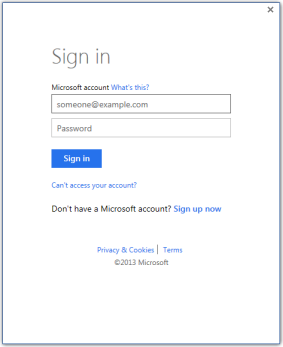
Given that I do not see any GCM tracing in the git.txt file, either git-credential-manager.exe isn't being launched or it is failing to trace. If that's the case, then we need to determine why that is.
A few things to consider:
Perhaps your credentials are bad, and for some reason the GCM cannot purge them - a manual pruge might be helpful.
- Open Windows Credential Manager. The easiest method is [Start] -> Type "cred" -> Click on "Credential Manager" tile.
- Click "Windows Credentials" tab (icon is a vault with a computer, not the vault with a globe).
- Scan the list for any "git:https://" prefixed entries.
- Delete any entries related to the Git repository in question.
The issue might be related to git-lfs. To validate attempt to perform your network operation from the Command Prompt using the latest Git for Windows.
whoisj
on 6 Sep 2017
@whoisj I do get that Azure Authentication Portal screen.
Deleted the "git:https://" prefixed entries.
Ran this in CMD:
C:\Users\wesleych>git clone https://<>.visualstudio.com/<>/_git/ProductBravo
Cloning into 'ProductBravo'...
Logon failed, use ctrl+c to cancel basic credential prompt.
error: failed to execute prompt script (exit code 1)
fatal: could not read Username for 'https://<>.visualstudio.com': No error
"git:https://" prefixed entries. did not recreated.
git log:
08:26:59.617416 git.c:328               trace: built-in: git 'clone' 'https://<>.visualstudio.com/<>/_git/ProductBravo'
08:26:59.669325 run-command.c:626       trace: run_command: 'remote-https' 'origin' 'https://<>.visualstudio.com/<>/_git/ProductBravo'
08:26:59.678350 git.c:560               trace: exec: 'git-remote-https' 'origin' 'https://<>.visualstudio.com/<>/_git/ProductBravo'
08:26:59.679354 run-command.c:626       trace: run_command: 'git-remote-https' 'origin' 'https://<>.visualstudio.com/<>/_git/ProductBravo'
08:27:00.140085 run-command.c:626       trace: run_command: 'git credential-manager get'
08:27:00.199559 git.c:560               trace: exec: 'git-credential-manager' 'get'
08:27:00.200562 run-command.c:626       trace: run_command: 'git-credential-manager' 'get'
08:29:18.837070 run-command.c:626       trace: run_command: 'bash' '-c' 'cat >/dev/tty && read -r line </dev/tty && echo "$line"'
Not sure what else to do to get you more information :-/
Username and Password is def correct - I use the same ones in Git Kraken and it works fine...
wesleychinnapper
on 7 Sep 2017
Given the parallel runs of trace: run_command: 'git credential-manager get' I'm guess at least one of those is Git-Lfs (or similar) and it is failing to authenticate. Does this repository have any Git-Lfs items in it?
whoisj
on 7 Sep 2017
No :)
Its a very simple solution with two projects and a couple of Nuget packages with very simple class files, nothing else.
wesleychinnapper
on 7 Sep 2017
OK then. I think we'll need to use something like Fiddler to capture a trace of what is happening inside the HTTP stack.
whoisj
on 7 Sep 2017
@whoisj there is a typo on # 3, UserProfile in your comment above.
I have the same issue. We're in the process of switching our corporate VSTS from Microsoft accounts to AAD/ADFS, and I can no longer authenticate during this transition. git.log
From the looks of it, VSTS is reporting MSA, which is for personal accounts. My guess is once VSTS reports AAD then the Git Credential Manager will start working again.
__Update__
The file based cache configured the authentication to use Windows Live but the account had switched to AAD.
__Solution__
Delete tenant.cache from AppData\Local\GitCredentialManager
 GeorgeTsiokos
on 26 Dec 2017
GeorgeTsiokos
on 26 Dec 2017
Thanks @GeorgeTsiokos , I was having the exact same issue and after much frustration, deleting tenant.cache solved it immediately 👍
 mwanchap
on 4 Jan 2018
mwanchap
on 4 Jan 2018
I had similar problems and the reason was an http_proxy entry in the global config:
$ git config --global --list
...
proxy = httpproxy.my.company.com
proxyAuthMethod = ntlm
...
Just disable these both entries by pre-pending a comment char (#) and Git works with VSTS.
To edit the config you can use git config --global --edit.
 aryoda
on 19 Mar 2018
aryoda
on 19 Mar 2018
@wesleychinnapper @coyot I've learned a lot about HTTP proxies and ADAL authentication since starting this project, and that has enabled me to make several important architectural changes to the GCM's most recent (preview) version which I believe will help resolve these issues for you.
If you wouldn't mind, please download and evaluate the GCMW-v1.16.0-preview.3 and let me know how it goes. Thanks!
whoisj
on 16 May 2018
@whoisj How do I setup the GCMW you provided? Having continual issues with Visual Studio saying it cannot find git-askpass.exe even though authentication and pushing to my git repo was working again yesterday!
EDIT: The "real" solution ended up being importing my ssh keys from my other dev environment, caching them in Pageant PuTTY authentication agent and closing the repo via SSH rather than HTTPS. Was not able to solve the HTTPS / two-factor auth issues with VS, Atlassian and Windows Credentials.
Error: cannot spawn /C/Program Files (x86)/Microsoft Visual Studio/2017/Community/Common7/IDE/CommonExtensions/Microsoft/TeamFoundation/Team Explorer/Git/mingw32/libexec/git-core/git-askpass.exe: No such file or directory
Error encountered while pushing to the remote repository: Git failed with a fatal error.
could not read Password for 'https://[email protected]': terminal prompts disabled
Pushing to https://[email protected]/blahblahblah/blahblahblah.git
This is still the case even though recent versions of Visual Studio have apparently solved the issue: https://github.com/github/VisualStudio/issues/949
I have tried clearing all credentials from Windows credentials manager, but they do not appear to be getting recreated into the credentials manager when I sign back into Atlassian.
I cannot find any GitCredentialsManager directory on my system, even though I have enabled the display and search of hidden files and system directories, so no tenant.cache file that I can delete to try and resolve, either.
Have executed git config and am not seeing any proxies, although I am running Windows from a Parallels VM. Any other internet connectivity is working fine though, including auth... credentials just aren't getting stored. No enterprise network settings on my machine, etc. again, two-factor auth was working not too long ago.
 ghost
on 7 Jul 2018
ghost
on 7 Jul 2018
@Pritchard the downloadable GCM package is not designed to override the GCM package that ships with Visual Studio (yes, GCM ships as part of Visual Studio - cool huh?). The latest update to VS should include GCMW v1.16.0 - which is not the latest, but there will be at least one more patch (probably many more) of VS and that future version will contain v1.16.2.
Best way to see what is happening with Visual Studio is to do the following:
- Open Command Prompt
- Run
setx GIT_TRACE %UserProfile%\git.log - Run
setx GCM_TRACE %UserProfile%\git.log - Restart Visual Studio
- Reproduce your issue.
Once you've done the above, you can collect the logs from %UserProfile%\git.log and share them here. Of course, please redact any private, secret, or personally identifiable information from the logs before sharing.
Since the logs grow very quickly, to disable logging:
- Open Command Prompt
- Run
setx GCM_TRACE "" - Run
setx GIT_TRACE "" - Restart Visual Studio.
Additionally, have you use the Visual Studio Feedback tool from within Visual Studio to report the problem on https://developercommunity.visualstudio.com/ yet?
whoisj
on 9 Jul 2018
Thank you for your detailed response...
We began having the same issue with Atlassian's own software, SourceTree using BitBucket HTTPS connections. We've quickly moved our teams to use SSL only from hereon. This is resolving the issue across all teams - some using Visual Studio, some not.
I will debug next time we run into a an issue isolated to Visual Studio environments, but I consider this resolved as not being a bug with VS itself.
ghost
on 25 Jul 2018
I have three computers running VS 2017. One has Windows 10 and version 15.7.5 of VS 2017 the other two run on Win 7 and have version 15.7.6 of VS 2017. When I try to push or pull to bitbucket all of them show this message:
Git failed with a fatal error.
HttpRequestException encountered.
An error occurred while sending the request.
cannot spawn /C/Program Files (x86)/Microsoft Visual Studio/2017/Community/Common7/IDE/CommonExtensions/Microsoft/TeamFoundation/Team Explorer/Git/mingw32/libexec/git-core/git-askpass.exe: No such file or directory
could not read Username for 'https://bitbucket.org': terminal prompts disabled
Git push/pull to/from Bitbucket worked perfectly in all three installations 6 days ago.
5-6 ago (probably after the last push) I updated the VS 2017 in the two Win 7 computers from 15.7.5 to 15.7.6.
The way I solved it was to go and edit the remote origin in VS 2017 from
https://bitbucket.org/user/repo
to
https://user:[email protected]/user/repo
Is this safe? I think my password is sent in clear text within the URL to the bitbucket servers and is stored in the logs.
Will you provide a fix for this in the VS studio updates?
 retsetman
on 8 Aug 2018
retsetman
on 8 Aug 2018
Same problem with Bitbucket as @retsetman
 alecrt
on 8 Aug 2018
alecrt
on 8 Aug 2018
same problem witrh bitbucket too, but VS says me "Password" no "username"
 andreakarasho
on 8 Aug 2018
andreakarasho
on 8 Aug 2018
All, @Foda and I are actively working on these issues #711, #712, #713 are flight to resolve them. Patience please 😊
whoisj
on 8 Aug 2018
Same problem here. I've starting encountering this issue after updating to 15.7.6 and installing the latest Resharper for VS2017. Can you share the cause? Only crashes when working with git from Bitbucket. Git from Github or TFSO works ok.
 razvangoga
on 9 Aug 2018
razvangoga
on 9 Aug 2018
I am also encountering this issue, I will attach my git.log from the setx commands when I get home.
It's complaining that bitbucket closed the connection before the response was read.
 jasoncouture
on 9 Aug 2018
jasoncouture
on 9 Aug 2018
@razvangoga looking at the pull requests (which are fix) should help point to the cause. 😏
whoisj
on 9 Aug 2018
It's complaining that bitbucket closed the connection before the response was read.
This particular fact has been rather troubling to me. @Foda, does the fixes so far cover this issue? Normally we see errors where the host closes the connect abruptly around TLS, DNS, and other networking issues - not with authentication directly.
whoisj
on 9 Aug 2018
What i meant (maybe was not too clear) was "should i start uninstalling / downgrading stuff or wait for a fix because it's unrelated". But thanks for the GTFO and RTFM style answer @whoisj.
razvangoga
on 9 Aug 2018
But thanks for the GTFO and RTFM style answer @whoisj.
Hey no problem 😉.
Seriously though, I don't have an answer to your actual question was. We're working on a fix as quickly as possible. It's not as quick as you might hope given the need to actually test and validate everything, but progress is being made. We're still hoping on getting a release out today, or at latest tomorrow.
whoisj
on 9 Aug 2018
Any update on this? I just ran into this issue when it was working perfectly fine just the other day. Nothing has changed except suddenly it says "Logon failed, use ctrl+c to cancel basic credential prompt." This only happens when running "git clone" through Jenkins. and again it was working perfectly fine 3 days ago and we haven't changed anything. Not sure what to do here.
 VivaLaRobo
on 16 Aug 2018
VivaLaRobo
on 16 Aug 2018
@VivaLaRobo you'll likely need to capture trace logs for me to help. To do so
- Open Command Prompt
- Run
setx GIT_TRACE %UserProfile%\git.log. - Run
setx GCM_TRACE %UserProfile%\git.log. - Restart any Git clients (consoles, Jenkins, Visual Studio, etc.)
- Reproduce the issue with Jenkins.
Once you have captured the issue, share the data captured in %UserProfile%\git.log. As always, redact any private, secret, or personally identifiable information before sharing on the Internet.
The logs can get large quickly, so to disable logging
- Open Command Prompt
- Run
setx GIT_TRACE "". - Run
setx GCM_TRACE "". - Restart any Git clients (consoles, Jenkins, Visual Studio, etc.)
whoisj
on 16 Aug 2018
@whoisj hey thanks for the help. here is my git.log:
git.c:344 trace: built-in: git clone XXX
git.c:344 trace: built-in: git clone XXX
run-command.c:640 trace: run_command: git remote-https origin XXX
git.c:576 trace: exec: git-remote-https origin XXX
run-command.c:640 trace: run_command: git-remote-https origin XXX
run-command.c:640 trace: run_command: 'git credential-manager get'
git.c:576 trace: exec: git-credential-manager get
run-command.c:640 trace: run_command: git-credential-manager get
run-command.c:640 trace: run_command: bash -c 'test "a$SHELL" '!'= "a${SHELL%.exe}" || exit 127; cat >/dev/tty && read -r -s line
This only happens when I am connecting to the computer through SSH and running git clone https://XXX if I use the computer directly it works perfectly fine
VivaLaRobo
on 17 Aug 2018
@VivaLaRobo that is a very partial log, and none of the GCM_TRACE information is present. I will likely need a more complete log if I am to reason about what is actually happening here.
When you're connected via SSH, which users are actually running as? And, does that user have access to the credential store you expect? Remember that, on Windows, credential stores are not permissions based, instead they're cryptographically secured to prevent system administrators from having access to your secrets.
whoisj
on 20 Aug 2018
So i'm attaching 2 logs with my situation.
Since my last message I've updated all i can. I'm using:
- VS 2017 v15.8.1
- Github extension v2.5.4.3349
- Windows 10 Pro Version 10.0.17134 Build 17134
- git v2.18.0 (installed via Chocolatey v0.10.11 if it makes any difference)
- i always run VS as administrator
I've attached 2 logs one with and without the saved bitbucket Windows Credential.
The only difference is that without it i get a prompt window asking me to enter my bitbucket user /account but this does not get saved in Windows Credentials.
At the end of the logs i've put also the dump of the VS Source Control output.
Basically it's prompting me to enter my pass.
If I use git from the command line it works after entering the pass (sync / pull / push work as expected).
The issue seams to manifest only when working with Bitbucket based git repos. TFSO git repos and Github repos work as expected.
git_no_existing_credentials.log
git_with_existing_credentials.log
Is there anything more I can do / update / change ?
razvangoga
on 21 Aug 2018
@whoisj For me, windows does save the credentials. I can see the credentials stored when I open up the credential manager within windows. However it does not work when connected over SSH or through Jenkins. Interesting that it doesn't work with bitbucket based repos, but it works with others according to @razvangoga ^ wonder if this is the same issue I am seeing. Also I am connected with the same user that I connect to over SSH and Jenkins, yet it just throws the "Logon failed, use ctrl+c to cancel basic credential prompt." error
VivaLaRobo
on 21 Aug 2018
i've double checked now and after entering my user / pass in the Bitbucket login prompt
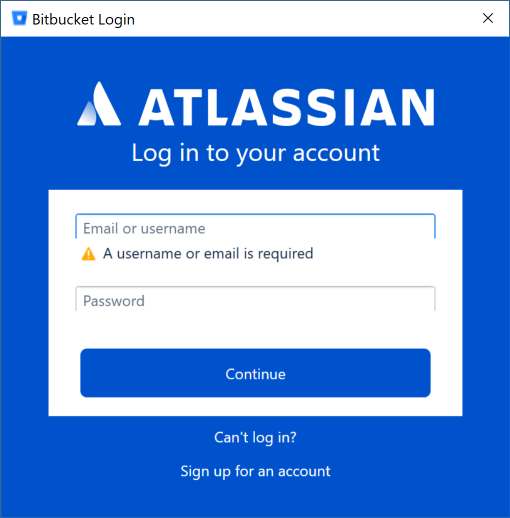 i get no new entry in Windows Credentials
@VivaLaRobo - don't know if it's the same. I only get this behavior from VS. If I use the command line, i get the same prompt but now it saved creds in Windows Credentials.... I just get the same "unable to read pass for your user error" as in the logs. It's just that from the command line i can enter the pass and all works ok from there on (i can push / pull / sync etc).
I have not tried from any other machine but my dev laptop, but i would guess it will work if i use the command line.
The Windows credential is this

Below the red rectangles is my Bitbucket username (not the email)
razvangoga
on 22 Aug 2018
@razvangoga there's a known bug in VS15.8. There is a fix coming out asap, but VS hasn't been able to get the update out the door quite yet. It should arrive in the near future, but honestly I have nearly zero insight into the VS release schedule.
whoisj
on 22 Aug 2018
@VivaLaRobo my guess is that when you're connected via SSH you do not have a "desktop" allocated, and therefore lack access to the Windows Credential Manager (which is where the GCM stores secrets). If this is the case, you're kind of stuck.
If you can get the GCM_TRACE environment variable to point to a file (or 1 if you using the command line) you should see the error message with enough details to move this conversation forward.
whoisj
on 22 Aug 2018
@whoisj strange... i first encountered the problem when i was still on 15.7.6 (when i blew a gasket a few posts up.. sorry for that). Maybe the problem was from the 15.7.5 to 15.7.6 update?
Anyway, if you say it's VS related, i'll wait for the update. I can manage with the command line - which I was doing anyway until the vs git integration extension became so handy :))
Thanks,
Razvan
razvangoga
on 22 Aug 2018
@razvangoga we all blow a gasket from time to time, no harm done 😄
The bug is in the GCM, but the GCM that ships with the Git for Windows package that ships with Visual Studio. Hence we need to wait for VS to issue an update to fix it. Apologies for the wait, but at least the fix is forth coming. Thanks for being understanding 😊
And, yes there have been bugs in the Bitbucket authentication stack since around the time of VS 15.7, so it would not surprise me that you affects - again apologies. If it makes you feel any better, things really blew up with Atlassian mass invalidated access tokens, forcing a huge number of people to discover the not working authenticator all at once. 😖
whoisj
on 22 Aug 2018
The 15.8.2 update fixed the problem for me.
 danhollingshead
on 29 Aug 2018
danhollingshead
on 29 Aug 2018
Looks like the 15.8.2 also fixed my issue
razvangoga
on 30 Aug 2018
Any idea if this was re-introduced to 15.9 ? :(
 bartdk-be
on 12 Dec 2018
bartdk-be
on 12 Dec 2018
I have the same question as @bartdekeersmaeker. We just updated our Azure DevOps organization to the new URL scheme and I am having this issue in all of my repositories. Connecting through Visual Studio (Manage Connections) seems to work fine, but I prefer working on the command line.
I am using version 15.9.3 of Visual Studio 2017 Professional
 danyadsmith
on 14 Dec 2018
danyadsmith
on 14 Dec 2018
Update:
Upgrading to Git Credential Manager for Windows 1.18.3
Cleaning up old git:// entries in Windows Credential Manager related to Azure DevOps
Restarting my Machine
resolved my issues.
danyadsmith
on 15 Dec 2018
@danyadsmith : Thanks for the feedback !
I did change the values in the Windows Credential Manager myself. Resolved the issue as well.
bartdk-be
on 15 Dec 2018
Can't remember password rest Microsoft password
 HopeMarie22
on 31 Aug 2020
HopeMarie22
on 31 Aug 2020
Need help resetting Microsoft password contact me on my Gmail [email protected]
HopeMarie22
on 31 Aug 2020
Related issues
 clairernovotny
·
7Comments
clairernovotny
·
7Comments
 eromoe
·
5Comments
eromoe
·
5Comments
 garretwilson
·
5Comments
garretwilson
·
5Comments
 panuganti
·
4Comments
panuganti
·
4Comments
 wayneuroda
·
3Comments
wayneuroda
·
3Comments
Most helpful comment
@whoisj there is a typo on # 3,
UserProfilein your comment above.I have the same issue. We're in the process of switching our corporate VSTS from Microsoft accounts to AAD/ADFS, and I can no longer authenticate during this transition. git.log
From the looks of it, VSTS is reporting MSA, which is for personal accounts. My guess is once VSTS reports AAD then the Git Credential Manager will start working again.
__Update__
The file based cache configured the authentication to use Windows Live but the account had switched to AAD.
__Solution__
Delete
tenant.cachefromAppData\Local\GitCredentialManager