Ghidra: Ablity to load external libraries after loading a project
Is your feature request related to a problem? Please describe.
I'm not sure if it's currently possible to load external libraries after importing a file. When importing a file, you are able to load external libraries as shown below.
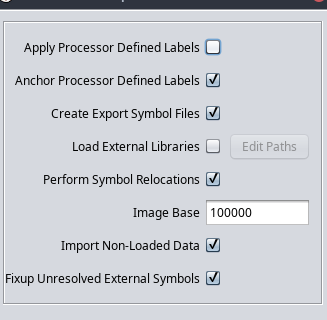
But what happens if you decided to analyze a library the code is calling, after the fact? E.G. Winsock
I don't see an option to analyze libraries in the codebrowser.
Describe the solution you'd like
Perhaps consider a menu entry in the analysis menu.
Additional context
Not sure if I'm missing something obvious?
 redragonx
All 12 comments
Apparently you could also just import the libraries and link them afterwards.
redragonx
on 10 Apr 2019
@redragonx Could you elaborate on the 'import and link afterwards'?
Is that a feature that Ghidra has (and if so, how does one "link" the library?), or is that just an idea of how it could be implemented?
 Ristovski
on 10 Apr 2019
Ristovski
on 10 Apr 2019
I'd like to add to this with some examples.
I have imported a binary into a Ghidra project and analysed it. After a while, I realised that winsock functions were not being recognised (shown as below):

I then added wsock32.dll as an external library and made Ghidra analyse it.
Now when you click the WSOCK function handle in the first image, it goes into this:

And then if you click on the red function name it goes into the correct function in wsock32.dll:

However, the function names in the binary listing (as shown in the first image) have not been updated.
 pedrib
on 10 Apr 2019
pedrib
on 10 Apr 2019
Hi, not sure if my problem is the same as this one.
I have batch imported full fs of device I am analyzing and all of the necessary libs are inside project.
But, when I analyze binary, all import are in EXTERNAL instead of appropriate lib and I can not see function code.
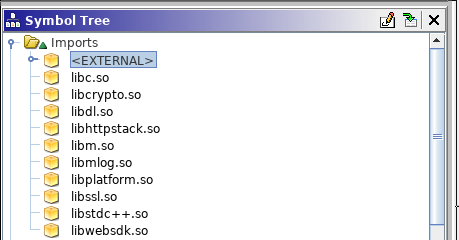
 nemanjan00
on 13 Jul 2019
nemanjan00
on 13 Jul 2019
@nemanjan00 once you have set all the shared libraries you care about to their external binary, you can run the FixupELFExternalSymbolsScript plugin
 mumbel
on 13 Jul 2019
mumbel
on 13 Jul 2019
@mumbel, thanks! Worked!
nemanjan00
on 14 Jul 2019
How can we do the same for 16-bit Windows NE files?
 Wall-AF
on 25 Aug 2020
Wall-AF
on 25 Aug 2020
FWIW, what worked for me is dragging the symbols from <EXTERNAL> to the correct library (ctrl+click and shift+click work).
 sollyucko
on 20 Sep 2020
sollyucko
on 20 Sep 2020
So here's a step by step guide on how to do this.
First open the "External Programs" window. You'll see the various imported libraries there. Right click, then select "Set External Name Association" and link it to the library (which you must have previously imported into Ghidra).
Then finally go to "Script Manager", then choose the "Symbol" folder and run "FixupELFExternalSymbolsScript.java".
Done!
PS: no idea if this works for Windows binaries (probably not given the name of the Java file).
pedrib
on 1 Oct 2020
I think java is language plugin is written in
nemanjan00
on 1 Oct 2020
They are pointing at ELF in the filename, which is a Linux binary (contrast with, say, PE)
 draeath
on 9 Oct 2020
draeath
on 9 Oct 2020
Speaking of which, is there an equivalent solution for PE?
pedrib
on 10 Oct 2020
Related issues
 loudinthecloud
·
3Comments
loudinthecloud
·
3Comments
 toor-de-force
·
3Comments
toor-de-force
·
3Comments
 Barakat
·
3Comments
Barakat
·
3Comments
 Merculous
·
3Comments
Merculous
·
3Comments
 astrelsky
·
3Comments
astrelsky
·
3Comments
Most helpful comment
@nemanjan00 once you have set all the shared libraries you care about to their external binary, you can run the
FixupELFExternalSymbolsScriptplugin