Ghidra: Uncontrolled Search Path Element when executing CMD.
Describe the bug
When executing Ghidra from a given path the Java process working directory is set to this path. Then, when launching Python interpreter located in "Ghidra Codebrowser" -> "Window" -> "Python"
Ghidra will try to execute an arbitrary file "cmd.exe" located at the attacker choosen working directory.
To Reproduce
Steps to reproduce the behavior:
- Copy an arbitrary Portable Executable file named "cmd.exe" into a folder, for instance: c:\test.
- Open a command line and go to the choosen folder. Following the same example: cd c:\test\
- Execute Ghidra from the command line: [route_to_ghidra]\ghidraRun.bat
- Create a new Ghidra proyect.
- Add a Portable Executable into the proyect.
- Open the added file in "GhidraCodebrowser".
- Go to "Window", and then to "Python".
- Wait until your arbitrary file "cmd.exe" is executed.
Expected behavior
Ghidra would resolve the right "cmd.exe" located into the Windows system directory.
Screenshots

Environment (please complete the following information):
- OS: Microsoft Windows 7 x64
- Version 6.1.7601
 dalvarezperez
All 19 comments
I could not reproduce this. The first line of output in your Process Monitor is referencing bin\jython.exe. That is not part of the Ghidra release. Did you add that there? Where you doing anything with Eclipse projects in that jython directory?
 ryanmkurtz
on 8 Mar 2019
ryanmkurtz
on 8 Mar 2019
I could not reproduce this. The first line of output in your Process Monitor is referencing bin\jython.exe. That is not part of the Ghidra release. Did you add that there? Where you doing anything with Eclipse projects in that jython directory?
The CreateFile operation result of "bin\jython.exe" is: PATH NOT FOUND because the file, as you known, is not included with Ghidra, in fact, file does not exist but this is not relevant in this case.
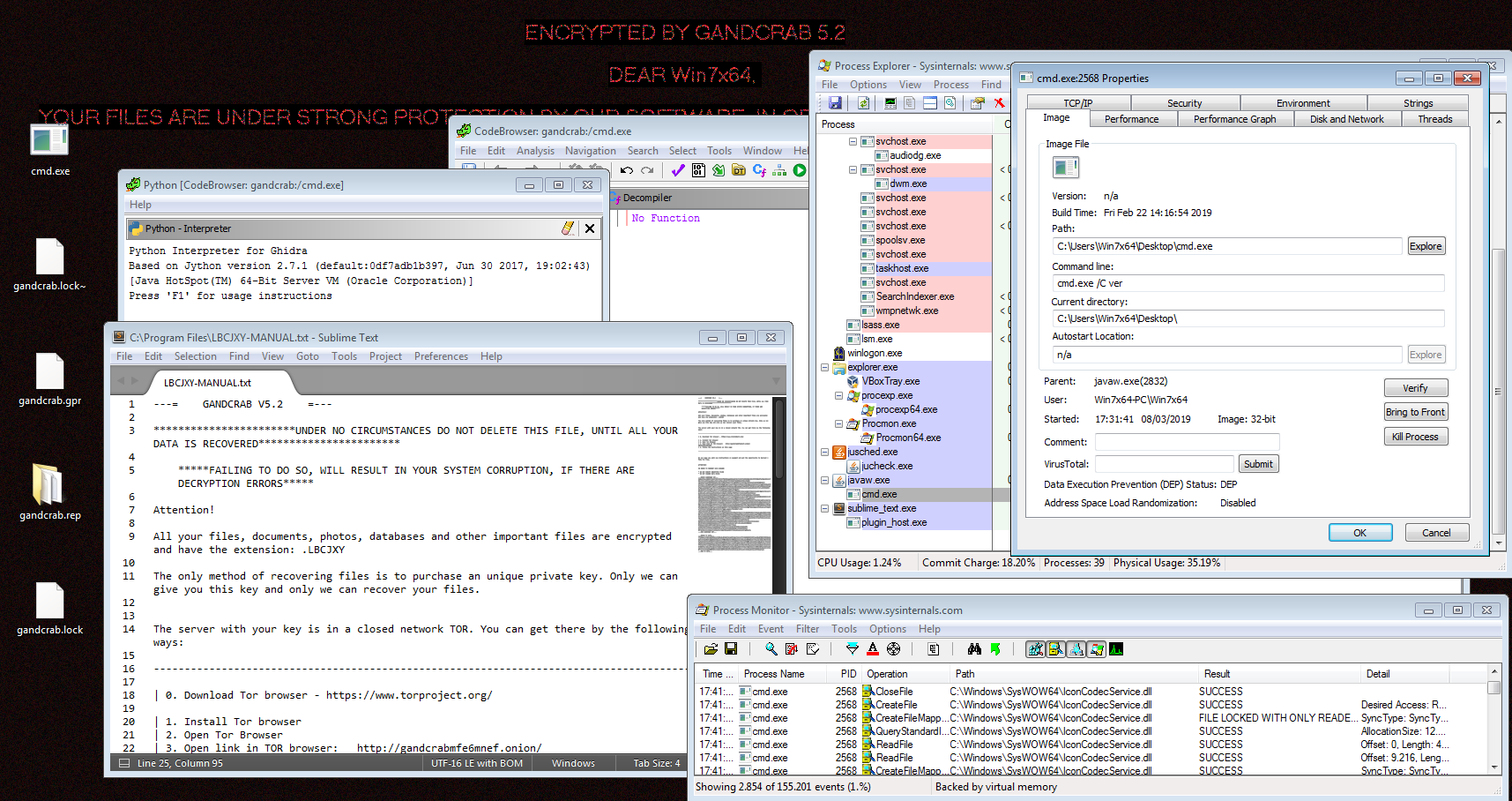
Important things here are to execute Ghidra from a choosen working directory where arbitrary "cmd.exe" do exist. You can verify that with Process Explorer. Then, when you launches the python interpreter this file will be unexpectedly executed. Maybe this screeshot helps:

dalvarezperez
on 8 Mar 2019
Thanks for the additional info. Does it execute your cmd.exe binary every time you reset the python interpreter (ctrl+d or exit() from the interpreter)?
ryanmkurtz
on 8 Mar 2019
Thanks for the additional info. Does it execute your cmd.exe binary every time you reset the python interpreter (ctrl+d or exit() from the interpreter)?
Yes, It happens in both cases: CTRL+D and exit()
dalvarezperez
on 8 Mar 2019
Ok, I'll have to look into why Jython is doing this...it's definitely not necessary for our built-in python interpreter to function. Thanks for finding/reporting this and all of the detailed information!
ryanmkurtz
on 8 Mar 2019
Would you mind sharing the command line arguments that get passed to cmd.exe? Looking at the jython source, it seems to be launching _cmd.exe /c ver_ to get the Windows version (and uname for linux/mac). I want to confirm that is what is happening for you.
ryanmkurtz
on 8 Mar 2019
Would you mind sharing the command line arguments that get passed to cmd.exe? Looking at the jython source, it seems to be launching _cmd.exe /c ver_ to get the Windows version (and uname for linux/mac). I want to confirm that is what is happening for you.
Yes, it is launching _cmd.exe /c ver_
dalvarezperez
on 8 Mar 2019
I got infected with Gandcrab v5.2 while analyzing it named as: "cmd.exe"
But this behaviour will happen with any other threat.
dalvarezperez
on 8 Mar 2019
This security breach was silently fixed. It is not in release notes: https://ghidra-sre.org/releaseNotes.html#9_0_1
dalvarezperez
on 26 Mar 2019
Unfortunately this issue was not able to be fixed for 9.0.1. Are you sure you are testing it in exactly the same manner as when you reported it?
ryanmkurtz
on 26 Mar 2019
You are right. It is not fixed yet.
dalvarezperez
on 27 Mar 2019
cmd.exe is also launched every time you call getwindowsversion() from the interpreter.
ryanmkurtz
on 5 Apr 2019
It is possible to set the JAVA working directory avoiding most of these situations instead of fixing one by one. I suggest to add the following code into "support\launch.bat" :
cd /d %~dp0/../
But well, an analogous command will be necessary for Linux/Mac into the file "support\launch.sh"
dalvarezperez
on 5 Apr 2019
I would say this is an issue in Jython. More specifically this line: https://github.com/jythontools/jython/blob/master/src/org/python/core/PySystemState.java#L1786
I would open an issue there and have it fixed upstream.
However, Ghidra has the same issue when opening manuals, see: https://github.com/NationalSecurityAgency/ghidra/blob/49c2010b63b56c8f20845f3970fedd95d003b1e9/Ghidra/Features/Base/src/main/java/ghidra/util/ManualViewerCommandWrappedOption.java#L121
I would use %COMSPEC% which is the Windows env var for the comandline interpreter binary.
Linux should be OK as there binaries that are not in the PATH env var can only be executed by prefixing them with ./. So uname will not run a local uname. To run a local uname bin in the CWD you'd have to run ./uname... as Unix has identified this problem of local binaries shadowing global ones early on and recognized the threat this poses.
 0x6d696368
on 23 Oct 2019
0x6d696368
on 23 Oct 2019
@ryanmkurtz was this issue ever addressed ?
If so could you point me to the fixing commit ?
Please note that this issue was assigned CVE-2019-17664.
Thanks in advance !
 NicoleG25
on 22 Apr 2020
NicoleG25
on 22 Apr 2020
No, it is not fixed. It's more of an issue with Jython...it should be fixed in that library. As far as I know, Jython is unaware of the issue.
ryanmkurtz
on 22 Apr 2020
@jeff5 Could you take a look/have someone take a look at this ?
Thanks in advance :)
@ryanmkurtz was this issue ever addressed ?
If so could you point me to the fixing commit ?
Please note that this issue was assigned CVE-2019-17664.
Thanks in advance !
NicoleG25
on 22 Apr 2020
Happy to take a look You just missed v2.7.2, sorry. I raised https://bugs.jython.org/issue2882 .
Almost certainly, the right answer is to use COMSPEC as @0x6d696368 suggests.
The standard library subprocess.py in CPython falls back to cmd.exe if COMSPEC is not defined, but Jython's subprocess.py on;y uses a value ultimately defined in enum OS, cmd.exe . Given the experience here, the fallback may be undesirable.
 jeff5
on 22 Apr 2020
jeff5
on 22 Apr 2020
Thank you Jeff !
NicoleG25
on 23 Apr 2020
Related issues
 huettenhain
·
3Comments
huettenhain
·
3Comments
 tambry
·
3Comments
tambry
·
3Comments
 pd0wm
·
3Comments
pd0wm
·
3Comments
 lab313ru
·
3Comments
lab313ru
·
3Comments
 gemini00
·
3Comments
gemini00
·
3Comments
Most helpful comment
Happy to take a look You just missed v2.7.2, sorry. I raised https://bugs.jython.org/issue2882 .
Almost certainly, the right answer is to use
COMSPECas @0x6d696368 suggests.The standard library subprocess.py in CPython falls back to
cmd.exeifCOMSPECis not defined, but Jython's subprocess.py on;y uses a value ultimately defined in enum OS,cmd.exe. Given the experience here, the fallback may be undesirable.