Ggez: Canvas with different sized aspect ratio to screen strechted rendering
Apologies if this has been covered already, I think this issue is different from what has already been reported. Alternatively, I could just be being thick.
Describe the bug
I'm trying to render graphics to a canvas which has a different aspect ratio from the window. My window is 16:9, but the canvas is 1:1: When displaying the canvas it shows as the right size, but everything rendered in the canvas is squashed so the x axis is less than the y axis. I've attached an image to hopefully demonstrate what's happening. This issue does not happen when creating a canvas using with_window_size().
To Reproduce
Clear window with a colour.
Create canvas and clear with different colour.
Draw images to canvas.
Display canvas
Expected behavior
Canvas background should be correct size and images drawn to canvas maintain their aspect ratio.
Screenshots or pasted code
Canvas displays at correct size, but images have different aspect ratio.
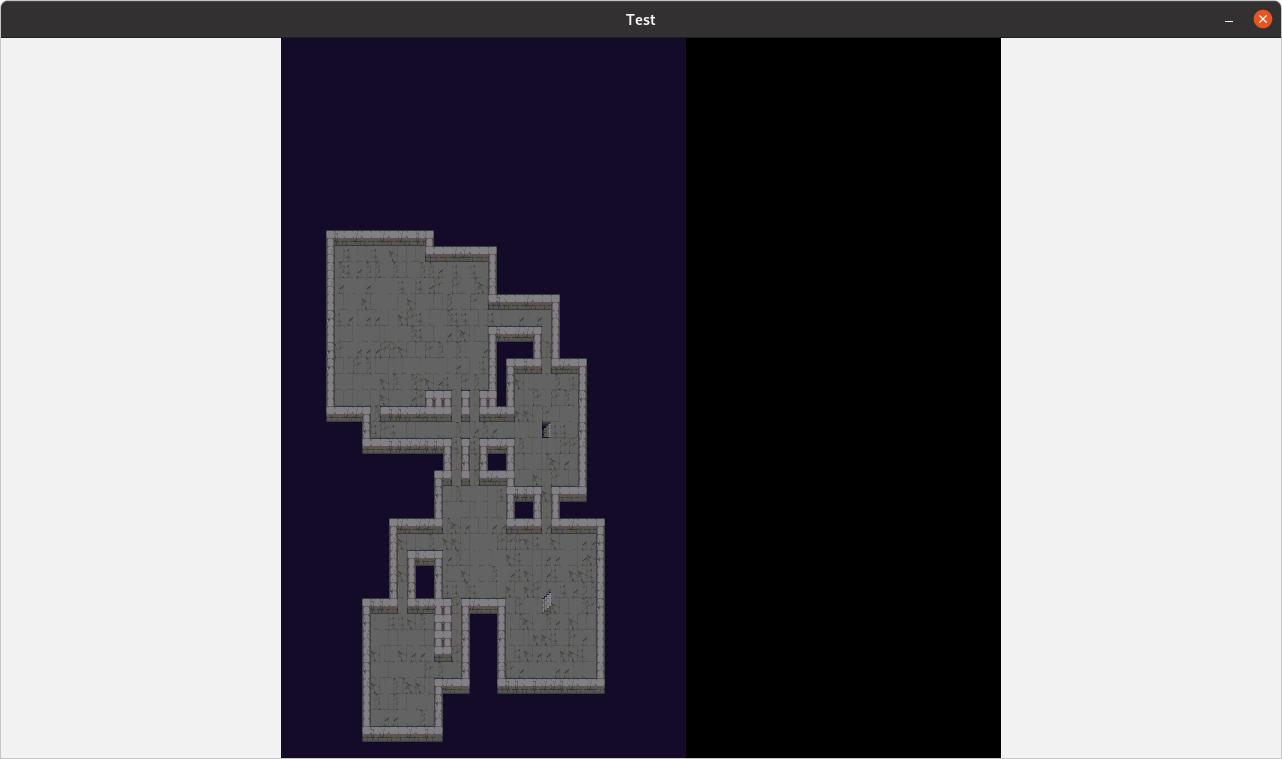
Hardware and Software:
- ggez version: 0.5.1
- OS: Fedora 32
- Graphics card: NVidia GTX 1060
- Graphics card drivers: NVidia propriety.
 BezPowell
All 3 comments
I have also stumbled across this issue. I don't think it has anything specifically to do with aspect ratio though.
See the following screenshot:
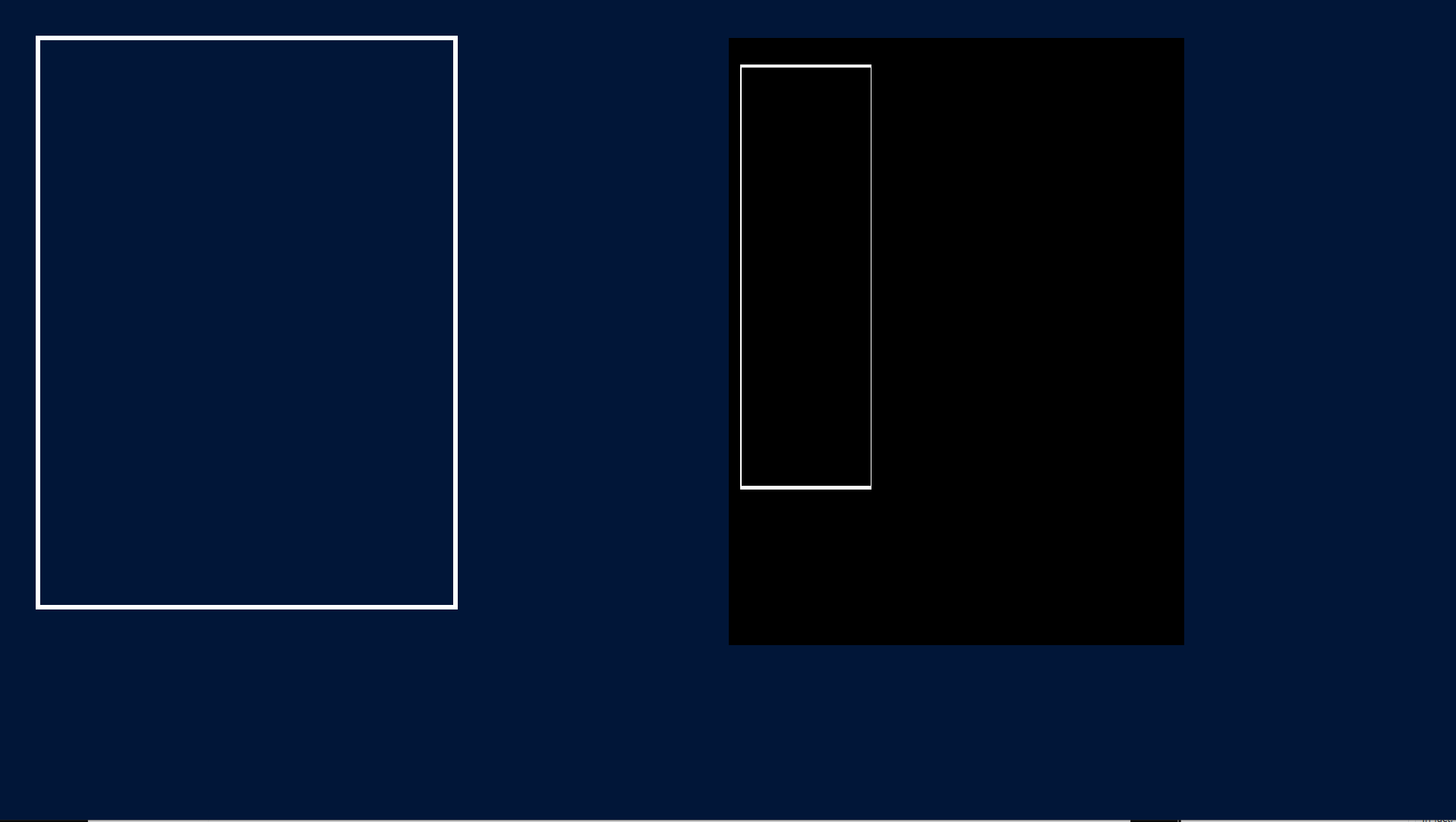
This is a 1920x1080 window. On the left I draw a rectangle mesh of 550x750 to the screen at (50,50). On the right is a 600x800 canvas, cleared black, on which I also draw the same rectangle mesh, also at 50x50 (relative to the canvas).
As you can see the canvas is indeed 600x800, however the rectangle in the canvas is deformed, as if the canvas was originally 1920x1080 when the mesh got drawn, and then squashed to 600x800 when the actual canvas gets drawn.
This is also what I suspect happens (somehow) behind the scenes. When a canvas is set to be drawn to, it appears that somehow the drawable size is still considered to be the actual screen size when making draw calls. Then when the canvas itself is drawn its internal Image is drawn with the canvas's width and height.
I tried to figure out more about how this could happen, but I'm not knowledgeable about the nitty-gritties of gfx and got lost at shaders drawing and encoders drawing.
Here is another example, with the rectangle now 860x980 (so taking up half the screen, minus margins, in screen space), again drawn at (50,50), once on the 1920x1080 screen and once on the 600x800 canvas.

I would expect a 860x980 pixels rectangle to not fit on a 600x800 pixels canvas.
Clearly, drawing on canvas somehow still happens on the window's dimensions. Only when the canvas('s image) is drawn are its dimensions taken into account, scaling everything drawn to it by canvas_size/window_size.
 bguns
on 17 Sep 2020
bguns
on 17 Sep 2020
Did you call graphics::set_screen_coordinates after activating your canvas? The following works for me:
// Activate canvas and configure coordinates
graphics::set_canvas(ctx, Some(&canvas));
graphics::set_screen_coordinates(ctx, graphics::Rect::new(0.0, 0.0, width as f32, height as f32)).unwrap();

// Draw stuff
graphics::clear(ctx, graphics::Color::from((0, 0, 0, 0)));
graphics::draw(ctx, &text, graphics::DrawParam::new().color(*color)).unwrap();

// Reset
graphics::set_canvas(ctx, None);
let (w, h) = graphics::drawable_size(ctx);
graphics::set_screen_coordinates(ctx, graphics::Rect::new(0.0, 0.0, w, h)).unwrap();
 jabdoa2
on 11 Oct 2020
jabdoa2
on 11 Oct 2020
I'm no GGEZ expert, but from my understanding, that's exactly it.
The coordinate system seems to be agnostic to the size of the rendering target. You can see this when you resize the window, by default the content stretches and maintains the current coordinate system. You can override this by updating the coordinates with the new window size in the resize event handler as seen in the graphics-settings example: https://github.com/ggez/ggez/blob/master/examples/graphics_settings.rs#L173
The canvas is just another render target, and so even though it has a different width / height, the graphics API doesn't seem to know or care.
 adam-bates
on 8 Jan 2021
adam-bates
on 8 Jan 2021
Related issues
 blofroth
·
5Comments
blofroth
·
5Comments
 icefoxen
·
4Comments
icefoxen
·
4Comments
 fzzr-
·
6Comments
fzzr-
·
6Comments
 abderrahmane-tj
·
3Comments
abderrahmane-tj
·
3Comments
 Catvert
·
5Comments
Catvert
·
5Comments
Most helpful comment
Did you call
graphics::set_screen_coordinatesafter activating your canvas? The following works for me: