Ggez: Drawing a Canvas on the main Canvas squashes drawings.
Hi there,
I have issue with drawing canvases on the main canvas. My sub canvases are being squashed when drawn and not fitting the entire width meant.
The lines on this screenshot are supposed to span the whole width of the blue and red sub canvases.
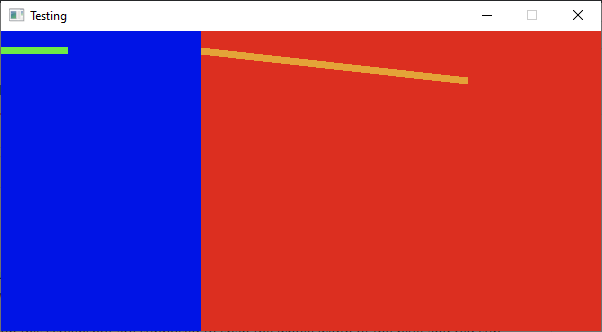
Can you point out what I am doing wrong?
here is the code I am using
use ggez::GameResult;
use ggez::{self, conf};
use ggez::{event, graphics, Context};
use std::env;
use std::path;

use ggez::conf::NumSamples;
use ggez::event::EventHandler;
use ggez::graphics::{Canvas, Color, DrawParam, Mesh};
use ggez::nalgebra::Point2;

const LEFT_WIDTH: f32 = 200.0;
const RIGHT_WIDTH: f32 = 400.0;
const HEIGHT: f32 = 300.0;

pub struct Test {
    left_canvas: Canvas,
    right_canvas: Canvas,
}

impl Test {
    pub fn new(ctx: &mut Context) -> Test {
        Test {
            left_canvas: graphics::Canvas::new(ctx, LEFT_WIDTH as u16, HEIGHT as u16, NumSamples::One).unwrap(),
            right_canvas: graphics::Canvas::new(ctx, RIGHT_WIDTH as u16, HEIGHT as u16, NumSamples::One).unwrap(),
        }
    }
}

impl EventHandler for Test {
    fn update(&mut self, ctx: &mut Context) -> GameResult {
        Ok(())
    }

    fn draw(&mut self, ctx: &mut Context) -> GameResult {
        // left
        graphics::set_canvas(ctx, Some(&self.left_canvas));
        graphics::clear(ctx, Color::from((0x00, 0x14, 0xE6, 0xFF)));
        let line = Mesh::new_line(
            ctx,
            &[Point2::new(0.0, 20.0), Point2::new(LEFT_WIDTH as f32, 20.0)],
            7.0,
            Color::from((0x6E, 0xEB, 0x47, 0xFF)),
        )
        .unwrap();
        graphics::draw(ctx, &line, DrawParam::new()).unwrap();

        // right
        graphics::set_canvas(ctx, Some(&self.right_canvas));
        graphics::clear(ctx, Color::from((0xDC, 0x2F, 0x20, 0xFF)));
        let line = Mesh::new_line(
            ctx,
            &[Point2::new(0.0, 20.0), Point2::new(RIGHT_WIDTH as f32, 50.0)],
            7.0,
            Color::from((0xE4, 0xA3, 0x38, 0xFF)),
        )
        .unwrap();
        graphics::draw(ctx, &line, DrawParam::new()).unwrap();

        // main
        graphics::set_canvas(ctx, None);
        graphics::draw(ctx, &self.left_canvas, DrawParam::new().dest(Point2::new(0.0, 0.0))).unwrap();
        graphics::draw(
            ctx,
            &self.right_canvas,
            DrawParam::new().dest(Point2::new(LEFT_WIDTH as f32, 0.0)),
        )
        .unwrap();

        graphics::present(ctx)?;
        Ok(())
    }
}

pub fn main() -> GameResult {
    let (ref mut ctx, ref mut event_loop) = ggez::ContextBuilder::new("test", "Tester")
        .window_setup(conf::WindowSetup::default().title("Testing"))
        .window_mode(conf::WindowMode::default().dimensions(LEFT_WIDTH + RIGHT_WIDTH, HEIGHT))
        .build()
        .unwrap();

    let test = &mut Test::new(ctx);

    event::run(ctx, event_loop, test)
}
 abderrahmane-tj
All 3 comments
@icefoxen sorry to bother you 🙈🙈, but am I mis-using the draw canvas on canvas feature? Am I supposed to add more information about the size of the sub-canvases and where they should be drawn and how?
I couldn't glean from the documentation if it is possible to draw canvases on the main canvas this way, or if it is only meant for manually double-buffering the rendering.
Would you perhaps point me in the right direction?
abderrahmane-tj
on 4 Jan 2021
Each canvas that you're drawing is reusing the same coordinate system. There are a couple of different approaches you could take here depending on what makes the most sense, but it looks like for your situation you expect the coordinates to follow the canvas' width/height.
    fn draw(&mut self, ctx: &mut Context) -> GameResult {
        // left
        graphics::set_canvas(ctx, Some(&self.left_canvas));
        graphics::set_screen_coordinates(ctx, [0.0, 0.0, LEFT_WIDTH, HEIGHT].into())?; // <-- Add this line

        ...

        // right
        graphics::set_canvas(ctx, Some(&self.right_canvas));
        graphics::set_screen_coordinates(ctx, [0.0, 0.0, RIGHT_WIDTH, HEIGHT].into())?; // <-- Add this line
Just a note though, as far as I understand it, canvas' are designed to be used as off-screen rendering targets so you can add effects to your main rendering target, or so that you can do something like a screen shot. This means there's much more going on under the hood than just layout, so I would assume that using canvases for layout is significantly more work per frame than necessary.
 adam-bates
on 7 Jan 2021
adam-bates
on 7 Jan 2021
Thank you, set_screen_coordinates is indeed the information I desperately needed.
abderrahmane-tj
on 8 Jan 2021
Related issues
 ozkriff
·
5Comments
ozkriff
·
5Comments
 Manghi
·
3Comments
Manghi
·
3Comments
 icefoxen
·
5Comments
icefoxen
·
5Comments
icefoxen
·
5Comments
icefoxen
·
5Comments
 eisterman
·
3Comments
eisterman
·
3Comments
Most helpful comment
Each canvas that you're drawing is reusing the same coordinate system. There are a couple of different approaches you could take here depending on what makes the most sense, but it looks like for your situation you expect the coordinates to follow the canvas' width/height.
Just a note though, as far as I understand it, canvas' are designed to be used as off-screen rendering targets so you can add effects to your main rendering target, or so that you can do something like a screen shot. This means there's much more going on under the hood than just layout, so I would assume that using canvases for layout is significantly more work per frame than necessary.