Gesturefy: New gestures system leads to a much lower hit rate
After migrating to the new gestures system, my gestures have a significantly lower success rate. Occasionally, I'll have to repeat a gesture 2 - 3 times to get it to trigger. I've deleted and recreated my saved gestures, but it still fails repeatedly.
Is there any way that in a future version, you can add a selector switch that will allow you to choose to go back to the old way of recognizing gestures, with only up, down, left, and right being acceptable directions? Using the new version makes browsing more difficult.
 elbucho
All 34 comments
Verily agree with elbucho. The old version is Perfect. 3.0 is suck. I have to repeat the gestures many times before success.
Many years ago a tech master taught me this: If something ain't broken, don't touch it.
But you did.
 imkc1127
on 14 Jun 2020
imkc1127
on 14 Jun 2020
In case anybody else has a similar complaint, you can revert to the old version by going to addons.mozilla.org, searching for gesturefy, then clicking on the "see all versions" link under "version history". You will have to uninstall v3 and install v2.1.6. This will mean that you'll lose all of your stored gestures, and you'll have to re-set them up, which is a pain, but in the end, you'll have the old gesture recognition system back.
elbucho
on 14 Jun 2020
Yep, came here to say the same. The new system makes it very hard to do the gestures.
 BTAxis
on 14 Jun 2020
BTAxis
on 14 Jun 2020
At first I was kind of happy that the new system was added, but frequent recognition failure has undone that. Very small differences in how the gesture is done seems to be enough to make it unrecognizable to the add-on. One line slightly longer than usual: nope, it don't know it. One line at a slightly different angle: nope, it don't know it. The old system was much more reliable in comparison.
Maybe the new system needs a tolerance slider, or maybe have the person draw the gesture a few times when setting it so that it can build tolerance ranges along the whole gesture. ?
 asdgfd
on 15 Jun 2020
asdgfd
on 15 Jun 2020
I'm rather sloppy at drawing my gestures, too. On my Windows PC the recognition is rather good, though. But on my Linux PC it's hard to get it right and I often have to draw them many times until they are recognized :/
 jdreesen
on 15 Jun 2020
jdreesen
on 15 Jun 2020
I'm open to new ideas in how the recognition algorithm can be approved, but any one who hopes that I'll revert to the previous gesture recognition system should rather use one of the many alternative gesture add-ons out there. I was aware that this change will get some negative feedback, but this is nothing unusual. Example: A new Android version releases and changes the UI, or whatever and people will criticize it. Sometimes just because it broke the users habit, which kind of happened with the release of Gesturefy 3.
And sometimes the critic is valid (I also can acknowledged that for Gesturey v3). However software developers don't change things because they are bored, want to torture people or what ever some people allege to them. I already wrote that in my opinion the new recognition system brings more benefits than disadvantages. This is what developers do, trying to weight the pros and cons the change might have in a global picture. This statement is mainly targeted to people like @imkc1127
To give some "hope": I actually have an idea about a "prediction algorithm" which should solve the problems related to drawing gestures in a insufficient length (like left - right or down - right), but I haven't tested it yet.
Maybe the new system needs a tolerance slider,
There is a tolerance value in Settings > Advanced settings (which shouldn't exceed 0.25 if you want to cancel your gesture by drawing a random gesture), but this will mostly change the tolerance of the directions.
or maybe have the person draw the gesture a few times when setting it so that it can build tolerance ranges along the whole gesture. ?
This is already possible while not practical, by creating the gesture multiple times with the same command but different path.
One line slightly longer than usual: nope, it don't know it. One line at a slightly different angle: nope, it don't know it. The old system was much more reliable in comparison.
While your first point about length is valid, the one about angle is not. At least it doesn't make sense to me, but perhaps you aren't using any diagonal gestures and expect that it does recognize a diagonal gesture as down or up.
I'm rather sloppy at drawing my gestures, too. On my Windows PC the recognition is rather good, though. But on my Linux PC it's hard to get it right and I often have to draw them many times until they are recognized :/
I'm using Linux 90% of the time and do not encounter any problems. Is there any visual difference in the line drawing that could explain that?
 Robbendebiene
on 15 Jun 2020
Robbendebiene
on 15 Jun 2020
While your first point about length is valid, the one about angle is not. At least it doesn't make sense to me, but perhaps you aren't using any diagonal gestures and expect that it does recognize a diagonal gesture as down or up.
Hmm, well, data point: my gesture for closing a tab is →←→ (under the old system). It did seem to me that drawing the gesture at a slight angle was not picked up too well, although the line length aspect of it doubtlessly also factors in.
BTAxis
on 15 Jun 2020
I had 0 problems with the old system. The new system adds nothing useful and constantly gets my input wrong. Why was this change necessary?
 klaritan
on 15 Jun 2020
klaritan
on 15 Jun 2020
A follow-up to my previous comment which may be helpful to those having failed gesture recognitions. Earlier today I noticed that Gesturefy allows one to add additional gestures that have the same resulting command. So, I tried adding 3 extra "close tab" gestures where the gestures are slight variations of my original gesture for that command (I named the additional ones "close tab 2", "close tab 3", and "close tab 4" so that I don't get confused later about why there are 4 with the same name and seemingly same gesture). The idea is that at least one of them should be similar enough that drawing the gesture will trigger it.
The result is that I'm now having _very few_ failed-recognitions for that set of gestures for that one command. The slight down-side is that adding a bunch of near-duplicate gestures will add a little clutter in that part of settings, but I'm guessing most people aren't going to be digging around in the settings much after they get their settings the way they like, so, that's probably no big deal.
asdgfd
on 16 Jun 2020
The options screen is beautifully laid out, maybe adding some sort of toggle to enable/disable diagonals or ability to widen recognition for diagonals vs. cardinal directions would be super nice. I don't use anything other than the basic gestures and this feature mainly just added new ways for my gestures not to be recognized. I guess I can also downgrade or add duplicative gestures as a workaround if it turns out this isn't a change that is happening.
 gothate
on 16 Jun 2020
gothate
on 16 Jun 2020
Same problem. I'd really like the option mentioned above "a selector switch that will allow you to choose to go back to the old way of recognizing gestures, with only up, down, left, and right being acceptable directions".
 spaspaspa00
on 16 Jun 2020
spaspaspa00
on 16 Jun 2020
Just echoing another preference for the old way - I've had like 50% hit rate on some of mine since the update, I thought I was going crazy until I saw this thread. I draw incredibly sloppy gestures and I'd really appreciate it being less sensitive to slightly wrong angles.
Either way though, this is probably my favorite Firefox addon, so thank you for maintaining it so actively!!
 RheingoldRiver
on 17 Jun 2020
RheingoldRiver
on 17 Jun 2020
I agree! Gesture success rate is lower than 50% for me. Unacceptable. If I need to be more careful and slower with gestures, such as navigating back in my history, I would just right-click and select "Back".
 irahsu
on 17 Jun 2020
irahsu
on 17 Jun 2020
I have trouble with the new system. I use up+right and up+left to change tabs, and my "up" part is very short when I do it. To make it a bit reliable, I had to redraw the gesture in the parameters, but still most of the time it fails because one move is too short, or too long...
 LeBlondTenebreux
on 18 Jun 2020
LeBlondTenebreux
on 18 Jun 2020
+1 for the suggestion of disabling diagonal recognition, only allowing cardinal directions. It's cool that you can draw stuff but for me basic gestures are enough and right now the add-on doesn't work well for me, I'd rather roll back to previous version than moving to another add-on though.
Edit: by the way I reduced the minimum distance (to 3) for which a gesture can be recognized and it seems to improve things (I also brought tolerance to 0.25). The problem I had was mostly when drawing a segment too short, that made the gesture fail. Not sure if this will be enough but it seems to be better already.
 mg979
on 19 Jun 2020
mg979
on 19 Jun 2020
I have deleted all my old gestures and make again with the new system.
It's very important during the gesture creation do the same movement that you make navigating without thinking about it.
No problem after that and the diagonal gestures is a great addition in my opinion.
 happysurf
on 22 Jun 2020
happysurf
on 22 Jun 2020
Agreed, I had lots of problems until I recreated all my gestures. Upgraded gestures from the previous version don't work right.
 rodalpho
on 22 Jun 2020
rodalpho
on 22 Jun 2020
@Robbendebiene I have an idea that might help you perfect the new algorithm.
I think the tolerance settings needs to "think" in terms of relative size of the edges. It's not just the angle of the line that counts, a very wrong angle can (should) be tolerated if it is disproportionately smaller (in length) than the other edges.
For example, with the gesture that I get more problems with.
This is my failed attempt at a DR gesture:
|
|
|
|
|
|---------------------/
Maybe Gesturefy recognizes that final bit as a direction, and doesn't see a Down + Right, it sees a Down + Right + UpRight instead.
My idea is that, instead of just considering the angle of that, you could try taking into account the fact that it is a very short stroke, compared to the other two, and disregard it.
Is this already in the current algorithm?
 pgorod
on 23 Jun 2020
pgorod
on 23 Jun 2020
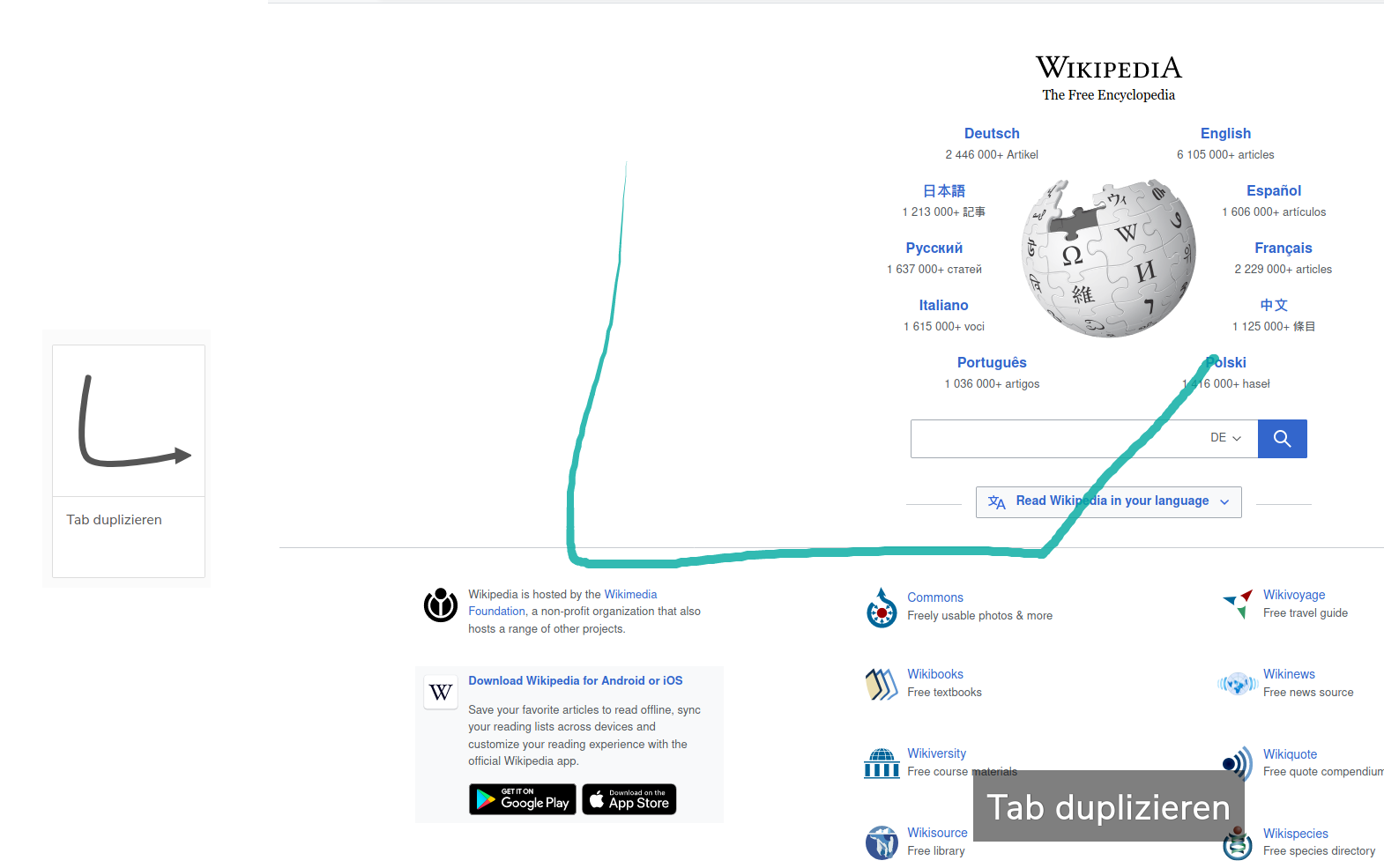
@pgorod The current algorithm exactly behaves the way you've requested. It "ignores" slight changes in direction, as long as the overall shape matches. All the others have the exact opposite problem.
Honestly the problem you have should not exist with the current matching algorithm. But of course it depends on the gesture you've defined.
This is the maximum deviation I can draw on my setup:
Robbendebiene
on 23 Jun 2020
I'll upload a new version today which will contain a different comparison algorithm that should do exactly what most of you want.
Robbendebiene
on 23 Jun 2020
That's great to hear, thanks @Robbendebiene.
One thing that can also be confusing and lead to user annoyance is that sometimes, although the name of the action corresponding to the gesture is shown on screen, the action doesn't go through.
As a user, i've learned that "word is visible, action happens" and "word goes away, action doesn't happen", which is the point of the idle timeout.
Combine that with the problems mentioned in this thread, and you get a frustrating result. Looking forward to testing the new version!
 axelsimon
on 24 Jun 2020
axelsimon
on 24 Jun 2020
@Robbendebiene thank you very much! It's perfect for me that way!
LeBlondTenebreux
on 24 Jun 2020
So far seems great, even better than before the update!!
RheingoldRiver
on 26 Jun 2020
It works very well for me too, now :)
jdreesen
on 1 Jul 2020
@Robbendebiene I gather that newest fix is incorporated into version 3.0.4.
I still have the problem in that version that this new algorithm takes stroke length into account. I.e. for Tab Reload I use the gesture UD (up, down). When I make one of the strokes more than twice as long as the other (e.g. down stroke is 2.5x as long as the up stroke) then the gesture is NOT identified. This used to work fine in version 2.
You could say "well hey, then draw that gesture like that in the setting!" but that means now don't have to freedom of variance in stroke length like I did before in version 2. This can be slightly improved by messing with the Tolerance and Threshold values, but even then, when I make one of these strokes significantly longer than the other, the algorithm decides to ignore the shorter stroke and turns it into a one-stroke gesture (that I also have configured). This is still different behaviour from before.
I know that I can improve the hit rate by being more careful, but the exact reason why I used gestures for years now is that I can be as sloppy as I want, I just need to perform the correct cardinal movements in the correct order and Bob's your uncle. Now that's changed for the worse. I'll stay on v 2.1.6 until this problem goes away.
 doodhout
on 3 Jul 2020
doodhout
on 3 Jul 2020
@doodhout Have you tried switching to the shape-independent algorithm in the Gesturefy settings?
Robbendebiene
on 3 Jul 2020
@Robbendebiene I had not! I just did and wow it's better now! Thanks a bunch. 👍
doodhout
on 3 Jul 2020
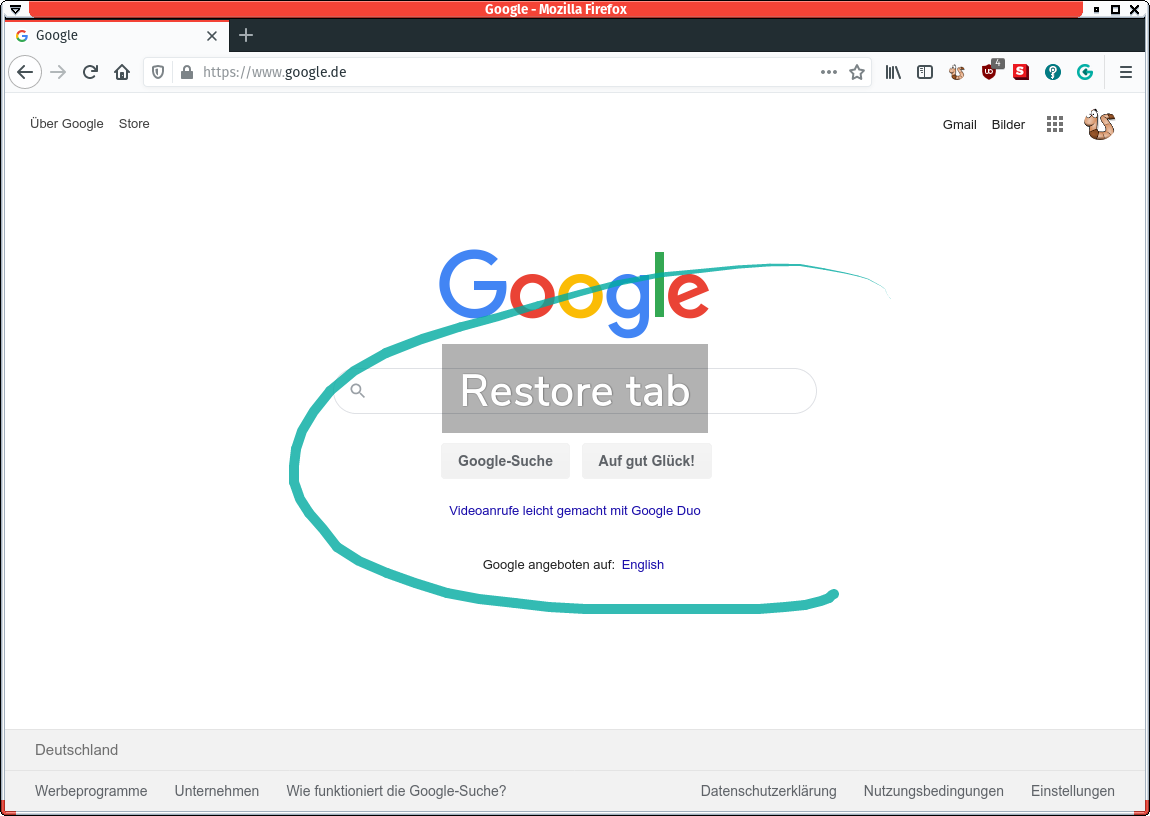
I am suffering a bad success rate as well, currently with version 3.0.4.
I have just the default gestures, no custom one. Reload is often recognized as restore tab.
 eworm-de
on 3 Jul 2020
eworm-de
on 3 Jul 2020
Oh, missed the new algorithm... Will try that for some time.
eworm-de
on 3 Jul 2020
Next version will include a link to the wiki for a more detailed explanation about the differences between the two algorithms. In the meantime I'll post the link here: https://github.com/Robbendebiene/Gesturefy/wiki/Matching-Algorithm
Robbendebiene
on 3 Jul 2020
Since the "shape-independent" algorithm solves this issue I'm closing it. Also with the release of Gesturefy version 3.0.5 the description now contains a link to a more detailed explanation.
Robbendebiene
on 8 Jul 2020
Thanks for providing the other algorithm, no problems in the last two weeks using it, it was frustrating before.
 internationils
on 8 Jul 2020
internationils
on 8 Jul 2020
Same for me, works perfectly now.
eworm-de
on 8 Jul 2020
Thank you! I was able to enable the setting and remove my gesture variations, and it seems to be solid!
gothate
on 9 Jul 2020
Related issues
 calLsOLoIsNOob
·
7Comments
calLsOLoIsNOob
·
7Comments
 LlamaFarmerama
·
3Comments
LlamaFarmerama
·
3Comments
 seascape
·
3Comments
happysurf
·
7Comments
seascape
·
3Comments
happysurf
·
7Comments
 larryedwards
·
7Comments
larryedwards
·
7Comments
Most helpful comment
I'll upload a new version today which will contain a different comparison algorithm that should do exactly what most of you want.