Gesturefly 3.0.0 with Firefox 77.0.1 on Windows 10.
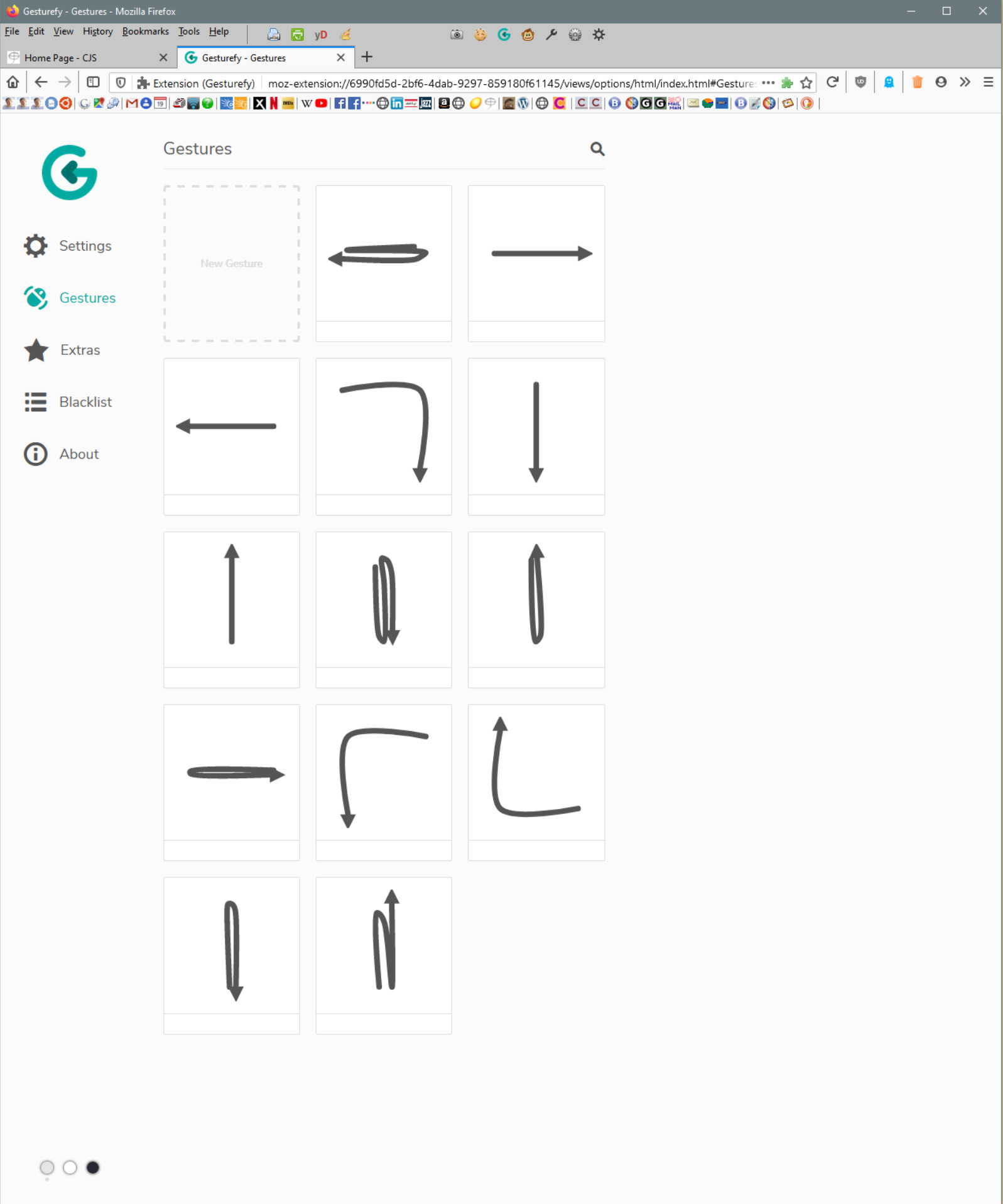
The new Gesturefly 3.0.0 is working fine with Firefox on my Xubuntu and on another Windows 10 laptop, but for some reason none of the gestures are working on this particular version of Firefox/Windows 10 running in a VM on my Xubuntu machine. Previous versions of Gesturefly always worked. I noticed that the gesture titles are not showing up on the gesture page. I uninstalled the add-on, exited and restarted Firefox, and reinstalled the add-on but nothing improved. The Gesture page remains as shown and the gestures do not work, even though this does not happen on the other Windows 10 machine.
Any thoughts?
 jefferysmall
All 17 comments
Immediately after posting the info above, I discovered that the problem had migrated to all other instances of Firefox/Gesturefly on every platform and gestures have all stopped working with a setup screen as seen above. Clearing the Firefox cache had no effect. Every time I reinstall Gesturefly, it pick up the previous settings and gestures. I think I need to nuke the settings and start over, but I cannot locate the settings in the Firefox profile directory. Any suggestions what to do next?
jefferysmall
on 5 Jun 2020
Also: The red gesture lines are appearing on the screen, but the gestures commands are not executed.
jefferysmall
on 5 Jun 2020
Since no titles appear among your gestures, your commands do not seem to have been taken over. This also means that no gesture will work because no command is assigned.
Maybe it is enough to edit the gestures and reassign the commands.
If that doesn't help, you can reset your settings and gestures under "About". This restores the default configuration of Gesturefy.
But since we can't understand your problem yet, it would be nice to keep your current state on one platform. Robbendebiene might have some technical questions for you :)
 Itchiii
on 5 Jun 2020
Itchiii
on 5 Jun 2020
Can also report that Gesturefly 3.0 is not working with FF 77.0.1 in windows 10 64 bit on all 6 of the PCs in my house.
 Rot10Crotch
on 5 Jun 2020
Rot10Crotch
on 5 Jun 2020
Itchiii, good suggestion to reassign commands. I just tried that and no commands appear when I click on the Command box or the "menu" icon in that box! Hopefully this points closer to the problem. What really confuses me is that this all worked right after I upgraded, but then something happened and it broke. Other than checking/upgrading on the Windows platforms, I don't know what else could be responsible.
By the way, does this add-on specifically have to use the sync function or does that happen automatically now with all extensions? As soon as I changed a motion assignment, I an (was) seeing it on all platforms immediately. I ask because I want to use the middle-mouse button for my Linux setup, but set the right-mouse button on the laptop which has a scroll wheel and don't want that one setting to propagate.

jefferysmall
on 5 Jun 2020
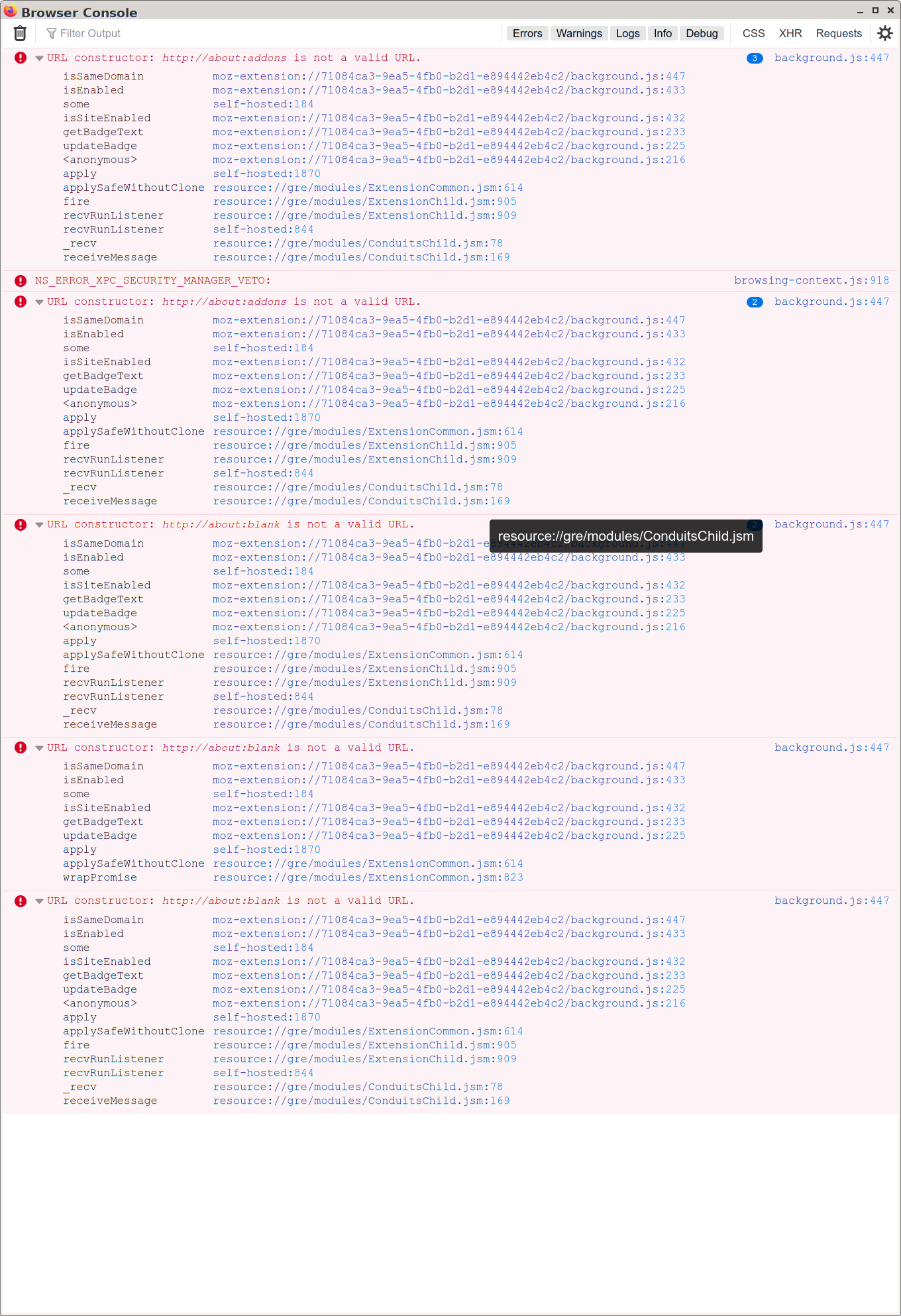
Can you please open the console (Ctrl+Shift+J), then reload the addon page, try to open the command bar and then take a picture from the console and upload it here?
And could you please export your settings and upload them here? (About -> Backup)
Settings, gestures and blacklisted websites are synced if Firefox sync is enabled. Otherwise you could transfer your settings via Backup and Restore.
Itchiii
on 5 Jun 2020
Here is the console output. The first three messages were generated when reloading the Firefox Addon page. The second set of three when the Gesturefly Setup page was displayed.
Here is the JSON file generated by the Gesturefly backup.
jefferysmall
on 5 Jun 2020
I had the same issue with Firefox 77.0.1 on Ubuntu: Gestures did not work, and I can not reassign the commands because no commands appear.
But I could delete the existing gestures and create new ones, and that works.
 FranzHoffmann
on 6 Jun 2020
FranzHoffmann
on 6 Jun 2020
Same here on Firefox 77.0.1 on Windows 10. Couldn't choose command in the Gestures settings. Have to remove the gesture and create a new one. Old gestures are all lost.
 gongminmin
on 6 Jun 2020
gongminmin
on 6 Jun 2020
I can verify all symptoms (lines showing up, no gestures working, not being able to assign gestures) on win10 firefox 78.0b3 (64-bit) and 77.0.1 (64-bit).
 thebjorn
on 6 Jun 2020
thebjorn
on 6 Jun 2020
I think the problem is not that the gestures do not work, it is that the commands are not connected to them.
 sharpless
on 6 Jun 2020
sharpless
on 6 Jun 2020
I added a screen shot of a quick debugging session in #478 . It seems that the Command ctor expects a string but gets a {name: {name: string, ..}} object at some point.
thebjorn
on 6 Jun 2020
Yep, same here. I deleted them all and recreated them on the Linux box and they are now working. Next I'll check out the Windows platforms where these should have been synced overnight.
jefferysmall
on 6 Jun 2020
The syncing with Firefox is a real problem. After getting the gestures to work on the Linux platform, they stopped working again. I believe this was due to the faulty settings being stored on the other two syncing Windows platforms. After clearing out all settings on all platforms and starting over, I was able to set gestures on the Linux platform. Eventually these synced to the Windows 10 platform running in a VM on this box. So syncing can cross-pollinate bad setting and cause problems. Just an FYI for others with multiple installations of Firefox.
As I said above, I use a standard three-button mouse on my main system and use the middle mouse button for gestures, but would prefer the right mouse button on the laptop because of the scroll wheel. This setting is now being propagated with the sync to all platforms. If some sort of "lock" feature could be applied to lock the button selection on each instance of Firefox, it would be great.
Thanks for everyone's help in getting this working.
jefferysmall
on 6 Jun 2020
For the next 2 days I'm unable to read all the bug report. For users who have problems with their settings please look here: https://github.com/Robbendebiene/Gesturefy/issues/480
Sorry for the inconvenience.
 Robbendebiene
on 7 Jun 2020
Robbendebiene
on 7 Jun 2020
Can also report that Gesturefly 3.0 is not working with FF 77.0.1 in windows 10 64 bit on all 6 of the PCs in my house.
me too.
 lovezk
on 8 Jun 2020
lovezk
on 8 Jun 2020
The sync problem should be fixed with version 3.0.1. This wont fix your config if it is corrupted but the config should no longer get corrupted on sync.
If your config got corrupted (before the fix in version 3.0.1) please look here: #480
Robbendebiene
on 10 Jun 2020
Related issues
 happysurf
·
7Comments
happysurf
·
7Comments
 KES777
·
7Comments
KES777
·
7Comments
 Dituar
·
6Comments
Dituar
·
6Comments
 LlamaFarmerama
·
3Comments
LlamaFarmerama
·
3Comments
 ghost
·
7Comments
ghost
·
7Comments
Most helpful comment
I had the same issue with Firefox 77.0.1 on Ubuntu: Gestures did not work, and I can not reassign the commands because no commands appear.
But I could delete the existing gestures and create new ones, and that works.