Gesturefy: [FEEDBACK] Gesturefy Major Update 3.0
This is a temporary issue where users can leave feedback and share their thoughts about the new Gesturefy version.
To be honest, since I first started this project, I always wanted Gesturefy's gestures to work the way they do now. I'm aware that not everyone will like the change introduced in version 3.0, but I still think the advantages outweigh the disadvantages.
For users that lost their gestures/settings please read more here: https://github.com/Robbendebiene/Gesturefy/issues/480
 Robbendebiene
All 41 comments
I'm very curious about new version, is possible know the change log?
 happysurf
on 17 May 2020
happysurf
on 17 May 2020
@happysurf You can find the full changelog here: https://github.com/Robbendebiene/Gesturefy/releases
Unfortunately I'm not able to publish the new version on mozilla add-ons until Firefox 77 is released.
Robbendebiene
on 17 May 2020
@happysurf You can find the full changelog here: https://github.com/Robbendebiene/Gesturefy/releases
Unfortunately I'm not able to publish the new version on mozilla add-ons until Firefox 77 is released.
OK thanks, then the new version is only for Firefox 77+ for some new embedded features.
happysurf
on 18 May 2020
So it will be released today on AMO? :smile:
 serovar
on 2 Jun 2020
serovar
on 2 Jun 2020
Probably not. I'm still unable to upload it on AMO (because they haven't updated their add-on linter yet) and after that it has to go through a review process, which might also take some days.
Robbendebiene
on 2 Jun 2020
It's fantastic you implemented a way to draw diagonal gestures! I was already a little worried that they would never make it into the extension after you closed #158. 😄 I just tried them out for a few minutes and it works perfectly!
I just saw one issue small issue so far. Due to the new visual representation of the gestures, overlapping gestures are now hard to recognize. E.g. a gestures ⬆️ ⬇️ cannot be distinuished from one that's just ⬇️. Maybe the animation when hovering them could be optimized or the lines be drawn slightly displaced.
Besides that nit, fantastic work! Thank you a lot for putting so much effort into the extension!
Sebastian
 SebastianZ
on 5 Jun 2020
SebastianZ
on 5 Jun 2020
Compliments for the new fantastic version!
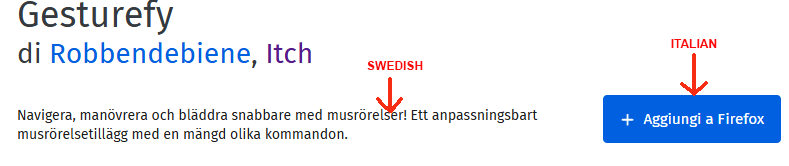
There is a small problem in the Italian add-on page.
The description is not Italian but in swedish.
The page is this: https://addons.mozilla.org/it/firefox/addon/gesturefy/
happysurf
on 5 Jun 2020
@happysurf It seems that someone at Crowdin has accidentally copied the Swedish translation into it. It's adapted :)
 Itchiii
on 5 Jun 2020
Itchiii
on 5 Jun 2020
@SebastianZ We knew this would be hard to recognize. The easiest way would be if you edited the gestures and draw them minimally next to or below each other.
Itchiii
on 5 Jun 2020
I'm loving it already. The up down for refresh is working fine for me, but I think I've always drawn it like a very narrow Λ.
 robme
on 5 Jun 2020
robme
on 5 Jun 2020
Standard "Close tab" gesture (Down + Right). If you do it FAST but mostly when Right is MUCH longer then Down, it will treat it as Right only.
Screencast: https://recordit.co/zhdpBk35UY
My settings attached.
Gesturefy 3.0.0 Fri Jun 05 2020.json.txt
EDIT: similar behaviour with "Toggle pinned tab" (Left + Up): it sometimes gets recognized as "Back" (Left) or "Scroll to the Top" (Up). Visually though (the trail line) is a correct Left+Up...
 bazzik
on 5 Jun 2020
bazzik
on 5 Jun 2020
@bazzik The new gesture detection looks for the best match. So if you draw a short distance down and then a long line to the right its closer to the "right" gesture than to the "down + right" gesture.
You can solve this by recording your left + up or down + right gestures again and draw them the way you are using them (with a longer line at the end for example)
Robbendebiene
on 5 Jun 2020
@Robbendebiene I've just tried that -- it now says "It looks similar to Page Forward".
I've now completely removed gestures for "Page Back" and "Page Forward" and re-draw the "Close Tab" gesture... and it now sometimes does not register the gesture at all (it's drown on a screen... but no action name is written/recognized).
I do not think that drawing 3 or 4 different but similar gestures is the way to go here... as you do not always control how long/accurate you draw your lines during the actual usage.
I would really suggest to have some sort of "dumb / simplified" mode for those who does not need complex gestures that can "properly" recognize directions regardless of direction length/duration (as in: will recognize D+R regardless if it's Short-D+R or D+Long-R or just D+R).
Related nuance: As you may see from my settings, I got 2 gestures for "Close Tab" -- one is D+R and another one is D + DR (DR stands for East-South direction: 45 degrees -- see screenshot). When I was drawing my new D+R gesture, few times it complained that "it looks similar to existing gesture".
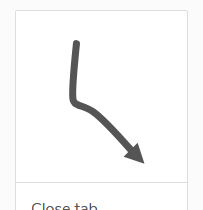
Suggestion: if both gestures have the same action assigned, maybe it's worth not showing such warning.
bazzik
on 6 Jun 2020
Quick feedback: the update looks great, taking diagonals into account and representing movements with a drawing finishing with an arrowhead looks much more intuitive, it feels less artificial, more compelling.
I noticed one unwelcome change, Firefox latest stable, windows 10: the left and right horizontal moves I used to make to go to "previous tab" and "next tab" have now become "tab on the left", "tab on the right".... With a new limitation: once we're on the last tab on the right, it won't go back to the first tab if we make right once again. Same if I'm on the first tab and make left to go to the previous tab, it won't move to the last tab on the right.
I thought the extension would "emulate" the same commands that Firefox assigns to keyboard shortcuts, but I was probably wrong, as the keyboard shortcuts for next/previous tab don't have that issue, make "next tab" when you're on the last tab on the right, and it takes you back to the first tab on the left, etcetera.
Edit: not sure it matters, but just in case, as it might have a relation: I remember I altered the default control-tab handing in Firefox, to disable the pseudo alt-tab appearance that sorts tabs by their latest use, so that I would be back to the legacy setting in which control-tab and control-shift-tab moves to the next tab on left or right.
I think there's a reasonable chance I will survive this gigantic change (cough), but at least I'm reporting it. Thanks for the work!
 OliverFrWTFalreadyTakenComeOnNow
on 6 Jun 2020
OliverFrWTFalreadyTakenComeOnNow
on 6 Jun 2020
This! Finally! This is how I remember gestures working 20 years ago on a chip design workstation where I discovered them. I'm delighted to see you stepping up from the simplification, and (so far, at least) it appears to be working really well for me.
Just wanted to give you a rare and well deserved completely positive comment. :) Well done!
 theerik
on 6 Jun 2020
theerik
on 6 Jun 2020
Thank you for this great addon and open source projet. The new gesture recognition is very handy. Bonus: the setting page is visually very pleasant and contribute to give a good feeling.
Bravo !
 lilive
on 6 Jun 2020
lilive
on 6 Jun 2020
Open link in new tab doesn't work on some images that are links, instead it opens a new tab.
robme
on 6 Jun 2020
I noticed one unwelcome change, Firefox latest stable, windows 10: the left and right horizontal moves I used to make to go to "previous tab" and "next tab" have now become "tab on the left", "tab on the right".... With a new limitation: once we're on the last tab on the right, it won't go back to the first tab if we make right once again. Same if I'm on the first tab and make left to go to the previous tab, it won't move to the last tab on the right.
I noticed this, too. I used to make use of this all the time. Really hope this functionality will be brought back. I guess for now I will have to set up new gestures for "first tab" and "last tab" as replacement.
 Destragon
on 7 Jun 2020
Destragon
on 7 Jun 2020
Awesome update and you're awesome
 misium
on 7 Jun 2020
misium
on 7 Jun 2020
I am really enjoying this update!!! I couldn't use Gesturefy in its previous form, but now I absolutely love it. This is exactly what I wanted when I first found it too. I have no idea how you did this wizardry. But it's marvelous!
 IzuTJ
on 7 Jun 2020
IzuTJ
on 7 Jun 2020
Великолепно. Спасибо огромное за Вашу работу.
 gagarinds
on 8 Jun 2020
gagarinds
on 8 Jun 2020
I absolutely hate the new changes, but I think it can be improved.
I redid my close tab (right down) with shortest "down" I could possibly draw in the new version, but when I do the "right down" gesture, it is often registered as just "right", even though there's a clear short line going down at the exact 90 degrees angle at the end.
Please fix this.
 klaritan
on 8 Jun 2020
klaritan
on 8 Jun 2020
I redid my close tab (right down) with shortest "down" I could possibly draw in the new version
You should draw it _longer_, not shorter, so the "right down" gesture can clearly be distinguished from the "right" gesture.
As @Robbendebiene explained in issue #486, you may also reduce the deviation tolerance value in the Gesturefy settings > _Advanced settings_ > _Deviation tolerance_ a bit in order to increase the differenciation. Though note that this also requires you to draw the gestures more precisely.
Sebastian
SebastianZ
on 8 Jun 2020
It feels like the new system requires the user to be much more precise. This isn't convenient at all. What about people with disabilities who rely on solutions like this? This new shape based system absolutely won't work for them if it can't even properly recognize my not-that-sloppy wrist movements. Reducing the tolerance only makes things worse, inviting a "move mouse with RMB down and a random thing will happen" type of situation.
 wolterkam
on 9 Jun 2020
wolterkam
on 9 Jun 2020
The new system does not require to be more precise, it's the exact opposite for most of the cases. Previously a tiny wrong mouse movement could lead to no gesture being recognized. For example I always drew the reload gesture (R D L) like a semicircle and often it didn't recognize it because I ended up with R D L U or something like that.
The only disadvantage of the new method is pointed out here: #486 but can be countered by recreating the gesture the way you actually draw it.
I suggest anyone who has problems with the new system to monitor themselves how they actually draw their gestures and based on that update the gestures in the config.
I know not everyone will like that, but there are plenty of other good mouse gesture extensions which all behave the way as Gesturefy did before.
Reducing the tolerance only makes things worse, inviting a "move mouse with RMB down and a random thing will happen" type of situation.
I guess you are talking about increasing the value, otherwise this doesn't make sense.
Robbendebiene
on 9 Jun 2020
Thank you for your reply - I guess the problem likely is in how I'm drawing my gestures. This whole new system sounds really exciting, the challenge lies in how different it feels in comparison with other solutions of this type that I'm accustomed to, which _might_ translate to other users' experiences but I can only speak of my own.
Maybe the plugin should make it more clear on how it now works, with some sort of intro interactive test for checking whether the gestures, as they were drawn in the past, will still be properly recognized?
It would certainly be a better way to find out that the gestures have to be redrawn than just having them not working as intended without knowing why. Not everyone is tech savvy enough to jump to Github as the first thing, or to look into the settings.
I'm afraid something like this would take a lot of time to put together though.
wolterkam
on 9 Jun 2020
After working with the new version for a few days, it still works totally fine for me, and I cannot reproduce the issues other people are experiencing.
E.g. opening a new tab has an "up" gesture (⬆️) and I assigned scrolling up now a new 45 degrees diagonal "up right" gesture (↗️). Drawing it like below still recognizes the new tab gesture and correctly distinguishes it from the one for scrolling up (with the default tolerance value of 0.2):
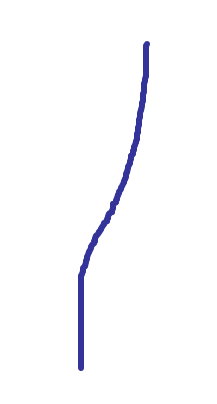
If you experience something different, I think it is best to post a screenshot or a short screencast of the gesture you draw and the saved gestures, like @bazzik did, so it can be reproduced.
Sebastian
SebastianZ
on 9 Jun 2020
@wolterkam I agree. The transition is far from perfect. My hope was that the introduction page (displayed after the update from v2 to v3) would be enough to let people know, that they have to recreate some of their gestures. But I guess not everyone has time to read through it and I also didn't emphasized it enough.
@SebastianZ Thanks for your support.
Robbendebiene
on 9 Jun 2020
Love it! This extension so important for my productivity that I would support your effort more than by translation. You might consider setting up some donation system at the add-on page.
 bubblefoil
on 11 Jun 2020
bubblefoil
on 11 Jun 2020
After trying to work with the 3.0 update for several days, I have given up and rolled back to 2.1.6.
My most commonly used gestures are D (open link in new tab), R (page forward), L (page back), DR (close tab), UR (focus tab right) UL (focus tab left), LR (new tab), and UD (new tab). I am also rather imprecise, and make gestures quickly--in other words, the size of the gesture I draw can vary widely.
I cannot count the number of times since this update that I have tried to close a tab, and because I drew the gesture too far right it swapped from "Close tab" to "Page forward," or how many times I've overcorrected and turned "Close tab" into "Open link in new tab." It's seriously impacted my productivity since I have to spend several seconds processing what just happened, undo it (which if I use gestures is a 50/50 whether it'll actually process the right gesture or do something ELSE wrong), and then try again. This is the most common example, but it's far from the only one--I've had "Open new tab" get interpreted as "Close tab," I've had "Focus tab right" interpreted as "Page forward," I've had "Reload page" interpreted as "Close window," and all sorts of other issues. It's been endlessly frustrating, especially since I use gestures primarily for tab navigation, and with the latest update I can no longer rely on this add-on to do what I want it to.
I've tried adjusting the deviation, I've tried adjusting the gestures, I've tried removing gestures, I've tried almost everything I can. It seems the only feasible solution is for me to force myself to slow down and train myself to draw gestures more carefully, which is effort I am not willing to make.
I sincerely hope this change is reverted, or that there is some other accommodation for people such as myself--whether it's a fork of the 2.1 branch that is maintained separately, a toggle between the old and new gesture system in future updates, or something similar.
 THyldahl
on 12 Jun 2020
THyldahl
on 12 Jun 2020
My most commonly used gestures are D (open link in new tab), R (page forward), L (page back), DR (close tab), UR (focus tab right) UL (focus tab left), LR (new tab), and UD (new tab). I am also rather imprecise, and make gestures quickly--in other words, the size of the gesture I draw can vary widely.
I've tried adjusting the deviation, I've tried adjusting the gestures, I've tried removing gestures, I've tried almost everything I can. It seems the only feasible solution is for me to force myself to slow down and train myself to draw gestures more carefully, which is effort I am not willing to make.
Right after praising this update 1 post above, I bumped into the same issue. Most gestures were OK but e.g. RUR was always mistaken for R, no matter how distinctly I drew the 90deg turns. I would have to change the RUR gesture to look more like mirrored 'Z'.
What did help was changing RUR to just straight diagonal UR. I will be inconvenient to re-learn some gestures but I can get it to work.
Anyway I would really like some adjustment of the recognition system so it does not fail when overall direction is similar but there is are distinct turns in the gesture.
bubblefoil
on 15 Jun 2020
I guess positive feedback is also useful - the update is working perfectly for me, my gestures are being recognized flawlessly and the new possibilities are very welcome. Congratulations and a big "thank you".
 pgorod
on 15 Jun 2020
pgorod
on 15 Jun 2020
My most commonly used gestures are D (open link in new tab), R (page forward), L (page back), DR (close tab), UR (focus tab right) UL (focus tab left), LR (new tab), and UD (new tab). I am also rather imprecise, and make gestures quickly--in other words, the size of the gesture I draw can vary widely.
I've tried adjusting the deviation, I've tried adjusting the gestures, I've tried removing gestures, I've tried almost everything I can. It seems the only feasible solution is for me to force myself to slow down and train myself to draw gestures more carefully, which is effort I am not willing to make.Right after praising this update 1 post above, I bumped into the same issue. Most gestures were OK but e.g. RUR was always mistaken for R, no matter how distinctly I drew the 90deg turns. I would have to change the RUR gesture to look more like mirrored 'Z'.
What did help was changing RUR to just straight diagonal UR. I will be inconvenient to re-learn some gestures but I can get it to work.
Anyway I would really like some adjustment of the recognition system so it does not fail when overall direction is similar but there is are distinct turns in the gesture.
Unfortunately, that's only a partial solution. For example, I have two gestures: LU (scroll to top of page) and UL (focus left tab). I can only change one of those to diagonal UL. It also runs into the same issue where diagonal DR is registered as pure R.
There's other issues, too--just now, I tried to reload a tab (up+down) and it registered it as _close window_ (U+R+D) because the angle was just slightly off, causing me to lose 15+ tabs. Thankfully I could quickly undo it with native keyboard shortcuts, but I still had to reload all of those tabs, which is... annoying when I'm working over VPN.
THyldahl
on 15 Jun 2020
How about a slightly different approach?
Option 1
A pop-up which let you choose the desired action when more defined gestures meet the similarity threshold, instead of picking the one with the highest score.
Ultimately, the user-selected gesture might be adjusted in setting by the drawn gesture, like a very simple learning mechanism.
Option 2
Could the recognition be improved by a hybrid of the old and the new matching systems? E.g. storing a gesture as a bunch of very significant changes of direction, maybe 8 instead of just 4, compare this sequence as well and this result to the hit score?
Option 3 (rather a workaround)
A checkbox option to cancel the gesture altogether when more gestures are a close match, to start with.
bubblefoil
on 15 Jun 2020
I redid my close tab (right down) with shortest "down" I could possibly draw in the new version
You should draw it _longer_, not shorter, so the "right down" gesture can clearly be distinguished from the "right" gesture.
As @Robbendebiene explained in issue #486, you may also reduce the deviation tolerance value in the Gesturefy settings > _Advanced settings_ > _Deviation tolerance_ a bit in order to increase the differenciation. Though note that this also requires you to draw the gestures more precisely.
Sebastian
You couldn't be more wrong. My original gesture WAS LONGER. It was awful so I switched it to be shorter which is miles better than before, but still awful compared to original detection.
klaritan
on 15 Jun 2020
Everything seems to be fine with v3.0.4 and the new algorithm. It works very well for me now. Thx for your work and this add-on I really can't live without! :heart:
 jdreesen
on 1 Jul 2020
jdreesen
on 1 Jul 2020
I'm very sorry if my problem is well known as well as solution for it, but I'm unable to find it -_-
Gesturefy stopped working at all after update (actually, it worked, say, half of a year ago, then I was forced to remove it, now I installed it again, and it does not work), even on the "welcome" page that is shown after installing addon - gesture is shown, but does not work, the same for all other pages. Also I can not create any gesture: window for it's creation is shown, I can select desired action, but the gesture itself is not neither drawn nor accepted by Gesturefy (single right mouse button click on that area brings standard FF menu, if it matters).
I have FF 78.0.1, and uMatrix + uBlock installed (tried disabling it and restarting FF - no luck).
 AlexMatiash
on 8 Jul 2020
AlexMatiash
on 8 Jul 2020
@AlexMatiash This is usually due to a corrupted config which can occur when using Firefox sync. The safest way to deal with that is to reset Gesturefy under settings in the about section (if you have a lot of gestures you can make a backup before that and I might be able to restore it). Make sure that the same major version (version 3) is installed on all your other devices that use Firefox sync.
If you are not using Firefox sync, please open a new issue.
Robbendebiene
on 8 Jul 2020
@Robbendebiene thank you very much. It fixed everything. Actually, I do not use FF sync, but my profile is old enough to get some problems, so I believe it is not good idea to open a new issue on it, I 99% sure it is my local issue.
AlexMatiash
on 8 Jul 2020
@AlexMatiash All right :) If it somehow occurs again, feel free to open an issue.
Robbendebiene
on 8 Jul 2020
Thanks to everyone who provided feedback to the new version. I'm closing this issue now.
Robbendebiene
on 8 Jul 2020
Related issues
 ghost
·
7Comments
ghost
·
7Comments
 grzebo
·
6Comments
grzebo
·
6Comments
 R0nd
·
3Comments
R0nd
·
3Comments
 LlamaFarmerama
·
3Comments
LlamaFarmerama
·
3Comments
 larryedwards
·
7Comments
larryedwards
·
7Comments
Most helpful comment
After trying to work with the 3.0 update for several days, I have given up and rolled back to 2.1.6.
My most commonly used gestures are D (open link in new tab), R (page forward), L (page back), DR (close tab), UR (focus tab right) UL (focus tab left), LR (new tab), and UD (new tab). I am also rather imprecise, and make gestures quickly--in other words, the size of the gesture I draw can vary widely.
I cannot count the number of times since this update that I have tried to close a tab, and because I drew the gesture too far right it swapped from "Close tab" to "Page forward," or how many times I've overcorrected and turned "Close tab" into "Open link in new tab." It's seriously impacted my productivity since I have to spend several seconds processing what just happened, undo it (which if I use gestures is a 50/50 whether it'll actually process the right gesture or do something ELSE wrong), and then try again. This is the most common example, but it's far from the only one--I've had "Open new tab" get interpreted as "Close tab," I've had "Focus tab right" interpreted as "Page forward," I've had "Reload page" interpreted as "Close window," and all sorts of other issues. It's been endlessly frustrating, especially since I use gestures primarily for tab navigation, and with the latest update I can no longer rely on this add-on to do what I want it to.
I've tried adjusting the deviation, I've tried adjusting the gestures, I've tried removing gestures, I've tried almost everything I can. It seems the only feasible solution is for me to force myself to slow down and train myself to draw gestures more carefully, which is effort I am not willing to make.
I sincerely hope this change is reverted, or that there is some other accommodation for people such as myself--whether it's a fork of the 2.1 branch that is maintained separately, a toggle between the old and new gesture system in future updates, or something similar.