Geonode: Mapstore2 Add Group button is missing
Expected Behavior
You can add a new group to a map like in mapstore2 demo: https://dev.mapstore.geo-solutions.it/mapstore/#/viewer/openlayers/6200

Actual Behavior
The add group button is missing in GeoNode

Steps to Reproduce the Problem
- open master.demo.geonode.org and login
- create a map
- try to create a new group
Specifications
I tested this on my dev instance with SPC 2.10.1 and master.demo.geonode.org
- GeoNode version: master.demo.geonode.org ? / 2.10.1
- Installation method (manual, GeoNode Docker, SPCGeoNode Docker): ? / SPC
- Platform: some Linux
- Additional details:
 gannebamm
All 30 comments
Still trying to understand all about the ms2 integration but it looks either as the settings is missing (like: https://github.com/geosolutions-it/MapStore2/blob/a1413ae84fd0e6d26c5bf47d8b01d515fdaf3b97/web/client/localConfig.json#L298) and/or the build does not include the component/plugin.
 t-book
on 13 Oct 2019
t-book
on 13 Oct 2019
@t-book yeah it is complicated. Good find.
I thought this to be something easy and straightforward. But I did not get it in my first attempt...
This week is full of other tasks, but I'll take a second look end of this month
gannebamm
on 14 Oct 2019
@gannebamm I don't think it's a regression but a feature (label). Did a test by adding the plugin to base_plugin config and map composer config without luck. Will have a deeper look at the plugin config as soon there is time.
t-book
on 14 Oct 2019
I think I found the correct config you should set to enable group additions:
But maybe this https://github.com/GeoNode/geonode-mapstore-client/issues/4 will prevent the ms2 config to load:
https://github.com/geosolutions-it/geonode-mapstore-client/blob/master/geonode_mapstore_client/static/geonode/js/ms2/utils/ms2_composer_plugins.js
gannebamm
on 15 Oct 2019
Please do not use the https://github.com/geosolutions-it/geonode-mapstore-client repository, the official one is https://github.com/GeoNode/geonode-mapstore-client
In order to add more plugins, you most probably need to include their configuration here
NOTE: anything added to "/geonode_mapstore_client/client" needs to be rebuilt with "npm"
 afabiani
on 15 Oct 2019
afabiani
on 15 Oct 2019
Thanks @afabiani this is actually what I tried. However, I will do more testing by end of the week and if it works can update the readme/docs.
t-book
on 15 Oct 2019
Dear @ t-book
You can guide me on how to add or activate plugins in geonode_mapstore_client.
Thanks for your attention
 dpadron
on 4 Dec 2019
dpadron
on 4 Dec 2019
@gannebamm @dpadron
We assume you have a geonode in development mode installed for example at /opt/geonode
further, you have setup node on your development machine.
I'm using yarn as package manager, however, this all will work the same with npm.
Set settings var and start Geonode
Set MAPSTORE_DEBUG=True in your settings or set it as ENV variable. Next start the stack
cd /opt/geonode
paver start
Install mapstore2 locally
Open a new Terminal (to keep geonode running)
cd /opt/geonode
git clone https://github.com/GeoNode/geonode-mapstore-client.git --recursive
pip install -e geonode-mapstore-client/
cd /opt/geonode/geonode_mapstore_client/geonode_mapstore_client/client/
yarn install
yarn start
Mapstore2 should now be running and geonode will talk to it via api/socket
Add addGroup-Settings
Change the following files to enable the addGroup Button (check comments):
File: ~ms_composer_plugins.js~
EDIT BY @gannebamm actually it is geonode-mapstore-client/geonode_mapstore_client/static/geonode/js/ms2/utils/ms2_composer_plugins.js
var MS2_EDIT_PLUGINS = {
    "desktop": [
        {
            "name": "TOC",
            "cfg": {
                "activateQueryTool": true,
                "activateAddLayerButton": true,
                "activateMetedataTool": false,
                                 // ### Activate the Group Button in TOC
                "activateAddGroupButton": true,

                "spatialOperations": [{
                        "id": "INTERSECTS",
                        "name": "queryform.spatialfilter.operations.intersects"
                    },
                    {
                        "id": "BBOX",
                        "name": "queryform.spatialfilter.operations.bbox"
                    },
                    {
                        "id": "CONTAINS",
                        "name": "queryform.spatialfilter.operations.contains"
                    },
                    {
                        "id": "WITHIN",
                        "name": "queryform.spatialfilter.operations.within"
                    }
                ],
                "spatialMethodOptions": [{
                        "id": "Viewport",
                        "name": "queryform.spatialfilter.methods.viewport"
                    },
                    {
                        "id": "BBOX",
                        "name": "queryform.spatialfilter.methods.box"
                    },
                    {
                        "id": "Circle",
                        "name": "queryform.spatialfilter.methods.circle"
                    },
                    {
                        "id": "Polygon",
                        "name": "queryform.spatialfilter.methods.poly"
                    }
                ]
            }
        },
        //  // ###  Add the AddGroup Settings
        "AddGroup",
        {
            "name": "Settings",
            "cfg": {
                "wrap": true
            }
        },
        "Locate",
        "WidgetsBuilder",
        "Save"
    ]
}
File: plugins.js
EDIT @gannebamm this one: geonode-mapstore-client/geonode_mapstore_client/client/js/plugins.js
Add
[...]
AddGroupPlugin: require('../MapStore2/web/client/plugins/AddGroup').default,
[...]
Visit geonodes "create new map view" and make sure to not use a cached version. (Open f.e. Chrome dev tools and check [ ] Disable cache in network tab).
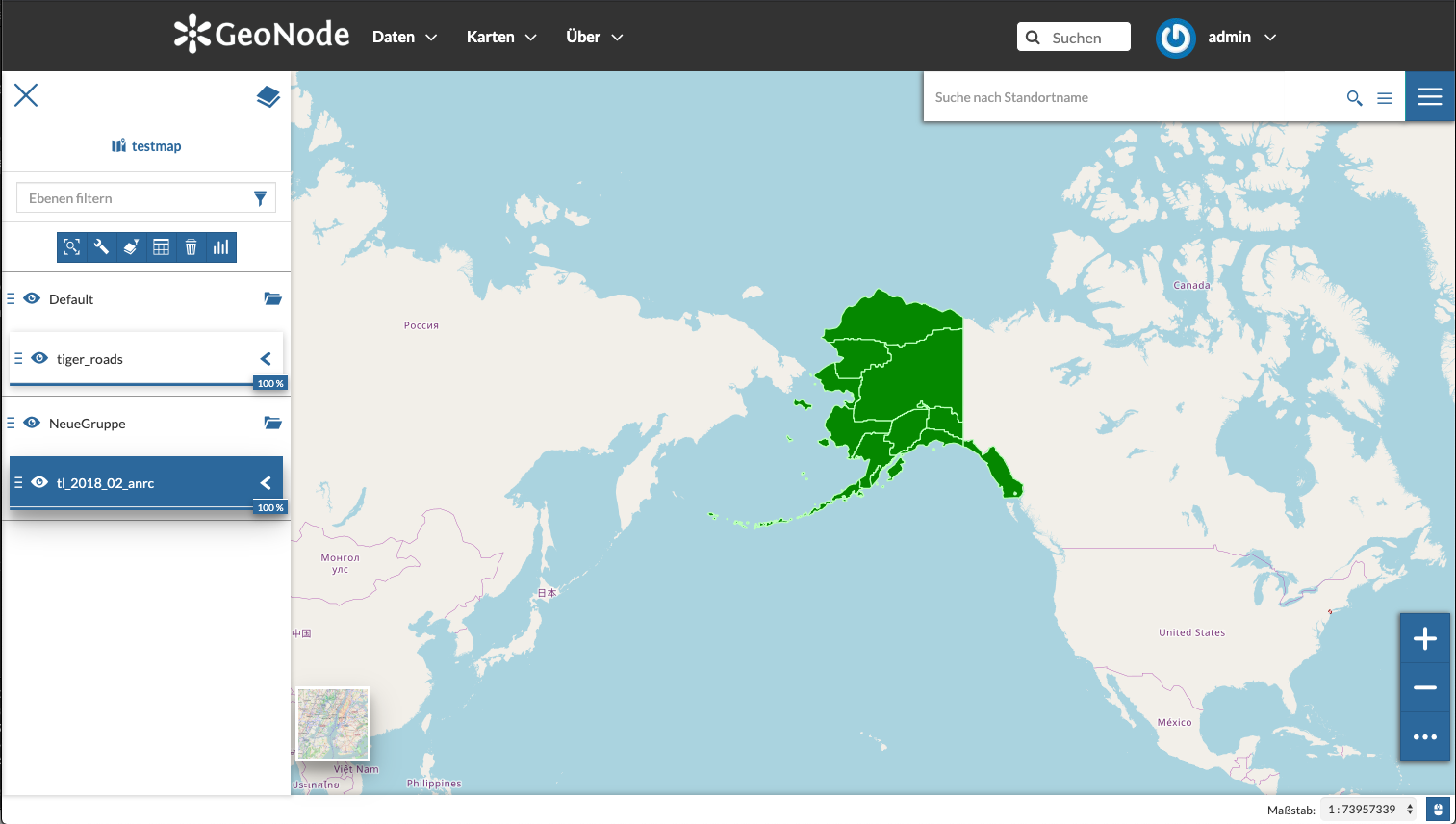
Build new viewer with
yarn compile
Hope this get's you started.
t-book
on 13 Jan 2020
@afabiani Could this be the default, or are there good reasons to not include it in the standart built?
@t-book Awesome work
gannebamm
on 13 Jan 2020
@gannebamm @t-book sure, nothing against to make it as default.
Just open tickets along with PRs to the official repos
- https://github.com/GeoNode/django-mapstore-adapter
- https://github.com/GeoNode/geonode-mapstore-client
I'll be happy to review and include it on the next releases.
afabiani
on 13 Jan 2020
@afabiani @t-book See this https://github.com/GeoNode/geonode-mapstore-client/pull/45
I need help to see if this is the intended way to add the functionality AND am unable to resolve the listed issue with changing TOC.jsx, which is part of the main MapStore2 repo (see patch in description at PR).
gannebamm
on 2 Mar 2020
@gannebamm unsure if I fully understand. Did it work for you to add the button as suggested at gitter? If so you could just repeat it, PR and I will review.
t-book
on 2 Mar 2020
@t-book It does work IF you include the TOC.jsx fix:
--- web/client/plugins/TOC.jsx  (date 1573211951000)
+++ web/client/plugins/TOC.jsx  (date 1583155850000)
@@ -284,7 +284,7 @@
         onGetMetadataRecord: () => {},
         hideLayerMetadata: () => {},
         activateAddLayerButton: false,
-        activateAddGroupButton: false,
+        activateAddGroupButton: true,
         catalogActive: false,
         refreshLayerVersion: () => {},
         metadataTemplate: null
I can not change this since it is not part of the geonode-mapstore-client repo but MapStore2 repo. I think it will conflict with their base configuration If we change it there? I do not know 🤷♂
gannebamm
on 2 Mar 2020
@gannebamm I see well. no I think it would be better to not set the config in the component but a config file as shown here: https://github.com/geosolutions-it/MapStore2/blob/06e1489f6402ae1d813fa0812c086c2243185428/web/client/plugins/mapEditor/DefaultConfiguration.js#L56
I think the composer config should be the right place https://github.com/GeoNode/geonode-mapstore-client/blob/master/geonode_mapstore_client/static/geonode/js/ms2/utils/ms2_composer_plugins.js unfortuantely I'm quite under time pressure and cannot test it myself.
t-book
on 2 Mar 2020
@t-book I see. I will take a look at this. Many thanks for pointing in the right direction!
gannebamm
on 2 Mar 2020
There are known issues with this:
The current integration of mapstore does not save groups descriptions NOR their names if updated initial creation. Meaning the name will always picked from ID which is the first name you gave the group. See this: https://github.com/GeoNode/django-mapstore-adapter/issues/27
gannebamm
on 10 Mar 2020
@gannebamm Okay if we remove this from gn3 milestone? Further, do you need my help here?
t-book
on 23 Mar 2020
We can postpone it. The mapstore2 geonode integration would need to save the groups name. This is some work to do I currently can not accomplish.
gannebamm
on 24 Mar 2020
This issue has been automatically marked as stale because it has not had recent activity. It will be closed if no further activity occurs. Thank you for your contributions.
![stale[bot] picture](https://avatars3.githubusercontent.com/in/1724?v=4&s=40) stale[bot]
on 1 Jun 2020
stale[bot]
on 1 Jun 2020
This issue has been automatically marked as stale because it has not had recent activity. It will be closed if no further activity occurs. Thank you for your contributions.
stale[bot]
on 1 Aug 2020
AFAIK @t-book continues my work on this issue
gannebamm
on 8 Aug 2020
is there any chance to reopen and getting this into the 3.1 Release?
 ikzte
on 2 Oct 2020
ikzte
on 2 Oct 2020
reopened +1
As far as I remember I had some problems with naming. The folder was always namend with it's ID. (My guess to provide translations). However this would include much manual work. I've asked in the mapstore dev list ~august ? @gannebamm as a reply to your post. I will try to check it again.
t-book
on 2 Oct 2020
@t-book I tried to enable add group on the geonode-mapstore-client:
https://github.com/GeoNode/geonode-mapstore-client/compare/master...allyoucanmap:enable-add-group
It was missing a configuration on the composer.
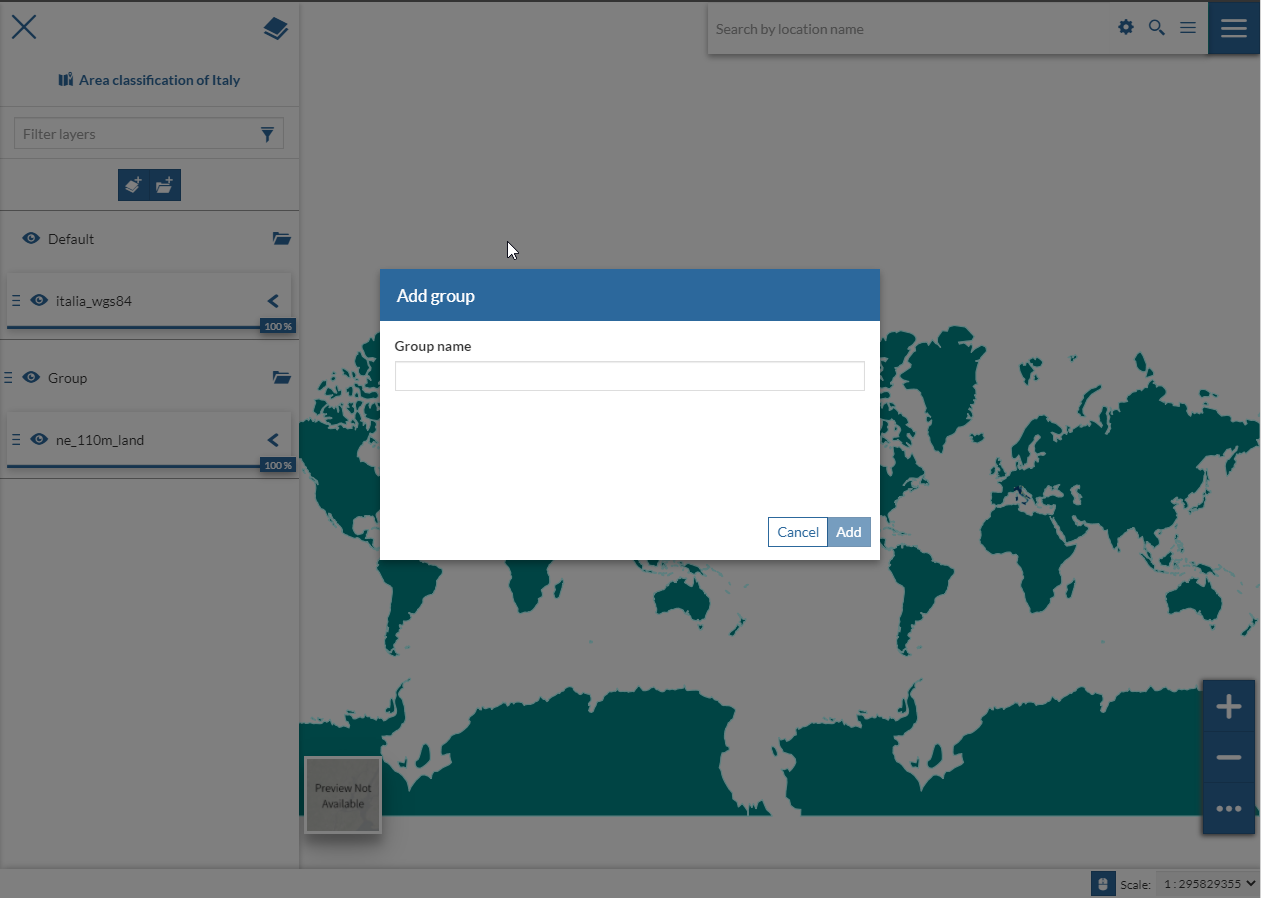
Some limitation about translations:
- MapStore2 has this interface with translations but it's not currently possible to enable these inputs in geonode-mapstore-client due to different implementation on the management of the locale (some additional work to evaluate is needed on the geonode-mapstore-client repo)
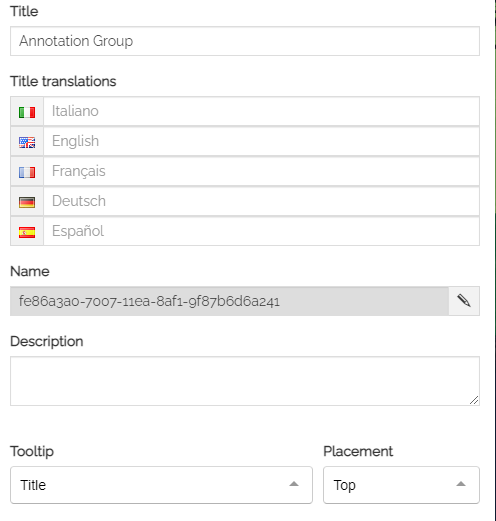
- This is the ui in geonode and the title can enable only a single input
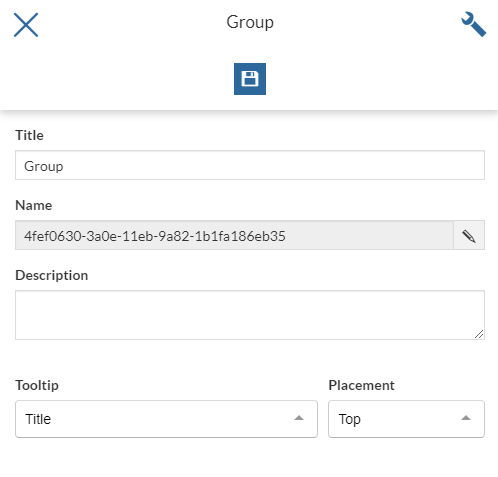
As far as I remember I had some problems with naming. The folder was always namend with it's ID. (My guess to provide translations). However this would include much manual work. I've asked in the mapstore dev list ~august ? @gannebamm as a reply to your post. I will try to check it again.
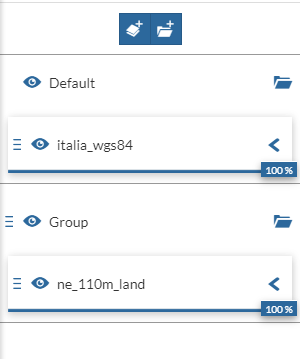
The title should be the value visible in the layers tree while the id it's only visible in the setting. Do you see the id in the layers tree?
 allyoucanmap
on 9 Dec 2020
allyoucanmap
on 9 Dec 2020
@allyoucanmap awesome. I will checkout your branch and give it a test!
t-book
on 9 Dec 2020
@allyoucanmap I've checkout your branch. Double checked that the config is present, disabled cache in network tab and checked that *.js is loaded from static port 8081. all looks fine expect I cannot see the group button? :// Anyway at this point what I would check is:
- save the map
- see if the name is taken instead of the id
is this the result you are getting? If so it should be ready to merge!
Thanks again Stefano!
t-book
on 9 Dec 2020
all looks fine expect I cannot see the group button?
@t-book could you check if the button is visible on /maps/{pk}/edit path ? the view path currently has not the add group enable, should be available also there?
Anyway at this point what I would check is:
save the map
see if the name is taken instead of the id
I'll try these steps later
allyoucanmap
on 9 Dec 2020
could you check if the button is visible on /maps/{pk}/edit path ? the view path currently has not the add group enable, should be available also there?
yep, tested does not show up for /edit either. My guess is maybe it needs to be enabled in TOC as well "activateAddGroupButton": true, but nope :/
t-book
on 9 Dec 2020
@t-book
Anyway at this point what I would check is:
save the map
see if the name is taken instead of the id
Yes, this is the behaviour, on save the name is the correct one
PR https://github.com/GeoNode/geonode-mapstore-client/pull/74
yep, tested does not show up for /edit either. My guess is maybe it needs to be enabled in TOC as well "activateAddGroupButton": true, but nope :/
I'm wondering if it's due to the wrong installation of geonode_mapstore_client because from your description it seems that the geonode does not use the correct template. I usually follow these steps in my local setup:
- activate the virtual env
workon geonode - check installation of mapstore
(geonode)pip freeze | grep -i mapstore - unistall the current version of django-geonode-mapstore-client if not the correct one
(geonode)pip uninstall django-geonode-mapstore-client - navigate to the local repository clone of geonode-mapstore-client
(geonode)cd /home/workspace/geonode-mapstore-client - install the local repository clone of geonode-mapstore-client
(geonode)pip install -e .
with this setup I'm able to see changes in geonode after modifying a template in geonode-mapstore-client but maybe this is not the reason.
allyoucanmap
on 15 Dec 2020
thanks, @allyoucanmap I can try to review/checkout your PR tomorrow. For sure the error is somewhere on my side, some pip dependency or similar as you're writing. Thanks 🙏 , Stefano!
t-book
on 15 Dec 2020
Related issues
afabiani
·
8Comments
afabiani
·
8Comments
gannebamm
·
4Comments
dpadron
·
7Comments
 sjohn-atenekom
·
5Comments
sjohn-atenekom
·
5Comments
Most helpful comment
reopened +1
As far as I remember I had some problems with naming. The folder was always namend with it's ID. (My guess to provide translations). However this would include much manual work. I've asked in the mapstore dev list ~august ? @gannebamm as a reply to your post. I will try to check it again.