Geonode: Error Upload or update Metadata
Actual Behavior
When I try to upload or update an .xml metadata file, the following error is generated

Specifications
- GeoNode version: 2.10.1
- Installation method (manual, GeoNode Docker, SPCGeoNode Docker): SPCGeoNode Docker and Geonode-project
- Platform: Ubuntu 18.04
- Additional details:
 dpadron
All 7 comments
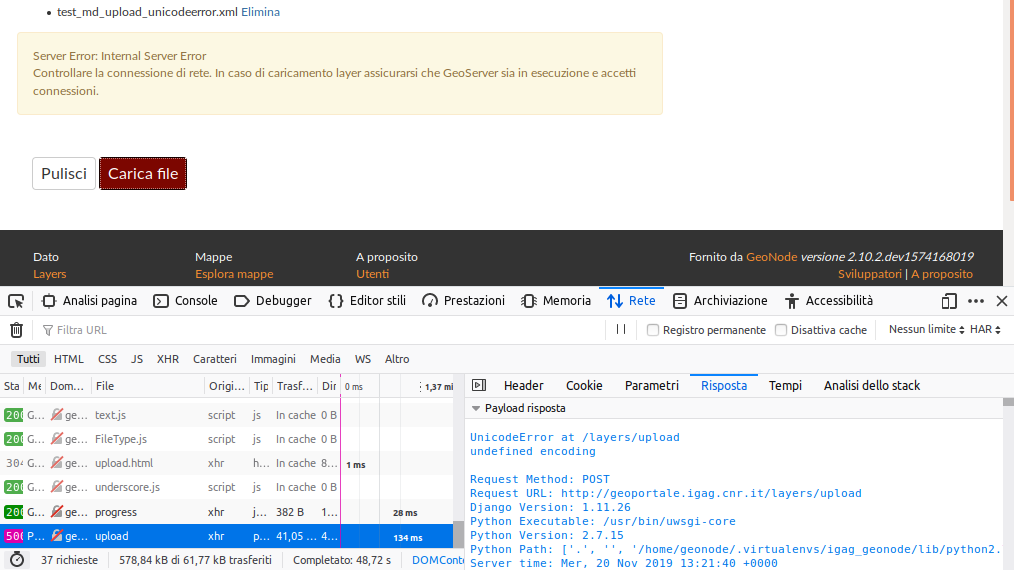
Same for me; wathever the content of the file, the response from server is always:
UnicodeError at /layers/upload
undefined encoding
...
 fpennica
on 19 Nov 2019
fpennica
on 19 Nov 2019
@dpadron @fpennica can you please share a demo of your dataset? Also please make sure to use latest versions there just has happend a Pull request for layer encoding: https://github.com/GeoNode/geonode/pull/5271
 t-book
on 20 Nov 2019
t-book
on 20 Nov 2019
I switched to the 2.10.x branch, here are some tests:
- every metadata file I've tried to upload gives
UnicodeError, here is an example: http://www.pcn.minambiente.it/geoportal/rest/document?id=m_amte%3A299FN3%3A4c90991f-285c-4964-a633-bacc63bb281f
- the only way to successfully upload a metadata file was by using this example as a template: https://inspire.ec.europa.eu/id/document/tg/metadata-iso19139/2.0/examples/dataset_metadata.xml
- trying to update a layer, created from the shapefile attached, with a metadata file based on the example above (changing only some fields like abstract and title), results in creating a new empty geonode layer with id
geonode: - in the file
test_md_upload_unicodeerror.xmlI only commented out the<gmd:fileIdentifier>section, and it givesUnicodeError.
Test files:
fpennica
on 20 Nov 2019
@fpennica Here is what I tried.
- uploaded your layer: https://master.demo.geonode.org/layers/geonode:test_md_upload
- saved your xml:
view-source:http://www.pcn.minambiente.it/geoportal/rest/document?id=m_amte%3A299FN3%3A4c90991f-285c-4964-a633-bacc63bb281f(make sure to use the raw output to not get messed up with browser styling output) - set the correct id of the uploaded layer
<gco:CharacterString>3cfa5d20-0b9f-11ea-92e0-0242ac120007</gco:CharacterString>. This is needed otherwise you will get a new one! - changed the summary with some special caracters
- on layers detail used edit button to upload metadata file
- the file has been uploaded without error. special characters are shown.

https://master.demo.geonode.org/layers/geonode:test_md_upload
As summary, be sure to use a valid xml structure. If you like to update an existing set use the id of the resource. you should get that easily by just downloading the metadata as iso.
hope this helps!
t-book
on 20 Nov 2019
set the correct id of the uploaded layer
<gco:CharacterString>3cfa5d20-0b9f-11ea-92e0-0242ac120007</gco:CharacterString>. This is needed otherwise you will get a new one!
Aaah, I see that now... :) thank you!
Just some observation:
- the
Internal Server Errorin case something goes wrong with metadata is not very helpful... maybe an "Incorrect metadata structure" or something like that - isn't the
UnicodeErrorwrong when the problem is the xml structure and not the encoding? - If I'm uploading metadata to update an existing layer, maybe it should automatically take the layer id and ignore the metadata id (I'm already sure I want to update that specific layer).
Thanks!
fpennica
on 20 Nov 2019
@fpennica I agree good points! @dpadron would you kindly test this as well and if it works close here?
t-book
on 20 Nov 2019
@fpennica Acepto buenos puntos! @dpadron , ¿podría probar esto también amablemente y si funciona cerca aquí?
Hi, I performed tests and the problem was that I was trying to update a metadata.xml with the wrong identifier.
I have followed the steps indicated by t-book and it works correctly.
Thank you
dpadron
on 25 Nov 2019
Related issues
 HaidarZ
·
4Comments
HaidarZ
·
4Comments
 gannebamm
·
6Comments
gannebamm
·
6Comments
 audetrobergem
·
9Comments
audetrobergem
·
9Comments
 sjohn-atenekom
·
5Comments
sjohn-atenekom
·
5Comments
 capooti
·
8Comments
capooti
·
8Comments
Most helpful comment
@fpennica Here is what I tried.
view-source:http://www.pcn.minambiente.it/geoportal/rest/document?id=m_amte%3A299FN3%3A4c90991f-285c-4964-a633-bacc63bb281f(make sure to use the raw output to not get messed up with browser styling output)<gco:CharacterString>3cfa5d20-0b9f-11ea-92e0-0242ac120007</gco:CharacterString>. This is needed otherwise you will get a new one!https://master.demo.geonode.org/layers/geonode:test_md_upload
As summary, be sure to use a valid xml structure. If you like to update an existing set use the id of the resource. you should get that easily by just downloading the metadata as iso.
hope this helps!