Geonode: Failed from timeout: Could not create Thumbnail
Expected Behavior
Create thumbnail of map
Actual Behavior
Return with Failed from timeout: Could not create Thumbnail
Steps to Reproduce the Problem
- Using Edit Tools
- Press set button under Thumbnail
Specifications
- GeoNode version: 2.10rc5
- Installation method (manual, GeoNode Docker, SPCGeoNode Docker): GeoNode Docker
- Platform: Ubuntu 16.04
 bkhezry
All 12 comments
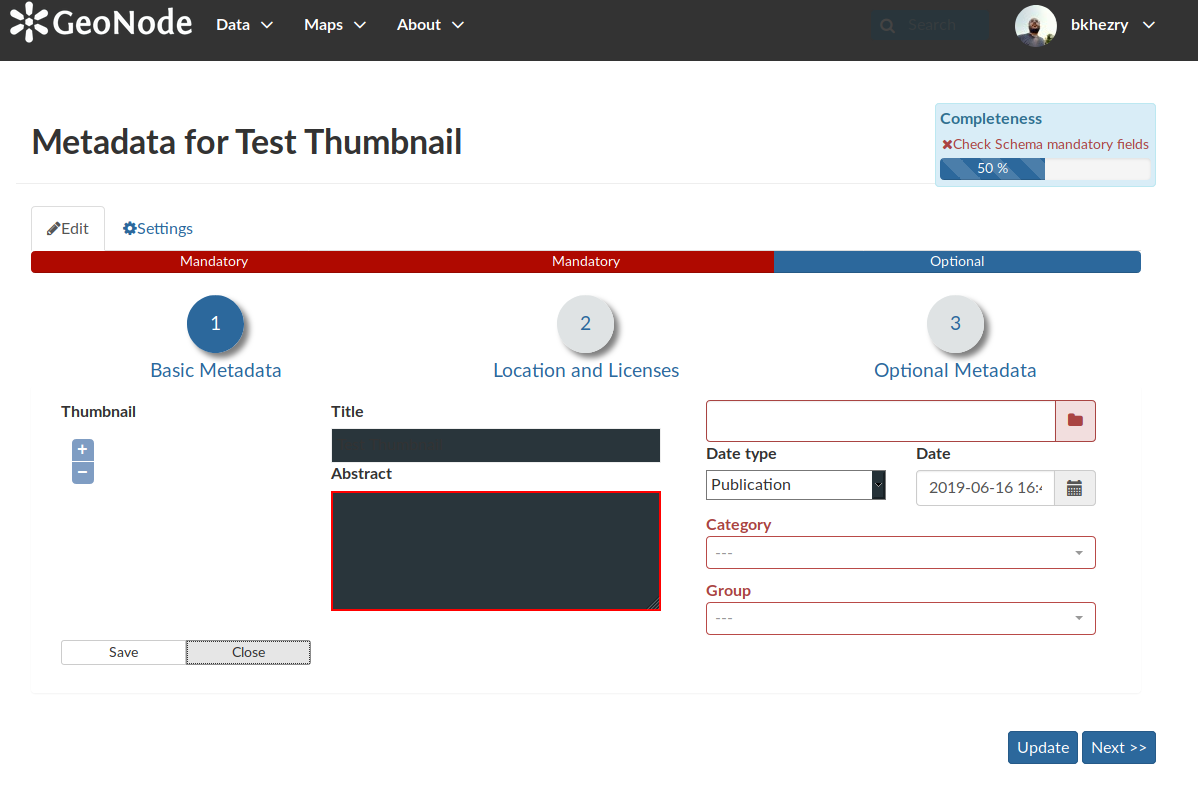
I just test http://master.demo.geonode.org/maps/80 map for creating thumbnail and it not working.
With wizard option in editing tools, the thumbnail preview of the map did not work too.
bkhezry
on 16 Jun 2019
Hi @bkhezry,
Do you have some GeoServer logs for us?
And could you check if this PR will fix the timeout: https://github.com/GeoNode/geonode/pull/4509
It is just one line in the settings.py you have to change.
 gannebamm
on 17 Jun 2019
gannebamm
on 17 Jun 2019
Btw. I encountered one instance in which gefence was not fetching the correct tiles from webcache and this culminating into the timeout. Releasing the old geofence cache fixed the issue for me (until now). In addition I lowered the fence cache invalidation time, hoping this will get rid of old cache soon enough to prevent this.
gannebamm
on 17 Jun 2019
Hi @gannebamm,
I change the URL of the base map for a thumbnail to Wikipedia & time out error fixed. but thumbnail didn't create and the white image generates for map.
bkhezry
on 20 Jun 2019
hi @gannebamm
I confirm the error is still there unfortunately - same error like before. Here is the GeoServer log:
2019-06-27 15:17:11,088 INFO [geoserver.flow] - releasing flow controllers for [WMS 1.1.1 GetMap]
2019-06-27 15:17:11,088 INFO [geoserver.flow] - Request completed, running requests: 0, blocked requests: 0
2019-06-27 15:17:11,171 WARN [geoserver.printng] - Error fetching : http://a.tile.openstreetmap.org/5/28/18.png, status is : 403
2019-06-27 15:17:11,336 WARN [geoserver.printng] - Error fetching : http://a.tile.openstreetmap.org/5/27/18.png, status is : 403
2019-06-27 15:17:11,365 WARN [geoserver.printng] - Error fetching : http://a.tile.openstreetmap.org/5/28/17.png, status is : 403
2019-06-27 15:17:11,561 WARN [geoserver.printng] - Error fetching : http://c.tile.openstreetmap.org/5/27/17.png, status is : 403
2019-06-27 15:17:11,569 WARN [geoserver.printng] - Error fetching : http://a.tile.openstreetmap.org/5/28/19.png, status is : 403
 capooti
on 27 Jun 2019
capooti
on 27 Jun 2019
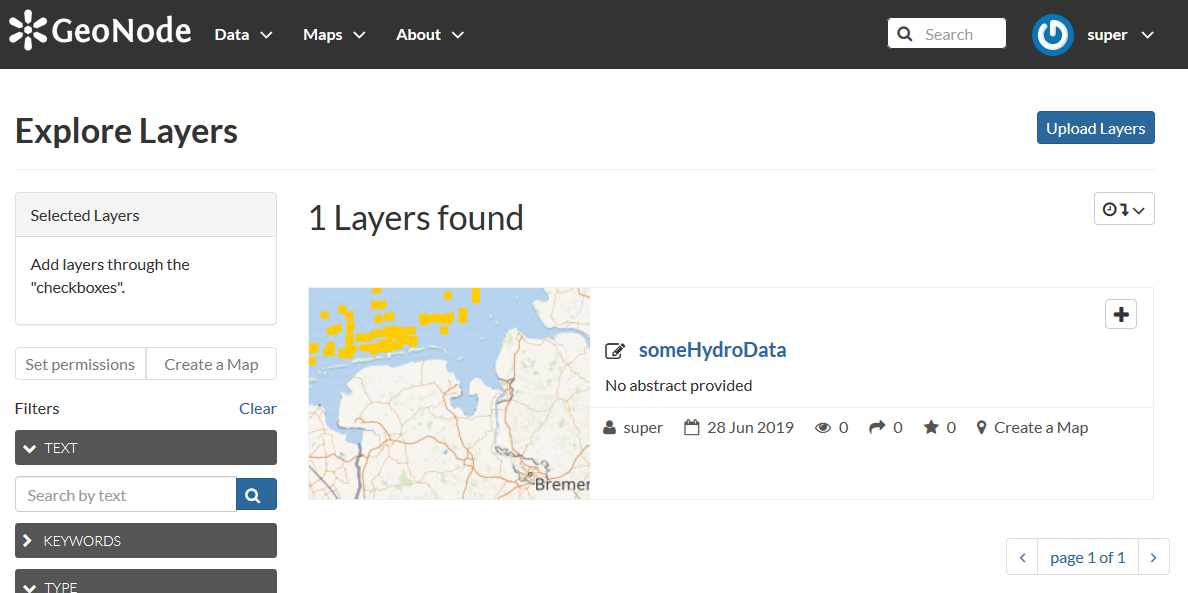
I just did the following:
- git clone master
- used spc-geonode docker setup with
docker-compose up --build - checked if the geoserver auth button works (it did)
- uploaded a shapefile
result:
Which setup of geonode did you use @capooti ?
gannebamm
on 28 Jun 2019
Ok but If you click the create thumbnail button for the exact same layer it will result in an empty background..
nginx_1           | 172.18.0.11 - - [28/Jun/2019:07:52:48 +0000] "POST /api/o/v4/tokeninfo/?access_token=xJhkLo2US4hEx4zj9sUGCgxrgiGPfq HTTP/1.1" 200 273 "-" "Java/1.8.0_212"
django_1          | [pid: 40|app: 0|req: 62/221] 172.18.0.11 () {40 vars in 704 bytes} [Fri Jun 28 07:52:48 2019] POST /api/o/v4/tokeninfo/?access_token=xJhkLo2US4hEx4zj9sUGCgxrgiGPfq => generated 273 bytes in 12 msecs (HTTP/1.1 200) 8 headers in 291 bytes (1 switches on core 0)
nginx_1           | 172.18.0.5 - - [28/Jun/2019:07:53:00 +0000] "POST /geoserver/rest/printng/render.png?width=240&auth=172.29.179.101,super,duper&height=200 HTTP/1.1" 200 1820 "-" "python-requests/2.22.0"
nginx_1           | 172.29.179.97 - - [28/Jun/2019:07:53:00 +0000] "POST /layers/geonode:someHydroData/thumbnail HTTP/1.1" 200 15 "http://172.29.179.101/layers/geonode:someHydroData" "Mozilla/5.0 (Windows NT 10.0; Win64; x64; rv:64.0) Gecko/20100101 Firefox/64.0"
Geoserver.log:
2019-06-28 07:52:40,402 WARN [servlet.PageNotFound] - Request method 'PUT' not supported
2019-06-28 07:52:49,949 WARN [geoserver.printng] - Error fetching : http://c.tile.openstreetmap.org/10/533/329.png, status is : 403
2019-06-28 07:52:50,217 WARN [geoserver.printng] - Error fetching : http://b.tile.openstreetmap.org/10/533/328.png, status is : 403
2019-06-28 07:52:50,266 WARN [geoserver.printng] - Error fetching : http://c.tile.openstreetmap.org/10/532/328.png, status is : 403
2019-06-28 07:52:50,291 WARN [geoserver.printng] - Error fetching : http://c.tile.openstreetmap.org/10/533/330.png, status is : 403
2019-06-28 07:52:50,312 WARN [geoserver.printng] - Error fetching : http://c.tile.openstreetmap.org/10/534/329.png, status is : 403
2019-06-28 07:52:50,364 WARN [geoserver.printng] - Error fetching : http://a.tile.openstreetmap.org/10/532/330.png, status is : 403
2019-06-28 07:52:50,427 WARN [geoserver.printng] - Error fetching : http://c.tile.openstreetmap.org/10/534/328.png, status is : 403
2019-06-28 07:52:50,637 WARN [geoserver.printng] - Error fetching : http://b.tile.openstreetmap.org/10/531/329.png, status is : 403
2019-06-28 07:52:50,659 WARN [geoserver.printng] - Error fetching : http://c.tile.openstreetmap.org/10/534/330.png, status is : 403
2019-06-28 07:52:51,902 WARN [geoserver.printng] - Error fetching : http://b.tile.openstreetmap.org/10/533/327.png, status is : 403
2019-06-28 07:52:52,200 WARN [geoserver.printng] - Error fetching : http://b.tile.openstreetmap.org/10/531/328.png, status is : 403
2019-06-28 07:52:52,237 WARN [geoserver.printng] - Error fetching : http://c.tile.openstreetmap.org/10/532/327.png, status is : 403
2019-06-28 07:52:52,306 WARN [geoserver.printng] - Error fetching : http://a.tile.openstreetmap.org/10/531/330.png, status is : 403
2019-06-28 07:52:52,373 WARN [geoserver.printng] - Error fetching : http://a.tile.openstreetmap.org/10/533/331.png, status is : 403
2019-06-28 07:52:52,407 WARN [geoserver.printng] - Error fetching : http://c.tile.openstreetmap.org/10/534/327.png, status is : 403
2019-06-28 07:52:52,442 WARN [geoserver.printng] - Error fetching : http://c.tile.openstreetmap.org/10/532/331.png, status is : 403
2019-06-28 07:52:52,552 WARN [geoserver.printng] - Error fetching : http://a.tile.openstreetmap.org/10/535/329.png, status is : 403
2019-06-28 07:52:52,600 WARN [geoserver.printng] - Error fetching : http://a.tile.openstreetmap.org/10/535/328.png, status is : 403
2019-06-28 07:52:52,628 WARN [geoserver.printng] - Error fetching : http://c.tile.openstreetmap.org/10/531/327.png, status is : 403
2019-06-28 07:52:53,840 WARN [geoserver.printng] - Error fetching : http://b.tile.openstreetmap.org/10/534/331.png, status is : 403
2019-06-28 07:52:53,887 WARN [geoserver.printng] - Error fetching : http://a.tile.openstreetmap.org/10/535/330.png, status is : 403
2019-06-28 07:52:54,149 WARN [geoserver.printng] - Error fetching : http://b.tile.openstreetmap.org/10/530/329.png, status is : 403
2019-06-28 07:52:54,176 WARN [geoserver.printng] - Error fetching : http://c.tile.openstreetmap.org/10/531/331.png, status is : 403
2019-06-28 07:52:54,222 WARN [geoserver.printng] - Error fetching : http://a.tile.openstreetmap.org/10/530/328.png, status is : 403
2019-06-28 07:52:54,252 WARN [geoserver.printng] - Error fetching : http://a.tile.openstreetmap.org/10/530/330.png, status is : 403
2019-06-28 07:52:54,282 WARN [geoserver.printng] - Error fetching : http://a.tile.openstreetmap.org/10/535/327.png, status is : 403
2019-06-28 07:52:54,470 WARN [geoserver.printng] - Error fetching : http://b.tile.openstreetmap.org/10/535/331.png, status is : 403
2019-06-28 07:52:54,489 WARN [geoserver.printng] - Error fetching : http://c.tile.openstreetmap.org/10/530/327.png, status is : 403
2019-06-28 07:52:54,510 WARN [geoserver.printng] - Error fetching : http://c.tile.openstreetmap.org/10/530/331.png, status is : 403
2019-06-28 07:52:55,208 WARN [geoserver.printng] - Error fetching : http://b.tile.openstreetmap.org/10/532/329.png, status is : 403
2019-06-28 07:55:11,393 WARN [geofence.cache] - org.geoserver.geofence.cache.CachedRuleReader$NoAuthException: Can't auth user [admin]
2019-06-28 07:55:11,397 WARN [geoserver.security] - Failed login, user admin from 172.18.0.4, forwarded for 172.29.179.97
The "set thumbnail" button uses the layers rendered on the currently visible map.
In order to fix this, we would need to change the background layers from openlayers to wikimedia.
This is something that must be done through settings
 afabiani
on 28 Jun 2019
afabiani
on 28 Jun 2019
yes, correct, layer upload works, but set thumbnail doesn't and definitely agree with @afabiani
capooti
on 28 Jun 2019
Be aware that there could be some copyright issues.
We need to be sure that:
The attribution is correctly displayed on maps
The documentation says explicitly that developers are not responsible for using those backgrounds for commercial products based on GeoNode
afabiani
on 28 Jun 2019
I agree @afabiani
I would suggest that by default thumbnails are generated without base layers. We could have a setting which enables that, and we should point out that by enabling that setting there could be implication of copyright etc etc
capooti
on 28 Jun 2019
This issue has been automatically marked as stale because it has not had recent activity. It will be closed if no further activity occurs. Thank you for your contributions.
![stale[bot] picture](https://avatars3.githubusercontent.com/in/1724?v=4&s=40) stale[bot]
on 10 Sep 2019
stale[bot]
on 10 Sep 2019
Related issues
 kikislater
·
7Comments
kikislater
·
7Comments
 t-book
·
5Comments
t-book
·
5Comments
 hishamkaram
·
9Comments
hishamkaram
·
9Comments
 cezio
·
6Comments
capooti
·
8Comments
cezio
·
6Comments
capooti
·
8Comments
Most helpful comment
The "set thumbnail" button uses the layers rendered on the currently visible map.
In order to fix this, we would need to change the background layers from openlayers to wikimedia.
This is something that must be done through settings