Note: for support questions, please join our Discord server
Installed gekko on an ec2 ubuntu image. now want to access the ui remotely. configured gekko to run as a server in a trusted environment (later i want to switch to reverse proxy).
I checked all submitted issues on this. quite a couple there but no one could help me or address my topic.
I guess I need to adapt the inbound rules for my ec2 instance on aws console but not sure
Maybe someone is kind enough to help me out here.
I'm submitting a ...
[ ] bug report
[X] feature request
[ ] question about the decisions made in the repositoryAction taken (what you did)
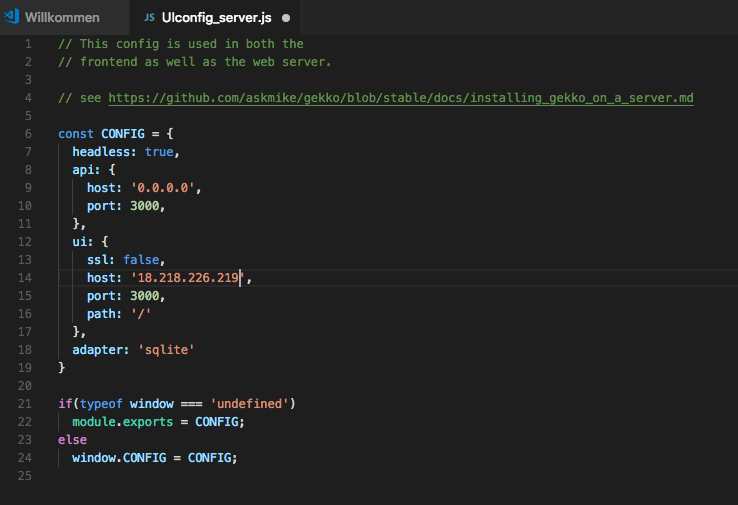
Made the settings for installing gekko on a server in a trusted environment.
started gekko on ec2 and it looks good.
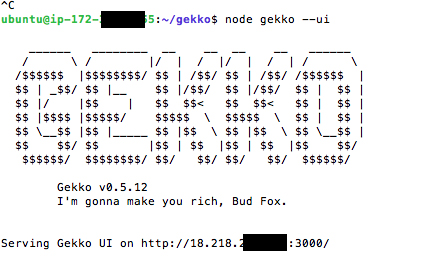
Then opened my firefox and tried to access gekko ui via http://ipaddress:3000
Expected result (what you hoped would happen)
Access gekko UI from my laptopActual result (unexpected outcome)
get timeout and cannot access gekko ui running from my laptopOther information (e.g. detailed explanation, stacktraces, related issues, suggestions how to fix, links for us to have context, eg. stackoverflow, etc)
 PanoPilot
All 11 comments
You may need to open port 3000 for your instance.
For that you find your EC2 instance -> security group and update inbound rule settings
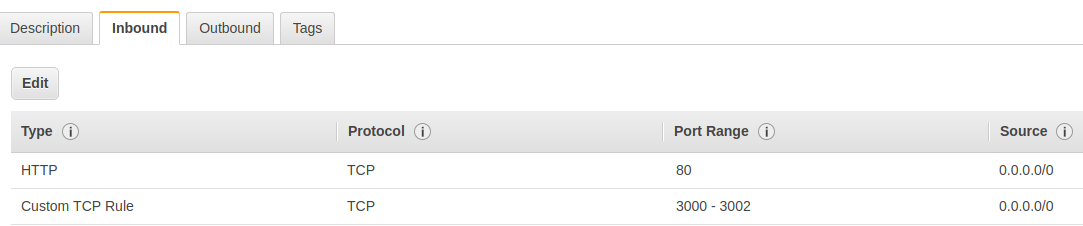
Als, potentially is not related to Gekko
 austris-argalis
on 10 Feb 2018
austris-argalis
on 10 Feb 2018
Yes @austris-argalis is right this is exactly how I did it. Ubuntu, EC2 and Nginx. I struggled to get HTTPS working though due to AWS - unrelated to Gekko
 rcoenen
on 10 Feb 2018
rcoenen
on 10 Feb 2018
thanks a lot! works nice now!
PanoPilot
on 10 Feb 2018
ok well, i followed the ngix setup as described in the install guide.
everything ok but. i cannot access it via firefox and https://18.xxx.xxx.xxx:443/
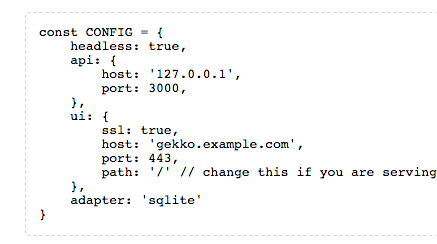
gekko launches nicely but no remote connection via browser. i did also checked the security group for my ec2 instance. looks ok.
Any further help is highly appreciated
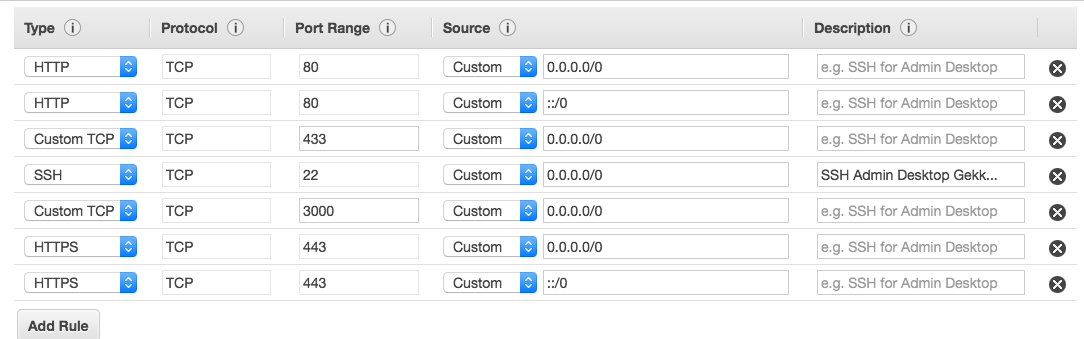
PanoPilot
on 10 Feb 2018
FYI, you can map ports over an SSH connection and be a whole lot more secure. Using the default configuration, connect via ssh like so
ssh -i AccessKey.pem -L3000:localhost:3000 ec2-user@instance_ip as long as the SSH connection is open, going to http://localhost:3000 on your local system will route into the EC2 instance by tunneling through the SSH connection. This limits your exposure to the outside world.
Also makes configuration painless, it works out of the box.
 cmroche
on 10 Feb 2018
cmroche
on 10 Feb 2018
that's it!!!
PanoPilot
on 10 Feb 2018
@cmroche damn that's awesome! a lot easier than installing ssl certs. Though not sure how hard this is to setup for non tech savvy users.
 askmike
on 11 Feb 2018
askmike
on 11 Feb 2018
@PanoPilot the whole idea with the nginx setup is that you keep port 3000 closed for the outside world and that your browser connects to 443 (with proper encryption and auth) and that becomes the only way to access the UI. If you open up port 3000 to the internet there is no point in putting nginx in front of it.
askmike
on 11 Feb 2018
@askmike ok, thanks for the explanation. I am a non tech savvy user, but i'm getting there ... one day ;-)
The solution of @cmroche is not hard at all. pretty easy to setup. In combination with the pm2 to ensure gekko is still running while you kill the ssh connection works perfect for me!
thx u all!
PanoPilot
on 11 Feb 2018
Thanks to @cmroche and everyone who wrote in this thread. I have pretty much got the gekko up and running.
Using -
ssh -i C:\Users\D.ssh\id.pem -L3011:localhost:3011 ubuntu@18.*..62
Gekko is running on Amazon AWS, with a remote powershell open I am connecting and seeing the expected output.
My problem is using a browser and browsing to "localhost:3011" the Gekko ui appears but disconnects maybe 1 or two seconds later.
Can anybody give me any pointers?
THANKS
 tronksoft
on 26 Apr 2018
tronksoft
on 26 Apr 2018
@tronksoft I've managed to solve this when using the tunnel. You need to edit the /web/vue/dist/UIconfig.js and set the ui host to 127.0.0.1:
ui: {
ssl: false,
host: '127.0.0.1',
port: 3000,
path: '/'
},
Hope this solves your problem!
 danieljdsgit
on 26 Oct 2018
danieljdsgit
on 26 Oct 2018
Related issues
 ChadTaljaardt
·
5Comments
ChadTaljaardt
·
5Comments
 burtnderson
·
5Comments
rcoenen
·
5Comments
burtnderson
·
5Comments
rcoenen
·
5Comments
 patjk
·
3Comments
rcoenen
·
3Comments
patjk
·
3Comments
rcoenen
·
3Comments
Most helpful comment
FYI, you can map ports over an SSH connection and be a whole lot more secure. Using the default configuration, connect via ssh like so
ssh -i AccessKey.pem -L3000:localhost:3000 ec2-user@instance_ipas long as the SSH connection is open, going to http://localhost:3000 on your local system will route into the EC2 instance by tunneling through the SSH connection. This limits your exposure to the outside world.Also makes configuration painless, it works out of the box.