Note: for support questions, please join our Discord server
I'm submitting a ...
[X] bug report
[ ] feature request
[ ] question about the decisions made in the repositoryAction taken (what you did)
When we click on live gekko -> start new gekko and clicking on start, we get following error.
We already have entered API key, sqlite3 already installed and up to date.
We have already checked the issues with the same case but none of other steps in it worked.
Please help!
RECEIVED ERROR IN GEKKO 245911204699529
Gekko encountered an error and can't continue
Gekko encountered an error and can't continue
Error:
The plugin sqlite adapter expects the module sqlite3 to be installed. However it is not, install it by running:
npm install [email protected]
Meta debug info:
Gekko version: v0.5.8
Nodejs version: v6.11.4
 sarperhorata
All 22 comments
have you run the command prompted?
 askmike
on 19 Oct 2017
askmike
on 19 Oct 2017
Yes we did. What else can we do ?
19 Eki 2017 Per 12:49 tarihinde Mike van Rossum notifications@github.com
şunu yazdı:
have you run the command prompted?
—
You are receiving this because you authored the thread.
Reply to this email directly, view it on GitHub
https://github.com/askmike/gekko/issues/1220#issuecomment-337857696, or mute
the thread
https://github.com/notifications/unsubscribe-auth/AUT2YufBumvy_pGw5QLTed1tAySuJrJMks5stxsugaJpZM4P-8Ep
.>
Sarper Horata
sarperhorata
on 19 Oct 2017
Maybe there was an error running the command, can you post the output?
askmike
on 19 Oct 2017
It was the output actually? What would you like to see?
19 Eki 2017 Per 12:53 tarihinde Mike van Rossum notifications@github.com
şunu yazdı:
Maybe there was an error running the command, can you post the output?
—
You are receiving this because you authored the thread.
Reply to this email directly, view it on GitHub
https://github.com/askmike/gekko/issues/1220#issuecomment-337858847, or mute
the thread
https://github.com/notifications/unsubscribe-auth/AUT2Yox70ApdHiRQLqJhAo7j6LWvGW2gks5stxwugaJpZM4P-8Ep
.>
Sarper Horata
sarperhorata
on 19 Oct 2017
Please post what was in your terminal after you ran npm install [email protected].
askmike
on 19 Oct 2017
I'm attaching entire output for you to check
entire response.txt
sarperhorata
on 19 Oct 2017
Hello @askmike
Have you had time to check the response I have provided?
sarperhorata
on 20 Oct 2017
Yes, it looks fine. Very strange. Can you copy this file into your gekko folder: https://gist.github.com/askmike/4544cc88d24f926db58f2c2f09ce6b97
and run the command:
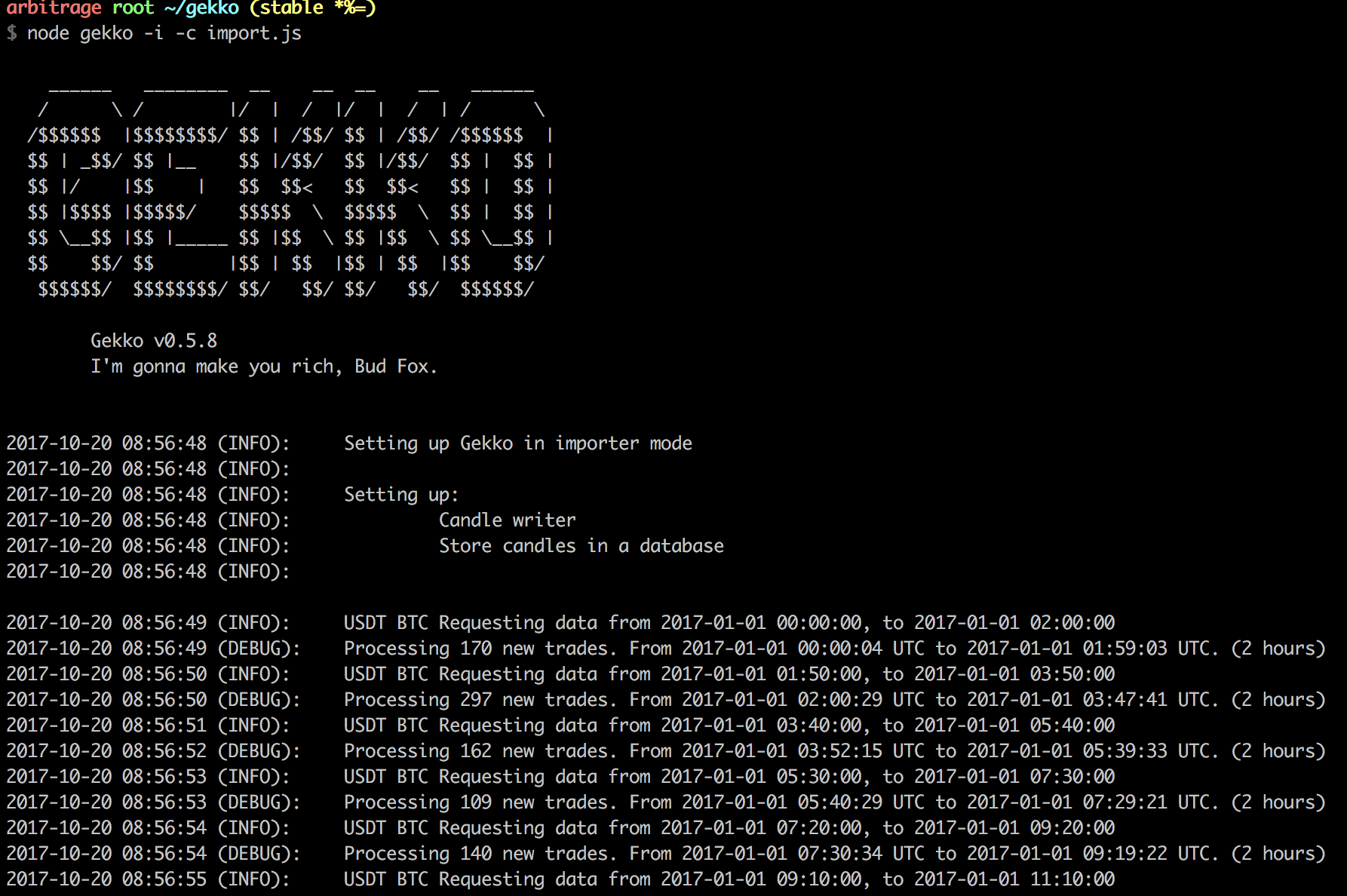
node gekko -i -c import.js
And post the output here?
askmike
on 20 Oct 2017
Hi, I have copied it and run the command
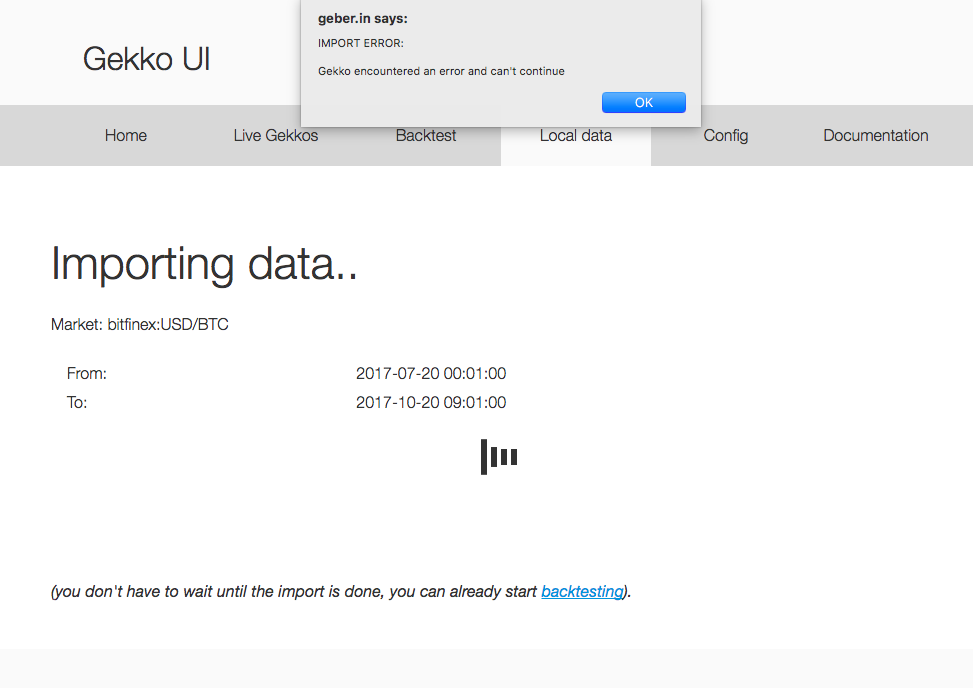
It looks like it is working in the console, however it produces the same error again.
I guess it is fetching data but unable to write it somehow?
I also tried from the web, hence is the result:
sarperhorata
on 20 Oct 2017
Are you able to import from poloniex via the UI?
On 20 Oct 2017 16:07, "Sarper Horata" notifications@github.com wrote:
Hi, I have copied it and run the command
It looks like it is working in the console, however it produces the same
error again.
I guess it is fetching data but unable to write it somehow?[image: pasted image at 2017_10_20 11_58 am]
https://user-images.githubusercontent.com/21296738/31813237-53357548-b58e-11e7-8697-0a82e2f2ac2d.pngI also tried from the web, hence is the result:
[image: screen shot 2017-10-20 at 12 02 17]
https://user-images.githubusercontent.com/21296738/31813354-b3bc0dd2-b58e-11e7-87bd-28ca55c2e6bd.png—
You are receiving this because you were mentioned.
Reply to this email directly, view it on GitHub
https://github.com/askmike/gekko/issues/1220#issuecomment-338150550, or mute
the thread
https://github.com/notifications/unsubscribe-auth/AA7MD1LYzjpi74UNxKaQUb20Ki1gQ1w6ks5suGK0gaJpZM4P-8Ep
.
askmike
on 20 Oct 2017
Unfortunately no
20 Eki 2017 Cum 12:07 tarihinde Mike van Rossum notifications@github.com
şunu yazdı:
Are you able to import from poloniex via the UI?
On 20 Oct 2017 16:07, "Sarper Horata" notifications@github.com wrote:
Hi, I have copied it and run the command
It looks like it is working in the console, however it produces the same
error again.
I guess it is fetching data but unable to write it somehow?[image: pasted image at 2017_10_20 11_58 am]
<
https://user-images.githubusercontent.com/21296738/31813237-53357548-b58e-11e7-8697-0a82e2f2ac2d.pngI also tried from the web, hence is the result:
[image: screen shot 2017-10-20 at 12 02 17]
<
https://user-images.githubusercontent.com/21296738/31813354-b3bc0dd2-b58e-11e7-87bd-28ca55c2e6bd.png—
You are receiving this because you were mentioned.
Reply to this email directly, view it on GitHub
https://github.com/askmike/gekko/issues/1220#issuecomment-338150550,
or mute
the thread
<
https://github.com/notifications/unsubscribe-auth/AA7MD1LYzjpi74UNxKaQUb20Ki1gQ1w6ks5suGK0gaJpZM4P-8Ep.
—
You are receiving this because you authored the thread.
Reply to this email directly, view it on GitHub
https://github.com/askmike/gekko/issues/1220#issuecomment-338150714, or mute
the thread
https://github.com/notifications/unsubscribe-auth/AUT2Ypra3EuaqlzYN-Gyssly6iuIRxXAks5suGLtgaJpZM4P-8Ep
.>
Sarper Horata
sarperhorata
on 20 Oct 2017
@askmike what else can we check?
sarperhorata
on 21 Oct 2017
Wild shot in the dark - upgrade node to 7.6 and reinstall gekko.
 thegamecat
on 22 Oct 2017
thegamecat
on 22 Oct 2017
Hi @sarperhorata, I experienced the same issue. But I tried my stupid simple step and gave me a successful sqlite installation. I just typed following command:
npm install sqlite3
 bitkominer
on 28 Oct 2017
bitkominer
on 28 Oct 2017
Since no one can reproduce this and we haven't hear back from @sarperhorata I will close this for inactivity.
askmike
on 28 Oct 2017
I can...
Running Debian 8 Jessie, without Nginx Reverse Proxy (due to nat firewall settings, I only allow certain addresses through firewall)
I am running:
Gekko version: v0.5.9
Nodejs version: v7.10.1
and the moment I try to create a live gecko I get the same error:
RECEIVED ERROR IN GEKKO 978408823844398


Gekko encountered an error and can't continue


Gekko encountered an error and can't continue

Error:

The plugin sqlite adapter expects the module sqlite3 to be installed. However it is not, install it by running:

        npm install [email protected]

Meta debug info:
I tried
npm install [email protected]
npm install sqlite3


md5-5c8589e162862bd3216271763d94979c


npm install -g sqlite3
Nothing worked...
When I ran that import.js like:
gekko -i -c test.js
It didn't work...
BUT...
When I downloaded the develop branch and ran it, it started just fine.
 nomadturk
on 6 Nov 2017
nomadturk
on 6 Nov 2017
@bitkominer's solution fixed it.
 AHorihuela
on 25 Dec 2017
AHorihuela
on 25 Dec 2017
@bitkominer's solution fixed it too for me.
 behicsakar
on 29 Dec 2017
behicsakar
on 29 Dec 2017
None of the above helped for me, but wat did help was this:
wget http://www.sqlite.org/2018/sqlite-autoconf-3220000.tar.gz
tar xvfz sqlite-autoconf-3220000.tar.gz
cd sqlite-autoconf-3220000.tar.gz
./configure
make
make install
or sudo make install
 iDzine
on 22 Jan 2018
iDzine
on 22 Jan 2018
maybe npm install sqlite3 --build-from-source ?
 rafaeldelucena
on 23 Jan 2018
rafaeldelucena
on 23 Jan 2018
@rafaeldelucena, you should think so, but for some reason that generated an error in my setup.
iDzine
on 23 Jan 2018
hi, i have a probelm with [email protected] , when I start the strategy this error appear (fig1)
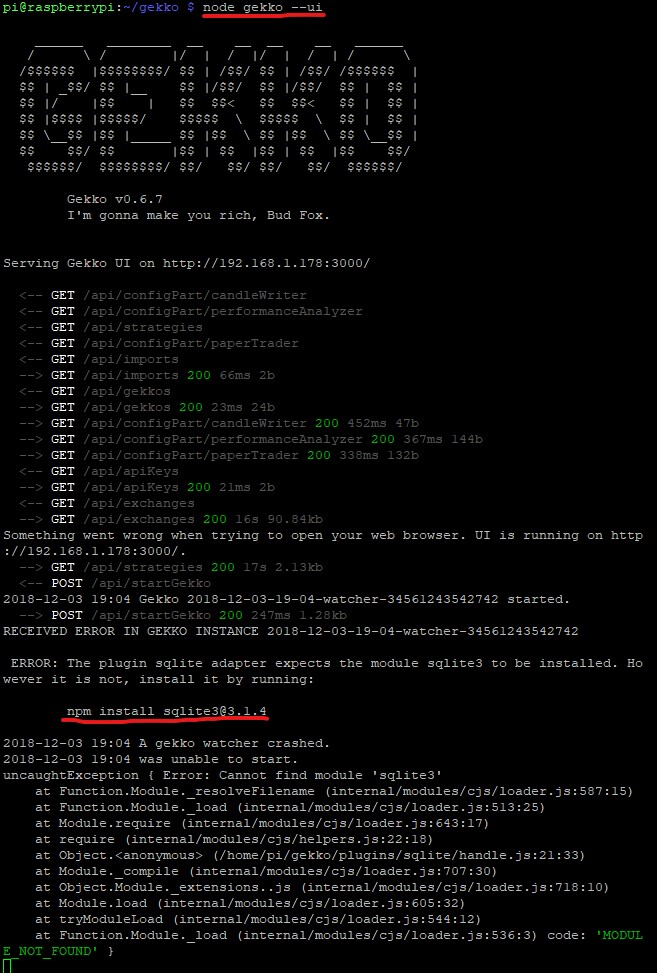
and then I run the command npm install [email protected] appear (fig 2)
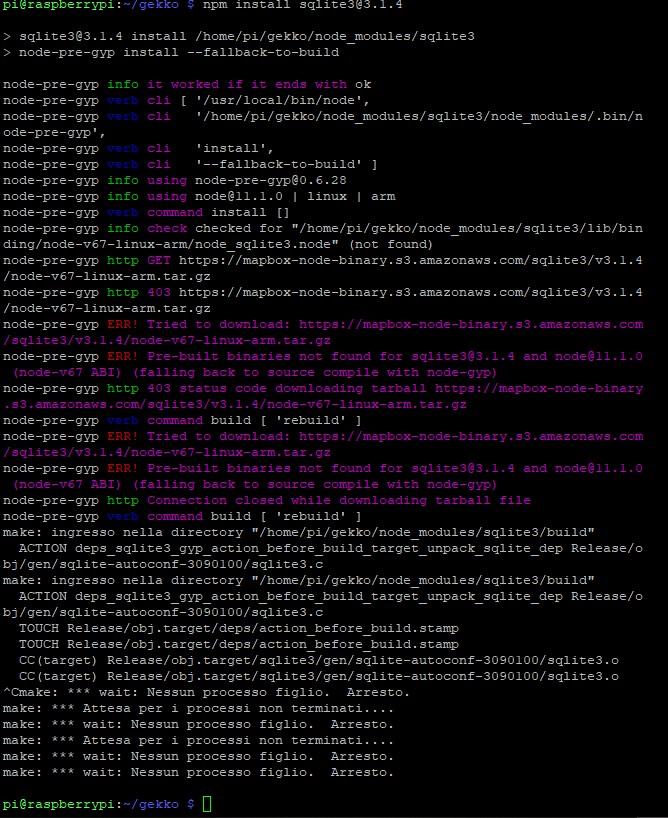
I use the raspberry 1, is possible to solve the problem? Thanks @askmike
 Ronny1011
on 3 Dec 2018
Ronny1011
on 3 Dec 2018
Related issues
 chevinbrown
·
3Comments
chevinbrown
·
3Comments
 LeMoussel
·
6Comments
LeMoussel
·
6Comments
 Oowii
·
4Comments
Oowii
·
4Comments
 rcoenen
·
5Comments
rcoenen
·
5Comments
 Chroll91
·
5Comments
Chroll91
·
5Comments
Most helpful comment
Hi @sarperhorata, I experienced the same issue. But I tried my stupid simple step and gave me a successful sqlite installation. I just typed following command:
npm install sqlite3