Gdevelop: Graphical glitch when resizing the objects editor
Describe the bug
please follow the steps to reproduce this :)
To Reproduce
Steps to reproduce the behavior:
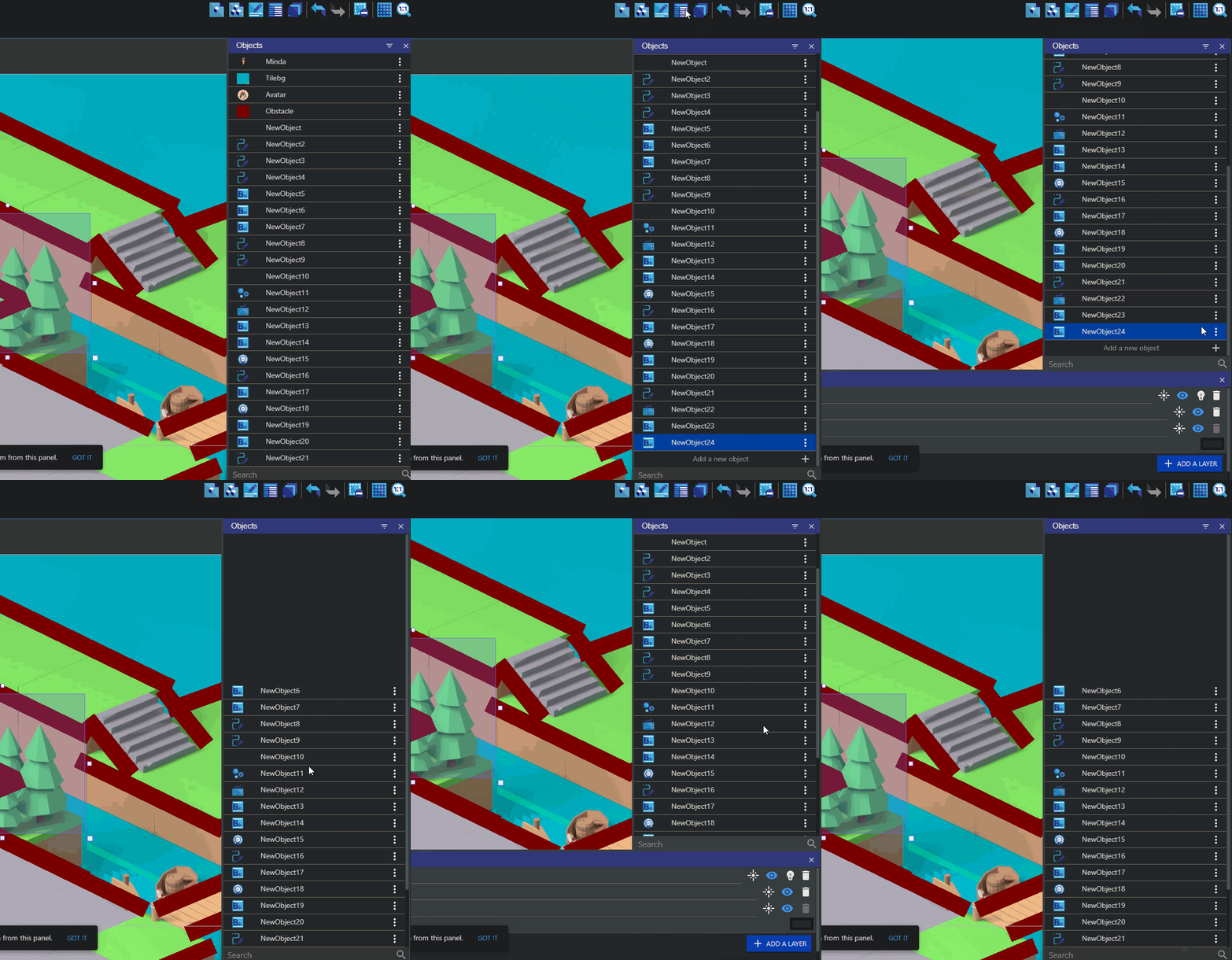
- Go to the objects editor and make sure you have enough objects to make you scroll.
- then open the layers editor.
- scroll down in the objects editor till you can see the add new object button.
- then close the layers editor after this you should see some blank spaces above. (check the image below) this would only go away once you close and reopen the objects editor.
Other details
 TheGemDev
All 5 comments
Confirmed
 Bouh
on 27 Sep 2020
Bouh
on 27 Sep 2020
The display of the objects is handled by a List component of third party library "react-virtualized" ,now I am just confused if we can fix this .I will try with a dummy list using "react-virtaulised" package in codesandox or locally ,to check if the issuse still persists when we change the height of list.If the issue still remains ,there's nothing much to be done .
ps : I am new to opensource;And this is repo is huge so I may have missed something
 KunalSolanke
on 7 Oct 2020
KunalSolanke
on 7 Oct 2020
It could be a react-virtualized issue, https://github.com/bvaughn/react-virtualized/issues/1533, seems pretty similar to what we have at GDevelop 🤔.
 HarsimranVirk
on 7 Oct 2020
HarsimranVirk
on 7 Oct 2020
@TheGemDev @4ian I have come up with a work around for this. Though it uses react-dom to fetch some information directly from the DOM. If that isn't an issue then I'll open a PR with the changes.
 dkapur17
on 22 Dec 2020
dkapur17
on 22 Dec 2020
Open the PR and we'll see directly in the code :)
 4ian
on 22 Dec 2020
4ian
on 22 Dec 2020
Related issues
Bouh
·
3Comments
 ced64k
·
4Comments
ced64k
·
4Comments
 Silver-Streak
·
4Comments
Silver-Streak
·
4Comments
 blurymind
·
5Comments
blurymind
·
5Comments
 Jeje2201
·
5Comments
Jeje2201
·
5Comments
Most helpful comment
It could be a react-virtualized issue, https://github.com/bvaughn/react-virtualized/issues/1533, seems pretty similar to what we have at GDevelop 🤔.