Gdevelop: How to create objects dynamically
Describe the bug
I have an extension (not js one from GD) and when I try to use the single action while the scene is loading (first action in event sheet) The game crashes and I can see on the console that the function generated from the extension is not found (
Uncaught TypeError: Cannot read property 'func' of undefined
at Object.gdjs.loginCode.eventsList0xb59b0 (code5.js:66)
at gdjs.RuntimeScene.gdjs.loginCode.func [as _eventsFunction] (code5.js:275)
at gdjs.RuntimeScene.renderAndStep (runtimescene.js:269)
at gdjs.SceneStack.step (scenestack.js:30)
at runtimegame.js:401
at gameLoop (runtimegame-pixi-renderer.js:373)
)
and In code 5 you can see
gdjs.evtsExt__ConsoleExtension__ActivateConsole.func(runtimeScene, (typeof eventsFunctionContext !== 'undefined' ? eventsFunctionContext : undefined));
, where you can see that the error comes from everything after .func. It seems like a code generation bug where the function is not defined correctly or not at the good time (after it has been called)
To Reproduce
- Create a new project or take an existing one
- Import the extension (https://pastebin.com/FijHbHvc)
- Create a scene, add an event with the single action from the extension as ac tion and no condition
- Start the game and notice game crash, see console etc
Other details
I am using the latest version of gd (Or at least I think so), Iam am on Windows 10 and @Bouh managed to replicate the bug too
 arthuro555
All 34 comments
The real question in background is how create object from gdjs directly in GD with JSEvent
 Bouh
on 13 Dec 2019
Bouh
on 13 Dec 2019
That is another problem. I think I figured it out, but that is something else.
arthuro555
on 13 Dec 2019
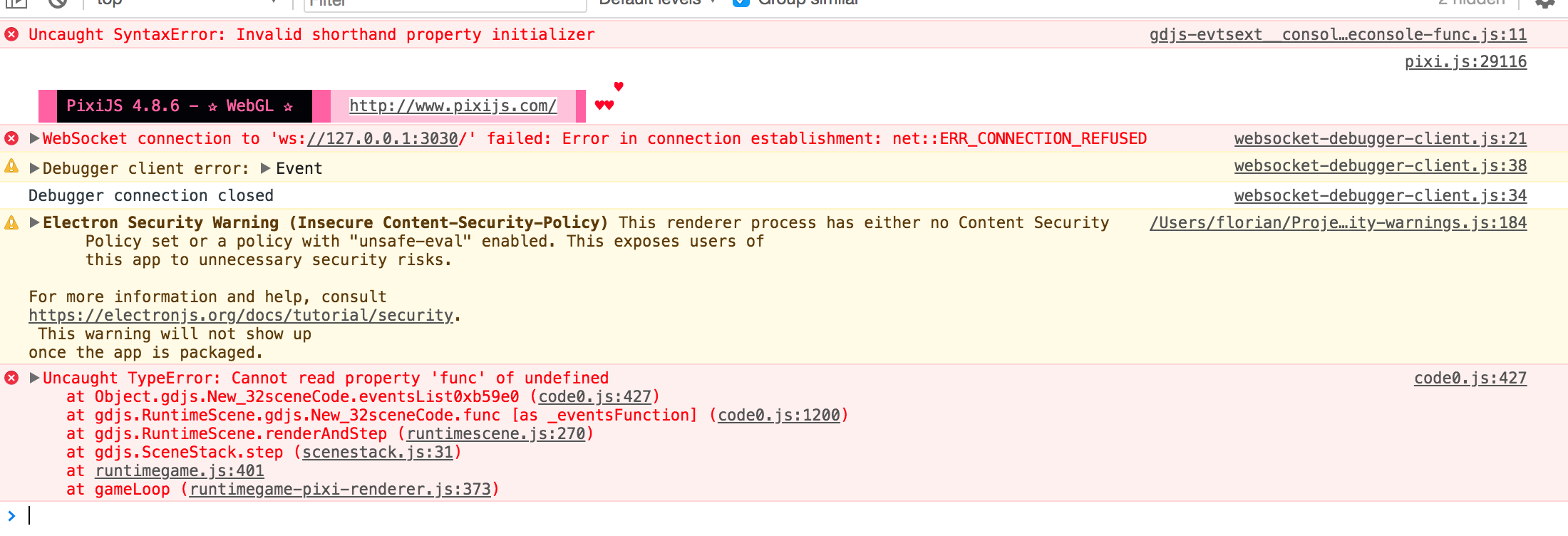
You have an error in your JS :)

 4ian
on 13 Dec 2019
4ian
on 13 Dec 2019
This is not the error I got
arthuro555
on 13 Dec 2019
Look at all errors :)
4ian
on 13 Dec 2019
Ohhh my bad sorry for that. What is a shorthand property initialiser tho? Could you document somewhere the objectData?
arthuro555
on 13 Dec 2019
= instead : in your code
gdjs.evtTools.console.te = new gdjs.TextEntryRuntimeObject(runtimeScene, {name="ConsoleEntry"})
Bouh
on 13 Dec 2019
For JS question please search online first ;) https://stackoverflow.com/questions/42006503/invalid-shorthand-property-initializer
The real question in background is how create object from gdjs directly in GD with JSEvent
Inspect how gdjs.RuntimeScene.prototype.createObject is doing.
You can create it by yourself by creating a RuntimeObject and then calling runtimeScene.addObject with this object.
The difficulty is in properly creating the object. You need to pass to the constructor the runtimeScene (easy) and the objectData which is a JS object containing the default values to initialize the object.
4ian
on 13 Dec 2019
This working (almost) \o/
if (!gdjs.evtTools.console){
    gdjs.evtTools.console = {}


//This create a new object Text in gdjs.evtTools.console.te
     gdjs.evtTools.console.te = new gdjs.RuntimeObject(runtimeScene, {type:"TextObject::Text", name:"obj",  _forces : [], behaviors : [] });

    //gdjs.evtTools.console.te = new gdjs.TextEntryRuntimeObject(runtimeScene, {name:"ConsoleEntry"})
}
console.log(runtimeScene._allInstancesList);
Could you document somewhere the objectData?
This could be done by adding JSDoc annotations - but it's a bit of an implementation detail so it could change if an extension is changing by adding/removing property to an object :/
You can try to inspect the code of the object you're creating.
In theory, these objectData must also contain a name and type, because it's required here in gdjs.RuntimeObject:
https://github.com/4ian/GDevelop/blob/master/GDJS/Runtime/runtimeobject.js#L27-L29
Also RuntimeObject was never really meant to be used as is... so you're in unknown territory :) Be sure to read the code which will be more helpful than the documentation.
This working \o/
I see that you properly passed type and name 👍
Don't forget to do this otherwise you risk strange bugs later in the game engine.
EDIT: actually there is a bug, see next message.
We can document objectData for each object if you want to help me do that.
4ian
on 13 Dec 2019
new gdjs.RuntimeObject(runtimeScene, {type:"TextObject::Text", name:"obj", _forces : [], behaviors : [] });
You're setting the type as TextObject::Text but creating a RuntimeObject. You must instanciate a derived class :) new gdjs.TextRuntimeObject(...)
EDIT: It's possible that type is actually not even used anywhere in the game engine... If true we should remove it entirely. But name is required because the game engine will put objects into "buckets" according to their names. Object with the same name are assumed to be of the same type and potentially same behaviors.
4ian
on 13 Dec 2019
Thank you very much for your answers! Bouh told me on the discord the type was used here.
arthuro555
on 13 Dec 2019
Bouh told me on the discord the type was used here.
Yes, though careful not to confuse the IDE (the editor) and GDJS Runtime (the game engine).
The IDE has indeed functions to render objects, but they are independent: the IDE is using what was declared by the extension, including the type, to know which object to render, but these objects are not gdjs.RuntimeObject or a derived class like gdjs.TextRuntimeObject. They are rendered instance, as you can see in the link you posted :)
When you're exporting the game (or making a preview), the editor is copying the game engine (the GDJS Runtime folder) and extensions files in the output game. Game engine and extensions are now using gdjs.RuntimeObject and derived classes.
In short:
- IDE = things that you find in
newIDE/app/src - Game engine = everything that start with
gdjs.and is in GDJS/Runtime or in a folder inExtensions. Exception: files inExtensionsfolders that are called JsExtension.js (or Extension.cpp) that are there to expose to the editor the extension, by declaring what is inside the extension and what are the files to copy in the final game.
4ian
on 13 Dec 2019
I use this code for create a new object text on my scene and it's working sometime...
let myTextObj = {};
myTextObj= new gdjs.TextRuntimeObject(runtimeScene, { string: "Mon Super Texte", name: "BouhTextObj", behaviors: [], characterSize: 20, color: { b: 0, g: 0, r: 0 } });
runtimeScene.addObject(myTextObj);
myTextObj.setPosition(10, 10);
This working only if i add an Text object before in object list with the interface of GD.
In other case i see the error :
gdjs.TextRuntimeObject is not a constructor
I use also the other way
let textObj = {};
textObj = new gdjs.RuntimeObject(runtimeScene, { name: "BouhTextObj", type: "TextObject::Text", behaviors: [], string: "Mon Super Texte", characterSize: 20, color: { b: 255, g: 0, r: 0 } });
runtimeScene.addObject(textObj);
textObj.setPosition(10, 10);
With this game is loaded, but the object is not visible on scene. But exist in runtimeScene._allInstancesList
Bouh
on 13 Dec 2019
This working only if i add an Text object before in object list with the interface of GD.
In other case i see the error :
gdjs.TextRuntimeObject is not a constructor
This is because if you don't use a single object text in a scene of your game, the Text extension (textruntimeobject.js containing gdjs.TextRuntimeObject) is not included to the game sources.
To verify that, in the Chrome Debugger, look at the Extensions folder (here in a game where there is a text object):
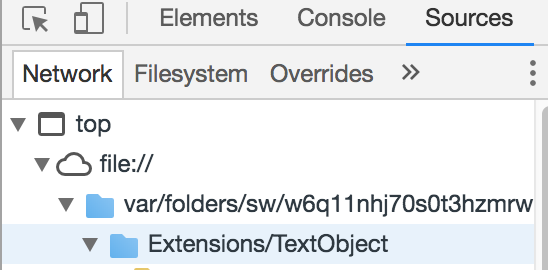
GDevelop will only copy and load extensions being used in object/events. We don't want to load all the existing extensions in the world for every game :)
With this game is loaded, but the object is not visible on scene. But exist in runtimeScene._allInstancesList
Yes, avoid doing that because you're creating a gdjs.RuntimeObject but this is a "base class", that is only useful for containing common features of all objects. It does not have any renderer. You must use a derived class to properly construct an object that will be visible on the scene.
4ian
on 14 Dec 2019
You must use a derived class to properly construct an object that will be visible on the scene.
Yes with the code in first part of my previous post.
But if files are not loaded, we can see the limit of JSEvent.
I understand the code generated with JSevent is launched after the loading of scene/game.
Then files cannot be loaded before because the engine only know it after he need to create a new object.
So we are limited ?
In fact there is no solution for create a object from scratch in a empty project ? 😬
No way to force GD to load the files ? I mean without require an action from user/creator.>
Or i copy/paste manually the files needed in the folder after the export?
Maybe my last hope.
Bouh
on 14 Dec 2019
I am no Professional, but I guess as 4ian said an action is enough,
You just have to add somewhere an action in th eventsheet with a condition that will Always be false, because then the exporter would see that there is an action from this extension in an event and include the files defined in JSExtension.js (or cpp if it’s c++) in the exported files, am I right ?
arthuro555
on 14 Dec 2019
I am not sure if you said thet to me or bouh but I would be happy to help document objectData @4ian
arthuro555
on 14 Dec 2019
Hey @4ian , I was wondering what thisIsARuntimeBehaviorConstructor is and I found this. What is this list of all Objects (same for behaviors) for?
EDIT: Ohhhh found out myself for behaviors and have an idea for the objects. It's to pass a string to objectData and let it find out where the constructor is.
arthuro555
on 14 Dec 2019
You just have to add somewhere an action in th eventsheet with a condition that will Always be false, because then the exporter would see that there is an action from this extension in an event and include the files defined in JSExtension.js (or cpp if it’s c++) in the exported files, am I right ?
Yes you're right.
Or i copy/paste manually the files needed in the folder after the export?
You can do that, but you also need to modify index.html to add a <script> tag to include it.
But it's not in anyway easier than adding an object called "ThisIsATextObjectThatIsNotUsedByUsefulToForceGDevelopToIncludeTextExtension" in your scene?
In fact there is no solution for create a object from scratch in a empty project ? 😬
You totally can, you just have to make sure the proper extension is included :)
But if files are not loaded, we can see the limit of JSEvent.
Well it's a bit hard to say that JS events are "limited" because GDevelop is not automatically guessing what extensions you are using in your JS Code - which would require it to read the code. 😉
JS events were done to allow you to write your game logic in JavaScript, it was simply never made so that people would want to load extensions from them. If we want this, we can modify them to store a list of extensions that are required. Then, in the editor, we somewhere display the list of extensions and allow to choose one or more, in an additional setup dialog for JS events.
Finally in the code generator for JS events, if there is one or more extension in the list of extension when generating code for a JS event, then we add all the include files of the extension (include files for all the objects, events, actions, conditions declared by the extension).
Meanwhile, you can always add a condition alerting the user in your extension:
if (!gdjs.TextRuntimeObject) {
  alert("Please include at least one Text object in the list of objects, even if not used. This is required for this extension to work"); // For this kind of thing (alerting the developer), alert is "ok" to use.
}
and then we can work on the "List of required extensions" for JS events. Or maybe a list of required extensions to be stored in the preferences of an extension (would be I think maybe better! :)). As with everything, this is adding work, complexity to the software and risk of making bad design decisions - so I prefer to do it only if we have a strong use case.
4ian
on 14 Dec 2019
I was wondering what thisIsARuntimeBehaviorConstructor is and I found this. What is this list of all Objects (same for behaviors) for?
When an extension file is loaded in the game, the JS is executed and it must find a way to register itself to GDJS, so that when an event asked to create a "TextObject::Text", then GDJS know what this string corresponds to. The way it's done is that at the beginning of the game, GDJS scans everything that is inside gdjs. If "thisIsARuntimeBehaviorConstructor" or "thisIsARuntimeObjectConstructor", it's adding this in a table, with the string as the key and the JavaScript class as the value.
Later when you call createObject on a runtimeScene, this is used to find the object to create.
You don't need all of this if you create object manually in JS - because you already know what derived class to create.
4ian
on 14 Dec 2019
Yes, I Already knew that, I edited the post to say it. However if I want to add a behavior to an object, I do need this to add the behavior. Here is my code ( I am still working on it):
function logdata(){
    console.info("Instances: ");console.log(runtimeScene._allInstancesList);
    console.info("ConsoleEntries: ");console.log(runtimeScene.getObjects("ConsoleEntry"));
    console.info("Objects: ");console.log(runtimeScene._objects);
    console.info("Behaviors: ");
    /** @type {gdjs.RuntimeObject} o */
    for (var o of runtimeScene._allInstancesList){
        for(var behavior of o._behaviors){ console.log(behavior) }
    }
}

if(runtimeScene.getObjects("ConsoleEntry").length === 0){
    if (gdjs.evtTools.console === undefined){
        gdjs.evtTools.console = {}
    }
    if (gdjs.evtTools.console.teBehaviorClass === undefined){
        gdjs.evtTools.console.teBehaviorClass = function(runtimeScene, behaviorData, owner){
            gdjs.RuntimeBehavior.call(this, runtimeScene, behaviorData, owner);
            this._runtimeScene = runtimeScene;
        }
        gdjs.evtTools.console.teBehaviorClass.prototype = Object.create( gdjs.RuntimeBehavior.prototype );
        gdjs.evtTools.console.teBehaviorClass.thisIsARuntimeBehaviorConstructor = "ConsoleExtension::ConsoleEntryBehavior"
        gdjs.evtTools.console.teBehaviorClass.prototype.doStepPostEvents = function(runtimeScene){
            console.log("hi")
        }
        gdjs.behaviorsTypes.put(
          gdjs.evtTools.console.teBehaviorClass.thisIsARuntimeBehaviorConstructor,
          gdjs.evtTools.console.teBehaviorClass
        );
        console.log("Behavior types: ");console.log(gdjs.behaviorsTypes)
    }
    gdjs.evtTools.console.te = new gdjs.TextEntryRuntimeObject(runtimeScene, {name:"ConsoleEntry",type:"TextEntryObject::TextEntry",_forces : [], behaviors : ["ConsoleExtension::ConsoleEntryBehavior"] })
    runtimeScene.addObject(gdjs.evtTools.console.te)
}
console.info("Logging Scene parameters")
logdata()
console.info("Object creating test object")
runtimeScene.createObject("ConsoleEntry")
console.info("Logging Scene parameters again after injecting object")
logdata()
When I look at the hashmap, it seems good. When I look at the behaviors in my object, there is only a "" Behavior, not mine. Did I do something wrong? I also need to add the object to runtimeScene._objects. Should I just manually add the behavior to the behavior array of the object?
Should we talk french because every 3 persons in this issue are french or should we stick to english for other people who might be reading this?
arthuro555
on 14 Dec 2019
Beware, runtimeScene.addObject(gdjs.evtTools.console.te) is adding an object living on the scene, it's not adding an object is the list of objects that can then be created using createObject.
See how createObject is implemented, it's calling addObject.
I also need to add the object to runtimeScene._objects.
You should add the object data to runtimeScene._objects and the constructor to this._objectsCtor and create an instance cache in _instancesCache and create a list of instances in _instances. Then you can use createObject. It's what is done in loadObject:
I'm still wondering if rather that doing all of this, you should rather not create an extension like others in JavaScript?
What you're doing is possible, but you need to dig into gdjs.RuntimeScene to understand how to register objects.
Or you would need to submit a PR to make loadObject a function that is on runtimeScene and documented. Remember that anytime you use something that starts with an underscore (like _objects), this is a private field and this can be renamed without warning during a refactoring (and this will happen sooner or later)
Should we talk french because every 3 persons in this issue are french or should we stick to english for other people who might be reading this?
Let's stick to english because other people might be reading, now or in the future :)
4ian
on 14 Dec 2019
I guess my real question is: what are you trying to achieve with this dynamically created objects? :)
I understand that it's interesting to see if you can create a new object type in JS events - you certainly can provided you do what you've already done and that you properly do all the stuff that is done in loadObject (and register your object in gdjs.objectsTypes/gdjs.behaviorsTypes).
It's fun experimentation but not well documented yet so you have to dig by yourself a bit. But what are you trying to achieve exactly? Isn't an extension written as the other already sufficient and easier to write (and "officially" supported :))?
4ian
on 14 Dec 2019
I was pretty much testing. I like to experiment with the engine. I can't start the dev version of gd for some reason, so I cannot test my JS Extensions before making a PR, wich is a big no from me. it is also faster as I don't have to restart (or at least I understood that it is required to restart GD to reload the JS Extension). I also like the fact that json extensions (I call them so because they are saved as JSON) are not required to be in the engine, but still importable from it.
arthuro555
on 14 Dec 2019
I see. Feel free to continue experimenting and asking questions! :)
But to do something really "officially supported" that allow "JSON extensions" (internally called Events Extensions, because generated from events) to create objects, there will be a need for a few refactoring in gdjs.RuntimeScene (and GDJS more generally) to expose a proper method to load an object (and also surely a method on gdjs to register a single object and a single behavior, rather than adding manually things in objectTypes and behaviorTypes - they should almost have an underscore).
(feel free to do it "dirty" for now to experiment, and suggest a PR later)
I can't start the dev version of gd for some reason
Interesting, this is a real issue, where is the whole thing stuck? I've seen that the initial starting time, after calling npm start can be quite long on some computers.
or at least I understood that it is required to restart GD to reload the JS Extension
If you change something in JsExtension.js yes but otherwise no :) Now all changes in your JS files are imported automatically.
So you can change a file (for example, textruntimeobject.js if you're hacking on the text object). When you save, GDevelop will automatically reimport the changes (this is new, I added this a few days ago. Before you add to run node import-GDJS-Runtime.js). You only have to launch a preview.
It's not 100% "live reload", but after making your JsExtension.js file, you can modify your object/behavior/extension very quickly without reloading anything. Just relaunch a preview!
I encourage you to open a new issue if there is something that prevent you to start GDevelop development version :)
4ian
on 14 Dec 2019
Well, it just freezes. But I also had issues with git so maybe some experimenting I've done in a branch of my fork of gd have been merged into master, and broke the whole thing.
I've been planning to contribute since some time now but this really stops me from doing it.
arthuro555
on 14 Dec 2019
Well, it just freezes
Can you explicit what is freezing? The computer/the app/the terminal?
If that's the terminal, what is the last message you can see?
I can take a look and see what could be wrong :)
4ian
on 14 Dec 2019
Feature Request: Having 4ian more often on the discord. We don't see you often there, and it is much more convenient for talking about such things than an issue tab...
arthuro555
on 14 Dec 2019
Oops, commented at the same time... almost...
Well, the web app starts and the electron app just stays on gdevelop is starting. I waited a few hours etc. I am currently cloning the official repo again because It might be me who broke something.
arthuro555
on 14 Dec 2019
It's also more time consuming for me and is not "asynchronous" communication: on GitHub, I can reply whenever I have time, even a few hours/day later, and all discussion are searchable and public.
I do sometimes go on Discord but have to set my priority between developing/discussing.
I do agree that for this it would be better to have a real time chat like Discord though. But it's a trade off between the time I can invest and the rest :)
Well, the web app starts and the electron app just stays on gdevelop is starting. I waited a few hours etc. I am currently cloning the official repo again because It might be me who broke something.
Pretty sure it's because of the languages messages that are too much time consuming to compile:
- Can you take a look at the memory usage when launching npm start? (check for the memory usage of a process called Node)
- Are you on Windows/mac/Linux by the way?
- Can you confirm that it just stays on "Starting the development server..."?
You can try to go in newIDE/app/src/locales and remove all folders except for "en" (also keep LocalesMetadata.js). Then, launch npm start. Hopefully that should be faster.
4ian
on 14 Dec 2019
Just for keep a note.
With your help guys we can now create object from scratch without any require !
And interact with it !
Thank for your help !
Check the project :
Create_object_from_scratch.zip
Next step add another instance of this object and pick the instance with JS event.
Bouh
on 14 Dec 2019
There is a condition when we export game or launch a preview for remove the instruction who have a object not declared in IDE ?
I declare an object Shape Painter like this:
const objectData = {
    name: "BouhShapePainterObj",
    behaviors: [],
    absoluteCoordinates: true,
    fillColor: { r: 255, g: 0, b: 0 },
    fillOpacity: 255,
    outlineColor: { r: 255, g: 0, b: 0 },
    outlineOpacity: 255,
    outlineSize: 10,
    type: "PrimitiveDrawing::Drawer"
};

//Create a new object Shape Painter
const myNewObjShapePainter = new gdjs.ShapePainterRuntimeObject(runtimeScene, objectData);

//This code permits to integrate the new object completely to the scene to make it possible to interract with it from runtimeScene.
runtimeScene._objects.put(objectData.name, objectData);
runtimeScene._instances.put(objectData.name, []); //Also reserve an array for the instances
runtimeScene._instancesCache.put(objectData.name, []); //and for cached instances
runtimeScene._objectsCtor.put(objectData.name, gdjs.getObjectConstructor(objectData.type));

//Add it on scene and place it.
runtimeScene.addObject(myNewObjShapePainter);
myNewObjShapePainter.setPosition(0, 0);
I've no error and i can access to object and draw with it through JS event.
But an classic action doesn't work, because the object isn't existing in the IDE?

I keep hope for create object from scratch and create any object in with an extension :)
I draw the hitboxes from objects with a shape painter, i hope to do this inside an extension.
Bouh
on 28 Feb 2020
If getObjects works, that means that you properly added the object. But the events are "compiled" to JavaScript when the game is exported/previewed.
At this time, GDevelop goes through your events and translate your two actions "Draw [...]" to JavaScript. It looks at this thing called "BouhShapePainterObj". It verifies that this is an object of type "ShapePainterObject". Unfortunately, it can't find this object in the scene! In theory that should be an error. In practice, GDevelop assume that this object is a "base object" - because it has no idea what this thing even is. And the action "Draw [...]" can not be called on a base object.
So it bails out and does not generate the action code because it's not making sense at this moment.
That's in short the issue here.
4ian
on 29 Feb 2020
Related issues
 RyanNerd
·
4Comments
RyanNerd
·
4Comments
 KinkGD
·
5Comments
KinkGD
·
5Comments
 PascalLadalle
·
3Comments
PascalLadalle
·
3Comments
 ddabrahim
·
4Comments
ddabrahim
·
4Comments
 blurymind
·
5Comments
blurymind
·
5Comments